2
CARE AND MAINTENANE
The paper shredder requires regular cleaning to ensure trouble free operation :
- Always turn off and unplug the unit from the mains supply before cleaning.
- Never immerse in water.
- Use a damp cloth to wipe the exterior of the unit to remove dust and dirt.
- Never clean with scouring powders or hard implements.
- Ensure the unit is dry before plugging back into the mains supply.
- No user serviceable part inside.
- To avoid electrical shock, do not remove the base.
STAND BY MODE
- The unit will be ready for operation when you move the slide switch
to the "ON/AUTO" position.
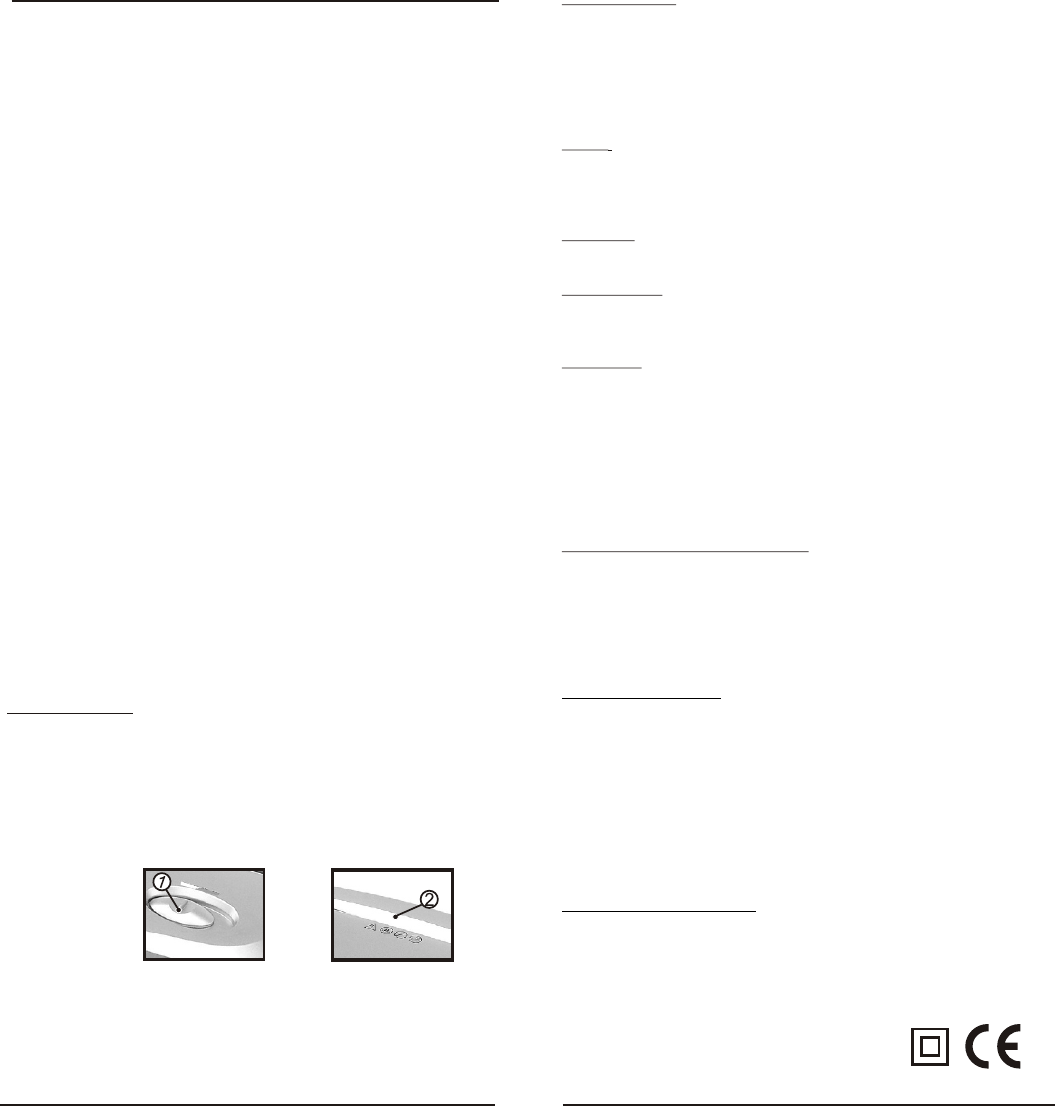
- Feed paper into the inlet guide to cutting system as well as press on the micro
switch (fig.2).
- The unit will switch on automatically to run forward and draw paper in. The unit
will switch back to stand by mode after shredding.
NOTE : Never feed the shredder with a large quantity of paper exceeding the
maximum indicated in the technical specification. Should the machine be
overfed and found to be stop working due to the paper jam. Please follow the
solution under paper jam section.
OFF MODE
- The unit will turn off when you move the slide switch to "OFF" position.
RUN REVERSE
- The unit will continue to run the cutting blade in reverse direction when you
move the slide switch to "REV" position.
PAPER JAM
MOTOR OVERHEAT SAFETY DEVICE
Your shredder is fitted with a safety device that switches off the unit in the
event of overload. Should the unit stop working, turn the unit off and unplug
from the mains. Unplug the machine from the main power allow the motor to
cool down to room temperature before resuming operation. If the unit fails to
operate or the safety device switches the unit again, return the unit to your
nearest service center for examination or repair.
If too much paper is fed to the cutting system the cutting system will jam.
Please follow the below steps to solve the problem:
-Move the slide switch to the "REV" position.
-The cutting blade will run in reverse direction for freeing out the jammed paper.
-Pull out the paper carefully to clear the opening.
-Once the jammed paper is removed, slide the switch to the "ON/AUTO"
position to go to stand by mode
-You can now continue to use the paper shredder.
1
IMPORTANT SAFEGUARDS
When using electrical appliances, basic safety precautions should always be
observed including the following:
1. Read all instructions before using this appliance.
2. To protect against risk of electrical hazards, do not immerse cord, plugs, etc. of the
appliance in water or other liquid.
3. Keep children away from the machine.This machine's design and safety concept
are based on adult dimensions to ensure that it can be operated safely by adults only.
4. Unplug from the outlet when not in use and before cleaning.
5. Do not operate any appliance with a damaged cord or plug or after the appliance
malfunctions, or has been damaged in any manner. Return the appliance to the
nearest authorized service facility.
6. The use of accessory attachments not recommended or sold by the appliance
manufacturer may cause injuries.
7. Do not use outdoors.
8. Do not use appliance for other than intended use.
9. The socket-outlet shall be installed near the equipment and shall be easily
accessible.
10. If the supply cord or plug is damaged, it must be replaced or repaired by the
manufacturer or its service agent or a similarly qualified person in order to avoid
a hazard.
11. CAUTION ! To prevent electric shock disconnect from the mains before removing
cover. No user serviceable parts inside. Refer servicing to qualified tradesperson.
12. Do not allow this unit to be exposed to rain or moisture.
13. The machine cannot be operated by more than one person at any given time! The
machine was designed for safe operation by "one person only".
14. During the shredding process no other work may be performed on the machine
(for example cleaning, etc).
15. Repairs must be executed by a qualified service personnel.
16. Keep all loose articles of clothing, ties, jewelry, long hair or other loose objects
away from opening, injury may result!
17. Never insert fingers into opening. Serious injury may result!
18. In case of danger unplug the machine.
19. Always unplug the machine from the mains power supply before opening the machine.
20. Always operate on a flat horizontal surface.
SAVE THIS INSTRUCTION FOR FUTURE REFERENCE.
INTRODUCTION
Congratulations on your purchase of the SM10 shredder. The shredder is a
machine for the destruction of common written material. The unit accepts paper,
credit card, small paper clips and staples! Shredding other types of materials can
cause injuries (e.g. by splinters of hard materials) or may damage the shredder
(e.g. destruction of the cutting system).
OPERATION
HOW TO OPERATE
- Remove shredder from its carton and unwind the cord to its full length
- Place the dust bin on a firm level surface in a stable upright position
- Take the main unit by the holdings on each side and put it onto the dust bin
(Note : will only fit one way round due to saftey switch.)
- Connect the plug tothe 230V-240V AC mains
Fig. 1
Fig. 2
ON/AUTO OFF REV
TECHNICAL SPECIFICATION
Model: SM10
Cutting size: 4 x 44mm (cross cut)
Cutting capacit
Recommended daily capacity: 10-20 shredding passes
Maximum running time: 2 min 30s
Automatic cool-down period:approx 15 min
y:8 sheets (80g/m A4 paper) or 1 credit card
2
Supply voltage: 230-240V~ 50Hz
Rated current: 1.5A
21. When the bin is nearly full,shredded Paper Dust maybe given off.
Please clear the bin.
- Make sure the slide switch on "OFF" position


Delta i konversationen om denna produkt
Här kan du dela vad du tycker om PC Line SM10 Dokumentförstörare. Om du har en fråga, läs först noggrant igenom manualen. Att begära en manual kan göras genom att använda vårt kontaktformulär.