Getting started
RQT6627
6
Disc information
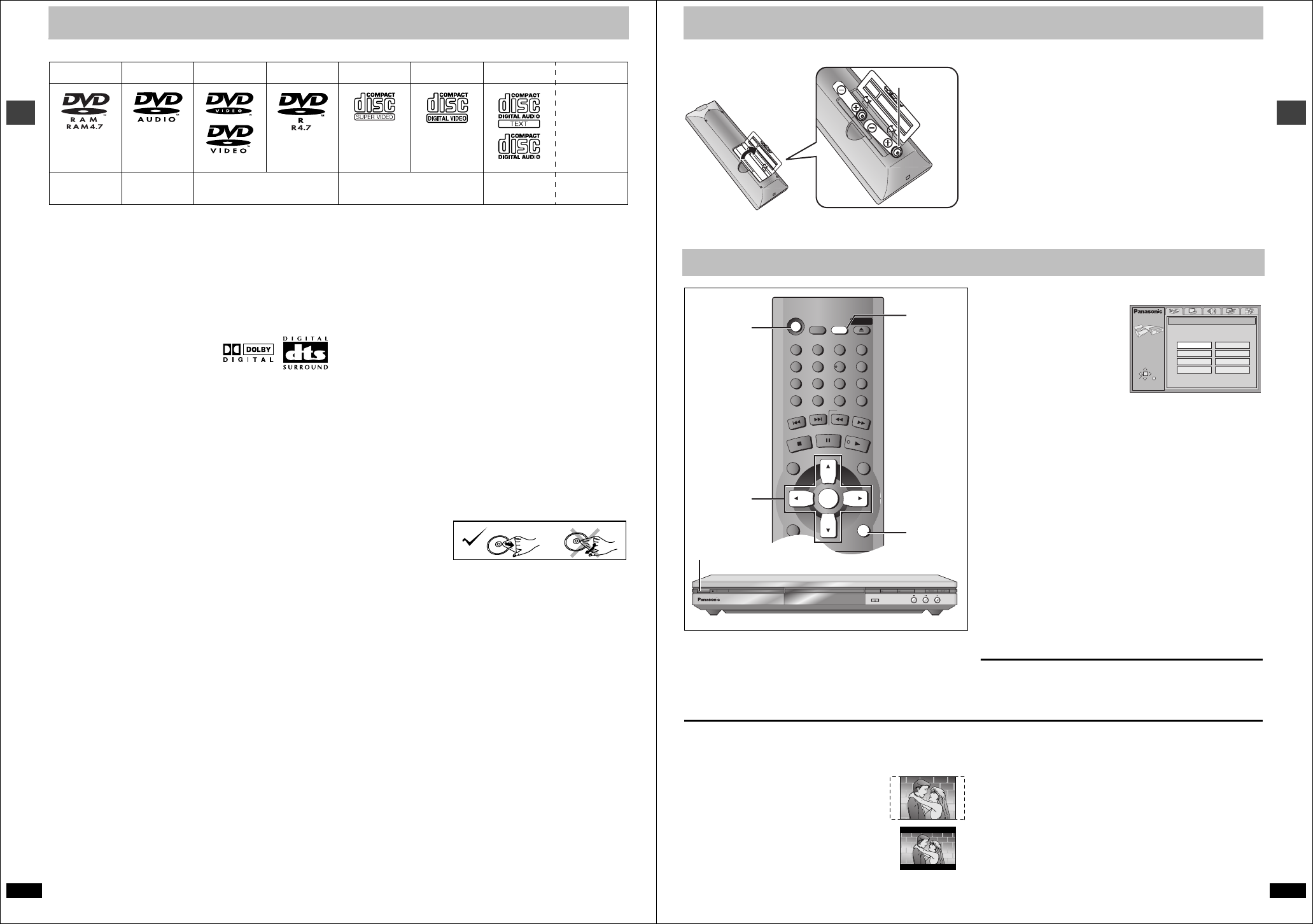
∫ Discs that can be played
Use discs with the above logos and that conform to specifications. The unit cannot play other discs correctly. Do not use irregularly shaped discs (e.g.
heart-shaped), as these can damage the unit.
It may not be possible to play CD-R, CD-RW, DVD-R and DVD-RAM in all cases due to the type of disc or condition of the recording.
∫ Discs that cannot be played
DVD-ROM, CD-ROM, CDV, CD-G, iRW, DVD-RW, CVD, SACD, Divx
Video Discs and Photo CD, DVD-RAM that cannot be removed from their
cartridge, 2.6-GB and 5.2-GB DVD-RAM, and “Chaoji VCD” available on
the market including CVD, DVCD and SVCD that do not conform to
IEC62107.
∫ Built-in decoders
You can play discs with these symbols.
∫ Video systems
≥This unit can play PAL and NTSC, but your television must match the
system used on the disc.
≥PAL discs cannot be correctly viewed on an NTSC television.
≥This unit can convert NTSC signals to PAL 60 for viewing on a PAL
television (➜ page 18, Video—NTSC Disc Output).
≥Output is interlace (576I) when playing PAL discs.
∫ Playing DVDs and Video CDs
The producer of these discs can control how they are played so you may
not always be able to control play as described in these operating
instructions (for example if the play time is not displayed or if a Video CD
has menus). Read the disc’s instructions carefully.
∫ DVD-RAM discs
The DVD-RAM you can play on this unit are those recorded with DVD
video recorders, DVD video cameras, personal computers, etc. using
Version 1.1 of the Video Recording Format (a unified video recording
standard).
≥Remove discs from their cartridges before use and return them when
you are finished, making sure that the labels of the disc and cartridge
face the same way.
≥Some parts of the disc, for example where one program ends and
another begins, may not play smoothly.
∫ DVD-R discs
Panasonic DVD-R recorded and finalized on a Panasonic DVD video
recorder or DVD video camera are played as DVD-Video on this unit.
∫ CD-R and CD-RW discs
This unit can play CD-R/RW (audio recording disc) recorded with CD-DA,
video CD, SVCD (conforming to IEC62107), WMA, MP3, or JPEG. Close
the sessions or finalize the disc after recording.
See page 11 for more information about WMA, MP3, and JPEG.
∫ HighMAT discs
This unit is compatible with HighMAT discs containing WMA, MP3, and/or
JPEG files.
∫ Disc structure
Disc structure and the labels given to the items on discs depend on the
disc type.
Track: the smallest division on DVD-Audio, CDs and Video CDs, or a
single WMA/MP3 file.
Chapter: the smallest division on DVD-Video.
Group: collections of tracks on DVD-Audio and equivalent to folders or
albums on data discs.
Title: the largest division on DVD-Video, usually an entire movie.
Program: the division on DVD-RAM equivalent to a single recording.
Picture: a single JPEG file.
Play list: the largest grouping on a HighMAT disc, or a group of scenes
on DVD-RAM.
Scene: DVD-RAM program sections specified and grouped into play
lists on a DVD video recorder.
Content: covers tracks and pictures on HighMAT discs.
∫ To clean discs
DVD-Audio, DVD-Video, Video CD, CD
Wipe with a damp cloth
and then wipe dry.
DVD-RAM, DVD-R
≥Clean with a DVD-RAM/PD disc cleaner (LF-K200DCA1, where
available).
≥Never use cloths or cleaners for CDs etc.
∫ Handling precautions
≥Do not write on the label side with a ball-point pen or other writing
instrument.
≥Do not use record cleaning sprays, benzine, thinner, static electricity
prevention liquids or any other solvent.
≥Do not attach labels or stickers to discs. (Do not use discs with exposed
adhesive from tape or left over peeled-off stickers.)
≥Do not use scratch-proof protectors or covers.
≥Do not use discs printed with label printers available on the market.
DVD-RAM
DVD-Audio
DVD-Video DVD-R
SVCD
Video CD CD CD-R/RW
Shown as
“DVD-VR” on
the display
Conforming to
IEC62107
`
[RAM] [DVD-A] [DVD-V] [VCD] [CD] [WMA] [MP3]
[JPEG]
RQT6627
Getting started
7
The remote control
∫ Batteries
≥Insert so the poles (i and j) match those in the remote control.
≥Do not use rechargeable type batteries.
Do not:
≥mix old and new batteries.
≥use different types at the same time.
≥heat or expose to flame.
≥take apart or short circuit.
≥attempt to recharge alkaline or manganese batteries.
≥use batteries if the covering has been peeled off.
Mishandling of batteries can cause electrolyte leakage which can damage
items the fluid contacts and may cause a fire.
Remove if the remote control is not going to be used for a long period of
time. Store in a cool, dark place.
∫ Use
Aim at the sensor (➜ page 3, Control reference guide), avoiding
obstacles, at a maximum range of 7 m directly in front of the unit.
The QUICK SETUP screen appears when you press [SETUP] the first
time after purchase and assists you to make necessary settings.
Preparation
Turn on the television and select the appropriate video input on the
television to suit the connections for the player.
[1] Press [Í] to turn on the unit.
[2] Press [SETUP] to
show the QUICK
SETUP screen.
e.g. Units for the United
Kingdom
[3] Press [3, 4, 2, 1] to
select the menu
language and press [ENTER].
[4] Press [3, 4] to select “Yes” to continue and
press [ENTER].
[5] Press [3, 4, 2, 1] to select the item and press
[ENTER].
≥Audio language (➜ page 18)
≥Subtitle language (➜ page 18)
≥TV Type (➜ page 18)
≥TV Aspect (➜ below)
≥Video Out (AV/Component)
§
(➜ page 18)
≥Progressive Out (Component) (➜ below)
Only displayed when setting “Video Out (AV/Component)” to “Y PB
PR”.
§
≥Speaker Setting (➜ page 18)
≥PCM Digital Output (➜ page 19)
§
Applies only to the United Kingdom and Continental Europe.
[6] Press [ENTER] and then [SETUP] to end the
settings.
To return to the previous screen
Press [RETURN].
To access this screen again later
➜ page 18, Others—QUICK SETUP
∫ TV Aspect
Select “4:3” (regular) or “16:9” (widescreen) to suit your television.
If you have a regular 4:3 television, you can also select how video on
some discs is shown (➜ page 18, Video—TV Aspect).
≥4:3 Pan&Scan (Factory preset)
Widescreen software is expanded to fill the screen
of a 4:3 aspect television (unless prohibited by the
producer of the disc).
≥4:3 Letterbox
Widescreen software is shown in the letterbox style
on a 4:3 aspect television.
∫ To enjoy progressive video
1. Connect to the component video input terminals on a 480P
compatible television. (Video will not be displayed correctly if
connected to an incompatible television.)
2. In QUICK SETUP, set “Video Out (AV/Component)” to “Y PB PR”, and
set “Progressive Out (Component)” to “Enable (NTSC Disc Only)”.
3. When playing NTSC discs, change video output mode to “480P” (➜
page 17).
≥All televisions manufactured by Panasonic and that have 480P input
connectors are compatible. Consult the manufacturer if you have
another brand of television.
≥If the unit is connected to the television through VIDEO OUT, S VIDEO
OUT or SCART (AV), output will be interlace, irrespective of the settings.
R6, AA, UM-3
Quick setup
[1]
Í
OPEN/CLOSE
DOUBLE RE-MASTER DEPTH ENHANCER
Í
/ I
Í
SLEEP
A.SRD
AUDIO ONLY
DEPTH ENH
GROUP
DIRECT NAVIGATOR
TOP
MENU
DISPLAY
SUBTITLE AUDIO
ANGLE/PAGE QUICK REPLAY
RETURN
MENU
PLAY LIST
SKIP
STOP
PLAY
SLOW/SEARCH
CANCEL
SETUP
OPEN/CLOSE
321
98
S
10
0
7
654
PAU SE
ENTER
RETURN
[2]0[6]
[3]`[6]
[1]
SELECT
SETUP
QUICK SETUP
Select the menu language.
ENTER RETURN
English
Deutsch
Español
Svenska
Français
Italiano
Português
Nederlands


Delta i konversationen om denna produkt
Här kan du dela vad du tycker om Panasonic DVD-S75 DVD spelare. Om du har en fråga, läs först noggrant igenom manualen. Att begära en manual kan göras genom att använda vårt kontaktformulär.