Getting started
RQT6627
4
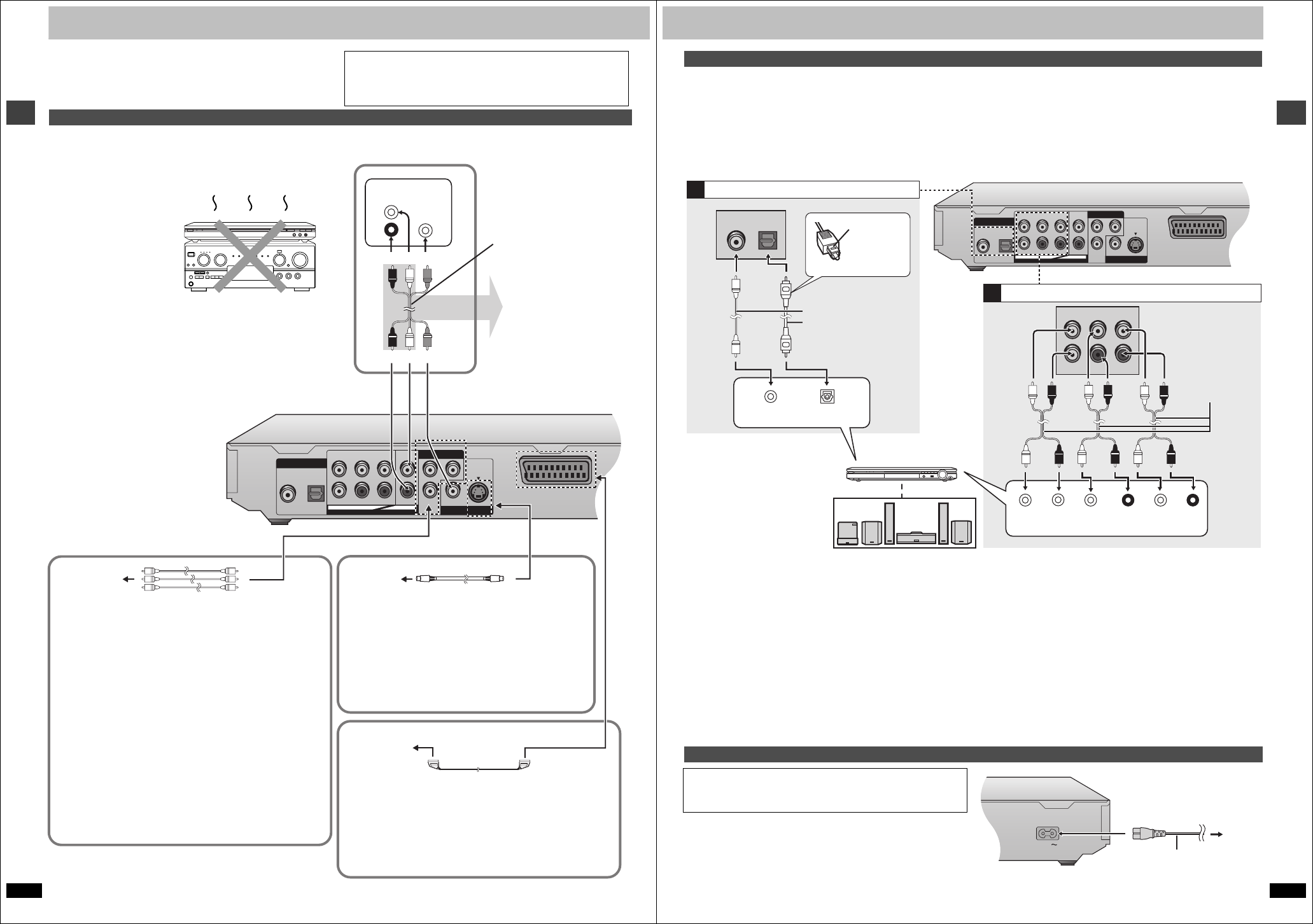
Connection
Before connection
≥Disconnect the AC mains lead.
≥Turn off all equipment and read the appropriate operating instructions.
≥The illustration shows the unit for the United Kingdom.
≥The equipment connections described are examples.
≥Peripheral equipment and optional cables sold separately unless
otherwise indicated.
Connection to a television
A V
OPTICAL
CENTER
SUBWOOFER
SURROUND
LL
L
P
B
Y
P
R
RR
R
FRONT
COAXIAL
DIGITAL AUDIO OUT
(
PCM/BITSTREAM
)
5.1ch
AUDIO OUT
COMPONENT VIDEO OUT
(NTSC:480P/480I.PAL:576I)
VIDEO
OUT
S VIDEO
OUT
2ch
AUDIO
IN
L
R
VIDEO
IN
Television
Audio/video cable
(included)
red white yellow
∫ Basic connection
COMPONENT VIDEO OUT terminal
These terminals can be used for either interlace or progressive
output (➜ page 7) and provide a purer picture than the S VIDEO
OUT terminal. Connection using these terminals outputs the color
difference signals (P
B/PR) and luminance signal (Y) separately in
order to achieve high fidelity in reproducing colors.The description of
the component video input terminals depends on the television or
monitor (e.g. Y/P
B/PR, Y/B-Y/R-Y, Y/CB/CR). Connect to terminals of
the same color.
≥When making this connection:
–Ensure you connect the audio cables to the corresponding audio
input terminals on the television.
[For\the\United\Kingdom\and\Continental\Europe]
–Set “Video Out (AV/Component)” to “Y PB PR” from Quick Setup
(➜ page 7).
Video cable (not included)
Television’s
COMPONENT
VIDEO IN
terminals
∫ For better pictures
S video cable (not included)
S VIDEO OUT terminal
The S video terminal achieves a more vivid picture than
the VIDEO OUT terminal by separating the chrominance
(C) and luminance (Y) signals. (Actual results depend on
the television.)
≥When making this connection, ensure you connect the
audio cables to the corresponding audio input terminals
on the television.
Television’s
S VIDEO IN
terminal
This page explains how to connect the unit to a television and set it
up so you hear the audio through the television’s speakers.
To get the full benefit from the powerful multi-channel audio found on
DVDs, you should connect an amplifier and speakers.
Do not place the unit on
amplifiers or equipment
that may become hot.
The heat can damage the unit.
Connect your unit directly to your television.
Do not connect the unit through your video cassette recorder when
setting up your home entertainment system, because the picture may
not be played correctly due to the copy guard.
red white yellow
21-pin SCART cable
(not included)
You can connect the
audio cable to the 2-
channel audio input
terminals of an analog
amplifier or system
component to enjoy
stereo or Dolby Pro
Logic.
SCART (AV) terminal
To improve picture quality, you can change the video signal output
from the SCART (AV) terminal from “Video” to either “S-Video” or
“RGB” to suit the type of television your are using. Set “Video Out
(AV/Component)” to “S-Video” or “RGB” from Quick Setup
(➜ page 7).
Television’s
SCART IN
terminal
[For\the\United\Kingdom\and\Continental\Europe]
RQT6627
Getting started
5
Enjoy the powerful movie theater and hall-like sound available with multiple channel audio found on DVDs by connecting an amplifier and speakers.
There are two types of connection, digital and analog.
\A\ Digital
Connect an amplifier with Dolby Digital, DTS and MPEG
§
decoders to
enjoy surround sound.
You can also enjoy high-quality stereo sound with sampling frequencies of
88.2 and 96 kHz if the material isn’t copy-protected and the equipment
you connect is compatible with these signals.
\B\ Analog
Connect an amplifier with multi-channel audio input terminals to enjoy
surround sound.
This unit can decode Dolby Digital, DTS and MPEG
§
, and there are no
limitations on sampling frequency with this kind of connection.
To obtain maximum performance of DVD-Audio multi-channel linear PCM
sound, the connections [B] below are recommended.
∫ Recording output
Digital recording
Connection [A] to digital recording equipment
≥With DVD, the following conditions must be met: a the disc doesn’t have
protection preventing digital recording, and b the recording equipment
can handle signals with a sampling frequency of 48 kHz.
≥You cannot record WMA/MP3.
When recording, make the following settings.
–Advanced Surround: OFF (➜ page 13)
–PCM Digital Output: Up to 48 kHz (➜ page 19)
–Dolby Digital/DTS Digital Surround/MPEG
§
: PCM (➜ page 19)
§
Units for the United Kingdom, Continental Europe, the Middle East,
South Africa, Russia, Australia and N.Z.
Analog recording
There are no limitations on recording analog signals as there are with
digital signals.
≥Connect the equipment to the unit’s 2-channel AUDIO OUT (L/R)
terminals.
or
≥Select “2-channel” in “Speaker Setting” (➜ page 18) when connecting
the equipment to the unit’s FRONT(L/R) 5.1-channel AUDIO OUT
terminals.
Conserving power
This unit consumes a small amount of power, even when it is turned off
(approx. 1.9 W). To save power when the unit is not to be used for a long
time, unplug it from the household mains socket.
Home Theater – Enjoying more powerful sound
A V
OPTICAL
CENTER
SUBWOOFER
SURROUND
LL
L
P
B
Y
P
R
RR
R
FRONT
COAXIAL
DIGITAL AUDIO OUT
(
PCM/BITSTREAM
)
5.1ch
AUDIO OUT
COMPONENT VIDEO OUT
(NTSC:480P/480I.PAL:576I)
VIDEO
OUT
S VIDEO
OUT
2ch
CENTER
SUB-
WOOFER
SURROUND
(L) (R)
FRONT
(L) (R)
OPTICALCOAXIAL
A
B
VOLUME
CENTER
SUBWOOFER
SURROUND
LL
RR
FRONT
OPTICALCOAXIAL
Analog connection
Insert fully,
with this side
facing up.
Coaxial cable
or
Optical digital audio cable
Do not bend sharply when
connecting.
Audio cable
Connect cables to
terminals
corresponding to the
speakers you have
connected.
Speakers (example)
Connect three or more speakers for
urround sound.
≥If you don’t connect a subwoofer, it
is advisable to connect front
speakers (L/R) capable of producing
bass of less than 100 Hz.
Amplifier
Digital connection
Change “Digital output” (➜ page 19).
≥You can connect to a digital amplifier or
system component to enjoy stereo or
Dolby Pro Logic.
Change “Speaker setting” (➜ page 20).
≥Switch the attenuator on if sound is distorted with this
connection (➜ page 17) .
Power connection
FOR THE UNITED KINGDOM ONLY
READ THE CAUTION FOR AC MAINS LEAD ON PAGE 2 BEFORE
CONNECTION.
AC mains lead (included)
To household
mains socket


Delta i konversationen om denna produkt
Här kan du dela vad du tycker om Panasonic DVD-S75 DVD spelare. Om du har en fråga, läs först noggrant igenom manualen. Att begära en manual kan göras genom att använda vårt kontaktformulär.