RQT6627
8
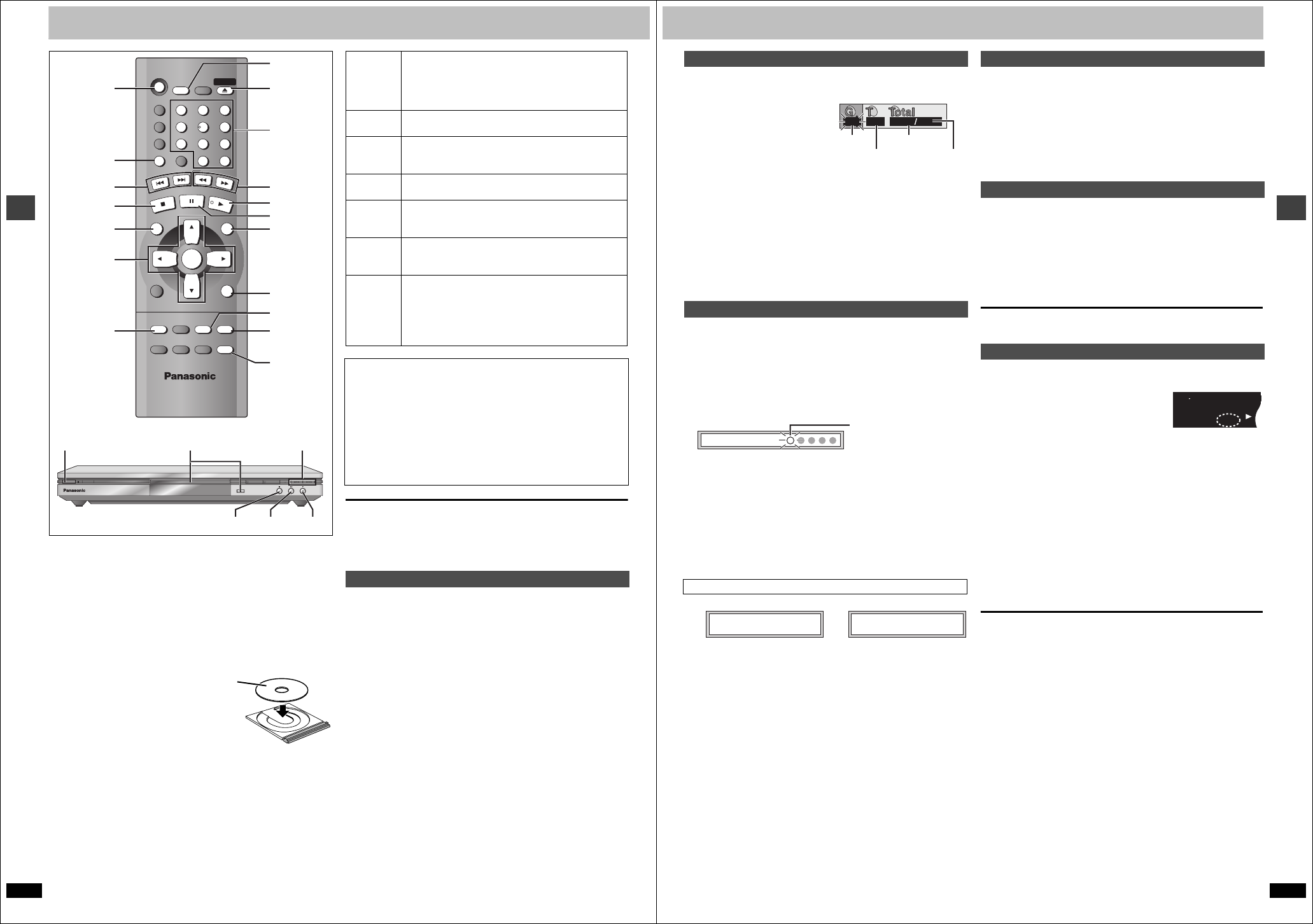
Basic operations
Basic play
Preparation
Turn on the television and select the appropriate video input on the
television to suit the connections for the player.
[1] Press [Í] to turn on the unit.
If the disc contains both audio data (WMA and MP3) and JPEG,
check the “Mixed Disc – Audio & Stills” in the SETUP menu (➜
page 18). Select “Stills (JPEG)” or “Audio (MP3/WMA)”.
[2] Press [<] to open the disc tray and place the
disc label-up on the disc tray.
≥Load double-sided discs so the label for
the side you want to play is facing up.
[3] Press [1] (PLAY).
The disc tray closes and play begins. It is
normal for sound and pictures to take time
to start.
[CD] (CD text only) [WMA] [MP3]
Track information appears on the television. Press [SUBTITLE] to
turn the display on or off.
≥If “$” appears on the television
The operation is prohibited by the unit or disc.
≥Discs continue to rotate while menus are displayed even after playing an
item. Press [∫] when you finish to preserve the unit’s motor and your
television screen.
[RAM] [DVD-A] [DVD-V] [VCD] [CD]
Press the numbered buttons.
To select a 2-digit number
e.g. 23: [S10] ➜ [2] ➜ [3]
[WMA] [MP3] [JPEG]
Press the numbered buttons then press [ENTER].
e.g. 123: [1] ➜ [2] ➜ [3] ➜ [ENTER]
≥This works only when stopped with some discs.
≥When playing DVD-Audio and you want to start play from a track in a
different group, select the group first (➜ page 9).
Í
SLEEP
A.SRD
AUDIO ONLY
DEPTH ENH
GROUP
DIRECT NAVIGATOR
TOP
MENU
DISPLAY
SUBTITLE
PLAY MODE
ZOOM
AUDIO
ANGLE/PAGE QUICK REPLAY
POSITION
MEMORY
DOUBLE
RE-MASTER
RETURN
MENU
PLAY LIST
SKIP
STOP
PLAY
SLOW/SEARCH
CANCEL
SETUP
OPEN/CLOSE
321
98
S
10
0
7
654
PAU SE
ENTER
[1]
[2]
[3]
[3]
[1] [2]
D,
E
Í
OPEN/CLOSE
DOUBLE RE-MASTER DEPTH ENHANCER
Í
/ I
RETURN
MENU
;
6
, 5
SLEEP
ANGLE/PAGE
QUICK
REPLAY
POSITION
MEMORY
∫;
GROUP
SUBTITLE
:, 9
∫
TOP MENU
3
,
4
,
2
,
1
ENTER
Numbered
buttons
Stop
Press [∫].
“!” flashes on the display. Press [1] (PLAY) to restart
from this position or [∫] to clear it.
DVD-Video: Press [1] (PLAY) again to review chapters
(➜ page 9).
Pause
Press [;].
Press [1] (PLAY) to restart.
Skip
Press [:] (backward) or [9] (forward).
Group skip [JPEG]
Press [4] (backward) or [3] (forward).
Search
Press [6] (backward) or [5] (forward).
Press [1] (PLAY) to restart play.
Slow-
motion
While paused, press [6] (backward) or [5]
(forward).
Press [1] (PLAY) to restart play.
Frame-
by-frame
While paused, press [2] (backward) or [1] (forward).
Press and hold to change in succession.
Or, press [;] repeatedly for forward frame-by-frame.
Menus
Press [3, 4, 2, 1] to select an item and [ENTER] to
confirm.
Or, press the numbered buttons.
Press [TOP MENU] to show the top menu.
Press [MENU] to show a menu.
Press [RETURN] to show a menu. [VCD]
Notes
≥On the main unit, press [D] or [E] to perform skip, and
press and hold to perform search and slow-motion.
≥The speed of search and slow-motion increases up to 5 steps.
≥Slow-motion and frame-by-frame only work on moving pictures.
≥You can turn off the sound during search (➜ page 18, Audio—Audio
during Search).
When playing Video CDs
≥You cannot move backwards during slow-motion and frame-by-frame.
≥Pressing buttons to perform skip, search or slow-motion may take you
to a menu screen.
Starting play from a selected item
RQT6627
9
Basic operations
[DVD-A] [WMA] [MP3] [JPEG]
1 Press [GROUP].
2 Press [3, 4] to select
the group number and
press [ENTER].
3 Press [3, 4] to select
the track/picture
number and press [ENTER].
≥You can also select the group and track/picture number with the
numbered buttons.
[DVD-A]
≥Playing all the groups in succession (➜ page 14, All group play)
≥Playing bonus groups
Some discs contain bonus groups. If a password screen appears after
selecting a group, enter the password with the numbered buttons. Refer
also to the disc’s jacket.
[RAM] [DVD-A] [DVD-V] [VCD] [CD] [WMA] [MP3]
(When the elapsed play time is displayed)
[JPEG]
Memorize positions on up to five discs to restart play after switching the
unit to standby or changing discs.
During play
1 Press [POSITION MEMORY].
2 Press [Í] to switch the unit to standby or press
[<] to remove the disc.
3 When you are ready to play the disc again
Press [1] (PLAY) to restart from the position.
(When playing DVD-Video ➜ “Chapter Review” below)
≥When you memorize the sixth position, the earliest position is replaced.
≥This function does not work while playing some DVDs or play lists on
DVD-RAM.
One of these messages appears.
Press [1] (PLAY) again to review the first few seconds of the chapters up
to the one where you memorized the position. Play then resumes from the
memorized position.
Do not press [1] (PLAY) if you do not want to review chapters.
[RAM] [DVD-A] [DVD-V] [VCD] [CD] [WMA] [MP3]
Skip back a few seconds within the current item (program, track or title).
[JPEG]
Skip back a few pictures.
During play
Press [QUICK REPLAY].
≥This feature may not work while playing some parts of a disc or at all
with some discs.
[JPEG]
You can rotate pictures ninety degrees.
While a picture is displayed
1 Press [ANGLE/PAGE].
2 Press [3, 4] to select “Rotate right” or “Rotate
left” and press [ENTER].
To clear the popup screen
Press [ANGLE/PAGE].
Press [SLEEP] to select the setting.
Each time you press the button:
≥AUTO also works with DVDs that show a menu after play finishes.
≥AUTO does not work if you press [∫], [MENU] or [TOP MENU]. It is
activated again when you restart play.
≥AUTO does not work correctly with some discs (e.g., if menus appear
after playing Video CDs).
To confirm the remaining time
Press [SLEEP].
∫ Auto standby
The unit switches to standby mode after about 30 minutes in the stop
mode, irrespective of the SLEEP setting.
Selecting groups to play
Position Memory function
Chapter Review [DVD-V]
1
1
118
e.g. [MP3]
Group No.
Track No. in group
Track No. in disc
Total No. of
tracks on disc
Position memorized
Flashes as you memorize
a position.
Press PLAY to Preview Chapters Press PLAY to Chapter Review
Replaying a scene—QUICK REPLAY
Rotating pictures
Setting the unit to turn off—SLEEP timer
[#
l
l
l
l
l
l
l
l
a---
OFF:
v
Cancel
AUTO:
v
Turns the unit off 5 minutes after play finishes
60 min:
v
Turns the unit off after 60 minutes
90 min:
v
Turns the unit off after 90 minutes
120 min: Turns the unit off after 120 minutes
DVD
MPEG
MPEG
4
PGMPGM
A B C D
SLEEP
RNDRND A B
JPEGJPEG
ZOOMZOOM PGPG SDSD
AVAAV MPMP
3
G
R
CDCD WMWM
M


Delta i konversationen om denna produkt
Här kan du dela vad du tycker om Panasonic DVD-S75 DVD spelare. Om du har en fråga, läs först noggrant igenom manualen. Att begära en manual kan göras genom att använda vårt kontaktformulär.