Operation Guide 3271
E-30
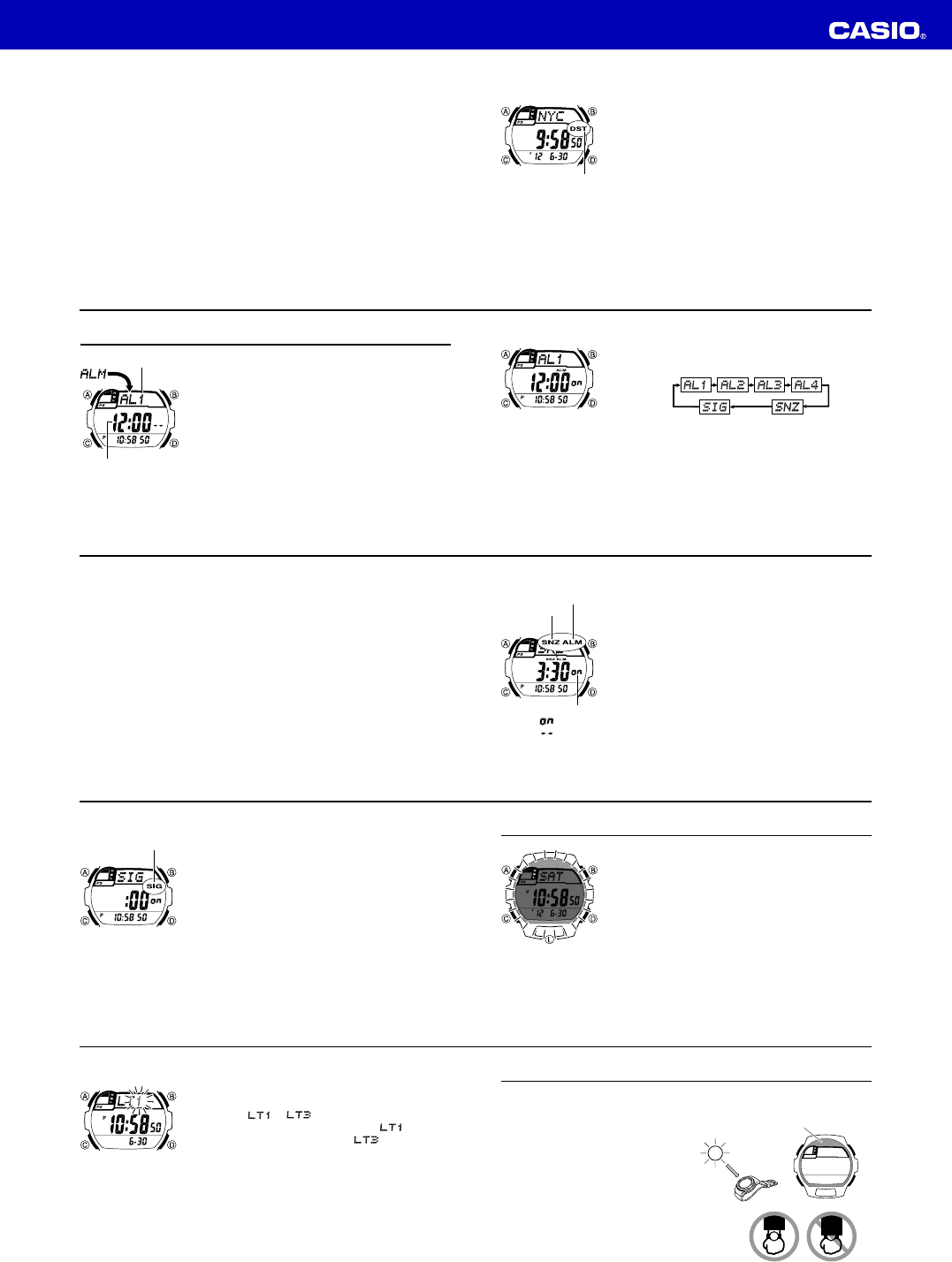
To view the time in another city
While in the World Time Mode, use D (eastward) and B (westward) to scroll through
the city codes (time zones).
• Pressing D and B at the same time will jump to the UTC time zone.
E-31
To toggle a city code time between Standard Time and Daylight Saving Time
1. In the World Time Mode, use D and B to display the
city code (time zone) whose Standard Time/Daylight
Saving Time setting you want to change.
2. Hold down A to toggle between Daylight Saving Time
(DST indicator displayed) and Standard Time (DST
indicator not displayed).
• The DST indicator is shown on the World Time Mode
screen while Daylight Saving Time is turned on.
• Note that the Standard Time/Daylight Saving Time
setting affects only the currently displayed city code.
Other city codes are not affected.
• Note that you cannot switch between Standard Time
and Daylight Saving Time while UTC is selected as the
city code.
DST indicator
E-32
Alarms
The Alarm Mode gives you a choice of four one-time
alarms and one snooze alarm.
Also use the Alarm Mode to turn the Hourly Time Signal
(
SIG) on and off.
• There are five alarm screens numbered
AL1, AL2,
AL3 and AL4 for the one-time alarm, and a snooze
alarm screen indicated by
SNZ. The Hourly Time
Signal screen is indicated by
SIG.
• All of the operations in this section are performed in the
Alarm Mode, which you enter by pressing C (page
E-9).
Alarm number
Alarm time
(Hour : Minutes)
E-33
To set an alarm time
1. In the Alarm Mode, use D to scroll through the alarm
screens until the one whose time you want to set is
displayed.
• To set a one-time alarm, display alarm screen AL1, AL2, AL3 or AL4.
To set the snooze alarm, display the
SNZ screen.
• The snooze alarm repeats every five minutes.
2. After you select an alarm, hold down A until the hour setting of the alarm time
starts to flash, which indicates the setting screen.
• This operation turns on the alarm automatically.
3. Press C to move the flashing between the hour and minute settings.
4. While a setting is flashing, use D (+) and B (–) to change it.
• With the 12-hour format, set the time correctly as a.m. or p.m. (P indicator).
5. Press A to exit the setting screen.
E-34
Alarm Operation
The alarm tone sounds at the preset time for 10 seconds, regardless of the mode the
watch is in. In the case of the snooze alarm, the alarm operation is performed a total
of seven times, every five minutes, until you turn the alarm off (page E-35).
• Alarm and Hourly Time Signal operations are performed in accordance with the
Timekeeping Mode time.
• To stop the alarm tone after it starts to sound, press any button.
• Performing any one of the operations below during a 5-minute interval between
snooze alarms cancels the current snooze alarm operation.
Displaying the Timekeeping Mode setting screen (page E-12)
Displaying the
SNZ
setting screen (page E-33)
To test the alarm
In the Alarm Mode, hold down D to sound the alarm.
E-35
To turn an alarm on and off
1. In the Alarm Mode, use D to select an alarm.
2. Press B to toggle it on and off.
• Turning on a alarm (
AL1, AL2, AL3, AL4 or
SNZ) displays the alarm on indicator on its Alarm Mode
screen.
• In all modes, the alarm on indicator is shown for any
alarm that currently is turned on.
• The alarm on indicator flashes while the alarm is
sounding.
• The snooze alarm indicator flashes while the snooze
alarm is sounding and during the 5-minute intervals
between alarms.
Alarm on indicator
Alarm on/off
: Alarm on
: Alarm off
Snooze alarm
indicator
E-36
To turn the Hourly Time Signal on and off
1. In the Alarm Mode, use D to select the Hourly Time
Signal (
SIG).
2. Press B to toggle it on and off.
• The Hourly Time Signal on indicator is shown on the
display in all modes while this function is turned on.
Hourly time signal
on indicator
E-37
Illumination
An LED (light-emitting diode) illuminate the display for
easy reading in the dark.
Illumination Precautions
• The illumination provided by the light may be hard to see
when viewed under direct sunlight.
• Illumination automatically turns off whenever an alarm
sounds.
• Frequent use of illumination runs down the battery.
To illuminate the display manually
In any mode, press L to turn on illumination.
• You can use the procedure below to select either 1.5 seconds or 3 seconds as the
illumination duration. When you press L, the illumination will remain on for about
1.5 seconds or 3 seconds, depending on the current illumination duration setting.
E-38
To specify the illumination duration
1. In the Timekeeping Mode, hold down A until the
display contents start to flash. This is the setting screen.
2. Press C 10 times until the current illumination duration
setting (
or ) appears.
3. Press D to toggle the setting between
(approximately 1.5 seconds) and (approximately
3 seconds).
4. Press A to exit the setting screen.
E-39
Power Supply
This watch is equipped with a solar cell and a rechargeable battery that is charged by
the electrical power produced by the solar cell. The illustration shown below shows
how you should position the watch for charging.
Example: Orient the watch so its face is
pointing at a light source.
• The illustration shows how to position a
watch with a resin band.
• Note that charging efficiency drops when
any part of the solar cell is blocked by
clothing, etc.
• You should try to keep the watch outside of
your sleeve as much as possible. Charging
is reduced significantly if the face is
covered only partially.
Solar cell



Delta i konversationen om denna produkt
Här kan du dela vad du tycker om Casio W-S220-1AVEF Sportklocka. Om du har en fråga, läs först noggrant igenom manualen. Att begära en manual kan göras genom att använda vårt kontaktformulär.