350 TRAINER PEDOMETER
IMPORTANT: READ THROUGH ALL INSTRUCTIONS BEFORE BEGINNING TO USE YOUR PEDOMETER
BATTERY CAUTION:
• Non-rechargeable batteries are not to be recharged
• Rechargeable batteries must be removed before recharging
• Rechargeable batteries only to be recharged under adult supervision
• Different types of batteries must not be mixed
• New and used batteries not to be mixed
• Exhausted batteries to be removed
• Do not dispose of battery in fire; battery may explode or leak
• Do not dispose of product in fire; battery may explode or leak
TO OPERATE YOUR NEW PEDOMETER
1. Remove the plastic film from the LCD display on the front of the pedometer.
2. Slowly pull the battery protector from the battery door located on the back to activate your pedometer.
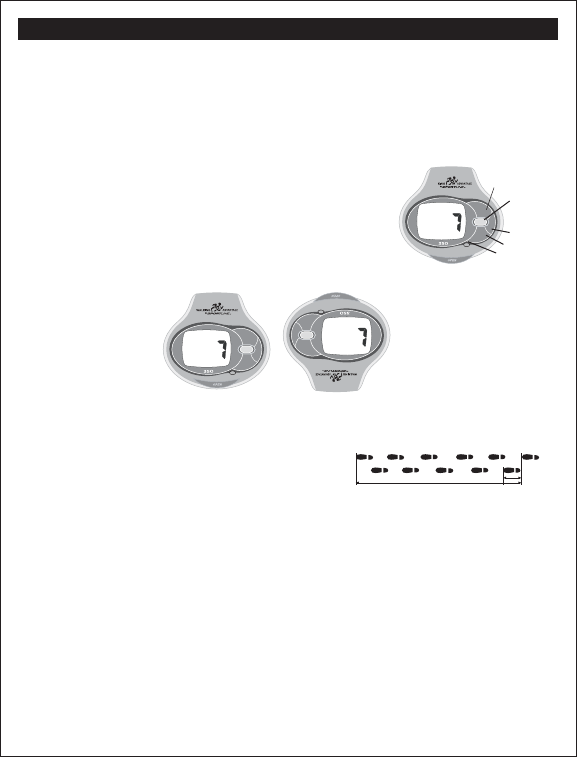
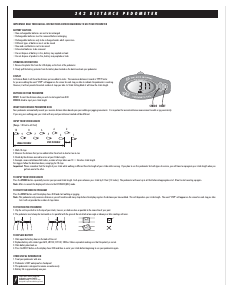
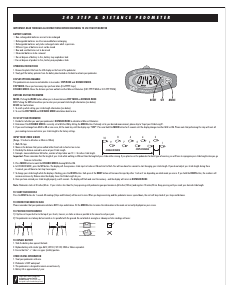
EXPLANATION OF BUTTON FUNCTIONS:
BUTTON A – RESET:
Resets all counts/measurements back to zero. Also changes measurements from Imperial System (Miles/Inches/Pounds)
to the Metric System (Kilometers/Centimeters/Kilograms).
BUTTON B – SET:
Used for setting stride length, weight, and time of day. Also used to increase minutes in TIME setting mode.
BUTTON C – SCAN:
Consecutively gives readings of all pedometers functions when
SCAN
feature is on.
BUTTON D – TOTAL:
Provides cumulative totals from your exercise intervals until the RESET button is pressed which will return all counts to zero.
BUTTON E – MODE:
Allows you to choose the MODE you want in the sequence of STEP, DISTANCE, CAL, CLOCK and TIMER.
NOTE: To operate properly, pedometer case MUST be closed!
REVERSIBLE DISPLAY: This pedometer has a unique feature that allows the display to reverse so that you can read it from two positions…
a) Reads in standard format when held upright in your hand.
b) Automatically reverses when the LCD display is lifted upward so the data can be read without removing it from your waistline during your exercise program.
TO SET UP YOUR PEDOMETER
1. Decide first whether you want your pedometer’s DISTANCE mode to operate in miles or kilometers.
2. Determine if the DISTANCE mode is currently set to MILE or KM by hitting the MODE button. If already set to your desired measurement, please skip to "Input Your Stride Length".
3. If you need to change from MILE to KM or vice versa, press and hold the RESET button for 5 seconds. This will change Stride setting measurements from inches to centimeters and weight setting measurements from pounds to kilograms as well.
INPUT YOUR STRIDE LENGTH (Range 12 - 96 inches or 30 - 240 centimeters; the default values are 30 inches/75 centimeters):
1. Walk 10 steps.
2. Measure the distance you have walked either from heel-to-heel or toe-to-toe.
3. Divide the distance covered by the number of steps.
4. Example: Distance covered in 10 steps = 360 inches. Divide the number of inches by the number of steps (360 inches divided by 10) = 36 inches.
IMPORTANT:
Please remember that the length of your stride while walking is different than the length of your stride while running. If you plan to use this pedometer for both types of exercise, you will have to reprogram your stride length when you go
from one to the other.
HOW TO ENTER YOUR STRIDE LENGTH
1. Press the MODE button (E) on the display panel to DIST (DISTANCE).
2. Press the SET button (B) to enter the setting mode, then press (B) repeatedly to enter your personal stride length.
Each press advances your stride by one inch/one centimeter.
NOTES:
The digits will flash five times and then the display will return to the DIST mode. If you want to go to the DIST mode immediately, press the MODE button (E).
The pedometer will only count up. It will count up to 96 inches/240 centimeters before dropping down to 12 inches/30 centimeters to allow you to count up from there if your stride is less than the default value.
MILE/KILOMETER CONVERSION
To change from MILES to KILOMETERS, press and hold RESET button (A) for 5 seconds. This will also change Stride setting measurements from feet to centimeters and weight setting measurements from pounds to kilograms as well.
INPUTTING YOUR WEIGHT (Ranges 60 - 300 lbs or 30 - 135 kg)
In order to measure your calories, you must enter your weight into the pedometer’s memory. To do this, follow these steps:
1. Press the MODE button (E) on the display panel to CAL (Calories).
2. Press the SET button (B), then continuously press
SET to enter your personal weight. Each press advances your weight by 1 pound or 1 kilogram (Range 60 to 300 lbs. or 30 to 135 kg; the default values are 100 lbs./45 kg).
NOTE: The display will flash five times before returning to the CAL mode. If you want to go to the CAL mode immediately, press the MODE button (E).
SETTING THE CLOCK
1. Press the MODE button (E) to reach CLOCK mode.
2. Press the SET button (B) and display shows time to be adjusted.
3. Press the RESET button (A) to correctly adjust A (am) "HOUR" or P (pm) "HOUR" digits.
4. Press the SET button (B) to correctly adjust ”MINUTE” digit.
5. When the clock is correctly set, the display returns to the CLOCK mode after 6 seconds. If you want to go to the CLOCK mode immediately, press the MODE button (C).
10
9
8
7
6
5
4
3
20
1
Step Distance
Ideal Distance
a) b)
STEP
MODE
SET
SCAN
TOT
AL
A
B
C
D
E
RESET
MODE
SET
SCAN
TOTAL
MODE
SET
SCAN
TOTAL
STEP
STEP
RESET
RESET
350 TRAINER PEDOMETER Instructions Cont…


Delta i konversationen om denna produkt
Här kan du dela vad du tycker om Sportline 350 Goal Stegräknare. Om du har en fråga, läs först noggrant igenom manualen. Att begära en manual kan göras genom att använda vårt kontaktformulär.