11/2014 – V 1.2
Trademarks
The Bluetooth
®
word mark and logos are registered trademarks of Bluetooth SIG,
Inc. (Special Interest Group).
USB is a registered trademark.
Other names and products may be the trademarks or registered trademarks of their
respective owners.
Introduction
Thank you for purchasing a SilverCrest product. The SilverCrest Bluetooth
®
headset
SBH 3.0 A1, hereinafter referred to as headset, allows operation with compatible
mobile phones.
Intended use
This headset is a consumer electronic device which allows you to make phone calls
with a compatible mobile phone without having to hold the phone. The device is
operated via a multifunction button. The headset can be worn very comfortably
either on the left or right ear due to the adjustable ear hook. The headset may only
be used privately and not for industrial or commercial purposes. Furthermore,
the device may not be used in tropical climates. The manufacturer does not accept
any liability for any resulting damage or faults in the event of unauthorised
modifications to the headset. Please observe the regulations and laws in the country
of use.
Supplied items
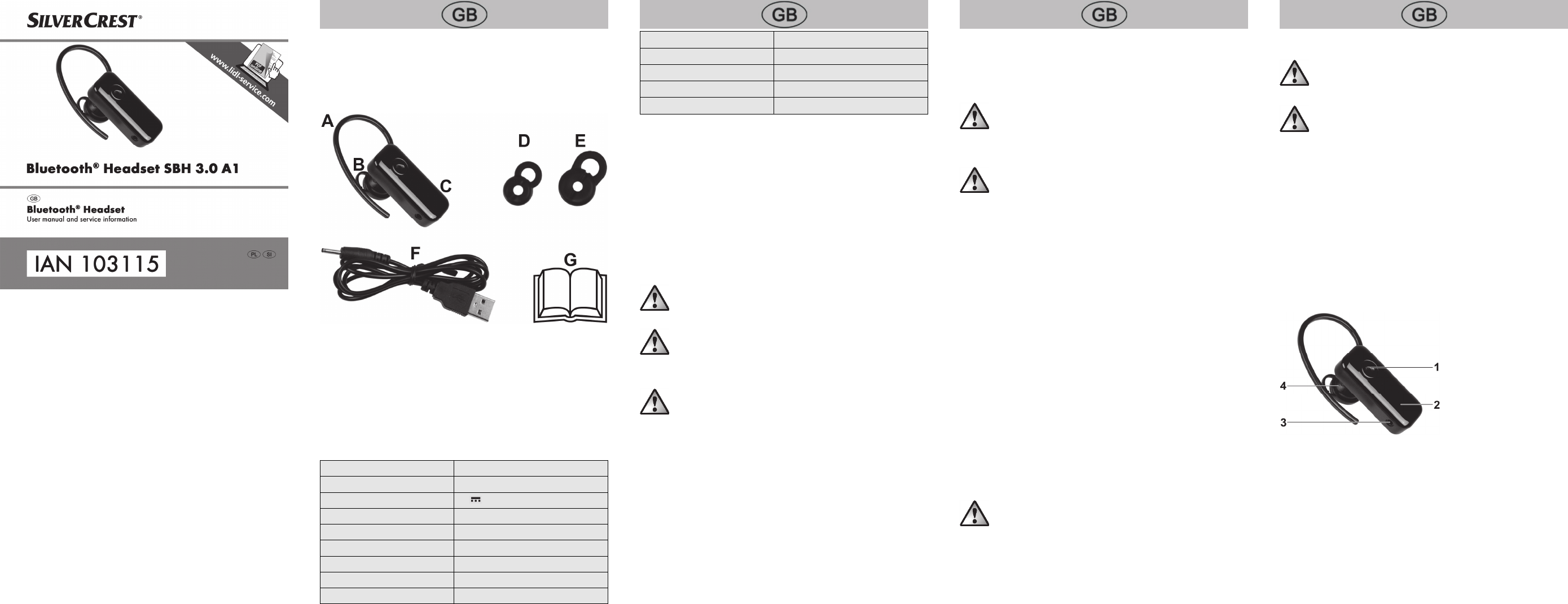
A Ear hook (mounted)
B Ear tip – medium (mounted)
C SilverCrest Bluetooth
®
headset SBH 3.0 A1
D Ear tip – small
E Ear tip – large
F USB charging cable
G These instructions (symbolic representation)
Technical data
Dimensions (W x H x D) approx. 43 x 26 x 18 mm
Weight approx. 10g (including ear hook)
Operating voltage 5V
Power consumption 500mA max. via USB
Battery Lithium polymer 85mAh
Talk time up to 4 hours
Standby time up to 100 hours
Charging time approx. 3 hours
Bluetooth
®
V3.0
Bluetooth
®
range up to 10 metres
Profile support HSP, HFP
Storage temperature -20°C to +45°C
Operating temperature +5°C to +35°C
Air humidity (rel. air humidity) max. 85%
The technical data and design may be changed without notification.
Safety instructions
Before using this headset for the first time, please read the following instructions
carefully and take note of the safety warnings, even if you are familiar with the use
of electronic devices. Store these instructions in a safe place for future reference. If
you sell the headset or pass it on, always include these instructions. They are an
integral part of the device.
Explanation of the hazard symbols used in these
instructions
DANGER! This symbol in conjunction with the "danger" note indicates
an imminent dangerous situation which, if not prevented, could result in
serious injury or even death.
WARNING! This symbol in conjunction with the "warning" note
indicates important information for safe operation of the device and the
safety of the user.
DANGER! Radio interface
Turn the headset off in aircraft, hospitals, operating rooms or in the vicinity of
medical electronic systems. The transmitted radio waves can impair the functionality
of sensitive devices. Keep the headset at least 20cm away from any pacemakers or
implantable cardioverter defibrillators because the proper functioning of the
pacemaker can be impaired by radio waves. The transmitted radio waves can
cause interference in hearing aids. Do not place the headset in the vicinity of
flammable gases or in a potentially explosive environment (e.g. paint shop) when
the radio components are switched on because the transmitted radio waves can
cause an explosion or a fire. The range of the radio waves is dependent on
conditions in the surrounding environment. In the event of data traffic via a wireless
connection, it is also possible for unauthorised third parties to receive data. Targa
GmbH is not responsible for radio or television interference caused by unauthorised
changes to this device. In addition, TARGA assumes no responsibility for the
replacement or exchange of connecting lines and devices not indicated by TARGA
GmbH. Only the user himself is responsible for the elimination of interference
caused by such unauthorised changes and for the replacement or exchange of the
devices.
DANGER! Risk of explosion!
The headset must not be thrown into a fire because the built-in battery may explode.
WARNING! Ensure that
no direct heat sources (e.g. heating) can affect the headset
no direct sunlight or bright artificial light reaches the headset
any contact with splashed and dripping water and corrosive liquids is avoided
and the headset is not operated in the vicinity of water. In particular, the headset
should never be submerged in liquid; do not place any vessels filled with liquid,
e.g. vases or drinks, on or near the headset
no fire sources (e.g. burning candles) are placed on or near the headset
no foreign objects penetrate the device
the headset is not in the immediate vicinity of magnetic fields (e.g. speakers)
the headset is never subjected to extreme temperature fluctuations as this could
result in condensation and electrical short circuits. If the headset was subjected to
extreme temperature fluctuations, however, wait (approx. 2 hours) until the
headset has reached ambient temperature before use
the headset is never subjected to excessive shocks and vibrations
connected cables are always laid in such a manner that nobody can step on
them or trip over them. There is a risk of injury
cables are never pulled on directly, but are always handled by the connector
Never place furniture or other heavy objects on the cable and take care that the
cable is not kinked, especially near the plug and connection sockets. Never tie a
knot in a cable and do not tie cables together.
DANGER! Children and persons with
disabilities
This headset can be used by children aged 8 and older and by persons with
reduced physical, sensory or mental abilities or lack of experience and knowledge
if they are supervised or have been instructed on the safe use of the headset and
understand the resulting risks. Children must not play with the headset. Cleaning
and user maintenance must not be carried out by children without supervision.
Always keep plastic packaging away from children.
It poses a suffocation risk!
WARNING! Cleaning / maintenance
It is necessary to repair the headset if it has been damaged in any way, for
example, if the housing is damaged, if liquid or objects have penetrated the device
or if the product has been exposed to rain or moisture. Repair work is also required
if the device is not working properly or has been dropped. If smoke is produced, or
there are any unusual sounds or smells, switch the headset off immediately. In these
cases, the headset should not be used until it has been inspected by authorised
service personnel. Only have the device repaired by qualified personnel. Never
open the housing of the headset. Only use a clean, dry cloth to clean the headset
and never use any corrosive liquids. Use a slightly moistened cloth and a mild
cleaning agent to remove stubborn dirt. Never try to open the housing of the
headset as this would void your warranty.
Overview
1 Multifunction button
2 LEDs (blue/orange)
3 Charging socket
4 Ear piece
First use
Charging the battery
Before the first use or when the built-in battery is empty, you charge it as follows:
Connect the supplied USB charging cable (F) to the charging socket (3) and a
free USB socket of your computer when it is switched on or a USB power supply
(not supplied).
The orange LED (2) lights up while the battery is being charged. Once the battery
is fully charged, the orange LED (2) goes out and the blue LED (2) lights up.
Never cover the headset while it is charging as it can become heated.
The orange LED (2) flashes when the battery is low.


Delta i konversationen om denna produkt
Här kan du dela vad du tycker om SilverCrest IAN 103115 Headset. Om du har en fråga, läs först noggrant igenom manualen. Att begära en manual kan göras genom att använda vårt kontaktformulär.