Bruksanvisning Sigma EF-530 DG ST Super (for Canon) Blixt

Behöver du en bruksanvisning för din Sigma EF-530 DG ST Super (for Canon) Blixt? Nedan kan du se och ladda ner PDF-bruksanvisningen gratis på svenska. Den här produkten har för närvarande 1 vanliga frågor, 0 kommentarer och har 1 röst med ett genomsnittligt produktbetyg på 100/100. Om det här inte är bruksanvisningen du vill ha, vänligen kontakta oss.

Är produkten defekt och erbjuder bruksanvisningen ingen lösning? Gå till ett Repair Café för gratis reparationstjänster.

Bruksanvisning

Loading…
19
FE LOCK
“FE” lock mode allows you to choose and lock the exposure before taking the picture.
1. Set the camera’s exposure mode (“P”, “Tv”, “Av”, “M” or “DEP”).
2. Set the flash’s mode to the E-TTL or the High Speed Sync.
3. Focus on the subject
4. Focus on the subject in the center AF frame of the viewfinder, and depress FE lock button.
The flash unit will make a pre-flash, then calculate and memorize the amount of light necessary for the
correct exposure.
The camera’s viewfinder will display “FEL” for 0.5 sec and the correct exposure will be set.
If the viewfinder shows mark, it means that power is not sufficient for correct exposure. Please get
closer to the subject and repeat from step 3.
5. After composing the picture, press the shutter button.
This function may vary depending on camera model. For more details please refer to “FE lock”
instructions of your camera manual.
MODELING FLASH
If useing the Modeling flash, you can check the lighting and shadow effects before taking the picture.
(This function is limited to cameras which are compatible with modeling flash. For more details, please
refer to the instruction manual of your camera)
When the camera is set to modeling flash, the Flash panel will display the symbol automatically.
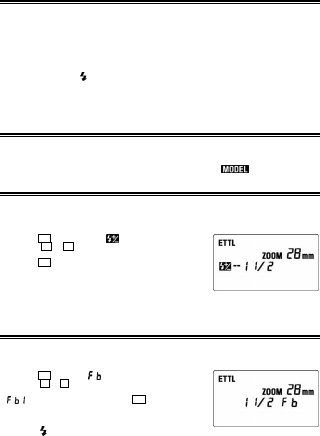
EXPOSURE COMPENSATION
You can use flash exposure compensation in combination with normal exposure compensation to control
the background exposure level. Flash exposure compensation can be set to ±3 stops in 1/3 stop
increments (or in 1/2 stop increments with some cameras).
◆This mode cannot be used with EOS 620, 650, 700, 850 and 1000 cameras.
1. Press the SEL button and select
.
2. Press the
+
or
-
button to set the desired flash exposure
compensation amount.
3. Press the SEL button until the display stops blinking.
4. Focus on the subject.
5. Check that the subject is within the flash range as displayed on the
EF 530 DG Super’s LCD panel.
6. You can take the picture after confirming that the Ready Light of the
flash is illuminated.
To cancel exposure compensation, please start from step 1 and choose + 0 on display.
FB (Flash Exposure Bracketing)
With FB, you can get bracketed flash shots of the subject while the ambient exposure level remains
constant. The bracketed flash shots can be taken in the sequence of correct exposure, under exposure and
over exposure, up to ± 3 stops in 1/3EV increments (or 1/2EV increments with some cameras).
1. Press the SEL button until
blinks.
2. Press the
+
or
-
button to set the flash exposure bracketing
amount.
3.
will be displayed after pressing the SEL button again.
4. Adjust the focusing.
5. Please check that the subject is within the flash range displayed on
the EF- 530 DG Super’s LCD panel.
6. Check the
mark is displayed in the virefinder and take the picture.
7. If it is necessary, repeat steps 4 to 6.
◆This function will be cancelled automatically after making the third exposure.
Ladda ner bruksanvisning i Engelska (PDF, 0.32 MB)
(Tänk på miljön och skriv endast ut denna bruksanvisning om det verkligen är nödvändigt)

Loading…

Betyg

Berätta vad du tycker om Sigma EF-530 DG ST Super (for Canon) Blixt genom att betygsätta den. Vill du dela med dig av dina åsikter om denna produkt eller ställa en fråga? Lämna en kommentar nederst på sidan.
Är du nöjd med Sigma EF-530 DG ST Super (for Canon) Blixt?
Ja Nej
100%
0%
1 röst

Delta i konversationen om denna produkt

Här kan du dela vad du tycker om Sigma EF-530 DG ST Super (for Canon) Blixt. Om du har en fråga, läs först noggrant igenom manualen. Att begära en manual kan göras genom att använda vårt kontaktformulär.

Mer om denna bruksanvisning

Vi förstår att det är trevligt att ha en pappersbruksanvisning för din Sigma EF-530 DG ST Super (for Canon) Blixt. Du kan alltid ladda ner bruksanvisningen från vår hemsida och skriva ut den själv. Om du vill ha en originalbruksanvisning rekommenderar vi att du kontaktar Sigma. De kanske kan tillhandahålla en originalbruksanvisning. Letar du efter bruksanvisningen för din Sigma EF-530 DG ST Super (for Canon) Blixt på ett annat språk? Välj ditt föredragna språk på vår hemsida och sök efter modellnumret för att se om vi har det tillgängligt.

Specifikationer

Märke Sigma
Modell EF-530 DG ST Super (for Canon)
Kategori Blixtar
Filtyp PDF
Filstorlek 0.32 MB

Alla bruksanvisningar för Sigma Blixtar
Fler bruksanvisningar för Blixtar

Vanliga frågor om Sigma EF-530 DG ST Super (for Canon) Blixt

Vårt supportteam söker efter användbar produktinformation och svar på vanliga frågor. Om du hittar en felaktighet bland våra vanliga frågor uppskattar vi om du meddelar oss detta via vårt kontaktformulär.

Vad är ledtal (engelska: guidenummer)? Verifierad

Ledtal anger den maximala styrkan på en (foto)blixt. Ju större tal desto starkare blixt. Ett stort tal betyder att motivet kan belysas från ett större avstånd.

Detta hjälpte (159) Läs mer
Bruksanvisning Sigma EF-530 DG ST Super (for Canon) Blixt

Relaterade produkter

Relaterade kategorier

×
Download