Bruksanvisning Sigma EF-530 DG ST Super (for Canon) Blixt

Behöver du en bruksanvisning för din Sigma EF-530 DG ST Super (for Canon) Blixt? Nedan kan du se och ladda ner PDF-bruksanvisningen gratis på svenska. Den här produkten har för närvarande 1 vanliga frågor, 0 kommentarer och har 1 röst med ett genomsnittligt produktbetyg på 100/100. Om det här inte är bruksanvisningen du vill ha, vänligen kontakta oss.

Är produkten defekt och erbjuder bruksanvisningen ingen lösning? Gå till ett Repair Café för gratis reparationstjänster.

Bruksanvisning

Loading…
18
5. The manual flash output display will stop blinking and remain displayed after you press the SEL button
again.
6. Adjust the focusing by pressing the shutter button, note the subject distance on the focus ring on the lens.
Then adjust the lens’ aperture value or flash power level until the distance indicated on the LCD panel of
the flashgun is equal to the subject distance.
7. When the Ready Light of the flash is illuminated, the unit is ready for use.
◆You can calculate the correct exposure by using the following formula:
Guide Number “GN” / Flash to Subject Distance = F-stop
This flash unit will automatically calculate and indicate the appropriate subject distance according to the
above formula.(Please refer to table1 on the last page)
SECOND CURTAIN SYNCHRONIZATION
When you photograph a moving subject with slow synchronization, usually the furrow of the subject will be
exposed in front of the subject. The ordinary flash light will fire when the first shutter curtain is fully opened,
thus the subject will be exposed from the time flash is fired to the time the shutter is closed (First curtain
synchronization). When you use second curtain synchronization, the flash will fire just before the second
curtain begins to close and the subject will be exposed by ambient light from the time the shutter opens
until the flash fires. As a result the furrow of the subject will be recorded behind the subject. This is a more
natural effect.
This mode cannot be used with EOS 700, 750, 850 cameras.
1. Set the desired picture-taking mode of the camera.
2.
Press
+
or
-
button mark will be displayed on the LCD panel.
3. Adjust the focus and take the picture after confirming the ready
light.
First curtain synchronization will be set if
mark is not
displayed.
If the camera is set to Full Auto Mode this function cannot be used.
To cancel second curtain synchronization, turn off the mark on the LCD panel by using
+
or
-
buttons.
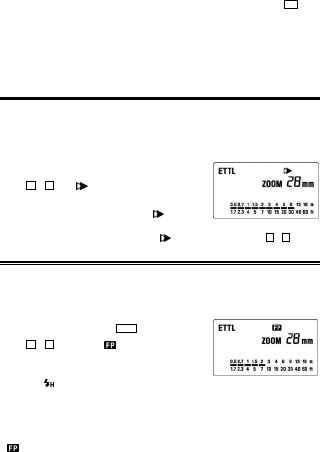
HIGH SPEED SYNC (FP) FLASH, A TYPE CAMERAS ONLY
When you take a picture with an ordinary flash, you cannot use a shutter speed faster than the camera’s
synchronized speed because the flash must fire when the shutter curtain is fully open. When using the
High Speed Sync mode, the flash keeps firing while the shutter curtain is running, thus you can use a
shutter speed faster than the shutter’s normal synchronization speed.
1. Select the camera’s exposure mode. (“Tv” or “M” modes can be used)
2. Select a shutter speed faster than the camera’s normal synchronization speed.
3. Slide the Power Switch of the flash to the ON position.
4. Choose the Flash Mode by using MODE button (“ETTL” or “M”
modes can be used).
5. Press
+
or
-
button until the mark is displayed on the LCD
panel.
6. Focus on the subject
7. Check that the subject is located within the effective distance,
indicated on the LCD panel.
8. Confirm the
mark is in the viewfinder of the camera and then you can take the picture.
With high-speed sync, the Guide Number changes depending on the shutter speed. The flash range will be
shorter (ie Guide Number will be smaller) when the shutter speed is faster. (Refer to table 2 on the last page).
Selecting shutter speeds slower than the camera’s normal synchronization speed cancels Hi-speed sync.
Then the flash will automatically set to normal ETTL operation. To activate FP flash again, follow the
procedure above from point 1.
It is possible to use the exposure compensation function with high speed synchronization operation. To
do so, please refer to your camera’s instruction manual regarding “exposure correction”.
will disappear when Hi-speed sync (FP Flash) is cancelled.
Ladda ner bruksanvisning i Engelska (PDF, 0.32 MB)
(Tänk på miljön och skriv endast ut denna bruksanvisning om det verkligen är nödvändigt)

Loading…

Betyg

Berätta vad du tycker om Sigma EF-530 DG ST Super (for Canon) Blixt genom att betygsätta den. Vill du dela med dig av dina åsikter om denna produkt eller ställa en fråga? Lämna en kommentar nederst på sidan.
Är du nöjd med Sigma EF-530 DG ST Super (for Canon) Blixt?
Ja Nej
100%
0%
1 röst

Delta i konversationen om denna produkt

Här kan du dela vad du tycker om Sigma EF-530 DG ST Super (for Canon) Blixt. Om du har en fråga, läs först noggrant igenom manualen. Att begära en manual kan göras genom att använda vårt kontaktformulär.

Mer om denna bruksanvisning

Vi förstår att det är trevligt att ha en pappersbruksanvisning för din Sigma EF-530 DG ST Super (for Canon) Blixt. Du kan alltid ladda ner bruksanvisningen från vår hemsida och skriva ut den själv. Om du vill ha en originalbruksanvisning rekommenderar vi att du kontaktar Sigma. De kanske kan tillhandahålla en originalbruksanvisning. Letar du efter bruksanvisningen för din Sigma EF-530 DG ST Super (for Canon) Blixt på ett annat språk? Välj ditt föredragna språk på vår hemsida och sök efter modellnumret för att se om vi har det tillgängligt.

Specifikationer

Märke Sigma
Modell EF-530 DG ST Super (for Canon)
Kategori Blixtar
Filtyp PDF
Filstorlek 0.32 MB

Alla bruksanvisningar för Sigma Blixtar
Fler bruksanvisningar för Blixtar

Vanliga frågor om Sigma EF-530 DG ST Super (for Canon) Blixt

Vårt supportteam söker efter användbar produktinformation och svar på vanliga frågor. Om du hittar en felaktighet bland våra vanliga frågor uppskattar vi om du meddelar oss detta via vårt kontaktformulär.

Vad är ledtal (engelska: guidenummer)? Verifierad

Ledtal anger den maximala styrkan på en (foto)blixt. Ju större tal desto starkare blixt. Ett stort tal betyder att motivet kan belysas från ett större avstånd.

Detta hjälpte (159) Läs mer
Bruksanvisning Sigma EF-530 DG ST Super (for Canon) Blixt

Relaterade produkter

Relaterade kategorier

×
Download