Bruksanvisning RugGear RG720 Mobiltelefon

Behöver du en bruksanvisning för din RugGear RG720 Mobiltelefon? Nedan kan du se och ladda ner PDF-bruksanvisningen gratis på svenska. Den här produkten har för närvarande 15 vanliga frågor, 0 kommentarer och har 0 röster. Om det här inte är bruksanvisningen du vill ha, vänligen kontakta oss.

Är produkten defekt och erbjuder bruksanvisningen ingen lösning? Gå till ett Repair Café för gratis reparationstjänster.

Bruksanvisning

Loading…
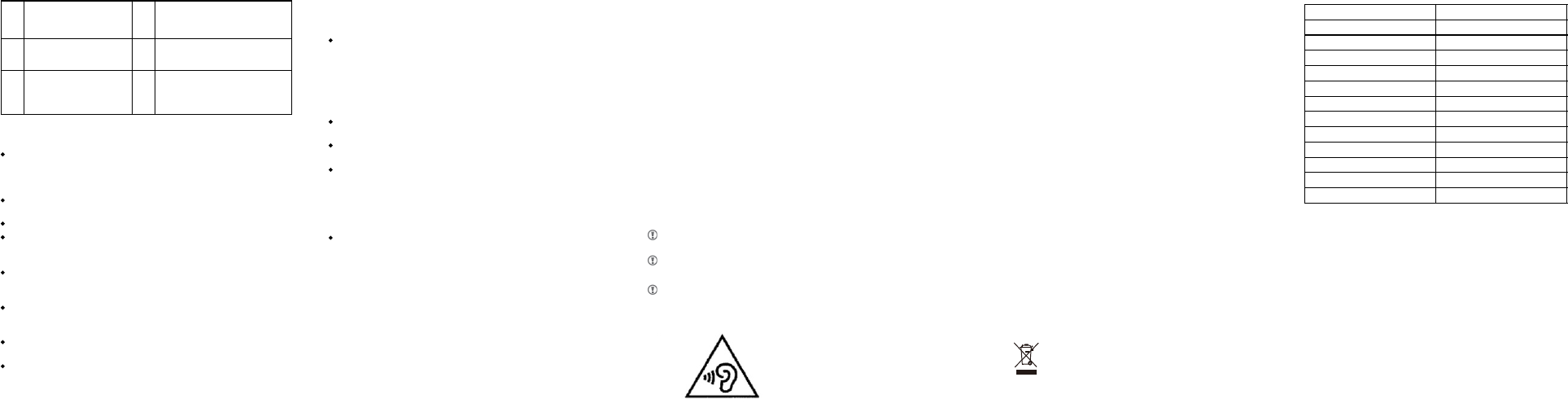
Frequency bands
GSM 900
DCS 1800
WCDMA 900
WCDMA 2100
LTE Band 1
LTE Band 3
LTE Band 5
LTE Band 38
LTE Band 39
LTE Band 40
WiFi
BT
Maximum output power
33dBm
30dBm
23dBm
23dBm
23dBm
23dBm
23dBm
22dBm
23dBm
22dBm
17dBm
7dBm
-07-
-08- -09- -10-
6
6
The mobile phone can be
used in a cabin environment.
The mobile phone can soak
for a short time
The mobile phone can soak
under a certain pressure in a
long time
7
8
completely prevent
dust from entering the
mobile phone
In order to avoid water or dust on your phone,
please strictly follow the following tips:
Make sure that the battery cover of the phone, the battery
cover screw lock, the headset and the USB interface are fully
closed to prevent dust and water. Be sure to clean off the
battery cover.
Do not expose your phone to an environment with water, such
as waves or waterfalls.
Do not expose your phone to brine, water, or soapy water.
Do not use in hot springs or high temperature water, waterproof
soft side cannot be high temperature, otherwise it will lead to
water.
Do not open the battery cover with wet hands or when the
phone is wet. Open the cover to open the cover to prevent the
inside of the cover from flowing into the compartment.
Do not open the phone's battery cover when immersing the
phone in water or in a very humid environment. (Such as
swimming or in a bathroom)
Do not open the battery cover when the body is not completely
dry
Do not clean the product with chemicals such as
detergents.
The rubber seal on the inside of the battery cover is an
important part of the phone. Be careful when opening or
closing the battery cover to avoid damaging the rubber
seal. Before closing the battery cover must ensure that
there is no debris on the seal, such as sand, dust, hair and
other debris, so as not to affect the battery cover tightly
closed.
If the phone is dropped or bumped, the battery cover and
the multifunction jack cover may be loose. Make sure that
all covers are properly aligned and tightly closed.
The phone's waterproof design makes it possible to vibrate
under certain conditions. Under these conditions (such as
when the volume is high) the vibration is normal, and will
not affect the performance of the phone.
If you are doing outdoor activities, and your phone
accidently falls into mud, rinse it with water.
If you accidentally fill your fuselage on the beach, rinse it
with water.
If the phone is immersed in water or the microphone or
speaker is wet, the person may not be able to hear your
voice during a call. The water must be dried and wiped with
a dry cloth to ensure that the microphone or speaker is
clean and dry and then air dried. Do not use a hair dryer to
dry.
If water droplets are attached to the screen, the touch
screen may be affected, resulting in an operation error. It is
recommended to dry water droplets and then continue to
use.
Extended battery life tips:
There are many features in the device that will increase
power consumption, thereby reducing battery life, you
can:
1. Turn off these radio functions when not using Bluetooth
connectivity, Wi-Fi, or GPS positioning;
2. Lower the phone screen brightness and set a shorter
sleep time can save power, you cannot use the device
when the power button to close the screen;
3. Close the Email, calendar and contacts and other
applications of automatic synchronization; clear recent
apps by tapping the “recent apps” key;
4. Clear recent apps by tapping the “recent apps” key
Security Information
Adapter shall be installed near the equipment and shall be
easily accessible.
The product shall only be connected to a USB interface of
version USB2.0.
Use careful with the earphone maybe possible excessive
sound pressure from earphones and headphones can
cause hearing loss.
The SAR limit of Europe is 2.0 W/kg. The device has
also been tested against this SAR limit. The highest
SAR value reported under this standard during
product certification for use at the ear is 1.30W/kg
and when properly worn on the body is 1.31W/kg.
This device was tested for typical body-worn
operations with the back of the handset kept 5mm
from the body. The device complies with RF
specifications when the device used at 5mm form
your body. The use of belt clips, holsters and similar
accessories should not contain metallic components
in its assembly. The use of accessories that do not
satisfy these requirements may not comply with RF
exposure requirements, and should be avoided.
Caution: risk of explosion if battery is replaced by an
incorrect type. Dispose used batteries according to
the instructions.
The phone's normal operating temperature is -10
+50 .In order to ensure the normal phone
functions, do not use this phone outside the
temperature range.
Disclaimer
All content and services available through this device are
third parties and are protected by copyright, patents,
trademarks and other intellectual property laws, which are
used only for personal non-commercial use. You may not
be able to use any content or services when you do not
have permission from the content owner or service
provider.
Third party content and services are provided as is.
RugGear makes no warranties, either express or implied,
with respect to the content or services provided for any
purpose. RugGear is expressly disclaims any implied
warranties or conditions, either by law, by common
law or by any other means [including but not limited
to merchantability or fitness for a particular purpose].
IN ANY CONTENT (INCLUDING NEGLIGENCE),
ANY CONTENT OR TORT, ARISING OUT OF ANY
DIRECT, INDIRECT, INCIDENTAL, SPECIAL OR
CONSEQUENTIAL DAMAGES ARISING OUT OF
ANY CONTENT, Loss or damages, attorneys' fees,
expenses or any other loss or damage arising
therefrom, or the connection of any information
contained therein, or any use of any content or
services by you or any third party, RugGear Shall not
guarantee its accuracy, validity, timeliness, legality or
completeness.
Third-party services may cease or discontinue at any
time, and RugGear shall not be liable or warranties
for any period of time that any content or service may
be used. Content and services are transmitted by a
third party through a network and transmission
equipment other than RugGear control. In addition to
the generality of the disclaimer, RugGear also
expressly disclaims any liability or liability for any
interruption or delay in any content or service to
which this device applies.
RugGear has neither liability nor obligation to
customer service involving content and services. Any
service requirements related to content or service
should be directly addressed by the content and
service provider.
-11- -12-
This symbol on your product, the battery
and the accessories means that these
products must be taken to collection points
at the end of their life.
Address4th Floor, A Section , Languang
Science&technology Building ,No.7 Xinxi RD , Hi-Tech
Industrial Park North , Nanshan District ,ShenZhen ,
P.R.C.
Ladda ner bruksanvisning i Engelska (PDF, 1.43 MB)
(Tänk på miljön och skriv endast ut denna bruksanvisning om det verkligen är nödvändigt)

Loading…

Betyg

Berätta vad du tycker om RugGear RG720 Mobiltelefon genom att betygsätta den. Vill du dela med dig av dina åsikter om denna produkt eller ställa en fråga? Lämna en kommentar nederst på sidan.
Är du nöjd med RugGear RG720 Mobiltelefon?
Ja Nej
Bli den första personen som betygsätter denna produkt
0 röster

Delta i konversationen om denna produkt

Här kan du dela vad du tycker om RugGear RG720 Mobiltelefon. Om du har en fråga, läs först noggrant igenom manualen. Att begära en manual kan göras genom att använda vårt kontaktformulär.

Mer om denna bruksanvisning

Vi förstår att det är trevligt att ha en pappersbruksanvisning för din RugGear RG720 Mobiltelefon. Du kan alltid ladda ner bruksanvisningen från vår hemsida och skriva ut den själv. Om du vill ha en originalbruksanvisning rekommenderar vi att du kontaktar RugGear. De kanske kan tillhandahålla en originalbruksanvisning. Letar du efter bruksanvisningen för din RugGear RG720 Mobiltelefon på ett annat språk? Välj ditt föredragna språk på vår hemsida och sök efter modellnumret för att se om vi har det tillgängligt.

Specifikationer

Märke RugGear
Modell RG720
Kategori Mobiltelefoner
Filtyp PDF
Filstorlek 1.43 MB

Alla bruksanvisningar för RugGear Mobiltelefoner
Fler bruksanvisningar för Mobiltelefoner

Vanliga frågor om RugGear RG720 Mobiltelefon

Vårt supportteam söker efter användbar produktinformation och svar på vanliga frågor. Om du hittar en felaktighet bland våra vanliga frågor uppskattar vi om du meddelar oss detta via vårt kontaktformulär.

Mitt SIM-kort passar inte min mobiltelefon, varför är det? Verifierad

Det finns flera SIM-kortstorlekar, vanliga, mikro och nano. Det är möjligt att använda en adapter eller att göra SIM-kortet mindre.

Detta hjälpte (1526) Läs mer

Kan jag använda min mobiltelefon när jag laddar den? Verifierad

Ja, du kan använda din mobiltelefon medan du laddar den. Laddningsprocessen går långsammare när du gör det.

Detta hjälpte (1347) Läs mer

Vad är en PUK-kod? Verifierad

PUK står för Personal Unblocking Code och behövs för att avblockera din telefon efter att du har angett en felaktig PIN-kod tre gånger. Om PUK inte längre är tillgänglig kan det ofta begäras från leverantören.

Detta hjälpte (783) Läs mer

Min telefon är i gott skick, men när jag ringer till människor som har problem med att höra mig, varför är det så? Verifierad

Det är möjligt att smuts har samlats i mikrofonens rutnät och dämpar ljudet. Det bästa sättet att rengöra detta är med tryckluft. Om du är osäker, gör detta av en professionell.

Detta hjälpte (679) Läs mer

När jag ansluter min enhet till laddaren laddas den dåligt eller inte alls, varför är det så? Verifierad

Det är möjligt att smuts har samlats i öppningen där laddaren är ansluten, vilket förhindrar att den kommer i rätt kontakt. Det bästa sättet att rengöra detta är med tryckluft. Om du är osäker, gör detta av en professionell.

Detta hjälpte (373) Läs mer

Måste jag ladda ur litiumjonbatteriet helt innan jag laddar upp det igen? Verifierad

Nej, det behövs inte. Det rekommenderades förr i tiden, med gamla batterier. Litiumjonbatterier kan laddas efter användningen och när som helst kopplas loss från laddaren.

Detta hjälpte (369) Läs mer

Vad betyder IMEI? Verifierad

IMEI står för International Mobile Equipment Identity och är ett (ofta) unikt nummer som används för att identifiera mobila enheter som surfplattor och smartphones och skydda dem mot stöld.

Detta hjälpte (332) Läs mer

När jag ansluter en hörlur till min enhet fungerar den inte korrekt, vad kan jag göra? Verifierad

Det är möjligt att smuts har samlats i öppningen där hörlurarna är ansluten, vilket förhindrar att den kommer i rätt kontakt. Det bästa sättet att rengöra detta är med tryckluft. Om du är osäker, gör detta av en professionell.

Detta hjälpte (291) Läs mer

Fungerar Bluetooth genom väggar och tak? Verifierad

En Bluetooth-signal fungerar genom väggar och tak, såvida inte dessa är gjorda av metall. Beroende på tjockleken och väggens material kan signalen förlora i styrka.

Detta hjälpte (273) Läs mer

Batteriet i min telefon tar slut snabbt när jag är ute, varför är det? Verifierad

Litiumjonbatterier klarar inte låga temperaturer. Om utetemperaturerna är nära att frysa tappas batteriet snabbare än normalt, även utan att använda telefonen. När telefonen har återgått till rumstemperatur visar den antagligen en batteriprocentandel nära den som den var.

Detta hjälpte (263) Läs mer

Vad kan jag bäst använda för att rengöra skärmen på min mobila enhet? Verifierad

Det är bäst att använda en mikrofiberduk, eventuellt med ett specialtvättmedel. Använd aldrig kökshanddukar eller andra pappersdukar, de lämnar repor!

Detta hjälpte (246) Läs mer

Hur ska man förvara litiumjonbatterier som man inte använder under en längre period? Verifierad

Bästa sätt att förvara ett litiumjonbatteri är vid en temperatur mellan +5 °C och 45 °C. Det är också en god idé att se till att batteriet är laddat till cirka 67 % innan det läggs undan för förvaring.

Detta hjälpte (241) Läs mer

Vad betyder VoIP? Verifierad

VoIP betyder Voice over IP (Internet Protocol) och är alltså telefoni över internet.

Detta hjälpte (240) Läs mer

Under vilka förhållanden fungerar mitt litiumjonbatteri optimalt? Verifierad

Litiumjonbatterier fungerar bäst vid en temperatur mellan 5 °C och 45 °C. Vid mycket kallt eller varmt väder kan du märka att batteriet tar slut snabbare. Vi rekommenderar att inte ladda batteriet vid temperaturer under +5 °C eller över +45 °C.

Detta hjälpte (237) Läs mer

Måste jag rengöra skärmen på min enhet innan jag använder ett skärmskydd? Verifierad

Ja, ett skärmskydd fäster bäst på fett- och dammfria ytor.

Detta hjälpte (231) Läs mer
Bruksanvisning RugGear RG720 Mobiltelefon

Relaterade produkter

Relaterade kategorier

×
Download