■ General ■ Stereo Radio
Frequency Range
Usable Sensitivity
Stereo Separation
87.5 - 108 MHz
6 dB/µV(S/N 30 dB)
35 dB (at 1 kHz)
Frequency Range
Usable Sensitivity
531 - 1 602 kHz
28 dB/µV (S/N 20 dB)
Frequency Range
Usable Sensitivity
153 - 279 kHz
32 dB/µV (S/N 20 dB)
■ CD Player
Sampling Frequency
Pick-Up Type
Light Source
Wavelength
Frequency Response
Total Harmonic Distortion
Signal to Noise Ratio
Wow and Flutter
Channel Separation
Astigma 3-beam
Semiconductor laser
780 nm
20 Hz - 20 kHz (±1 dB)
96 dB
0.01 % (1 kHz)
Below measurable limits
75 dB
8 times oversampling
FM
MW
LW
Specifications
CD Changer: CX-DP880N
(For Upgrade)
(For CQ-RDP153/RDP143/RDP133N)
Stereo/Mono Power Amplifier:
CY-M7052EN/CY-M9054EN
(For Upgrade)
Note:
Specifications and design are subject to modification
without notice due to improvements.
CQ-RDP153N CQ-RDP143N
CQ-RDP133N CQ-RDP123N
CQ-RDP113N CQ-RDP103N
CQ-RDP003N
Thank you very much for purchasing a Panasonic CD Player/Receiver.
Sophisticated Product Achieived by Optional Functions
●Sound System with Spurting Realism
(2-channel or 4-channel Power Amplifier)
●Powerful Heavy Bass
(Stereo/Mono Power Amplifier) : CY-M7052EN/CY-M9054EN
●Smooth Uninterrupted Play
(CD Changer) : CX-DP880N, etc
Fantastic
Sound Space!
■Radio The newly developed Alpha tuner enhances the reception sensitivity of FM broadcasts.
It is also less affected by receiving conditions inside and outside the vehicle.
■RDS The sensitivity in the AF mode is adjustable and the region-to-region signal strength is
memorized, which means the automatic best program reception can be achieved.
Subwoofer (For Upgrade)
Power Supply
Tone Controls (Bass)
Tone Controls (Treble)
Current Consumption
Maximum Power Output
Power Output
Speaker Impedance
Pre-Amp Output Voltage
Pre-Amp Output Impedance
Dimensions (Main Unit)
Weight (Main Unit)
12 V DC(11 V - 16 V),
Test Voltage 14.4 V, Negative Ground
±12 dB at 100 Hz
±12 dB at 10 kHz
Less than 2.5 A
(CD mode, 0.5 W 4-Speaker)
45 W x 4 (at 4 Ω)
20 W x 4 (DIN45 324, at 4 Ω)
4 - 8 Ω
2.5 V (CD mode)
200 Ω
178(W) x 50(H) x 155(D) mm
1.4 kg
Removable Front Panel CD Player/Receiver with CD Changer Control
CQ-RDP153/RDP143/RDP133N
Removable Front Panel CD Player/Receiver
CQ-RDP123/RDP113/RDP103/RDP003N
Operating Instructions
Something wrong....?!
(Ex. smoke, smell and no sound
B
possibility of fire or shorting.)
q
Turn off the power.
w
Detach the power cord and bring the unit to your dealer.
Product service, repair and enquiry
8Consult your nearest Panasonic Service Centre.
Trouble Check point
● Adjust the balance and fader.
● Verify the wiring.
●
Connect the speaker cord correctly.
3Sound quality
Left and right
sounds are
reversed
No sound from
left, right, front,
or rear speaker
3Error indication
●CD dirtied
●CD upside
down
●CD
scratched
●No operation
by some
cause.
●No CD in
magazine
CD player
●Eject the CD.
CD changer
●Next CD auto-
selected
●Consult your near-
est Panasonic
Service Centre.
●Insert CDs in the
magazine.
Message
Cause Remedy
(Changer only)
Troubleshooting
3General
No sound
Noise
●
Tune in to another high-intensity station.
● Make sure that the antenna mount-
ed point is grounded properly.
3Radio
Frequent
noise
● Load the CD correctly.
● Clean the CD.
● The maximum permissible tilt is
30°.
● Secure the unit.
3CD Player
No sound, or
disc is automati-
cally ejected
Sound skip
due to
vibration
●
Never try repair by yourself.
No power
● Start the engine. (
Or turn the
ignition switch to the ACC position.
)
● Verify the wiring. (Ex. Battery cord,
ACC cord, grounding cord, etc.)
● Fuse blown (Contact the nearest
Panasonic Service Centre.)
● Ask a professional for fuse
replacement.
●
Be sure to use the same rated fuse.
● Disable the mute function.
● Verify the wiring.
● Wait until the dew disappears
before turning on the unit.
● Make sure that the ground lead is
grounded properly.
● Connect the battery cord correctly.
Preset data
deleted
Sound skip,
poor
sound quality
● Clean the CD.
Trouble Check point
3CD Player (CONTINUED)
CD not
ejectable
● Press [u]. If the CD is not ejected,
contact the nearest Panasonic
Service Centre.
YEFM284003 ND1202-0 Printed in China
Matsushita Electric Industrial Co., Ltd.
Web Site : http://www.panasonic.co.jp/global/
www.panasonic.co.uk (for UK customers only)
8Order accessory and consumable items for your
product with ease and confidence by telephoning
our Customer Care Centre Mon–Friday
9:00am–5:30pm. (Excluding public holidays.)
8Or go on line through our Internet Accessory
ordering application.
8Most major credit and debit cards accepted.
8
All enquiries transactions and distribution facilities
are provided directly by Panasonic UK Ltd.
8It couldn’t be simpler!
Customer Care Centre
For UK customers: 08705 357357
For Republic of Ireland customers: 01 289 8333
8This operating instruction manual applies to the seven models below.
The difference among these models are mentioned below.
8All illustrations represent model CQ-RDP153N unless otherwise specified.
8Remote control unit is an option. (CA-RC61EX)
Models Changer Control Pre-out
4(Front/Rear)
4(Front/Rear)
4(Front/Rear)
2(Rear)
2(Rear)
2(Rear)
2(Rear)
CQ-RDP153N Yes
CQ-RDP143N Yes
CQ-RDP133N Yes
CQ-RDP123N None
CQ-RDP113N None
CQ-RDP103N None
CQ-RDP003N None
Face Color
Plating Silver
Plating Silver
Plating Silver
Coating Black
Coating Black
Coating Black
Coating Silver
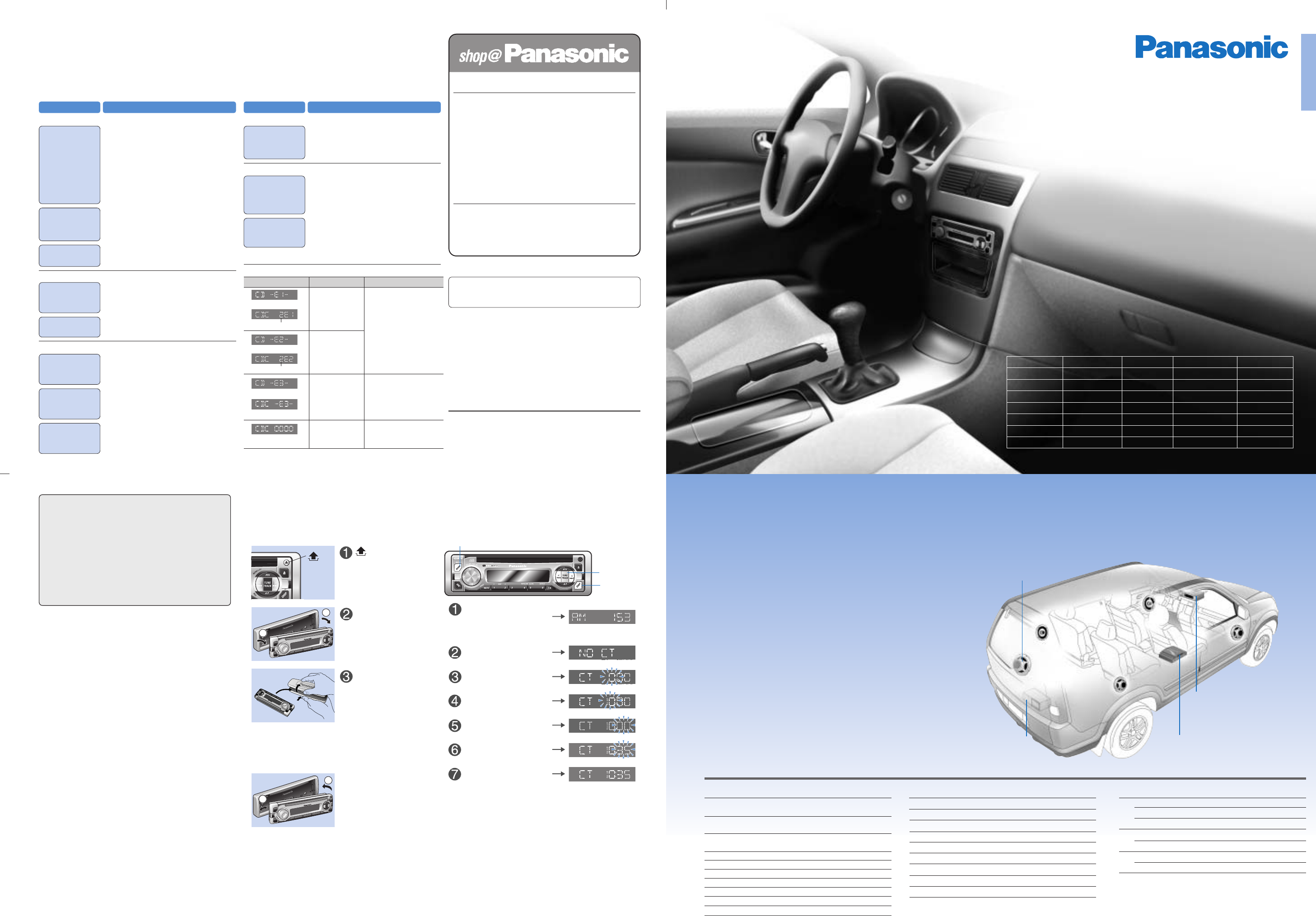
Release the
face plate.
Cautions
This product is a class I laser product.
●A laser beam leak results in hazardous radiation
exposure.
●Do not open covers and do not repair it by your-
self. Refer servicing to qualified personnel.
●Wave length : 780 nm
●Laser power : No hazardous radiation is
emitted with safety protection.
BAND
DISP
]
TUNE
[
qSlide the left side.
wPress the right side
until a
“
click
”
is heard.
Press [BAND] to
select the radio AM
(MW/LW) mode
(aRefer to “Radio”)
Press [DISP]
Hold down
[DISP]
for 2
seconds or more
Press []TUNE[]
Press [DISP]
Press []TUNE[]
Press [DISP]
Precaution
(Attached sheet
☞
q)
3For safe driving
Moderate the volume not to miss traffic information.
3
Shorting prevention
Do not wet this unit.
3
CD slot
Do not insert anything other than a CD.
3
Power supply
12-volt negative ground battery system
3
Protection of preset memory
Never disconnect the battery cord.
Accessories
(Attached sheet
☞
w)
●Operating Instructions
●Installation Instructions
●Supplied Hardware (
aInstallation Instructions)
●Warranty Card
●Removable Face Plate Case
Fuse
●Use fuses of the same specified rating (15A).
●Using different substitutes or fuses with higher
ratings, or connecting the unit directly without a
fuse, could cause fire or damage to the unit.
●If the fuse replacement fails, contact your near-
est authorized Panasonic Service Centre.
Maintenance
● Wipe the unit with a soft dry cloth.
● Never apply volatile liquids such as benzine and
thinner to prevent damage.
Take the face plate with you when leaving the car.
Theft Prevention
3Remove the face plate
qPull the right side.
wSlide the left side.
Detach the face
plate.
Put the face plate into
the case.
● Only when
“
NO CT
”
appears in the step w
below, set the clock.
Clock Setting
Notes on discs
(Attached sheet
☞
e)
●Do not touch the recorded surface.
●Avoid leaving CDs in places with direct sunlight,
dust and moisture such as seat and dashboard.
●Do not use irregular shaped discs.
●You may have trouble playing discs in the follow-
ing cases.
●
Dirt, fingerprints, scratches on the disc surface
●
If a disc is damaged from leaving inside a car for
extended periods, etc.
●
Inappropriate writing software and a CD changer
are used.
●
Contains other than CD-DA data.
(AM mode)
(NO CT)
(Blink: Hours)
Adjust hours
(Blink: Minutes)
Adjust minutes
(Completed)


Delta i konversationen om denna produkt
Här kan du dela vad du tycker om Panasonic CQ-RDP103N Bilradio. Om du har en fråga, läs först noggrant igenom manualen. Att begära en manual kan göras genom att använda vårt kontaktformulär.