Bruksanvisning Panasonic CQ-HX2083U Bilradio

Behöver du en bruksanvisning för din Panasonic CQ-HX2083U Bilradio? Nedan kan du se och ladda ner PDF-bruksanvisningen gratis på svenska. Den här produkten har för närvarande 4 vanliga frågor, 0 kommentarer och har 0 röster. Om det här inte är bruksanvisningen du vill ha, vänligen kontakta oss.

Är produkten defekt och erbjuder bruksanvisningen ingen lösning? Gå till ett Repair Café för gratis reparationstjänster.

Bruksanvisning

Loading…
E
N
G
L
I
S
H
E
N
G
L
I
S
H
2 3
Panasonic welcomes you to our ever growing family of electronic product owners. We know that this prod-
uct will bring you many hours of enjoyment. Our reputation is built on precise electronic and mechanical
engineering, manufactured with carefully selected components and assembled by people who take pride in
their work. Once you discover the quality, reliability, and value we have built into this product, you too will
be proud to be a member of our family.
Before Reading these
Instructions
What is Sirius Satellite Radio?. . . . . . . . . . . . . . . . . . . . . . . . . . . . . . . . . . 12
Before Reading these Instructions. . . . . . . . . . . . . . . . . . . . . . . . . . . . . . . 13
Before Operating . . . . . . . . . . . . . . . . . . . . . . . . . . . . . . . . . . . . . . . . . . . . 13
Sirius Setting . . . . . . . . . . . . . . . . . . . . . . . . . . . . . . . . . . . . . . . . . . . . . . . 13
Sirius Control . . . . . . . . . . . . . . . . . . . . . . . . . . . . . . . . . . . . . . . . . . . . 18
Sirius mode, band, channel selection, category selection, manual preset
memory, preset station calling, display change, title display change, key
display on/off, direct channel selection, Sirius control mode setting, tuning
method setting, category priority setting, Sirius ID confirmation
Troubleshooting . . . . . . . . . . . . . . . . . . . . . . . . . . . . . . . . . . . . . . . . . . 12
Troubleshooting tips
Electrical Connections . . . . . . . . . . . . . . . . . . . . . . . . . . . . . . . . . . . . . 13
SIRIUS
Contents
What is Sirius Satellite Radio?
Music. The way it was meant to be heard.
Completely commercial-free.
You’re riding in your car. Your crank up your fa-
vorite music station. You never hear a commercial.
Not one. Nice fantasy? No fantasy. It’s Sirius
Satellite Radio. 60 original music channels, all
commercial-free – not just some of them – all of
them. Guaranteed. So it’s just you, the road and
the music.
100 channels of the best in-car entertainment
Only Sirius has 60 original music channels, from
today’s hits to R&B oldies to classical masterpieces.
From authentic country and real bluegrass to cool
jazz, hot latin, reggae, rock, and many more. Plus
40 channels of world-class sports, news and enter-
tainment, like ESPN, The Speed Channel, CNBC, Fox
News, Radio Disney and E! Entertainment Radio.
With Sirius, the emphasis is on the music and en-
tertainment you want. Our music is hosted by
Master Music Programmers and on-air personali-
ties who are true experts. They back up the music
with compelling information about the song being
played, and they understand that sometimes it’s
best to just let the music speak for itself.
Rely on Sirius rocket science for superior cover-
age
Only Sirius has three powerful satellites that fly in
figure-eight orbits to ensure coast-to-coast cover-
age. These orbits allow Sirius satellites to broad-
cast at high angles for a “clear line of sight” and a
direct signal to your car.
Count on S>PLEX technology for superior sound
resolution
Sirius employs S>PLEX technology (statistical mul-
tiplexing), which optimizes the fidelity on each
channel to give you superior digital sound. So rock
really soars, jazz really jams and country really
sings.
Once you experience 100 channels of digital enter-
tainment, you’ll never want to leave your car. For
more information, visit sirius.com.
Sirius Setting
(Page 10)
After the Sirius receiver has been connected to
main unit, be absolutely sure to set Sirius setting
to ON. Otherwise, operation will not be trans-
ferred to the Sirius mode.
Preparations:
Power on the main unit. (See the operating instruc-
tions of the main unit.)
Default: OFF
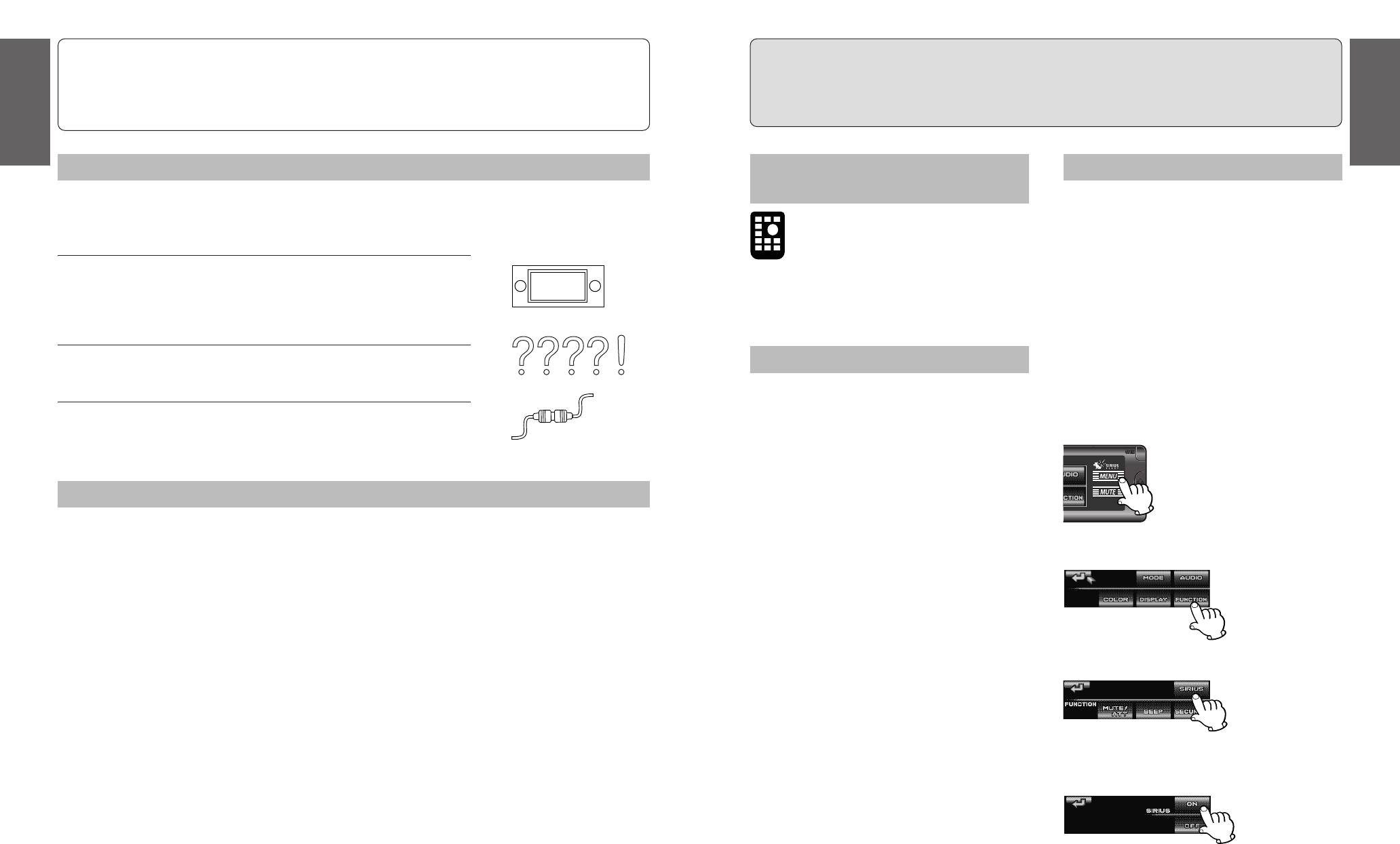
1 Press [MENU] .
2 Press [FUNCTION] .
3 Press [SIRIUS].
4 Press [ON].
ON: Sirius control mode is selectable as a source.
Operations with neither mark can be performed ei-
ther by the main unit or the remote control unit.
This can only be controlled through the
remote control unit.
Sirius Satellite broadcast service
The Sirius Satellite coverage is only for the United States except Hawaii and Alaska. There
is no Sirius Satellite coverage in Canada. The instruction of Satellite Operation Controls in
the Operating Instructions and Guide will not be applied.
Before Operating
Preparations:
Obtain the Sirius receiver (CR-SRT100, option).
Retain the unit’s product serial number.
Register the Sirius satellite program.
After completing the preparations and installation
of the antenna provided with the Sirius receiver,
proceed to connect the Sirius receiver to the main
unit. For further details, refer to the operating in-
structions for the Sirius receiver.
Installation and electrical connections:
Connect the Sirius receiver (CR-SRT100, option)
to the main unit.
Note:
Refer to the operating instruction of the main unit
for details and contact your nearest Panasonic
Servicenter for service.
Note:
Refer to the operating instruction of the main unit
for details.
Ladda ner bruksanvisning i Engelska (PDF, 0.68 MB)
(Tänk på miljön och skriv endast ut denna bruksanvisning om det verkligen är nödvändigt)

Loading…

Betyg

Berätta vad du tycker om Panasonic CQ-HX2083U Bilradio genom att betygsätta den. Vill du dela med dig av dina åsikter om denna produkt eller ställa en fråga? Lämna en kommentar nederst på sidan.
Är du nöjd med Panasonic CQ-HX2083U Bilradio?
Ja Nej
Bli den första personen som betygsätter denna produkt
0 röster

Delta i konversationen om denna produkt

Här kan du dela vad du tycker om Panasonic CQ-HX2083U Bilradio. Om du har en fråga, läs först noggrant igenom manualen. Att begära en manual kan göras genom att använda vårt kontaktformulär.

Mer om denna bruksanvisning

Vi förstår att det är trevligt att ha en pappersbruksanvisning för din Panasonic CQ-HX2083U Bilradio. Du kan alltid ladda ner bruksanvisningen från vår hemsida och skriva ut den själv. Om du vill ha en originalbruksanvisning rekommenderar vi att du kontaktar Panasonic. De kanske kan tillhandahålla en originalbruksanvisning. Letar du efter bruksanvisningen för din Panasonic CQ-HX2083U Bilradio på ett annat språk? Välj ditt föredragna språk på vår hemsida och sök efter modellnumret för att se om vi har det tillgängligt.

Specifikationer

Märke Panasonic
Modell CQ-HX2083U
Kategori Bilradio
Filtyp PDF
Filstorlek 0.68 MB

Alla bruksanvisningar för Panasonic Bilradio
Fler bruksanvisningar för Bilradio

Vanliga frågor om Panasonic CQ-HX2083U Bilradio

Vårt supportteam söker efter användbar produktinformation och svar på vanliga frågor. Om du hittar en felaktighet bland våra vanliga frågor uppskattar vi om du meddelar oss detta via vårt kontaktformulär.

Vad är DAB+? Verifierad

DAB+ är uppföljaren till FM-signalen och förkortningen står för Digital Audio Broadcasting. Det är en digital signal som möjliggör fler kanaler inom samma bandbredd och enklare växling mellan kanaler.

Detta hjälpte (639) Läs mer

Vad är det för skillnad mellan FM och AM? Verifierad

FM och AM är båda former av modulering som används för att överföra en signal. FM står för Frekvensmodulering och AM står för Amplitudmodulering. AM är den äldsta formen. Den största skillnaden är att FM-signalen är mycket starkare än AM-signalen.

Detta hjälpte (410) Läs mer

Det finns en CD fast i min bilradio, vad ska jag göra? Verifierad

Vissa bilradioer har en funktion för att mata ut fasta CD-skivor. Stäng av bilen och tryck samtidigt på '' på '' och '' mata ut '' i 10 sekunder. Om detta inte fungerar startar du bilen och försöker igen.

Detta hjälpte (391) Läs mer

Vilken bilradio passar min bil? Verifierad

Det finns två standardstorlekar för bilradio, 1-DIN och 2-DIN. 1-DIN är den vanliga tunna versionen och 2-DIN är dubbelt så hög. 2-DIN bilradio har ofta plats för en skärm för att visa navigationsinformation eller spela filmer.

Detta hjälpte (329) Läs mer
Bruksanvisning Panasonic CQ-HX2083U Bilradio

Relaterade produkter

Relaterade kategorier

×
Download