Bruksanvisning LG AG-S360 3D-glasögon

Behöver du en bruksanvisning för din LG AG-S360 3D-glasögon? Nedan kan du se och ladda ner PDF-bruksanvisningen gratis på svenska. Den här produkten har för närvarande 0 vanliga frågor, 0 kommentarer och har 0 röster. Om det här inte är bruksanvisningen du vill ha, vänligen kontakta oss.

Är produkten defekt och erbjuder bruksanvisningen ingen lösning? Gå till ett Repair Café för gratis reparationstjänster.

Bruksanvisning

Loading…
ENGLISH
2
ABOUT THE PRODUCT
The AG-S360 is a pair of 3D glasses that use radio frequency (RF) (2.4 GHz) wireless communication.
Connect them to any TV compatible with RF glasses and enjoy vivid 3D images.
Watch 3D movies and view 3D photos with 3D glasses.
When using 3D glasses for the first time, make sure the coin cell battery is inserted correctly.
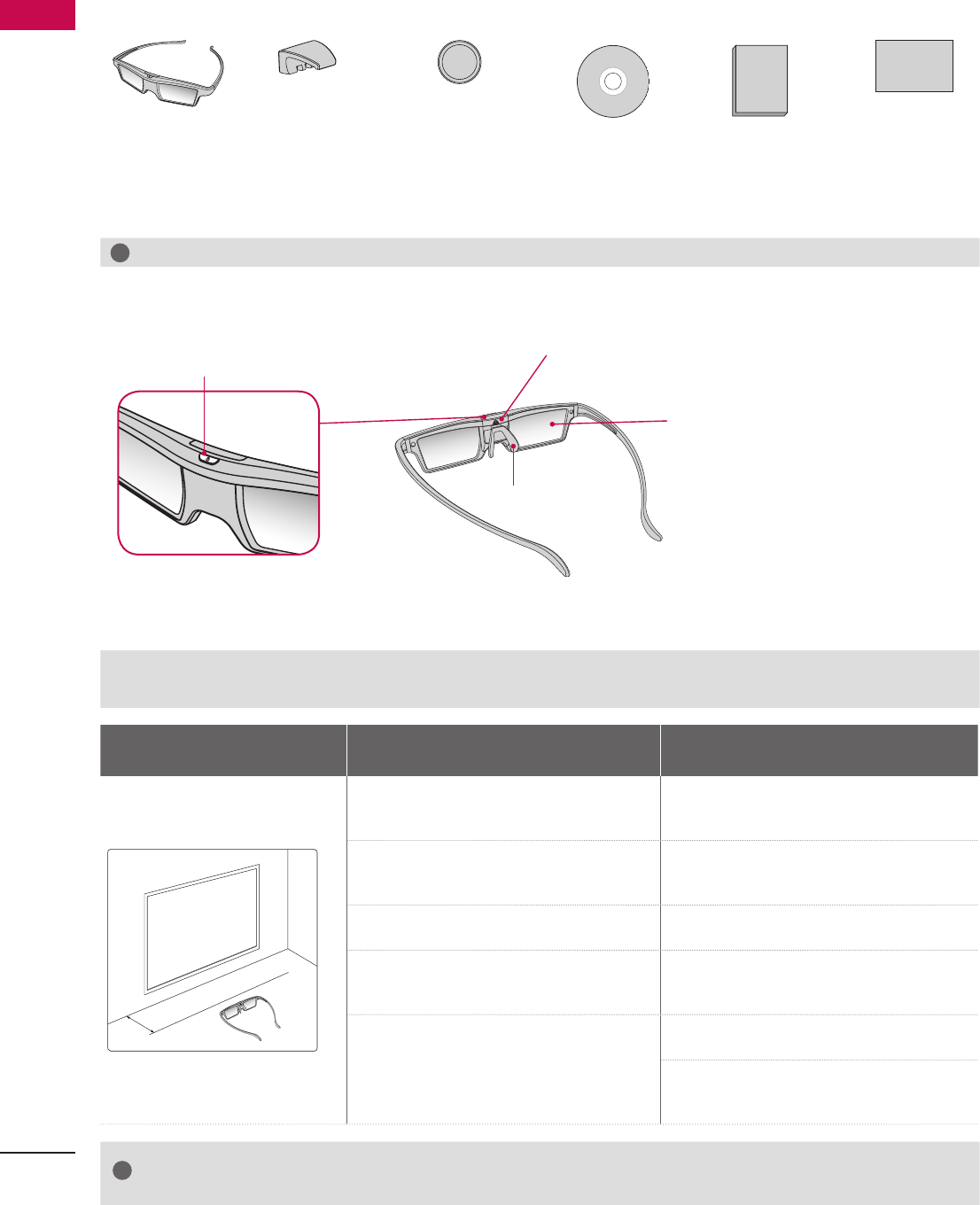
ACCESSORIES
3D Glasses
(Body, Leg)
Nose Pad
(for users wear-
ing regular
eyeglasses)
Coin Cell Battery
(CR2025)
Manual CD Quick Guide Cleaning Pad
!
NOTE
The accessories may look different from those shown here.
PART NAMES
Power Button/LED Indicator
Battery Slot
Lenses
Nose Pad
PAIRING 3D GLASSES WITH 3D TV
*1
*1
Pairing means establishing a wireless connection between the 3D TV and 3D glasses.
The 3D glasses pair with the 3D TV that has the strongest wireless signal. If there is more than one TV, place the 3D glasses within
10 cm of the 3D TV you want to pair with.
Recommended Pairing Distance:
10 cm
Pairing the Glasses Re-pairing the Glasses
͢͡ʹΞ
1. Turn the 3D TV on and activate 3D mode. 1. Press and hold the power button on the
3D glasses for at least eight seconds until
the LED indicator turns green.
2. Place your 3D glasses within the recom-
mended pairing distance and turn them
on.
2. After the green LED indicator flashes
three times, the glasses are ready to pair.
3. During pairing, the LED indicator flashes
green and red alternately.
3. Turn the 3D TV on and activate 3D mode.
4. When pairing is complete, the LED
indicator goes off and the 3D glasses are
ready to use.
4. Place your 3D glasses within the recom-
mended pairing distance and turn them
on.
5. It is unnecessary to pair the 3D glasses
with the same 3D TV again.
5. During pairing, the LED indicator flashes
green and red alternately.
6. When pairing is complete, the LED indica-
tor goes off and pairing with the second
3D TV is complete.
!
NOTE
The 3D glasses detect the unique ID of the TV within the recommended pairing distance; a pair of 3D
glasses cannot detect more than one TV.
If you want to connect the glasses to another TV, see "Re-syncing the Glasses."
Ladda ner bruksanvisning i Engelska (PDF, 2.4 MB)
(Tänk på miljön och skriv endast ut denna bruksanvisning om det verkligen är nödvändigt)

Loading…

Betyg

Berätta vad du tycker om LG AG-S360 3D-glasögon genom att betygsätta den. Vill du dela med dig av dina åsikter om denna produkt eller ställa en fråga? Lämna en kommentar nederst på sidan.
Är du nöjd med LG AG-S360 3D-glasögon?
Ja Nej
Bli den första personen som betygsätter denna produkt
0 röster

Delta i konversationen om denna produkt

Här kan du dela vad du tycker om LG AG-S360 3D-glasögon. Om du har en fråga, läs först noggrant igenom manualen. Att begära en manual kan göras genom att använda vårt kontaktformulär.

Mer om denna bruksanvisning

Vi förstår att det är trevligt att ha en pappersbruksanvisning för din LG AG-S360 3D-glasögon. Du kan alltid ladda ner bruksanvisningen från vår hemsida och skriva ut den själv. Om du vill ha en originalbruksanvisning rekommenderar vi att du kontaktar LG. De kanske kan tillhandahålla en originalbruksanvisning. Letar du efter bruksanvisningen för din LG AG-S360 3D-glasögon på ett annat språk? Välj ditt föredragna språk på vår hemsida och sök efter modellnumret för att se om vi har det tillgängligt.

Specifikationer

Märke LG
Modell AG-S360
Kategori 3D-glasögon
Filtyp PDF
Filstorlek 2.4 MB

Alla bruksanvisningar för LG 3D-glasögon
Fler bruksanvisningar för 3D-glasögon
Bruksanvisning LG AG-S360 3D-glasögon

Relaterade produkter

Relaterade kategorier

×
Download