Bruksanvisning Garmin vivosmart Sportklocka

Behöver du en bruksanvisning för din Garmin vivosmart Sportklocka? Nedan kan du se och ladda ner PDF-bruksanvisningen gratis på svenska. Den här produkten har för närvarande 1 vanliga frågor, 0 kommentarer och har 0 röster. Om det här inte är bruksanvisningen du vill ha, vänligen kontakta oss.

Är produkten defekt och erbjuder bruksanvisningen ingen lösning? Gå till ett Repair Café för gratis reparationstjänster.

Bruksanvisning

Loading…
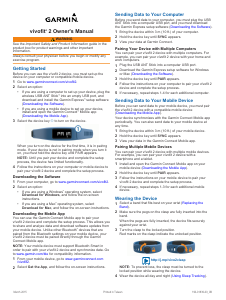
vívosmart
®
Owner's Manual
Introduction
WARNING
See the Important Safety and Product Information guide in the
product box for product warnings and other important
information.
Always consult your physician before you begin or modify any
exercise program.
Getting Started
Before you can use the vívosmart device, you must set up the
device on your compatible mobile device or computer.
Select an option:
Set up the device on your mobile device (Mobile Setup).
Set up the device on your computer (Computer Setup).
Mobile Setup
Before you can pair your vívosmart device with your mobile
device, your mobile device must support Bluetooth
®
Smart
wireless technology. Go to www.Garmin.com/BLE for
compatibility information.
You can use the Garmin Connect
Mobile app to pair your
vívosmart device and complete the setup process. This allows
you to share and analyze data and download software updates
from your mobile device.
NOTE: Unlike other Bluetooth devices that are paired from the
Bluetooth settings on your mobile device, your vívosmart device
must be paired directly through the Garmin Connect Mobile app.
1
Connect the charging clip securely to the device (Charging
the Device).
2
Plug the USB cable into a power source.
The device turns on and appears.
3
Go to www.GarminConnect.com/vivosmart on your mobile
browser.
4
Install and open the Garmin Connect Mobile app.
5
Follow the instructions on your mobile device to pair your
vívosmart device and complete the setup process.
NOTE: You can pair your vívosmart device with a different
mobile device after completing the initial setup (Pairing Your
Mobile Device with Your vívosmart Device).
Computer Setup
1
Connect the charging clip securely to the device (Charging
the Device).
2
Plug the USB cable into a USB port on your computer.
The device turns on and appears.
3
Hold on the touchscreen until you see .
4
Go to www.GarminConnect.com/vivosmart.
5
Download and install the Garmin Express
setup software:
If you are using a Windows
®
operating system, select
Download for Windows.
If you are using a Mac
®
operating system, select
Download for Mac.
6
Follow the instructions on your computer to pair your
vívosmart device and complete the setup process.
Charging the Device
WARNING
This device contains a lithium-ion battery. See the Important
Safety and Product Information guide in the product box for
product warnings and other important information.
NOTICE
To prevent corrosion, thoroughly dry the contacts and the
surrounding area before charging or connecting to a computer.
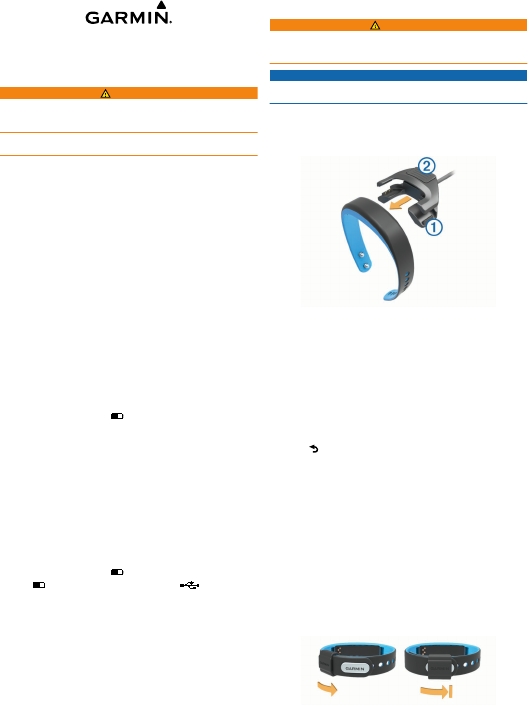
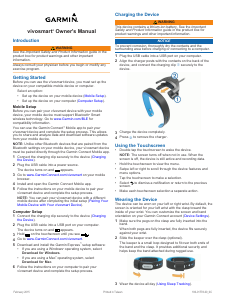
1
Plug the USB cable into a USB port on your computer.
2
Align the charger posts with the contacts on the back of the
device, and connect the charging clip
À
securely to the
device.
3
Charge the device completely.
4
Press
Á
to remove the charger.
Using the Touchscreen
Double tap the touchscreen to wake the device.
NOTE: The screen turns off when not in use. When the
screen is off, the device is still active and recording data.
Hold the touchscreen to view the menu.
Swipe left or right to scroll through the device features and
menu options.
Tap the touchscreen to make a selection.
Select to dismiss a notification or return to the previous
screen.
Make each touchscreen selection a separate action.
Wearing the Device
The device can be worn on your left or right wrist. By default, the
screen is oriented for your left wrist with the clasp toward the
inside of your wrist. You can customize the screen and band
orientation on your Garmin Connect account (Device Settings).
1
Make sure the pegs on the clasp are fully inserted into the
band.
When both pegs are fully inserted, the device fits securely
against your wrist.
2
Slide the keeper over the clasp (optional).
The keeper is a small loop designed to fit over both ends of
the band and the clasp. It provides additional security and
helps keep the band attached during rugged use.
3
Wear the device all day (Using Sleep Tracking).
February 2015
Printed in Taiwan 190-01778-00_0C
Ladda ner bruksanvisning i Engelska (PDF, 1.5 MB)
(Tänk på miljön och skriv endast ut denna bruksanvisning om det verkligen är nödvändigt)

Loading…

Betyg

Berätta vad du tycker om Garmin vivosmart Sportklocka genom att betygsätta den. Vill du dela med dig av dina åsikter om denna produkt eller ställa en fråga? Lämna en kommentar nederst på sidan.
Är du nöjd med Garmin vivosmart Sportklocka?
Ja Nej
Bli den första personen som betygsätter denna produkt
0 röster

Delta i konversationen om denna produkt

Här kan du dela vad du tycker om Garmin vivosmart Sportklocka. Om du har en fråga, läs först noggrant igenom manualen. Att begära en manual kan göras genom att använda vårt kontaktformulär.

Mer om denna bruksanvisning

Vi förstår att det är trevligt att ha en pappersbruksanvisning för din Garmin vivosmart Sportklocka. Du kan alltid ladda ner bruksanvisningen från vår hemsida och skriva ut den själv. Om du vill ha en originalbruksanvisning rekommenderar vi att du kontaktar Garmin. De kanske kan tillhandahålla en originalbruksanvisning. Letar du efter bruksanvisningen för din Garmin vivosmart Sportklocka på ett annat språk? Välj ditt föredragna språk på vår hemsida och sök efter modellnumret för att se om vi har det tillgängligt.

Specifikationer

Märke Garmin
Modell vivosmart
Kategori Sportklockor
Filtyp PDF
Filstorlek 1.5 MB

Alla bruksanvisningar för Garmin Sportklockor
Fler bruksanvisningar för Sportklockor

Vanliga frågor om Garmin vivosmart Sportklocka

Vårt supportteam söker efter användbar produktinformation och svar på vanliga frågor. Om du hittar en felaktighet bland våra vanliga frågor uppskattar vi om du meddelar oss detta via vårt kontaktformulär.

Hur många steg är den rekommenderade dagliga mängden för vuxna? Verifierad

För att träna tillräckligt är det nödvändigt att ta minst 10 000 steg om dagen. För personer äldre än 65 år är detta belopp 8 000 steg.

Detta hjälpte (182) Läs mer
Bruksanvisning Garmin vivosmart Sportklocka

Relaterade produkter

Relaterade kategorier

×
Download