Bruksanvisning Emporia TALKcomfortPLUS Mobiltelefon

Behöver du en bruksanvisning för din Emporia TALKcomfortPLUS Mobiltelefon? Nedan kan du se och ladda ner PDF-bruksanvisningen gratis på svenska. Den här produkten har för närvarande 15 vanliga frågor, 0 kommentarer och har 0 röster. Om det här inte är bruksanvisningen du vill ha, vänligen kontakta oss.

Är produkten defekt och erbjuder bruksanvisningen ingen lösning? Gå till ett Repair Café för gratis reparationstjänster.

Bruksanvisning

Loading…
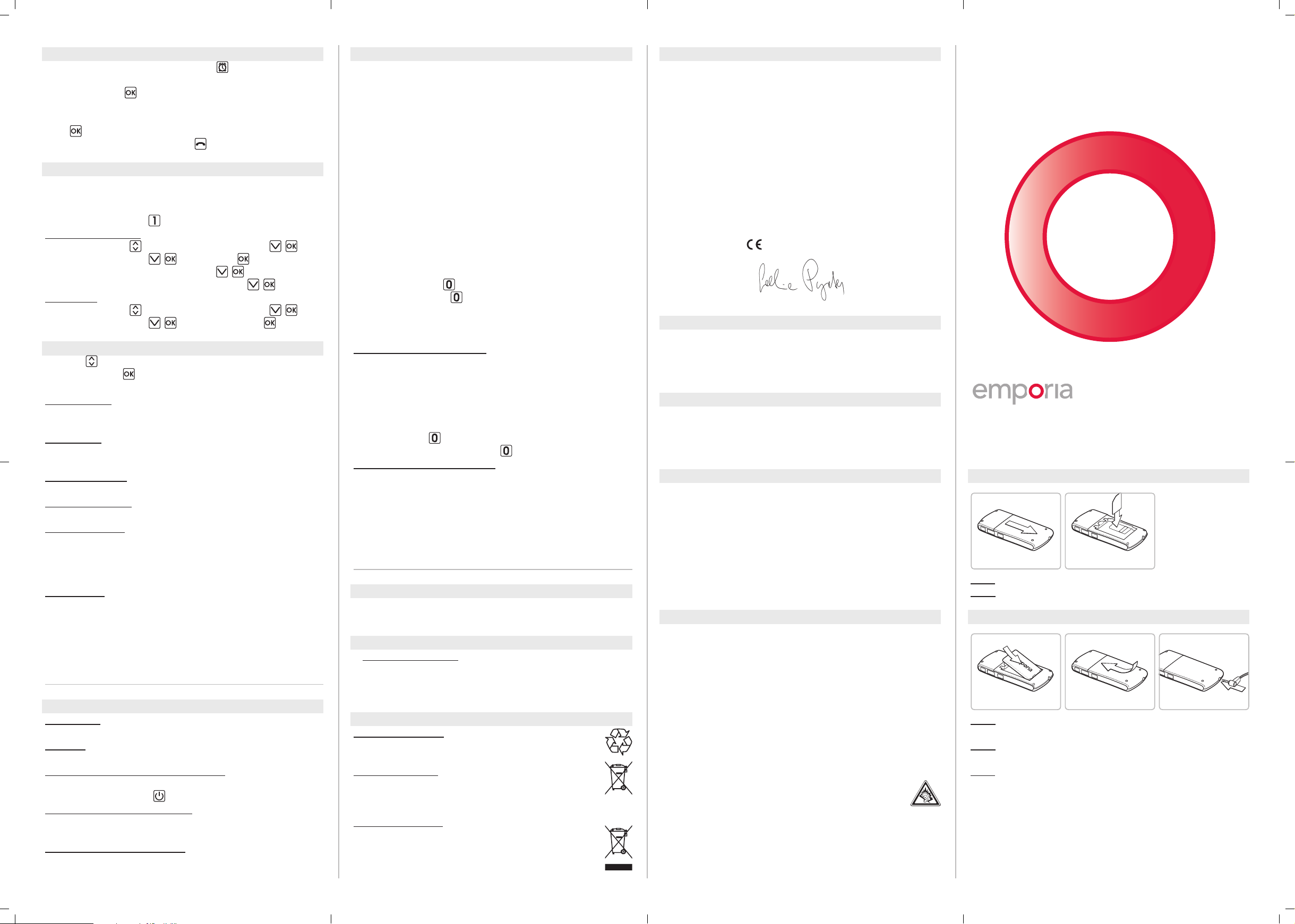
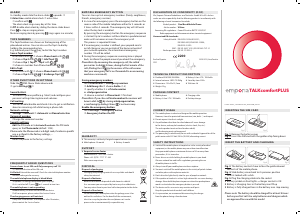
Fig. 1 Fig. 2
Fig. 3 Fig. 4 Fig. 5
frequently asked questions
Screen shows: Insert SIM card! Only emergency call 112
_ Check the direction of the SIM card
Call failed: Entered the area code? Check the selected telephone number
and area code again for accuracy.
The mobile telephone display is blank/black:
Telephone is in energy saving mode (press any key).
Or it is switched off _ press
for 2 seconds to turn it on.
The mobile phone is not responding:
Remove battery, re-insert and switch on the device.
If still no response, please contact the Service Centre.
The charging process will not start:
It may take a few minutes. If no response after 10 minutes,
please contact the Service Center.
inserting the siM card
Fig. 1: Remove the battery cover
Fig. 2: Insert the SIM card with the golden chip facing down
insert the battery and charging
Fig. 3: The battery contacts have to face the gold coloured
contacts of the mobile phone.
Fig. 4: Slide battery cover back to its previous position
until its locked with a click.
Fig. 5: Plug the charging cable into the socket
¡ Batterysymbol on front lights = charger contact is OK
¡ Battery is charging: bars in the battery icon ll up
¡ Battery is fully charged: bars in the battery icon stop moving
Please note: The battery should be charged for at least 4 hours
before your first call. Use only batteries and chargers which
are approved for use with this model.
alarM
In standby mode slide the alarm-slider
upwards _
¡ Enter time: enable alarm clock _ enter time
_ conrm with
.
The alarm clock rings every day at this time.
¡ O: disable alarm clock by sliding the alarm-slider down
Press
to stop an ringing alarm.
Mute an ringing alam by pressing
(rings again in a minute).
top5 nuMbers
The Top5 Numbers are shown on the beginning of the
phonebook entries. You can also use the Top 5 to dial by
holding the corresponding key.
E. g. hold and press the
key, to dial the Top1 number.
Save a Top5 number:
Enter menu with
_ choose Phone book with ,
_ choose Top 5 with
, _ Add Top 5
_ choose Top 1, Top 2, … Top 5 with
,
_ choose a number from Phone book with
,
Edit a Top5:
Enter menu with
_ choose Phone book with ,
_ choose Top 5 with
, _ Exchange Top 5
other functions in settings
Slide the
SMS-Menu Slider downwards
_ go to Settings
_
Sound & Alert:
To choose a phone prole (e.g. Silent) and congure your
personal settings like ringtone and volumes.
Call waiting:
You can enable/diasble and check status to get a notication
about an incoming call while having a phone talk.
Network settings:
Settings _ Network _ Automatic or Manual selection
Voicemail number:
Change the voicemail number
Security settings:
Edit the PIN code or to
Activate/Deactivate the PIN code
query or the Phonecode (default: 1234).
Please note: the Phonecode is a 4 digit code, for device-specific
use, e. g. Reset to the factory settings,
Master reset:
Reset the phone to the factory settings
eMporia eMergency button
You can store up to 5emergency numbers (family, neighbours,
friends, emergency services).
¡ In case of an emergency press the emergency button on the
reverse side of the mobile telephone either for 3seconds or
3times within 3seconds. The emergency key will still work
when the key lock is enabled.
By pressing the emergency button the emergency sequence
is started. Up to 5 numbers will be called in a predetermined
order until someone answers the emergency call.
This process is repeated 3 times.
¡ If no emergency number is dened, your prepaid-card is
out of charge or you are outside of the home network of
your network operator, the international emergency
number 112 will be called.
¡ During the emergency sequence a warning tone is played
back, to inform the people around you about the emergency.
PleaseNote: By answering the emergency call, the called
person has to dial
3 times, during the first minute of the
call. (Dialing the 3 x
by the receiver of the call ensures
that your emergency call is not forwarded to an answering
machine or voicemail).
Saving emergency numbers:
Go to Phone book _ Emergency numbers
_ Add Emerg. No _ choose EmNo. (1-5)
_ specify whether it is a Private number
or a Help organisation
_ choose a contact in Phone book _ nished
PleaseNote: If you choose Private number the receiver will
have to dial 3x
. By storing a Helporganisation,
a confirming by dialing 3 times
is not necessary.
Enable the emergency button:
Go to Settings _ Emergency button
_ Emergency button On/O
PartNo: V20me_ShortManual-V2a_40789-ENG_201308
support
¡ Emporia Service Center
Industriezeile 36 · 4020 Linz · Austria
Phone: +43 (0)732 · 77 77 17 · 446
Web: www.emporia.eu
declaration of conforMity (doc)
We, Emporia Telecom Produktions- und Vertriebs- GmbH & Co. KG. declare
under our sole responsibility that the following product is in conformity with
the following relevant harmonised standards.
Kind of product: Dual Band Mobile Phone
Article number: V20me
Governing EU-regulations: Council Directive R&TTE 1999/5/EC
Radio equipment and telecommunications terminal equipment
Harmonized EN standards:
Safety & Health: EN 60950-1:2006/A12:2011;
EN 50360:2001; EN 62209-1:2006;
EN 62209-2:2010
EMC: EN 301 489-1 V1.9.2; EN 301 489-7 V1.3.1
Radio spectrum: EN 301 511 V9.0.2
2200
Eveline Pupeter 14.02.2013, Linz/Austria
CEO
technical product description
package content
Warranty
¡ This warranty is valid only if original emporia batteries were used.
¡ Dualband GSM 900/1800MHz
¡ Internal antenna: SAR 0.733 W/kg
¡ Dimensions: 114 x 55 x 15,5 mm
¡ Weight: 90 g
¡ Battery: Li-Ion 3.7V / 1000mAh
¡ Stand-by-time: 300 h
¡ Talk time: 4 h
¡ Mobile phone
¡ Battery: Li-Ion 3.7V / 1000mAh
¡ Charging cable
¡ Desktop charger
¡ Mobile phone: 24 month ¡ Battery: 6 month
safety instructions
¡ Switch off the mobile phone in hospitals or in the vicinity of medical
equipment, as the mobile phone may cause them to malfunction.
Keep your mobile phone a minimum distance of 20cm away from
pacemakers, if it is turned on.
¡ Never drive a car while holding the mobile phone in your hand.
Observe national law and traffic regulations governing the use
of mobile phones in traffic.
¡ Always turn off your mobile phone inside an airplane.
¡ You must switch off the mobile phone in the vicinity of petrol stations
and other places with explosive materials.
¡ Don’t shine the light directly into the eyes of people or animals.
¡ If the speaker or headset is set to a high volume this can cause hearing
damage. Never hold the phone to your ear when the speakerphone
mode is activated or the emergency button is pressed.
¡ The device and its accessories may contain small parts.
Keep this product out of reach of small children.
¡ As a precaution, we recommend disconnecting the charger
from the phone during a thunderstorm.
correct usage
¡ This mobile phone is robust and designed for mobile operation.
However, it must be protected from moisture (rain, bath…) and impact.
¡ Do not expose it to direct sunlight.
¡ Any utilization other than described above will cause damage
to the device, and may be hazardous (electric shock, fire, etc.).
The entire product must not be altered or rebuilt,
and the housing must not be opened.
¡ The power plug is suitable only for use with residential-type outlets of the
public mains with 230 Volt/ 50 Hz (10/16A) alternating current.
disposal
Disposal of packaging:
Packaging and packaging materials are recyclable and should
always be returned.
Disposal of batteries:
Batteries must not be disposed of with domestic rubbish!
As a consumer you are required by law to recycle used batteries.
You may return them to your local collection point or to the dealer.
Disposal of the device:
Do not throw your mobile phone into the garbage, once it has
outlived its usefulness. For the benefit of the environment,
take it to a recycling location for used phones so it can be
processed in an environmentally responsible way.
TALKcomfortPLUS
Ladda ner bruksanvisning i Engelska (PDF, 3.51 MB)
(Tänk på miljön och skriv endast ut denna bruksanvisning om det verkligen är nödvändigt)

Loading…

Betyg

Berätta vad du tycker om Emporia TALKcomfortPLUS Mobiltelefon genom att betygsätta den. Vill du dela med dig av dina åsikter om denna produkt eller ställa en fråga? Lämna en kommentar nederst på sidan.
Är du nöjd med Emporia TALKcomfortPLUS Mobiltelefon?
Ja Nej
Bli den första personen som betygsätter denna produkt
0 röster

Delta i konversationen om denna produkt

Här kan du dela vad du tycker om Emporia TALKcomfortPLUS Mobiltelefon. Om du har en fråga, läs först noggrant igenom manualen. Att begära en manual kan göras genom att använda vårt kontaktformulär.

Mer om denna bruksanvisning

Vi förstår att det är trevligt att ha en pappersbruksanvisning för din Emporia TALKcomfortPLUS Mobiltelefon. Du kan alltid ladda ner bruksanvisningen från vår hemsida och skriva ut den själv. Om du vill ha en originalbruksanvisning rekommenderar vi att du kontaktar Emporia. De kanske kan tillhandahålla en originalbruksanvisning. Letar du efter bruksanvisningen för din Emporia TALKcomfortPLUS Mobiltelefon på ett annat språk? Välj ditt föredragna språk på vår hemsida och sök efter modellnumret för att se om vi har det tillgängligt.

Specifikationer

Märke Emporia
Modell TALKcomfortPLUS
Kategori Mobiltelefoner
Filtyp PDF
Filstorlek 3.51 MB

Alla bruksanvisningar för Emporia Mobiltelefoner
Fler bruksanvisningar för Mobiltelefoner

Vanliga frågor om Emporia TALKcomfortPLUS Mobiltelefon

Vårt supportteam söker efter användbar produktinformation och svar på vanliga frågor. Om du hittar en felaktighet bland våra vanliga frågor uppskattar vi om du meddelar oss detta via vårt kontaktformulär.

Mitt SIM-kort passar inte min mobiltelefon, varför är det? Verifierad

Det finns flera SIM-kortstorlekar, vanliga, mikro och nano. Det är möjligt att använda en adapter eller att göra SIM-kortet mindre.

Detta hjälpte (1530) Läs mer

Kan jag använda min mobiltelefon när jag laddar den? Verifierad

Ja, du kan använda din mobiltelefon medan du laddar den. Laddningsprocessen går långsammare när du gör det.

Detta hjälpte (1350) Läs mer

Vad är en PUK-kod? Verifierad

PUK står för Personal Unblocking Code och behövs för att avblockera din telefon efter att du har angett en felaktig PIN-kod tre gånger. Om PUK inte längre är tillgänglig kan det ofta begäras från leverantören.

Detta hjälpte (786) Läs mer

Min telefon är i gott skick, men när jag ringer till människor som har problem med att höra mig, varför är det så? Verifierad

Det är möjligt att smuts har samlats i mikrofonens rutnät och dämpar ljudet. Det bästa sättet att rengöra detta är med tryckluft. Om du är osäker, gör detta av en professionell.

Detta hjälpte (681) Läs mer

När jag ansluter min enhet till laddaren laddas den dåligt eller inte alls, varför är det så? Verifierad

Det är möjligt att smuts har samlats i öppningen där laddaren är ansluten, vilket förhindrar att den kommer i rätt kontakt. Det bästa sättet att rengöra detta är med tryckluft. Om du är osäker, gör detta av en professionell.

Detta hjälpte (374) Läs mer

Måste jag ladda ur litiumjonbatteriet helt innan jag laddar upp det igen? Verifierad

Nej, det behövs inte. Det rekommenderades förr i tiden, med gamla batterier. Litiumjonbatterier kan laddas efter användningen och när som helst kopplas loss från laddaren.

Detta hjälpte (370) Läs mer

Vad betyder IMEI? Verifierad

IMEI står för International Mobile Equipment Identity och är ett (ofta) unikt nummer som används för att identifiera mobila enheter som surfplattor och smartphones och skydda dem mot stöld.

Detta hjälpte (332) Läs mer

När jag ansluter en hörlur till min enhet fungerar den inte korrekt, vad kan jag göra? Verifierad

Det är möjligt att smuts har samlats i öppningen där hörlurarna är ansluten, vilket förhindrar att den kommer i rätt kontakt. Det bästa sättet att rengöra detta är med tryckluft. Om du är osäker, gör detta av en professionell.

Detta hjälpte (291) Läs mer

Fungerar Bluetooth genom väggar och tak? Verifierad

En Bluetooth-signal fungerar genom väggar och tak, såvida inte dessa är gjorda av metall. Beroende på tjockleken och väggens material kan signalen förlora i styrka.

Detta hjälpte (273) Läs mer

Batteriet i min telefon tar slut snabbt när jag är ute, varför är det? Verifierad

Litiumjonbatterier klarar inte låga temperaturer. Om utetemperaturerna är nära att frysa tappas batteriet snabbare än normalt, även utan att använda telefonen. När telefonen har återgått till rumstemperatur visar den antagligen en batteriprocentandel nära den som den var.

Detta hjälpte (263) Läs mer

Vad kan jag bäst använda för att rengöra skärmen på min mobila enhet? Verifierad

Det är bäst att använda en mikrofiberduk, eventuellt med ett specialtvättmedel. Använd aldrig kökshanddukar eller andra pappersdukar, de lämnar repor!

Detta hjälpte (246) Läs mer

Hur ska man förvara litiumjonbatterier som man inte använder under en längre period? Verifierad

Bästa sätt att förvara ett litiumjonbatteri är vid en temperatur mellan +5 °C och 45 °C. Det är också en god idé att se till att batteriet är laddat till cirka 67 % innan det läggs undan för förvaring.

Detta hjälpte (241) Läs mer

Vad betyder VoIP? Verifierad

VoIP betyder Voice over IP (Internet Protocol) och är alltså telefoni över internet.

Detta hjälpte (240) Läs mer

Under vilka förhållanden fungerar mitt litiumjonbatteri optimalt? Verifierad

Litiumjonbatterier fungerar bäst vid en temperatur mellan 5 °C och 45 °C. Vid mycket kallt eller varmt väder kan du märka att batteriet tar slut snabbare. Vi rekommenderar att inte ladda batteriet vid temperaturer under +5 °C eller över +45 °C.

Detta hjälpte (237) Läs mer

Måste jag rengöra skärmen på min enhet innan jag använder ett skärmskydd? Verifierad

Ja, ett skärmskydd fäster bäst på fett- och dammfria ytor.

Detta hjälpte (231) Läs mer
Bruksanvisning Emporia TALKcomfortPLUS Mobiltelefon

Relaterade produkter

Relaterade kategorier

×
Download