Bruksanvisning Doro Primo 366 Mobiltelefon

Behöver du en bruksanvisning för din Doro Primo 366 Mobiltelefon? Nedan kan du se och ladda ner PDF-bruksanvisningen gratis på svenska. Den här produkten har för närvarande 15 vanliga frågor, 2 kommentarer och har 1 röst med ett genomsnittligt produktbetyg på 100/100. Om det här inte är bruksanvisningen du vill ha, vänligen kontakta oss.

Är produkten defekt och erbjuder bruksanvisningen ingen lösning? Gå till ett Repair Café för gratis reparationstjänster.

Bruksanvisning

Loading…
Tip: Some features require extra
memory, to expand your phone’s storage
capacity, install a micro SD card.
3. Micro-SD card
(optional)
Lightly press the
card holder and
push it carefully
toward SIM card
holder until it unlocks. The card holder
can now be ipped up vertically. Place
the memory card in the plastic bracket.
Make sure that the memory card
contacts face down and that the card is
placed in formed area area. Do not
scratch or bend the card contacts.
Push the metal holder back down,
press it at and slide it until it snaps
into place.
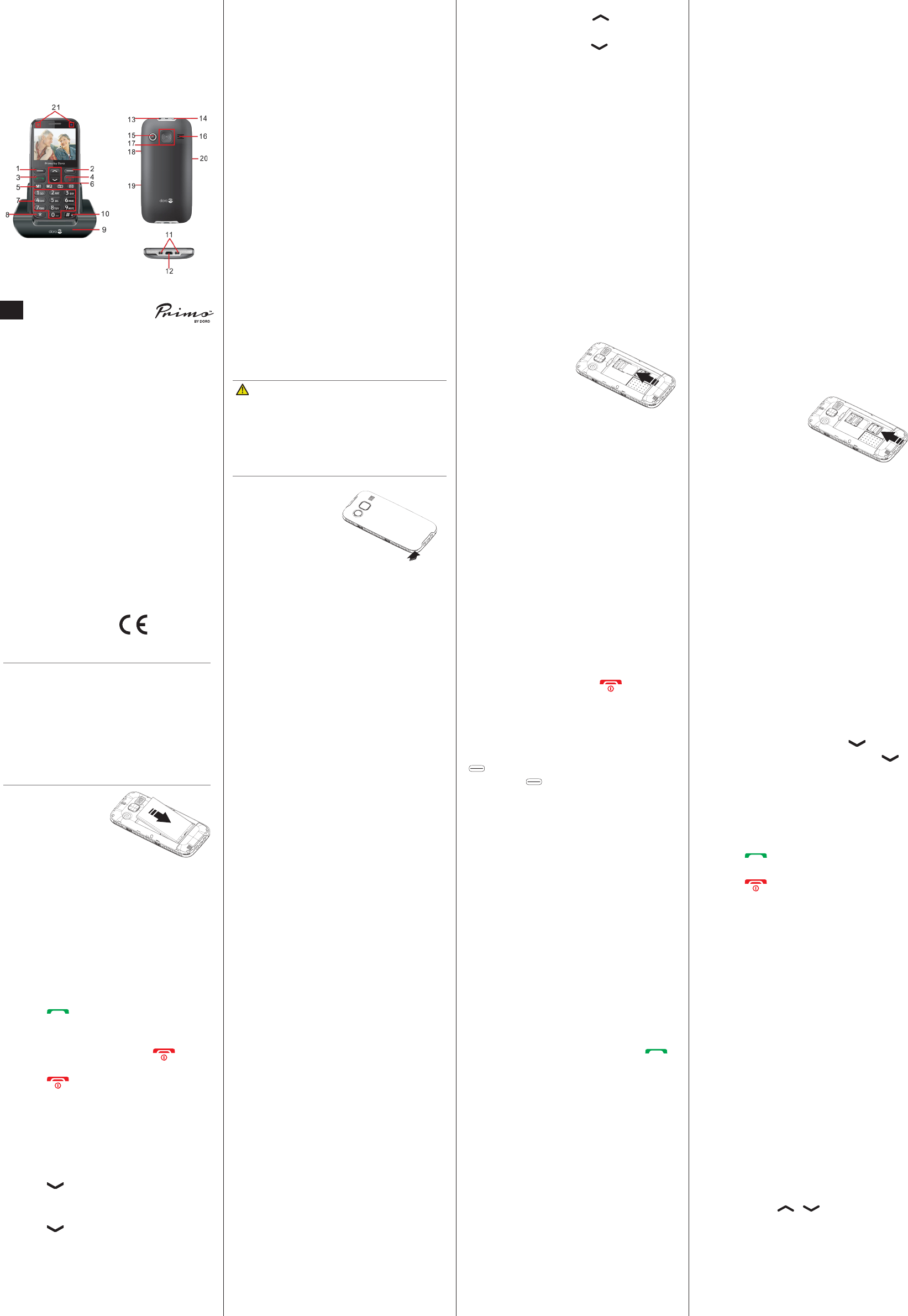
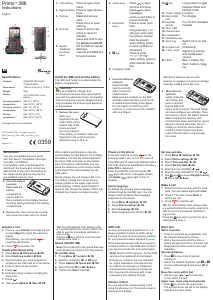
1. Left soft key
Press to open main
menu
2. Right soft key
Press to open phone-
book
3. Call key
Make and answer
calls;
Press once to open
Call log
4. End key
Press to end a call;
press to return to
standby;
press and hold to turn
the
phone on and off
5. Speed
dial/Quick
functions
keys
M1 and M2 are speed
dial keys.
Camera and SMS key
for quick access
6. Arrow keys
Press to open
shortcut functions;
press to open
messages;
scroll up and down in
menus and lists
7. Numerical
keys
Press to enter num-
bers;
long press key 1, to
call your voice mail-
box (phone number
must be stored);
when writing, press
to input numbers or
characters
8.
*
key
Press to enter
“*”/ “+” / “P”/“W“;
when writing, press to
enter special charac-
ters
9. Charging cradle
10.
#
key
Long press to toggle
between Silent and
Normal mode
11. Cradle charging contacts
12. Micro-USB
port
For charger
13. Headset
socket
For 3.5 mm standard
headset
14. Torch LED
15. Camera lens
16. Loudspeaker
17. Assistance key
18. Torch key
Switch torch on and
off
19. Keypad lock
lock/unlock
20. + and - keys
Adjust ring volume
and loudspeaker
volume
21. LEDs
Blue = battery full;
Red = battery charg-
ing
Install the SIM card and the battery
The SIM card holder is located inside the
battery compartment.
CAUTION
Only use batteries, charger and
accessories that have been approved for
use with this particular model. Connecting
other accessories may be dangerous and
may invalidate the phone’s type approval
and guarantee.
1. Remove the cover
Slide your
ngernail into the
small notch on the
bottom side of the
phone and pull
the cover upward.
If the battery is installed, slide your
ngernail in the notch below the
Assistance key to lift it up.
2. Insert the SIM card
(required)
Insert the SIM
card by carefully
slide it under the
metal bracket.
Make sure the contacts on the SIM
card face down and the cut off corner
is positioned according to the gure.
Do not scratch or bend the card
contacts. Try not to touch the contacts
with your ngers.
English
© IVS GmbH 2015 • All rights reserved
QSG_Primo_by_Doro_366_en_A3(A7)_v1.1
English
Version 1.1
0359
Specications
Network:
GSM 900/1800/1900
(Triband) MHz
Dimensions:
119 mm x 56 mm x 12 mm
Weight:
88 g
Battery:
3.7V/1000 mAh Li-ion
battery
Operating ambient
temperature:
Min: 0°C (32°F)
Max: 40°C (104°F)
Charging ambient
temperature:
Min: 0°C (32°F)
Max: 40°C (104°F)
Storage
temperature:
Min: -20°C (-4°F)
Max: 60°C (140°F)
Changes and errors excepted.
EN
IMPORTANT!
Use only compatible memory cards
with this device. Compatible card type:
microSD, microSDHC.
Incompatible cards may damage the
card itself, the device and corrupt any
data stored on the card. Depending on
the market some phones may have a
pre-installed memory card.
4. Insert the battery
(required)
Push it into the
battery
compartment
ensure that the
three contacts on the battery touches
the three spring contacts in the battery
compartment.
5. Replace the cover and press it all the
way around to make sure it is closed
When battery performance is low, the
empty battery symbol ashes. To recharge
the battery, connect the mains adapter to
the micro USB connector on the bottom
side of the phone. Alternatively you can
place the telephone in the charge cradle
connected to the mains adapter via the
USB cable.
During charge, the red charge LED is on.
The battery charge icon moves during
charge (visible in the upper right corner
of the display). It takes approximately 3
hours to fully charge the battery. When fully
charged the charge icon stops moving.
Power on the phone
Press and hold the red key on the
phone at least 2 sec. to turn it on and off.
If the SIM card is valid and protected with a
PIN code (Personal Identication Number),
Enter PIN
is displayed.
Enter the SIM PIN code and press
OK
( upper left corner of keypad). Delete
with
Delete
( upper right corner of
keypad).
Set the language
By default the phone’s menu language
is determined by the SIM card. You can
always switch between the languages
supported by the phone.
1. Press
Menu
â
Settings
â
OK
.
2. Select
Phone settings
â
OK
.
3. Select
Language
â
OK
.
4. Select language from the list â
OK
.
Answer a call
1. Press or
Answer
to accept the call
or press
Reject
to reject the call (busy
signal).
Alternatively, you can press to
reject the call directly.
2. Press to end the call.
Create phonebook entry
1. Press
Menu
â
Phonebook
â
OK
.
2. Select
Add new contact
â
Add
.
3. Select whether you want to save the
contact on the SIM card or in the phone.
4. Enter a name for the contact.
5. Press .
6. Enter the phone number including the
area code.
7. Press .
8. Then press
Options
â
Save
â
OK
.
Tip: For international calls, always enter
a + symbol before the country code to be
able to use the phonebook optimally in
any country.
Press the
*
key twice to enter the inter-
national area code +.
Speed dial (M1, M2)
Note!
The contacts for the speed dial keys
must already be stored in the Phonebook.
M1 and M2 setup
1. Press
Menu
â
Contacts
â
OK
.
2. Select a contact for
M1
or
M2
keys.
3. Press
Options
â
Speed dial
â
OK
.
4. Select the line
M1
or
M2
â
Save
.
5. Conrm the
Save?
with
Yes
.
Set time and date
1. Press
Menu
â
Settings
â
OK
.
2. Select
Phone settings
â
OK
.
3. Select
Time and date
â
OK
.
4. Select
Set time/date
â
OK
.
5. Enter the time (HH:MM) â .
6. Enter the date (DD.MM.YYYY) â .
7. Use
*
and
#
to select
Daylight saving
â
On
or
Off
â
Save
.
Make a call
1. Enter the phone number with the area
code. You can delete digits with
Clear
.
2. Press to dial. Press
Abort
to
cancel the call.
3. Press to end the call.
Tip: For international calls, always enter
a + symbol before the country code to be
able to use the phonebook optimally in
any country.
Press the
*
key twice to enter the inter-
national area code +.
SOS calls
As long as the phone is switched on, it is
always possible to place an SOS call by
entering the main local emergency number
for your present location followed by .
Some networks accept calls to emergency
numbers without a valid SIM card. Contact
your service provider for more information.
Note! Credit is NOT required - but the SIM
card must be registered and activated.
Emergency numbers are only intended
for urgent assistance, and should only
be called in an emergency. Please do
not misuse the emergency number as
this may prevent someone with a real
emergency from getting through.
Volume control
You can adjust the volume during a call
using the side keys
+/-
.The volume level is
shown on the display.
Enter text
Select character
Press a numerical key repeatedly until
the desired character is shown.
Wait a few seconds (until the blue or
yellow background of the character has
disappeared) before entering the next
character.
Special characters
Press
*
to view a list of special
characters.
Select the desired character with
*
or
#
(to move left and right) and press
OK
to
enter.
Move the cursor within text
Use the keys
/
to move the
cursor within the text.
Upper case, lower case and numerals
Press
#
to choose the input mode.
The symbol at the top left in the display
indicates the input mode.
Primo
366
Instructions
Ladda ner bruksanvisning i Engelska (PDF, 2.26 MB)
(Tänk på miljön och skriv endast ut denna bruksanvisning om det verkligen är nödvändigt)

Loading…

Betyg

Berätta vad du tycker om Doro Primo 366 Mobiltelefon genom att betygsätta den. Vill du dela med dig av dina åsikter om denna produkt eller ställa en fråga? Lämna en kommentar nederst på sidan.
Är du nöjd med Doro Primo 366 Mobiltelefon?
Ja Nej
100%
0%
1 röst

Delta i konversationen om denna produkt

Här kan du dela vad du tycker om Doro Primo 366 Mobiltelefon. Om du har en fråga, läs först noggrant igenom manualen. Att begära en manual kan göras genom att använda vårt kontaktformulär.

Mer om denna bruksanvisning

Vi förstår att det är trevligt att ha en pappersbruksanvisning för din Doro Primo 366 Mobiltelefon. Du kan alltid ladda ner bruksanvisningen från vår hemsida och skriva ut den själv. Om du vill ha en originalbruksanvisning rekommenderar vi att du kontaktar Doro. De kanske kan tillhandahålla en originalbruksanvisning. Letar du efter bruksanvisningen för din Doro Primo 366 Mobiltelefon på ett annat språk? Välj ditt föredragna språk på vår hemsida och sök efter modellnumret för att se om vi har det tillgängligt.

Specifikationer

Märke Doro
Modell Primo 366
Kategori Mobiltelefoner
Filtyp PDF
Filstorlek 2.26 MB

Alla bruksanvisningar för Doro Mobiltelefoner
Fler bruksanvisningar för Mobiltelefoner

Vanliga frågor om Doro Primo 366 Mobiltelefon

Vårt supportteam söker efter användbar produktinformation och svar på vanliga frågor. Om du hittar en felaktighet bland våra vanliga frågor uppskattar vi om du meddelar oss detta via vårt kontaktformulär.

Mitt SIM-kort passar inte min mobiltelefon, varför är det? Verifierad

Det finns flera SIM-kortstorlekar, vanliga, mikro och nano. Det är möjligt att använda en adapter eller att göra SIM-kortet mindre.

Detta hjälpte (1533) Läs mer

Kan jag använda min mobiltelefon när jag laddar den? Verifierad

Ja, du kan använda din mobiltelefon medan du laddar den. Laddningsprocessen går långsammare när du gör det.

Detta hjälpte (1354) Läs mer

Vad är en PUK-kod? Verifierad

PUK står för Personal Unblocking Code och behövs för att avblockera din telefon efter att du har angett en felaktig PIN-kod tre gånger. Om PUK inte längre är tillgänglig kan det ofta begäras från leverantören.

Detta hjälpte (790) Läs mer

Min telefon är i gott skick, men när jag ringer till människor som har problem med att höra mig, varför är det så? Verifierad

Det är möjligt att smuts har samlats i mikrofonens rutnät och dämpar ljudet. Det bästa sättet att rengöra detta är med tryckluft. Om du är osäker, gör detta av en professionell.

Detta hjälpte (684) Läs mer

När jag ansluter min enhet till laddaren laddas den dåligt eller inte alls, varför är det så? Verifierad

Det är möjligt att smuts har samlats i öppningen där laddaren är ansluten, vilket förhindrar att den kommer i rätt kontakt. Det bästa sättet att rengöra detta är med tryckluft. Om du är osäker, gör detta av en professionell.

Detta hjälpte (376) Läs mer

Måste jag ladda ur litiumjonbatteriet helt innan jag laddar upp det igen? Verifierad

Nej, det behövs inte. Det rekommenderades förr i tiden, med gamla batterier. Litiumjonbatterier kan laddas efter användningen och när som helst kopplas loss från laddaren.

Detta hjälpte (370) Läs mer

Vad betyder IMEI? Verifierad

IMEI står för International Mobile Equipment Identity och är ett (ofta) unikt nummer som används för att identifiera mobila enheter som surfplattor och smartphones och skydda dem mot stöld.

Detta hjälpte (332) Läs mer

När jag ansluter en hörlur till min enhet fungerar den inte korrekt, vad kan jag göra? Verifierad

Det är möjligt att smuts har samlats i öppningen där hörlurarna är ansluten, vilket förhindrar att den kommer i rätt kontakt. Det bästa sättet att rengöra detta är med tryckluft. Om du är osäker, gör detta av en professionell.

Detta hjälpte (291) Läs mer

Fungerar Bluetooth genom väggar och tak? Verifierad

En Bluetooth-signal fungerar genom väggar och tak, såvida inte dessa är gjorda av metall. Beroende på tjockleken och väggens material kan signalen förlora i styrka.

Detta hjälpte (273) Läs mer

Batteriet i min telefon tar slut snabbt när jag är ute, varför är det? Verifierad

Litiumjonbatterier klarar inte låga temperaturer. Om utetemperaturerna är nära att frysa tappas batteriet snabbare än normalt, även utan att använda telefonen. När telefonen har återgått till rumstemperatur visar den antagligen en batteriprocentandel nära den som den var.

Detta hjälpte (263) Läs mer

Vad kan jag bäst använda för att rengöra skärmen på min mobila enhet? Verifierad

Det är bäst att använda en mikrofiberduk, eventuellt med ett specialtvättmedel. Använd aldrig kökshanddukar eller andra pappersdukar, de lämnar repor!

Detta hjälpte (246) Läs mer

Hur ska man förvara litiumjonbatterier som man inte använder under en längre period? Verifierad

Bästa sätt att förvara ett litiumjonbatteri är vid en temperatur mellan +5 °C och 45 °C. Det är också en god idé att se till att batteriet är laddat till cirka 67 % innan det läggs undan för förvaring.

Detta hjälpte (241) Läs mer

Vad betyder VoIP? Verifierad

VoIP betyder Voice over IP (Internet Protocol) och är alltså telefoni över internet.

Detta hjälpte (240) Läs mer

Under vilka förhållanden fungerar mitt litiumjonbatteri optimalt? Verifierad

Litiumjonbatterier fungerar bäst vid en temperatur mellan 5 °C och 45 °C. Vid mycket kallt eller varmt väder kan du märka att batteriet tar slut snabbare. Vi rekommenderar att inte ladda batteriet vid temperaturer under +5 °C eller över +45 °C.

Detta hjälpte (237) Läs mer

Måste jag rengöra skärmen på min enhet innan jag använder ett skärmskydd? Verifierad

Ja, ett skärmskydd fäster bäst på fett- och dammfria ytor.

Detta hjälpte (231) Läs mer
Bruksanvisning Doro Primo 366 Mobiltelefon

Relaterade produkter

Relaterade kategorier

×
Download