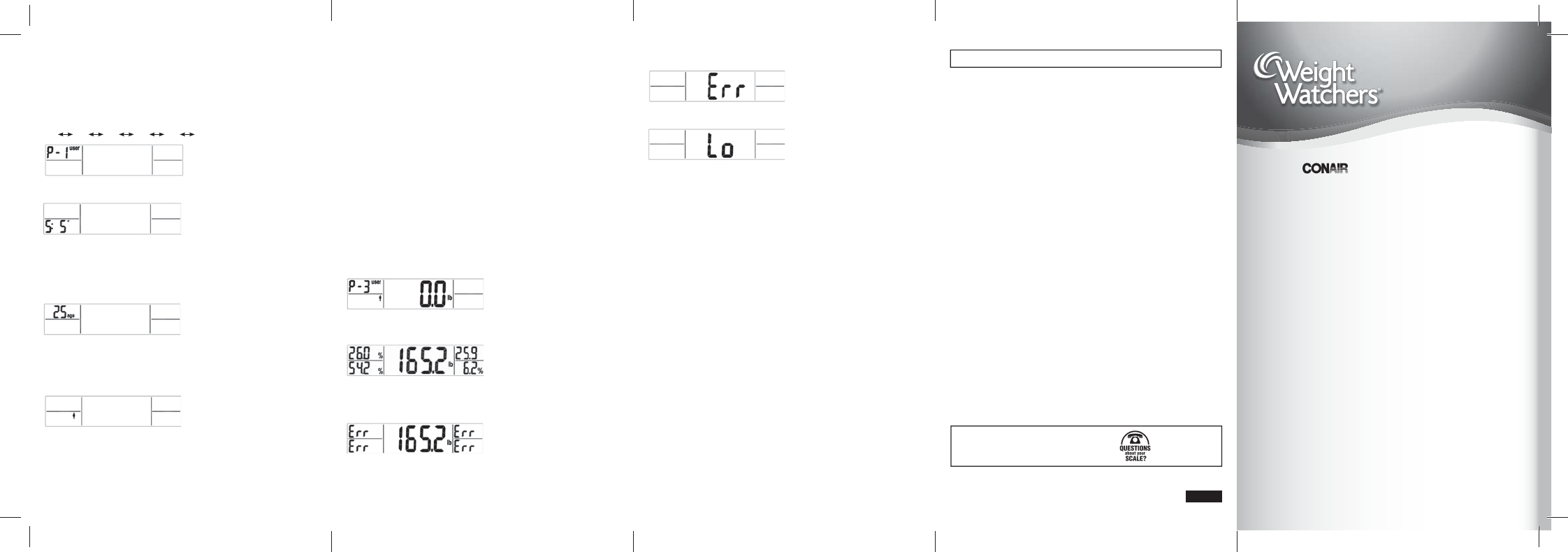
Note 1: If you need to edit any of your personal data, you can do so while the data
is being displayed: simply press the “SET” button and scale will go back to the
personal data setting mode again. Follow the instructions above.
Note 2: In the personal data setting mode, the scale will return to standby mode
automatically if no button is pressed within 30 seconds and already entered data
will not be saved. If that happens, simply repeat the personal data setting process
described above.
Display and store data
1. Once the gender is set, data storage is complete.
2. User number displays for a few seconds, Height displays for a few seconds,
and Age for another few seconds.
3. The scale is now ready for body analysis measurements.
Body Analysis Measurement
Operate the scale on a secure fl at fl oor. Tap on the platform fi rmly to activate
the scale. Wait until you see “0.00” in KG mode or “0.0” in LB mode, then press
the “UP”or ”DOWN” button to select your user number. Your data (height, age,
gender) will quickly display again.
Once the LCD shows “0.0”, you can step on the scale. Step on barefoot with your
feet aligned on the electrodes (metal strips) on the two sides of platform. If your feet
are not bare, the scale will not be able to take measurements and you will get an
error reading.
After a few seconds, the LCD will show your body weight, body fat percentage,
body water percentage, BMI and bone mass percentage for about 30 seconds,
and then turn off automatically.
If you get an error reading, make sure you are stepping on the scale in bare feet
(no stockings or pantyhose) and your feet are aligned on the metal strips. If you still
get an error reading, your skin may be too dry: try rubbing a bit of lotion on
the soles of your feet and make sure not to slip on the platform of the scale.
©2013 Conair Corporation. East Windsor, NJ 08520, Glendale, AZ 85307. Made in China.
©2013 Weight Watchers International Inc. All rights reserved. Weight Watchers is the
registered trademark of Weight Watchers International Inc. and used under license.
Service Centers
Conair Corporation
Service Department
150 Milford Road
East Windsor, NJ 08520
Conair Corporation
Service Department
7475 N. Glen Harbor Blvd.
Glendale, AZ 85307
1-800-326-6247
www.conair.com
IB-12266
FCC Markings:
Warning: Changes or modifi cations to this unit not expressly approved by
the party responsible for compliance could void the user’s authority to operate
the equipment.
This device complies with Part 15 of the FCC Rules. Operation is subject to the
following two conditions: (1) this device may not cause harmful interference, and
(2) this device must accept any interference received, including interference that
may cause undesired operation.
NOTE: This equipment has been tested and found to comply with the limits for a
Class B digital device, pursuant to Part 15 of the FCC Rules. These limits are
designed to provide reasonable protection against harmful interference in a
residential installation. This equipment generates, uses and can radiate radio
frequency energy and, if not installed and used in accordance with the instructions,
may cause harmful interference to radio communications. However, there is
no guarantee that interference will not occur in a particular installation. If this
equipment does cause harmful interference to radio or television reception, which
can be determined by turning the equipment off and on, the user is encouraged to
try to correct the interference by one or more of the following measures:
• Reorient or relocate the receiving antenna.
• Increase the separation between the equipment and receiver.
• Connect the equipment into an outlet on a circuit different from that to which
the receiver is connected.
• Consult the dealer or an experienced radio/TV technician for help.
Caution: Any changes or modifi cations not expressly approved by Conair
Corporation, the manufacturer of this product and the party responsible for
compliance could void the user’s authority to operate the equipment.
Personal Data Setting Mode
Personal Data Setting
Tap the platform firmly to activate the scale. The whole screen will appear. Wait for
“0.0” to show, then press the “SET” button to enter into Personal data setting mode.
User “P-01” will flash. Press the UP or DOWN button to choose user number (user 1
to user 4). Press the SET button to confirm.
P-4
P-1 P-2 P-3 P-4 P-01….
After selecting the user, continue to press the “SET” button and the scale will switch
to the height setting mode.
Height will flash. Press the UP or DOWN button to choose the height. If the scale
is set to measure in pounds, the height will display in feet and inches. If it is set to
measure in kgs, the height will display in cm. Pressing and holding the UP or DOWN
button will advance numbers quickly. Press the SET button to confirm the height.
After selecting the height, continue to press the “SET” button and the scale will switch
to Age setting mode.
Age will flash. Press the UP or DOWN button to choose the age (10 to 100). Pressing
and holding the UP or DOWN button will advance numbers quickly. Press the SET
button to confirm the Age.
After selecting the Age, continue to press “SET” button and the scale will switch to
the gender setting mode.
The gender icon will flash. Press the the UP or DOWN button to choose between
male and female.
After selecting the Gender, the personal data setting has been completed. The
scale will save the data and scroll through all settings in succession. Then the scale
will turn off automatically after a few seconds. Before scale turns off, you can enter
the body fat measurement mode (see below).
13AD143431
Congratulations! By purchasing this Weight Watchers® Scale,
you’ve made the first step toward taking control of your weight.
To get the greatest benefit from your purchase, please read this
entire brochure before using your scale.
Instructions
for use of
Digital Body
Analysis Scale
Scales by
™
Model WW65
LB mode
LB mode
LB mode
LB/feet and inches mode
Note: Your scale will also read error if your weight is below or above the
specifi cations for the scale.
Low battery warning: When the battery is critically low, the scale display will show
“Lo” and it is time to replace the battery (see battery replacement instructions).
NOTE:
If you step on the scale before “0.0” appears or if your feet are not aligned on
the electrodes, the scale will not function properly.
LIMITED TEN YEAR WARRANTY
Conair will repair or replace, at our option, your appliance free of charge for
120 months from the date of purchase if the appliance is defective in workmanship
or materials.
To obtain service under this warranty, return the defective product to the service
center listed below that is nearest you, together with your sales slip and $5.00 for
postage and handling. California residents need only provide proof of purchase and
should call 1-800-3-CONAIR for shipping instructions. In the absence of a receipt,
the warranty period shall be 120 months from the date of manufacture.
ANY IMPLIED WARRANTIES, OBLIGATIONS, OR LIABILITIES, INCLUDING BUT NOT
LIMITED TO THE IMPLIED WARRANTY OF MERCHANT ABILI TY AND FITNESS FOR
A PARTICULAR PURPOSE, SHALL BE LIMITED IN DURATION TO THE 120-MONTH
DURATION OF THIS WARRANTY. Some states do not allow limitations on how
long an implied warranty lasts, so the above limitations may not apply to you.
IN NO EVENT SHALL CONAIR BE LIABLE FOR ANY SPECIAL, INCIDENTAL, OR
CONSEQUENTIAL DAMAGES FOR BREACH OF THIS OR ANY OTHER WARRANTY,
EXPRESS OR IMPLIED, WHATSOEVER. Some states do not allow the exclusion
or limitation of special, incidental, or consequential damages, so the above
limitation may not apply to you. This warranty gives you specific legal rights,
and you may also have other rights which vary from state to state.
ww65_13ad143431_ib_final.indd 6-10ww65_13ad143431_ib_final.indd 6-10 5/29/13 1:24 PM5/29/13 1:24 PM


Delta i konversationen om denna produkt
Här kan du dela vad du tycker om Conair WW65 Weight Watchers Våg. Om du har en fråga, läs först noggrant igenom manualen. Att begära en manual kan göras genom att använda vårt kontaktformulär.