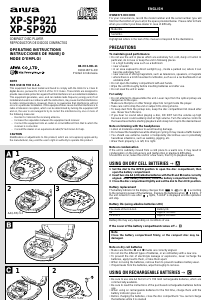
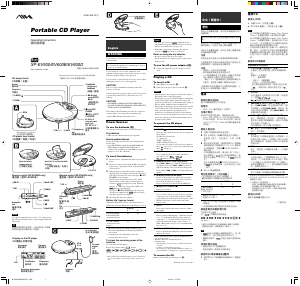
Bruksanvisning Aiwa XP-SP921 Discman

Behöver du en bruksanvisning för din Aiwa XP-SP921 Discman? Nedan kan du se och ladda ner PDF-bruksanvisningen gratis på svenska. Den här produkten har för närvarande 1 vanliga frågor, 0 kommentarer och har 0 röster. Om det här inte är bruksanvisningen du vill ha, vänligen kontakta oss.

Är produkten defekt och erbjuder bruksanvisningen ingen lösning? Gå till ett Repair Café för gratis reparationstjänster.

Bruksanvisning

Loading…
g,
commercially available.
Be sure to read the instructions of the purchased rechargeable batteries before
use.
When using on rechargeable batteries for the first time, charge them until the
battery indicator goes out.
Before charging the batteries, close the disc compartment. You cannot charge
the batteries while it is opened.
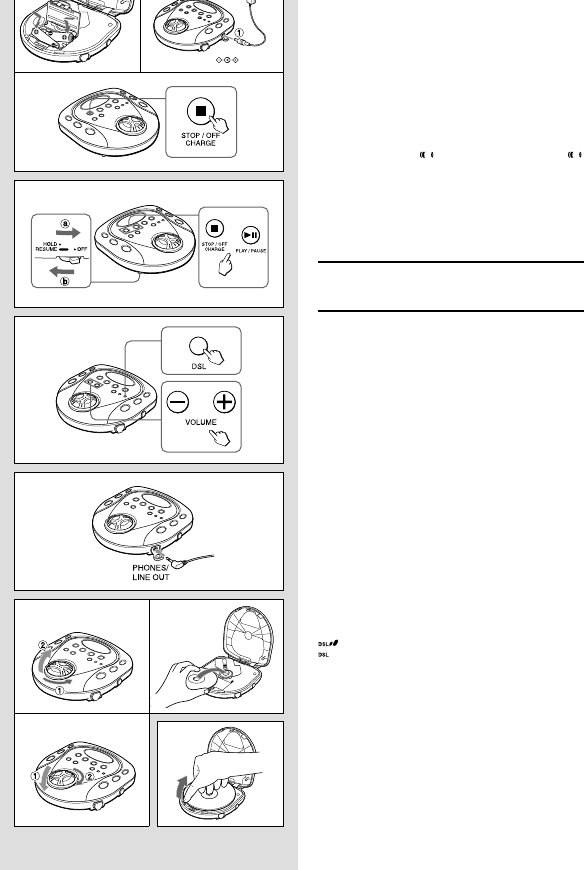
1 Insert the rechargeable batteries with the 0 and 9 marks correctly aligned.
2 Connect the AC adaptor.
Pull out the rubber cap before connecting the adaptor.
1 to DC 5 ~ 6 V jack
2 to wall outlet
3 Keep sSTOP/OFF/CHARGE pressed for about 1 second to start charging.
“Con” is displayed and the battery indicator blinks.
After charging, disconnect the AC adaptor.
Time to recharge the batteries
Recharge the batteries when
lights. If the unit remains in use after
lights, “LobAtt” is displayed and the current operation will stop.
To stop charging
Press sSTOP/OFF/CHARGE during charging.
Force charging
When the recharging stops after only few minutes or the batteries cannot be fully
recharged, press sSTOP/OFF/CHARGE while pressing PLAY MODE to start force
charging.
USING ON AC HOUSE CURRENT
Connect the supplied AC adaptor in the same way as when recharging the batteries.
During operation on AC house current, all of the battery indicators disappear.
BEFORE PLAYBACK
HOLD switch D
Release the HOLD switch before playback. a
When not using the unit, set the HOLD switch to the HOLD position. Accidentally
pressed button will not function. b
If buttons are pressed when the HOLD switch is set to the HOLD position, “HOLd”
flashes in the display.
Turning on and off D
Turning the power on
Press ePLAY/PAUSE. Power is turned on and playback starts.
Note
“Err” appears on the display in the following cases:
When you try to play the unit without a disc in the disc compartment.
When you play a disc placed upside-down or a defective disc.
Turning the power off
If no new operations are done within 30 seconds from the end of last operation,
the power is turned off automatically. (Auto power off function)
• You can turn off the power before it is automatically turned off by pressing
sSTOP/OFF/CHARGE.
Standby mode D
When an operation finishes, the unit goes into standby mode until the auto power
off function automatically turns off the power.
To enter standby mode, press ePLAY/PAUSE to start playback, then press
sSTOP/OFF/CHARGE.
Adjusting the sound E
Volume
Press + to increase the volume.
Press - to decrease the volume.
DSL
Press DSL for more powerful sound and deeper bass.
: Deep bass is emphasized.
: Normal sound
Connecting the headphones F
Pull out the rubber cap and connect the supplied headphones to the
PHONES/LINE OUT jack.
Inserting a disc G
1 Set the dial to the OPEN position to open the disc compartment.
2 Place a disc in the center with the label side facing up.
3 Close the disc compartment tightly and set the dial to the LOCK position.
To remove the disc H
Pick up the disc, holding its edge, while pressing the pivot gently.
Note
The unit may not play a CD-R/RW disc that is recorded on personal computers
or some kinds of CD-R/RW recorders because of differences in recording
platforms.
Do not attach any seal or label to either side (the recordable side or the labeled
side) of a CD-R/RW disc. It may cause malfunction.
D
E
3
F
G
3
H
DC 5~6V
12
Ladda ner bruksanvisning i Engelska (PDF, 0.53 MB)
(Tänk på miljön och skriv endast ut denna bruksanvisning om det verkligen är nödvändigt)

Loading…

Betyg

Berätta vad du tycker om Aiwa XP-SP921 Discman genom att betygsätta den. Vill du dela med dig av dina åsikter om denna produkt eller ställa en fråga? Lämna en kommentar nederst på sidan.
Är du nöjd med Aiwa XP-SP921 Discman?
Ja Nej
Bli den första personen som betygsätter denna produkt
0 röster

Delta i konversationen om denna produkt

Här kan du dela vad du tycker om Aiwa XP-SP921 Discman. Om du har en fråga, läs först noggrant igenom manualen. Att begära en manual kan göras genom att använda vårt kontaktformulär.

Mer om denna bruksanvisning

Vi förstår att det är trevligt att ha en pappersbruksanvisning för din Aiwa XP-SP921 Discman. Du kan alltid ladda ner bruksanvisningen från vår hemsida och skriva ut den själv. Om du vill ha en originalbruksanvisning rekommenderar vi att du kontaktar Aiwa. De kanske kan tillhandahålla en originalbruksanvisning. Letar du efter bruksanvisningen för din Aiwa XP-SP921 Discman på ett annat språk? Välj ditt föredragna språk på vår hemsida och sök efter modellnumret för att se om vi har det tillgängligt.

Specifikationer

Märke Aiwa
Modell XP-SP921
Kategori Discman
Filtyp PDF
Filstorlek 0.53 MB

Alla bruksanvisningar för Aiwa Discman
Fler bruksanvisningar för Discman

Vanliga frågor om Aiwa XP-SP921 Discman

Vårt supportteam söker efter användbar produktinformation och svar på vanliga frågor. Om du hittar en felaktighet bland våra vanliga frågor uppskattar vi om du meddelar oss detta via vårt kontaktformulär.

Kan jag reparera repor på en CD själv? Verifierad

Repor förhindrar att lasern läser skivan korrekt. När reporna bara är ytliga är det möjligt att reparera dem själv genom att polera skivan med en lätt slipande förening. Helst använder du en professionell slipmedel men det är också möjligt att använda vanlig tandkräm. Efter att du har polerat skivan måste den tvättas och torka. Det finns specialiserade företag som kan göra detta.

Detta hjälpte (38) Läs mer
Bruksanvisning Aiwa XP-SP921 Discman

Relaterade produkter

Relaterade kategorier

×
Download