i
IMPORTANT SAFETY INSTRUCTIONS
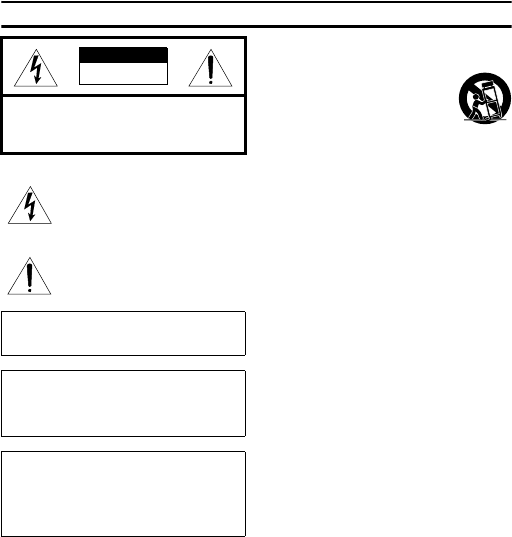
• Explanation of Graphical Symbols
The lightning flash with arrowhead symbol,
within an equilateral triangle, is intended to alert
you to the presence of uninsulated “dangerous
voltage” within the product’s enclosure that may
be of sufficient magnitude to constitute a risk of
electric shock to persons.
The exclamation point within an equilateral
triangle is intended to alert you to the presence of
important operating and maintenance (servicing)
instructions in the literature accompanying the
appliance.
Please read all these instructions regarding your projector and retain
them for future reference. Follow all warnings and instructions
marked on the projector.
1 Read instructions: All the safety and operating instructions
should be read before the appliance is operated.
2 Retain instructions: The safety and operating instructions
should be retained for future reference.
3 Warnings: All warnings on the appliance and in the operating
instructions should be adhered to.
4 Instructions: All operating instructions must be followed.
5 Cleaning: Unplug this projector from the wall outlet before
cleaning it. Do not use liquid aerosol cleaners.
6 Attachments and equipment: Never add any attachments
and/or equipment without the approval of the manufacturer as
such additions may result in the risk of fire, electric shock or
other personal injury.
7 Water and moisture: Do not use this projector near water or
in contact with water.
8 Accessories: Do not place this projector on
an unstable cart, stand, tripod, bracket or
table. Use only with a cart, stand, tripod
bracket, or table recommended by the
manufacturer or sold with the projector. Any
mounting of the appliance should follow the
manufacturer's instructions and should use a
mounting accessory recommended by the manufacturer.
An appliance and cart combination should be moved with care.
Quick stops, excessive force and uneven surfaces may cause the
appliance and cart combination to overturn.
9 Ventilation: Slots and openings in the cabinet are provided for
ventilation, ensuring reliable operation of the projector and to
protect it from overheating. Do not block these openings or
allow them to be blocked by placing the projector on a bed,
sofa, rug, or bookcase. Ensure that there is adequate ventilation
and that the manufacturer's instructions have been adhered to.
10 Power sources: This projector should be operated only from
the type of power source indicated on the marking label. If you
are not sure of the type of power, please consult your appliance
dealer or local power company.
11 Power-cable protection: Power-supply cables should be
routed so that they are not likely to be walked on or pinched by
items placed upon or against them. Pay particular attention to
cords at plugs, convenience receptacles, and points where they
exit from the appliance.
12 Overloading: Do not overload wall outlets and extension
cords as this can result in a fire or electric shock.
13 Objects and liquids: Never push objects of any kind through
openings of this projector as they may touch dangerous voltage
points or short-out parts that could result in a fire or electric
shock. Never spill liquid of any kind on the projector.
14 Servicing: Do not attempt to service this projector yourself.
Refer all servicing to qualified service personnel.
15 Damage requiring service: Unplug this projector from the
wall outlet and refer servicing to qualified service personnel
under the following conditions:
(a) If the power-supply cable or plug is damaged.
(b)If liquid has been spilled, or objects have fallen into the
projector.
(c) If the projector does not operate normally after you follow
the operating instructions. Adjust only those controls that are
covered by the operating instructions. An improper
adjustment of other controls may result in damage and may
often require extensive work by a qualified technician to
restore the projector to its normal operation.
(d)If the projector has been exposed to rain or water.
(e) If the projector has been dropped or the cabinet has been
damaged.
(f) If the projector exhibits a distinct change in performance -
this indicates a need for service.
16 Replacement parts: When replacement parts are required,
be sure that the service technician has used replacement parts
specified by the manufacturer or parts having the same
characteristics as the original part. Unauthorized substitutions
may result in fire, electric shock or other hazards.
17 Safety check: Upon completion of any service or repair to
this projector, ask the service technician to perform safety
checks determining that the projector is in a safe operating
condition.
18 Connection cable: Use the supplied RS-232C and RGB
cables with this equipment to keep interference within the limits
of an FCC/EN55022 Class B device.
CAUTION: TO REDUCE THE RISK OF
ELECTRIC SHOCK, DO NOT REMOVE
COVER (OR BACK). NO USER-SERVICEABLE
PARTS INSIDE. REFER SERVICING TO QUALIFIED
SERVICE PERSONNEL.
WARNING
TO REDUCE THE RISK OF FIRE OR ELECTRIC SHOCK,
DO NOT EXPOSE THIS UNIT TO RAIN OR MOISTURE.
For Canadian customers
To prevent electric shock, match wide blade of plug to
wide slot and fully insert.
This Class B digital apparatus complies with Canadian ICES-
003.
IMPORTANT!
Please record the serial number of this unit in the space below.
Model:
Serial No.:
The serial number is located on the bottom of the unit.
Retain this Owner’s Manual in a safe place for future reference.
CAUTION
RISK OF ELECTRIC SHOCK
DO NOT OPEN


Delta i konversationen om denna produkt
Här kan du dela vad du tycker om Yamaha DPX-530 Projektor. Om du har en fråga, läs först noggrant igenom manualen. Att begära en manual kan göras genom att använda vårt kontaktformulär.