
5 port Ethernet switch Upvel US-5G
8 port Ethernet switch Upvel US-8G
Package contents
• US-5G / US-8G switch
• Power adapter
• Installation guide, warranty cert.
Requirements
• A computer with a network adapter installed
• Cat.5, Cat.5e or Cat.6 network cable
• The surface must support at least 225g for the switch
• The power outlet should be within 1.8m (6 ft) of the switch
• Visually inspect the DC power jack to make sure that it is securely connected to the power
adapter
• Make sure that there is proper heat dissipation from the switch and adequate ventilation
around the switch
• Do not place heavy objects on the switch
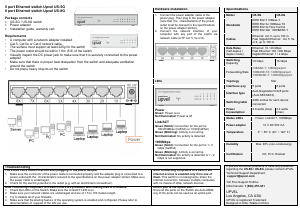
1. Connect the power adapter cable to the
power plug. Then plug in the power adapter
(note that the characteristics of the power
outlet must be relevant to the specifications
on the power adaptor sticker).
2. Connect the
network interface of your
computer with any port of the switch via
network cable (UTP cat. 5, 5e or 6).
Standards
IEEE 802.3u 100Base-TX
IEEE 802.3x Flow Control
Cables
Ethernet: cat. 5, up to 100 m.
Fast /Gigabit Ethernet: cat. 5, 5e
(half-duplex /
Fast Ethernet: 100 / 200 Мbps
Gigabit Ethernet: 1 / 2 Gbps
10 Gbps 16 Gbps
Forwarding Rate
100BASE-TX: 148800pps/port
1000BASE-T: 1488000pps/port
Power
Green: Power is on
Not Illuminated: Power is off
Link/ACT
Green (Solid): Connection for the port is
100/200Mbps (half/full) or 10/20(half/full)
Green (Blinking): Activity is occurring
Not Illuminated: No activity is detected
1000Mbps
Green (Solid): Connection for the port is 1 / 2
Gbps (half/full)
Green (Blinking): Activity is occurring
Not Illuminated: No activity is detected or 1 / 2
Interface type
Auto-Negotiation RJ45 ports
(Auto MDI/MDIX)
Switching table
4000 entries for each device
connected
Power, Link/ACT, 1000Mbps
Power adapter 12 V DC 500 mА
0° ~ 50° C (32° ~ 122° F)
Max. 90% (non-condensing)
If you still encounter problems or have any questions
regarding the US-5G / US-8G, please contact UPVEL
Technical Support Department.
support@upvel.com
Toll Free Support Hotline:
USA/Canada: 1 (800) 457-381
UPVEL
Los Angeles, CA USA
UPVEL is registered Trademark
Designed in USA / Made in China
The status LEDs remain inactive after plugging in the power adapter.
1. Make sure the connector of the power cable is connected properly and the adapter plug is connected to a
power outlet with the
characteristics relevant to the specifications on the power adaptor sticker. Make sure
the power cable is undamaged.
2. Check for the electric potential in the outlet (e.g. with an electrician's screwdriver).
After connecting computers to a switch the
Internet access is enabled only from one of
them. This switch is not designed to share the
Internet connection
between multiple computers
with no means of other network devices.
After connecting computers to a switch there are problems with sharing files in a network.
1. Check the LEDs on the Switch. Make sure the Link/ACT LED is on.
2. Make sure your network cables are undamaged and are of 1.5 to 100 meters length.
3. Try to disable all of your firewalls.
4. Make sure that file sharing feature of the operating system is enabled and configured. Please refer to
documentation of support of the OS you use.
Which port is the Uplink port?
Since all the ports on the Switch are Auto-MDIX,
any of the ports can be used as an uplink port.


Delta i konversationen om denna produkt
Här kan du dela vad du tycker om Upvel US-5G Switch. Om du har en fråga, läs först noggrant igenom manualen. Att begära en manual kan göras genom att använda vårt kontaktformulär.