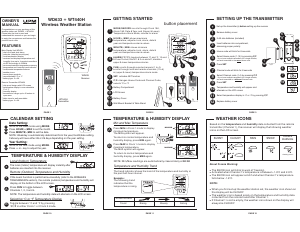
Bruksanvisning UPM WS222 Väderstation

Behöver du en bruksanvisning för din UPM WS222 Väderstation? Nedan kan du se och ladda ner PDF-bruksanvisningen gratis på svenska. Den här produkten har för närvarande 5 vanliga frågor, 0 kommentarer och har 1 röst med ett genomsnittligt produktbetyg på 100/100. Om det här inte är bruksanvisningen du vill ha, vänligen kontakta oss.

Är produkten defekt och erbjuder bruksanvisningen ingen lösning? Gå till ett Repair Café för gratis reparationstjänster.

Bruksanvisning

Loading…

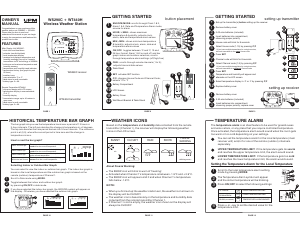
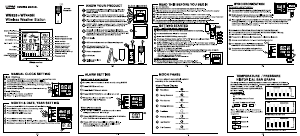
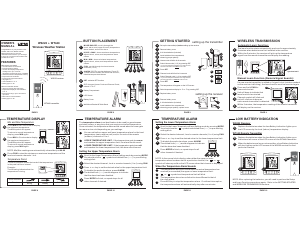
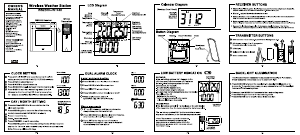
BUTTON PLACEMENT
1
6
7
8
9
2
3
4
5
MIN/-/MIN: shows minimum temperature;
adjusts clock, alarm, and temperature alarm
values
C/F: changes House Code and Channel Code;
selects °C or °F
SET: activates SET function
Battery Compartment
LCD Screen
ALARM /(°C/°F): toggles between °C and °F,
12 and 24 hour format, and alarm ON and OFF;
disables temperature alarms
CHN: scrolls through local and remote
channels (1 to 4);
HOUR/+/MAX: shows maximum temperature;
adjusts clock, alarm, and temperature alarm
values
MODE/SNOOZE: scrolls through the
clock, alarm, and (upper & lower) temperature
alarm modes; snooze for alarm
GETTING STARTED
Remove battery cover
Set up the transmitter(s) setting up the receiverbefore
Remove battery cover
2 AA size batteries (included)
setting up the transmitter
1
*
1
The temperature will appear on the LCD screen
House code will blink for 8 seconds
2
2
3
3
4
5
6
7
8
9
10
Select House code (1-15) by pressing C/F
Press SET
Press SET
Channel code will blink for 8 seconds
Select Channel code (1-4) by pressing C/F
* If you have multiple transmitters for a single receiver,
set each transmitter to the House codesame
* If you have multiple transmitters for a single receiver,
set each transmitter to a Channel codedifferent
Min and Max Temperature
Temperature Trend
WS222 Receiver
WT440 Remote Transmitter
TEMPERATURE DISPLAY
A
B
*
The trend indicator shows the trend of the temperature
in the past half-hour interval.
Example:
The following indicates that the
temperature is rising.
Arrow Indicator
Rising
Steady
Falling
Trend
WS222 + WT440
Wireless Weather Station
OWNER’S
MANUAL
setting up the receiver
Synchronized!!!
1
1
1
2
2
3
4
WIRELESS TRANSMISSION
Automatic Learn Function:
Manual Learn Function (Remote Signal Search):
The learn function starts automatically and runs for approximately
3 minutes when batteries are first installed in the receiver.
Press and hold for
3 seconds to start.
CHN
If a new remote transmitter is added or if signal is lost (outdoor readout
on the receiver is blinking), the learn function must be executed again.
Within the 3 minutes, the receiver will pick up the temperature
signal from the remote transmitter and display the reading.
Unit will beep to indicate that
learn function has started.
Channel symbol will blink and
unit will continue to beep as
each remote transmitter is detected.
1
Within 3 minutes, the temperature reading of the remote transmitter
will display on the receiver.
WS222 receiver
WT440 transmitter
10
Battery Cover
11
Wall Mount Bracket & Table Stand
1
1
SET
C/F
-
AA
1
.5V
+
-
AA
1
.5V
+
5
9
4
7
6
8
10
11
2
Insert batteries into compartment,
observing proper polarity
Insert batteries into compartment,
observing proper polarity; replace cover
Select temperature display in C or F by pressing C/F
°°
Replace battery cover
Congratulations on your purchase of this
weather station set, WS222+WT440.
Please take the time to read and
understand this manual so you can begin
to enjoy the convenience and features this
product has to offer.
Main Display Unit WS222:
* clock and alarm clock function
* local temperature display
* receives and displays temperature
readings from up to 4 remote
transmitters via RF technology of 433MHz
* minimum/maximum temperature memory
* temperature trend indicator
* local/remote temperature alarms
* day/night icon
* user-selectable C or F
* battery type:2xAA
°°
FEATURES
Remote Transmitter WT440:
* drip-proof design with LCD screen
* temperature display in user-selectable
Cor F
* transmission range: up to 40 metres in
open area
* table stand or wall mountable
* battery type:2xAA
°°
SET
C/F
-
AA
1
.5V
+
-
AA
1
.5V
+
11
10
2
11
12
3
1
12
1
1
1
8
9
6
7
Press intheClockmodetodisplay
the minimum temperature
The MIN symbol will appear.
MIN
.
To return to normal temperature
display, press again.MIN
To return to normal temperature
display, press again.MAX
Press inClockmodetodisplay
the maximum temperature.
The MAX symbol will appear.
MAX
NOTE: Min/Max readings are automatically cleared daily at 00:00
Press to view the minimum or maximum temperatures of the
local and remote channels 1 to 4.
CHN
1
1
LOW BATTERY INDICATION
Replace the batteries when the Low Battery Indication lights up on
the LCD screen by the local (indoor) temperature display.
NOTE: After replacing the batteries, you will need to perform the Setup
and Learn Function procedures again. Refer to the GETTING STARTED
and WIRELESS TRANSMISSION sections.
Replace the batteries when the Low Battery Indication lights up on
the bottom-left corner of the LCD screen on the WT440 transmitter.
When the batteries are low on a transmitter, a Low Battery Indication
willalsolightupontheLCDscreenoftheWS222receiverforthat
particular channel.
MINIMUM
MAXIMUM
A
B
B
C
3
4
B
*
A
*
*
2
2
3
3
4
4
1
1
2
1
2
3
*
4
TEMPERATURE ALARM
The is an ideal feature to be used for greenhouses
and wine cellars, or any place that you require controlled temperature.
Once activated, the temperature alarm would sound when the room gets
too warm or too cold depending on your settings.
temperature alarm
You can set both an upper and lower temperature alarm for the local
temperature (main receiver unit) and/or for each of the remote
(outdoor) channels of 1 to 4.
Scroll to the Upper Temperature Alarm Setting mode by pressing .
You should see the symbol and dotted lines ( ) or pre-existing
setting blink.
MODE
---
Select the desired channel, local or remote channels (1 to 4) using .CHN
Press to finish; or rMODE epeat steps for all
other channels if desired.
Press or key to set the desired value for the upper temperature limit.+-
To disable the particular alarm, press .
The dotted lines ( ) would reappear to indicate
that the alarm has been disabled.
ALARM
---
Setting the Upper Temperature Alarm
UPPER TEMPERATURE LIMIT: warmIf the temperature gets too
and reaches the upper temperature limit, the alarm would sound.
LOWER TEMPERATURE LIMIT: coldIf the temperature gets too
and reaches the lower temperature limit, the alarm would sound.
1
2
3
*
4
TEMPERATURE ALARM
Scroll to the Lower Temperature Alarm Setting mode by pressing .
You should see the symbol and dotted lines ( ) or pre-existing
setting blink.
MODE
---
Select the desired channel, local or remote channels (1 to 4) using .CHN
Press to finish; or rMODE epeat steps for all
other channels if desired.
NOTE: In the normal clock display, when either the upper or lower
temperature alarm has been set for a particular channel, the or
symbol will show up solid on the LCD screen when that channel is displayed.
Press or key to set the desired value for the lower temperature limit.+-
To disable the particular alarm, press .
The dotted lines ( ) would reappear to indicate
that the alarm has been disabled.
ALARM
---
Setting the Lower Temperature Alarm
When the Temperature Alarm Sounds
The temperature alarm will sound when the actual temperature has
reached (or exceeded) the upper or lower temperature limit.
The temperature alarm has a distinctive tone different to that of
the clock alarm.
or symbol and temperature limit will blink
Press ANY key to stop the temperature alarm. Or without interruption,
the temperature alarm will automatically stop after one minute.
C
A
1
2
3
5
4
PAGE 1
PAGE 9
PAGE 2 PAGE 3 PAGE 4
PAGE 10 PAGE 11 PAGE 12
1
3
2
Ladda ner bruksanvisning i Engelska (PDF, 0.92 MB)
(Tänk på miljön och skriv endast ut denna bruksanvisning om det verkligen är nödvändigt)

Loading…

Betyg

Berätta vad du tycker om UPM WS222 Väderstation genom att betygsätta den. Vill du dela med dig av dina åsikter om denna produkt eller ställa en fråga? Lämna en kommentar nederst på sidan.
Är du nöjd med UPM WS222 Väderstation?
Ja Nej
100%
0%
1 röst

Delta i konversationen om denna produkt

Här kan du dela vad du tycker om UPM WS222 Väderstation. Om du har en fråga, läs först noggrant igenom manualen. Att begära en manual kan göras genom att använda vårt kontaktformulär.

Mer om denna bruksanvisning

Vi förstår att det är trevligt att ha en pappersbruksanvisning för din UPM WS222 Väderstation. Du kan alltid ladda ner bruksanvisningen från vår hemsida och skriva ut den själv. Om du vill ha en originalbruksanvisning rekommenderar vi att du kontaktar UPM. De kanske kan tillhandahålla en originalbruksanvisning. Letar du efter bruksanvisningen för din UPM WS222 Väderstation på ett annat språk? Välj ditt föredragna språk på vår hemsida och sök efter modellnumret för att se om vi har det tillgängligt.

Specifikationer

Märke UPM
Modell WS222
Kategori Väderstationer
Filtyp PDF
Filstorlek 0.92 MB

Alla bruksanvisningar för UPM Väderstationer
Fler bruksanvisningar för Väderstationer

Vanliga frågor om UPM WS222 Väderstation

Vårt supportteam söker efter användbar produktinformation och svar på vanliga frågor. Om du hittar en felaktighet bland våra vanliga frågor uppskattar vi om du meddelar oss detta via vårt kontaktformulär.

Enligt min väderstation var prognosen att det skulle regna, men det hände inte. Vad beror det på? Verifierad

Väderstationens prognos baseras på lufttrycket. Generellt betyder lågtryck dåligt väder och högtryck bra väder. Det är möjligt att vädermönstret utvecklas annorlunda än vad lufttrycket förutspår.

Detta hjälpte (1468) Läs mer

Vad är den bästa platsen för en väderstation och dess sensorer? Verifierad

Själva väderstationen är placerad inuti och måste hållas borta från värmekällor som kök, fönster eller elektriska apparater. En separat yttemperaturgivare måste placeras i skugga och minst 1,25 m över marken. En regnsensor måste placeras i ett öppet område där det alltid kan samla regn. En vindsensor måste också placeras i ett öppet område med eventuella hinder som påverkar vinden.

Detta hjälpte (394) Läs mer

Min väderstation har en regnmätare, kan den också mäta mängden snöfall? Verifierad

Vissa regnmätare är utrustade med ett värmeelement som gör att snön smälter och låter den mätas. Utan värmeelement tätas regnmätaren och ingen mätning kan utföras.

Detta hjälpte (280) Läs mer

Ett batteri i min enhet är oxiderat, kan jag fortfarande använda det säkert? Verifierad

Ja, enheten kan fortfarande användas säkert. Ta först bort det oxiderade batteriet. Använd aldrig bara händer för att göra detta. Rengör sedan batterifacket med en bomullspinne doppad i ättika eller citronsaft. Låt det torka och sätt i nya batterier.

Detta hjälpte (279) Läs mer

Kan jag lämna ett utbytbart batteri i en enhet under lång tid? Verifierad

Utbytbara batterier kan stanna kvar i en enhet under lång tid om enheten används. När en enhet lagras under lång tid är det lämpligt att ta bort batterierna för att förhindra oxidation.

Detta hjälpte (279) Läs mer
Bruksanvisning UPM WS222 Väderstation

Relaterade produkter

Relaterade kategorier

×
Download