Bruksanvisning Toshiba RAS-H13S3KV-V Luftkonditionering

Behöver du en bruksanvisning för din Toshiba RAS-H13S3KV-V Luftkonditionering? Nedan kan du se och ladda ner PDF-bruksanvisningen gratis på svenska. Den här produkten har för närvarande 8 vanliga frågor, 0 kommentarer och har 0 röster. Om det här inte är bruksanvisningen du vill ha, vänligen kontakta oss.

Är produkten defekt och erbjuder bruksanvisningen ingen lösning? Gå till ett Repair Café för gratis reparationstjänster.

Bruksanvisning

Loading…
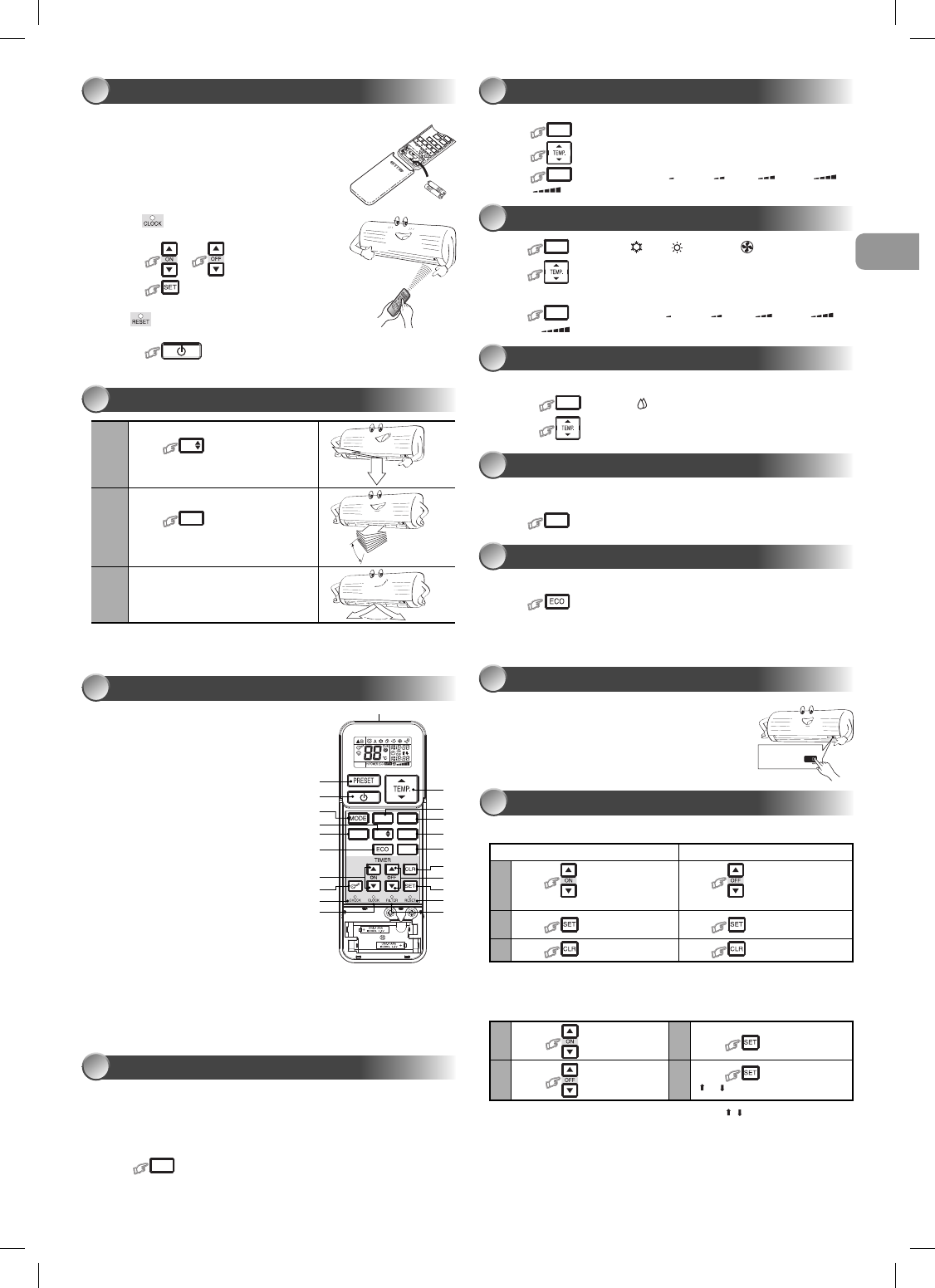
Setting Daily Timer
1
Press
: Set the ON timer.
3
Press
.
2
Press
: Set the OFF timer.
4
Press : button during the
(
or ) mark fl ashing.
• During the daily timer is activating, both arrows ( , ) are indicated.
Note:
• Keep the remote control in accessible transmission to the indoor unit;
otherwise, the time lag of up to 15 minutes will occur.
• The setting will be saved for the next same operation.
Press the “ONE-TOUCH” button for fully automated operation that is customized
to the typical consumer preferences in your region of the world. The customized
settings control temperature air fl ow strength, air fl ow direction and other settings
to provide you alternate contact with “ONE-TOUCH” of the button. If you prefer
other settings you can select from the many other operating functions of your
Toshiba unit.
Press
ONE-TOUCH
: Start the operation.
ONE-TOUCH
5
Preparing Filters
1. Open the air inlet grille and remove the air fi lters.
2. Attach the fi lters. (see detail in the accessory sheet).
Loading Batteries (when use wireless operation.)
1. Remove the slide cover.
2. Insert 2 new batteries (AAA type)
following the (+) and (–) positions.
Clock Setup
1. Push
by tip of the pencil.
If timer indication is fl ashing, go to the next step 2.
2. Press
or : adjust the time.
3. Press
: Set the time.
Remote Control Reset
Push by tip of the pencil or
1. Remove the batteries.
2. Press
.
3. Insert the batteries.
PREPARATION BEFORE USE
2
1
Press
FIX
: Move the louver in the
desired vertical direction.
2
Press
SWING
: Swing the air
automatically and press again to stop.
3
For horizontal direction, adjust manually.
Note:
Do not move the louver manually by others.
The louver may automation positioning by some operation mode.
AIR FLOW DIRECTION
3
Note:
The provided Remote Controller is a wireless type, which also can be used as
a wire. Please see “How to Connect The Remote Controller for Wired
Operation”, located in installation instruction, in case of wired control is required.
In wire operation, remote controller will return to initial condition (PRESET,
TIMER and CLOCK will return to initial condition) when user shutdown power
supply of Air conditioner.
1 Infrared signal emitter
2 Start/Stop button
3 Mode select button (MODE)
4 Temperature button (TEMP)
5 Fan speed button (FAN)
6 Swing louver button (SWING)
7 Set louver button (FIX)
8 On timer button (ON)
9 Off timer button (OFF)
! Setup button (SET)
" Clear button (CLR)
# Memory and Preset button (PRESET)
$ One-Touch button (ONE-TOUCH)
% High power button (Hi-POWER)
& Economy button (ECO)
( Quiet button (QUIET)
) Comfort sleep button (COMFORT SLEEP)
~ Filter reset button (FILTER)
+ Set clock button (CLOCK)
, Check button (CHECK)
- Reset button (RESET)
REMOTE CONTROL
4
SWING
FAN
FIX
QUIET
ONE-TOUCH
COMFORT
SLEEP
Hi POWER
4
5
!
-
"
%
(
8
1
2
$
)
,
&
#
3
+
7
6
~
9
1. Press
MODE
: Select Cool , Heat , or Fan only .
2. Press
: Set the desired temperature.
Cooling: Min. 17°C, Heating: Max. 30°C, Fan Only: No temperature indication
3. Press
FAN
: Select AUTO, LOW , LOW+ , MED , MED+ ,
or HIGH .
COOLING / HEATING / FAN ONLY OPERATION
7
For dehumidifi cation, a moderate cooling performance is controlled automatically.
1. Press
MODE
: Select Dry .
2. Press
: Set the desired temperature.
DRY OPERATION
8
To automatically control room temperature and airfl ow for faster cooling or heating
operation (except in DRY and FAN ONLY mode)
Press
Hi POWER
: Start and stop the operation.
Hi-POWER OPERATION
9
To automatically control room to save energy (except in DRY and FAN ONLY mode)
Press : Start and stop the operation.
Note: Cooling operation; the set temperature will increase automatically 1 degree/
hour for 2 hours (maximum 2 degrees increase). For heating operation the
set temperature will decrease.
ECO OPERATION
10
In case of the misplaced or discharged remote control
Pressing the RESET button, the unit can start or
stop without using the remote control.
Operation mode is set on AUTOMATIC
operation, preset temperature is 24°C
and fan operation is automatic speed.
TEMPORARY OPERATION
11
To automatically select cooling, heating or fan only operation
1. Press
MODE
: Select A.
2. Press
: Set the desired temperature.
3. Press
FAN
: Select AUTO, LOW , LOW+ , MED , MED+ , or
HIGH
.
AUTOMATIC OPERATION
6
Set the timer when the air conditioner is operating.
Setting the ON Timer Setting the OFF Timer
1
Press
: Set the desired
ON timer.
Press
: Set the desired OFF
timer.
2
Press
: Set the timer. Press : Set the timer.
3
Press
: Cancel the timer. Press : Cancel the timer.
Daily timer allows the user to set both the ON & OFF timers and will be
activated on a daily basis.
TIMER OPERATION
12
EN
ES
FR
IT
DE
PT
PL
NL
GR
CR
HU
TR
NL
GR
SV
FI
NO
DK
RO
BG
EE
LV
SK
SI
1110655166_(01_EN).indd 31110655166_(01_EN).indd 3 8/27/15 5:05 PM8/27/15 5:05 PM
Ladda ner bruksanvisning i Engelska (PDF, 6.5 MB)
(Tänk på miljön och skriv endast ut denna bruksanvisning om det verkligen är nödvändigt)

Loading…

Betyg

Berätta vad du tycker om Toshiba RAS-H13S3KV-V Luftkonditionering genom att betygsätta den. Vill du dela med dig av dina åsikter om denna produkt eller ställa en fråga? Lämna en kommentar nederst på sidan.
Är du nöjd med Toshiba RAS-H13S3KV-V Luftkonditionering?
Ja Nej
Bli den första personen som betygsätter denna produkt
0 röster

Delta i konversationen om denna produkt

Här kan du dela vad du tycker om Toshiba RAS-H13S3KV-V Luftkonditionering. Om du har en fråga, läs först noggrant igenom manualen. Att begära en manual kan göras genom att använda vårt kontaktformulär.

Mer om denna bruksanvisning

Vi förstår att det är trevligt att ha en pappersbruksanvisning för din Toshiba RAS-H13S3KV-V Luftkonditionering. Du kan alltid ladda ner bruksanvisningen från vår hemsida och skriva ut den själv. Om du vill ha en originalbruksanvisning rekommenderar vi att du kontaktar Toshiba. De kanske kan tillhandahålla en originalbruksanvisning. Letar du efter bruksanvisningen för din Toshiba RAS-H13S3KV-V Luftkonditionering på ett annat språk? Välj ditt föredragna språk på vår hemsida och sök efter modellnumret för att se om vi har det tillgängligt.

Specifikationer

Märke Toshiba
Modell RAS-H13S3KV-V
Kategori Luftkonditionering
Filtyp PDF
Filstorlek 6.5 MB

Alla bruksanvisningar för Toshiba Luftkonditionering
Fler bruksanvisningar för Luftkonditionering

Vanliga frågor om Toshiba RAS-H13S3KV-V Luftkonditionering

Vårt supportteam söker efter användbar produktinformation och svar på vanliga frågor. Om du hittar en felaktighet bland våra vanliga frågor uppskattar vi om du meddelar oss detta via vårt kontaktformulär.

Hur ofta ska jag rengöra eller byta ut filtren i min luftkonditionering? Verifierad

Det är lämpligt att kolla filtret på din luftkonditioneringsapparat 4 gånger om året. Smutsiga filter kan rengöras med hjälp av en dammsugare eller tvättas, beroende på vilken typ de är. Under underhållet bör en fackman bedöma om det är dags att byta ut filtren.

Detta hjälpte (3038) Läs mer

Vad betyder BTU? Verifierad

BTU står för British Thermal Unit. Denna enhet anger förmågan att kyla.

Detta hjälpte (1164) Läs mer

Fungerar alla luftkonditioneringsapparater också som avfuktare? Verifierad

Den kalla luften som produceras av en luftkonditionering har ofta en relativt låg luftfuktighet. Effekten är dock mindre än vid användning av en verklig avfuktare. Vissa luftkonditioneringsapparater har en speciell funktion för att avfukta luften.

Detta hjälpte (922) Läs mer

Vad är R-410A? Verifierad

R-410A är ett kylmedel som används i apparater som kyler upp till 0 ° C, som kylskåp och luftkonditionering. Det ersätter äldre kylmedel och skadar inte ozonskiktet.

Detta hjälpte (657) Läs mer

Vad är det bästa stället att montera inomhusenheten i en delad luftkonditionering? Verifierad

Detta beror på utrymmet, men i allmänhet kan följande regler följas. Se till att inget hindrar luftflödet. Se till att platsen är tillgänglig för underhåll. Montera enheten minst 2 meter från marken.

Detta hjälpte (465) Läs mer

Har en luftkonditionering en negativ inverkan på luftkvaliteten? Verifierad

Om luftkonditioneringen har underhållits ordentligt kommer det inte att påverka luftkvaliteten. Om t.ex. ett filter inte har bytts ut länge eller annat underhåll inte har utförts, kan en luftkonditionering producera smutsig luft.

Detta hjälpte (453) Läs mer

Kan jag placera min mobila luftkonditionering i ett skåp för att få den ur sikte? Verifierad

Nej, absolut inte. En mobil luftkonditionering behöver utrymme för att tillåta luftflöde och luftintag. I ett litet utrymme kan enheten överhettas.

Detta hjälpte (450) Läs mer

Hur länge kan jag förvänta mig att luftkonditionering från Toshiba ska hålla? Verifierad

Det beror på modell, användning och underhåll men Toshiba anger att deras system under normala förhållanden bör hålla i 12–15 år.

Detta hjälpte (56) Läs mer
Bruksanvisning Toshiba RAS-H13S3KV-V Luftkonditionering

Relaterade produkter

Relaterade kategorier

×
Download