Bruksanvisning Timex TW2T41100LG MK1 Armbandsur

Behöver du en bruksanvisning för din Timex TW2T41100LG MK1 Armbandsur? Nedan kan du se och ladda ner PDF-bruksanvisningen gratis på svenska. Den här produkten har för närvarande 6 vanliga frågor, 0 kommentarer och har 0 röster. Om det här inte är bruksanvisningen du vill ha, vänligen kontakta oss.

Är produkten defekt och erbjuder bruksanvisningen ingen lösning? Gå till ett Repair Café för gratis reparationstjänster.

Bruksanvisning

Loading…
2
ENGLISH 990-095926-05
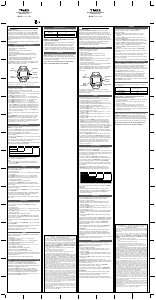
The date function advances the date between the hours of 10 PM and 2
AM. Avoid setting the date during this timeframe. If you attempt to set the
date during this time period, rotate the crown at a very slow rate to avoid
damaging the watch.
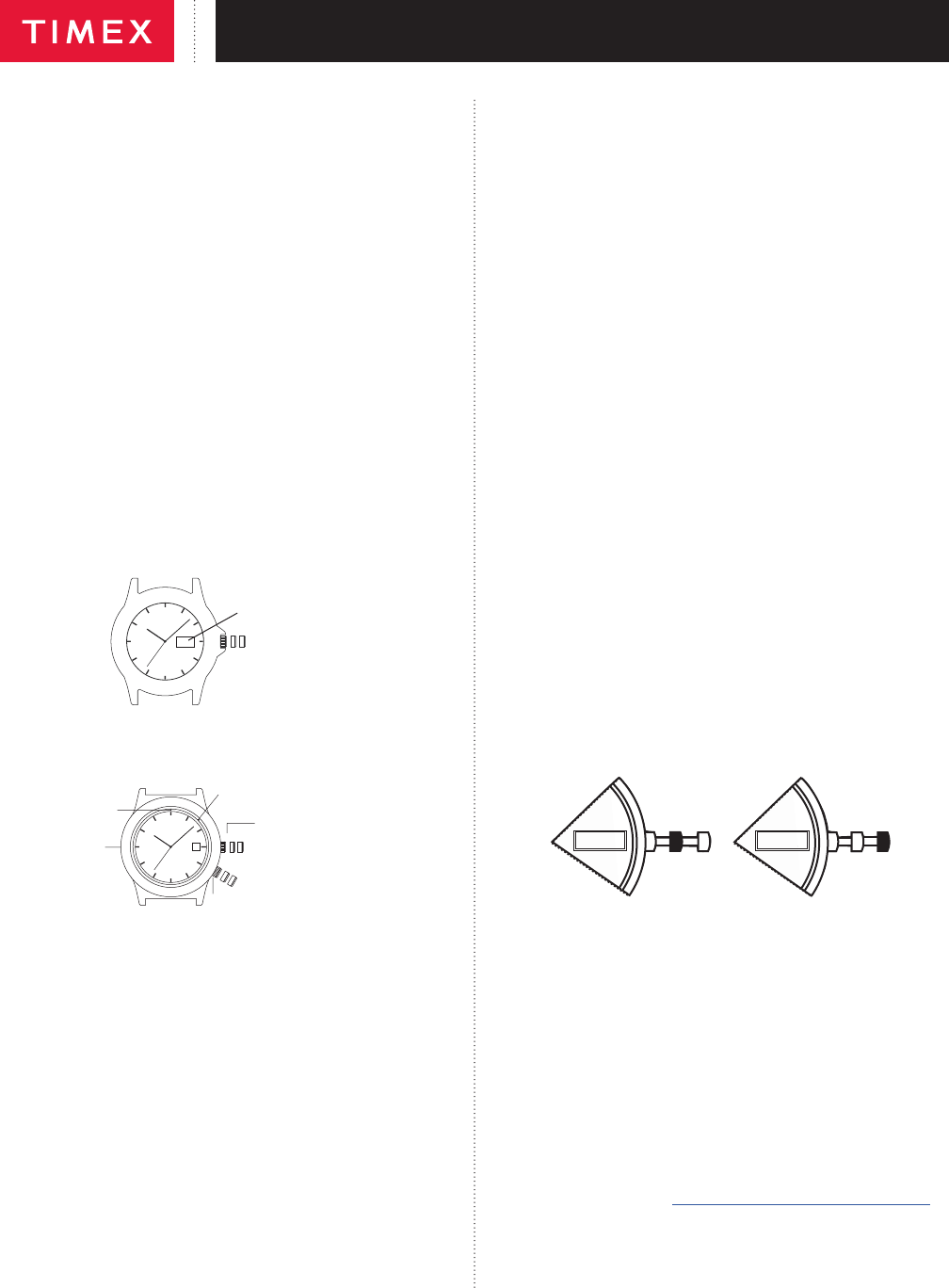
DAY / DATE MODELS
TO SET THE TIME:
1. PULL the crown out to the “C” position.
2. TURN the crown either way to the correct time.
3. PUSH in the crown to the “A” position.
TO SET THE DATE:
1. PULL the crown out to the “B” position.
2. TURN the crown either way to the correct date.
3. PUSH in the crown to the “A” position.
TO SET THE DAY:
1. PULL the crown out to the “C” position.
2. TURN the crown either way for full 24 hour cycle to set day.
3. PUSH the crown in to the “A” position.
TO SET THE BILINGUAL DATE:
If your watch is equipped with a bilingual day display, you may select the
desired language by advancing the day display.
1. PULL the crown out to the “C” position.
2. Repeatedly move the time back to 11pm and forward to 4am until you see
the current day displayed in the desired language.
3. PUSH the crown in to the “A” position.
C
B
A
DATE
CROWN POSITION
EASY SET ALARM
A B C
D E F
MINUTE MARKER
HOUR MARKER
ALARM SET
TURNING RING
ALARM CROWN
PULL CROWN “OUT” TO
ACTIVATE THE ALARM
POSITION
POSITION
TIMEKEEPING/INDIGLO
®
NIGHT-LIGHT
CROWN. PUSH CROWN TO ACTIVATE
THE INDIGLO
®
NIGHT-LIGHT
EASY SET ALARM WITH DATE & INDIGLO
®
NIGHT-LIGHT
1. From the “A” position, PUSH the TIMEKEEPING CROWN in (towards
the watch case) to activate the INDIGLO
®
Night-Light and illuminate the
watch dial.
EASY SET ALARM DATE & TIME SETTINGS
TO SET THE DATE:
1. With the TIMEKEEPING CROWN in the “B” position TURN the
TIMEKEEPING CROWN or TURNING RING in either direction to set the
date.
TO SET THE TIME:
1. With the TIMEKEEPING CROWN in the “C” position TURN the
TIMEKEEPING CROWN or TURNING RING in either direction to set the
time.
EASY SET ALARM SETTINGS
1. Your easy set alarm watch is equipped with two types of alarms:
2. 12-Hour Alarm: rings OR vibrates twice per day at the desired hour and
minute as long as the alarm is activated. (Alarm crown must be in “E”
position.)
3. Hourly Alarm: rings OR vibrates every hour at the desired minute if
activated. (Alarm crown must be in “F” position.)
TO SET THE 12-HOUR ALARM:
1. With the ALARM CROWN in the “D” position, TURN the ALARM CROWN
or TURNING RING in either direction to set the hour and minute alarm
markers. To activate the alarm to ring or vibrate at the desired time, PULL
the ALARM CROWN out to the “E” position. A single beep sound and
ash, OR a vibration will indicate that the 12-Hour Alarm is activated.
2. The alarm will sound and the dial will ash OR vibrate at the desired time
(hour and minute) and will repeat every twelve hours unless the alarm is
deactivated.
NOTE: Alarm is deactivated when the ALARM CROWN is in the “D” position.
If the alarm is not deactivated it will automatically stop ringing after 20 beeps
and ashes OR stop vibrating, and will resume in 12 hours at the indicated
time.
TO SET THE HOURLY ALARM:
1. With the ALARM CROWN in the “D” position, TURN the ALARM CROWN
or TURNING RING in either direction to set the minute alarm marker.
2. To activate the alarm to ring or vibrate at the desired minute, PULL the
ALARM CROWN out to the “F” position. Three beeps sound and ash OR
a vibration indicates the Hourly Alarm is activated.
3. The alarm will sound and the dial will ash OR vibrate at the desired
minute and will repeat every hour on the specied minute unless the
alarm is deactivated.
NOTE: Alarm is deactivated when the ALARM CROWN is in the “D” position.
If the alarm is not deactivated it will automatically stop ringing after 20 beeps
and ashes OR stop vibrating, and will resume again in one hour at the
indicated minute.
PERPETUAL CALENDAR
Your Perpetual Calendar watch accurately keeps track of how many days
are in each month. It also adjusts for leap years. The date on your watch
(including the month and year) was preset at the factory to Eastern Standard
Time, Greenwich Mean Time or Hong Kong Standard Time (depending on
where you purchased your watch). You only need to adjust the time.
I
I
WED 14
I
I
WED 14
CHECK DATE
(FACTORY USE ONLY)
SET TIME
DAY, DATE
MIDDLE OUT
TO SET TIME
To set time, simply pull crown all the way out and turn. Day and date change
automatically when time is adjusted past midnight; there is no additional step
for setting day or date. Push crown in when done.
After setting, if date changes at noon, time needs to be adjusted ahead or
back 12 hours.
If crown is accidentally put in MIDDLE position and turned, date display will
change temporarily, but date setting is unaffected. Simply pull crown all the
way out and set time. Proper date display will resume.
PERPETUAL CALENDAR WATCH
FREE LIFETIME BATTERY REPLACEMENT**
If the battery needs to be changed, we recommend that only TIMEX replace
it. Your watch will need to be recalibrated to correct time and date after
changing the battery. To return your watch to Timex, visit the retailer where you
purchased your watch or go to http://www.timex.com/productWarranty.html
for information on contacting Timex.
** Shipping & handling charges apply.
NEVER INCLUDE A SPECIAL WATCHBAND OR ANY OTHER ARTICLE
OF PERSONAL VALUE IN YOUR SHIPMENT.
Ladda ner bruksanvisning i Engelska (PDF, 4.22 MB)
(Tänk på miljön och skriv endast ut denna bruksanvisning om det verkligen är nödvändigt)

Loading…

Betyg

Berätta vad du tycker om Timex TW2T41100LG MK1 Armbandsur genom att betygsätta den. Vill du dela med dig av dina åsikter om denna produkt eller ställa en fråga? Lämna en kommentar nederst på sidan.
Är du nöjd med Timex TW2T41100LG MK1 Armbandsur?
Ja Nej
Bli den första personen som betygsätter denna produkt
0 röster

Delta i konversationen om denna produkt

Här kan du dela vad du tycker om Timex TW2T41100LG MK1 Armbandsur. Om du har en fråga, läs först noggrant igenom manualen. Att begära en manual kan göras genom att använda vårt kontaktformulär.

Mer om denna bruksanvisning

Vi förstår att det är trevligt att ha en pappersbruksanvisning för din Timex TW2T41100LG MK1 Armbandsur. Du kan alltid ladda ner bruksanvisningen från vår hemsida och skriva ut den själv. Om du vill ha en originalbruksanvisning rekommenderar vi att du kontaktar Timex. De kanske kan tillhandahålla en originalbruksanvisning. Letar du efter bruksanvisningen för din Timex TW2T41100LG MK1 Armbandsur på ett annat språk? Välj ditt föredragna språk på vår hemsida och sök efter modellnumret för att se om vi har det tillgängligt.

Specifikationer

Märke Timex
Modell TW2T41100LG MK1
Kategori Armbandsur
Filtyp PDF
Filstorlek 4.22 MB

Alla bruksanvisningar för Timex Armbandsur
Fler bruksanvisningar för Armbandsur

Vanliga frågor om Timex TW2T41100LG MK1 Armbandsur

Vårt supportteam söker efter användbar produktinformation och svar på vanliga frågor. Om du hittar en felaktighet bland våra vanliga frågor uppskattar vi om du meddelar oss detta via vårt kontaktformulär.

Ett batteri i min enhet är oxiderat, kan jag fortfarande använda det säkert? Verifierad

Ja, enheten kan fortfarande användas säkert. Ta först bort det oxiderade batteriet. Använd aldrig bara händer för att göra detta. Rengör sedan batterifacket med en bomullspinne doppad i ättika eller citronsaft. Låt det torka och sätt i nya batterier.

Detta hjälpte (927) Läs mer

Min mekaniska klocka går för fort. Vad kan jag göra åt det? Verifierad

Det kan bero på att den påverkas av ett magnetfält. Det kan lösas genom en avmagnetiseringsprocess, utförd av en professionell urmakare.

Detta hjälpte (866) Läs mer

Vad betyder AM och PM? Verifierad

AM står för ante meridiem och används för att ange ett klockslag under dygnets första hälft. PM står för post meridiem och används för att ange ett klockslag under dygnets andra hälft.

Detta hjälpte (744) Läs mer

Vad är en kronograf? Verifierad

Kronograf är bokstavligen en ”tidsskrivare”. En kronograf är ett annat ord för klocka med tidtagningsfunktion, tidtagarur eller stoppur.

Detta hjälpte (650) Läs mer

Vad är GMT? Verifierad

GMT står för Greenwich Mean Time (kallas även UTC, vilket står för Coordinated Universal Time). Det är tiden för longitud 0, som passerar genom Greenwich nära London.

Detta hjälpte (490) Läs mer

Vad är en kvartsrörelse? Verifierad

Klockor och klockor med kvartsrörelse drivs av ett batteri. Detta skickar en elektrisk ström genom kvartskristaller som kommer att vibrera. Dessa vibrationer överförs till rörelsen. Eftersom vibrationerna har en fast frekvens är klockor och klockor med kvartsrörelse extremt exakta.

Detta hjälpte (480) Läs mer
Bruksanvisning Timex TW2T41100LG MK1 Armbandsur

Relaterade produkter

Relaterade kategorier

×
Download