ROC4309
00131873
Operating Instructions .......................................................... 01
Mode d‘emploi ....................................................................... 04
Bedienungsanleitung ............................................................. 07
Istruzioni per l‘uso ................................................................. 10
Instrucciones de uso ............................................................. 13
Gebruiksaanwijzing ............................................................... 16
Manual de instruções ............................................................ 19
Οδηγίες χρήσης..................................................................... 22
Руководство по эксплуатации ......................................... 25
Instrukcja obsługi ................................................................... 28
Návod k použití ...................................................................... 31
Használati útmutató .............................................................. 34
Bruksanvisning ....................................................................... 37
Brukerveiledning .................................................................... 40
Brugsanvisning ....................................................................... 43
Pistokelaturi ............................................................................ 46
1
GB
1
3
4
5
7
10
9
9
17
13
15
2
12
16
14
6
8
8
11
Characteristics - Caractéristiques - Eigenschaften - Caratteristiche
Características - Eigenschappen - Características - χαρακτηριστικά
Технические характеристики - Dane techniczne - Technické údaje
Karakterisztika - Data - Karakteristikker - Data - Ominaisuudet
Dimensions - Dimensions - Abmessungen - Dimensioni - Dimensiones
- Afmetingen - Dimensões -
Διαστάσεις - размеры -
Wymiary - Rozměry
- Méret
- Mått - Dimensjoner - Mål - Mitat
= 171 x 49 x 20 mm
Weight = 80 grammes
Poids = 80 grammes
Gewicht = 80 Gramm
Peso = 80 grammi
Peso = 80 gramos
Gewicht = 80 gram
Peso = 80 gramas
Βάρoς = 80 γραμμάρια
вес = 80 грамм
Ciężar = 80 g
Hmotnost = 80 g
Súly = 80 gramm
Vikt = 80 gram
Vekt = 80 gram
Vægt = 80 gram
Paino = 80 grammaa
AAA
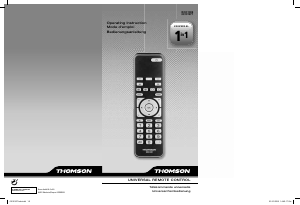
This universal remote control (4 in 1) is compatible with the majority of television sets, DVD
players and video recorders, amplifi ers and Hi-Fi and Home Cinema systems, as well as
digital boxes such as satellite or cable receivers, DVBT receivers (Digital Video Broadcast
Terrestrial), ADSL decoders, and so on.
This remote control was programmed in the factory, so that you can use it to control most
of the sets of the THOMSON group’s make. For this reason, we recommend that prior to
attempting to programme the remote control, you try it out by means of one of the methods
described in this user manual. However, fi rst of all, you must install 2 batteries (AAA) in the
remote control.
Please keep this guide along with the code list (provided separately), so that you can
subsequently programme your remote control for use with other sets.
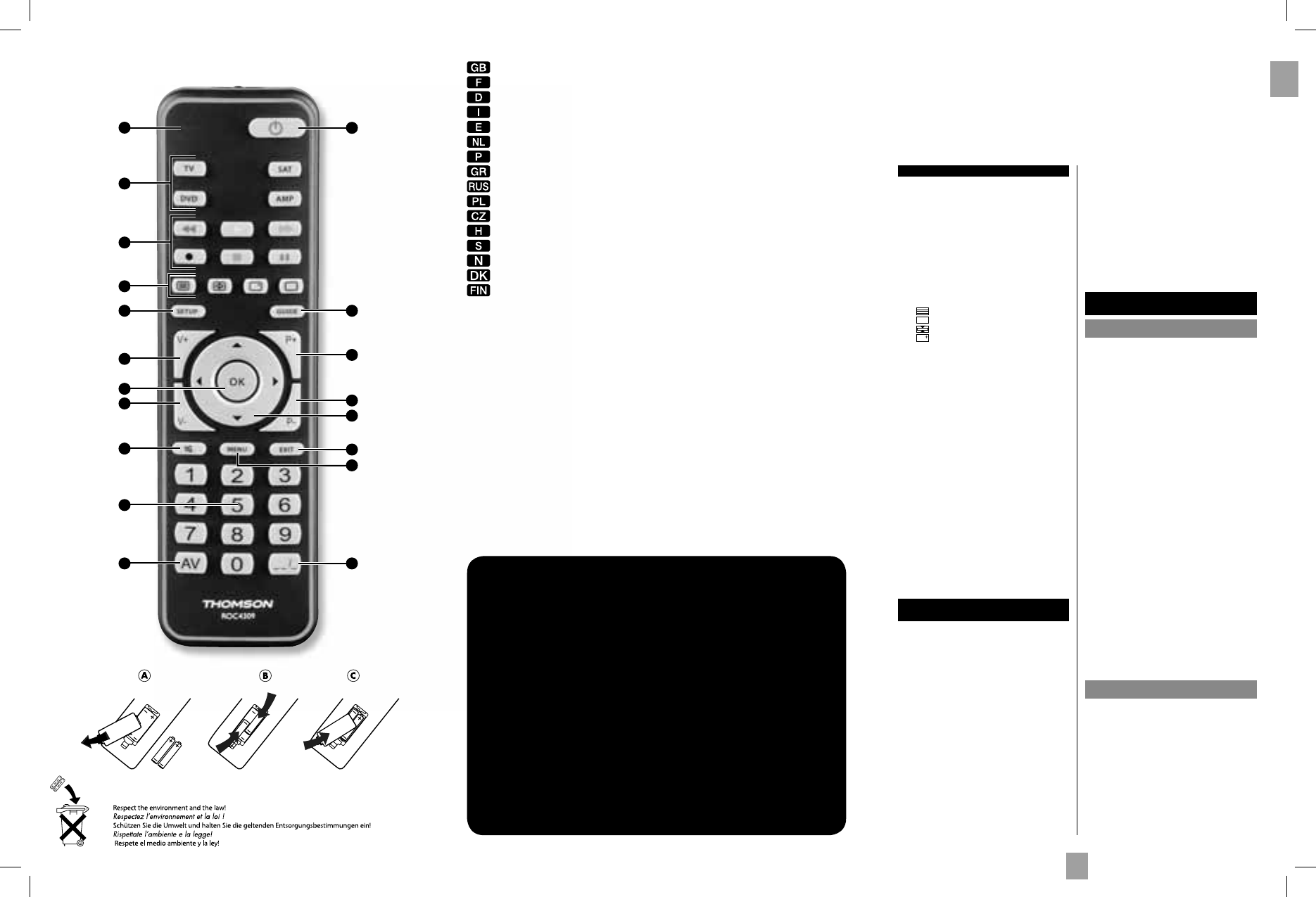
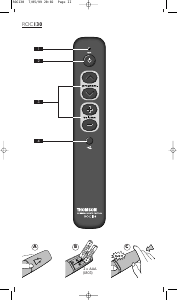
1 Indicator light: The red indicator light is lit
whenever a key is pressed.
2 G : On/Standby or Standby only, depending on
the equipment being used.
3 Mode keys: Select the device to control (TV, DVD,
…).
4. B (play): Play a DVD disc or a VCR tape*.
F (FF): Fast forward (DVD, VCR,...)*.
E (RW): Goes backward (DVD, VCR,...)*.
J (pause): Suspends play and stops on an
image*.
I (record): To record, press the RECORD key
twice.
K (stop): Stop the disc (DVD)*.
5. : Teletext On.
: Teletext Off.
: Teletext Hold (stop page scrolling).
: Displays information of the selected
appliance.
6 Guide: Electronic Program Guide.
7 Setup: Allows you to program your remote
before the fi rst use.
8 P+/P-: Channel Up and Channel Down buttons.
9. V+/V-: Increases (+) or decreases (-) the volume
of the selected device.
10. OK: Confi rms a selection.
11. C/D/A/B: Allow you to navigate the menus
verticaly and horizontaly.
12. Exit: Turn off the menu of the selected product.
13. H (Mute): Switches the selected appliance sound
off.
14. Menu: Turns on the menu of the selected product.
15. Numeric keys 0-9: These keys have the same
functions as those of your original remote and
are also used to enter the code.
16. :--/-: In connection with the numeric keys, this
button allows you, with some equipment, to select
directly channels with 2 digits.
17. AV: For selecting an external source (SCART,
HDMI, ...)..
Note: depending on the actual devices, manufacturers
and year of manufacture, the functions available
will vary.
* The coloured buttons can be used to select categories
when teletext is activated, and specifi c functions
depending on the make.
The keys
Testing the remote control before
you programme it
1. Switch on the set you want to control.
2. Press the key that corresponds to the type of
equipment you want to control:
TV: Television Set,
DVD: DVD Player, Video Recorder,
SAT: Satellite Receiver, Cable Receiver, ADSL Box,
DVBT Receiver, ...
AMP: Amplifi er, CD Player, HiFi System,...
3. Direct the remote control towards the TV set and
try to switch it off by simply pressing the key G. If
the device does not turn off, you must program the
remote control using one of the methods A, B, C or
D described hereafter.
Note 1: Except for the TV key, the DVD, SAT and AMP
mode keys can be programmed to control a device
other than that indicated on the key. It is therefore
possible, for example, to allocate SAT mode to the
DVD key. You must enter the code corresponding to
the manufacturer and the device by using one of the
methods indicated in this manual.
However, method D (automatic search for a code)
will greatly simplify the task for you. In this case it
is only necessary to enter a code from the list that
corresponds to the type of device, for example: 0603
for a Thomson satellite receiver) and then to run the
automatic search procedure. The remote control will
then test all the codes automatically until it fi nds those
that control the receiver.
Note 2: To control 2 devices of the same type and the
same brand (2 Thomson VCRs, 2 Thomson satellite
receivers, ...) ensure fi rst that these two devices are not
set to react to the same sub code, they will require one
sub code for one and a different sub code for the other
(i.e., codes A and B with Thomson devices). Once you
have checked this, successively program 2 separate
mode keys using method D.
Programming
the remote control
Method A – Fast programming
with 1-digit subcode
Before you start programming, you must fi nd the
subcode of the set to be controlled. Entering a subcode
lets the remote control test a predefi ned list of codes.
Refer to the list provided with these instructions, page I
of the subcodes.
1. Switch on the set you want to control.
2. Hold down the SETUP key until the red indicator
light blinks and then remains lit (the indicator light
remains on for a few seconds to give you the time to
proceed with the following steps. The indicator lamp
fl ashes to signal that this time is almost up, and then
goes off). Release the SETUP key.
3. Press the key that corresponds to the type of
equipment you want to control:
TV: television set, DVD: DVD player, Video
recorder, SAT: satellite receiver, cable, DVBT, ADSL
and AMP: audio equipment.
4. While the indicator is lit, type in the subcode
(example: 1 for THOMSON).
5. Direct the remote control towards the set and try to
switch it off by pressing the key G.
6. If the set you want to control switches off, press OK
to memorise the code.
7. Should the set not switch off, press key G repeatedly,
until the set switches off. Between pressing the keys,
be sure to leave enough time for the indicator light to
go out and then relight (about 1 second). Proceeding
this way will enable you to see whether the set
responds or not.
8. Immediately upon the switching-off of the set to be
controlled, press OK to store the code.
Check of the programming:
In principle, your set is ready for receiving the remote
control commands.
Check your remote control for proper functioning by
performing the test described on page 2.
Method B – 4-digit codes
programming
Before you start programming, you must fi nd the code
of the set to be controlled.
Refer to the list provided with these instructions, page
II of the codes.
1. Switch on the set you want to control.
2. Hold down the SETUP key until the red indicator
light blinks and then remains lit (the indicator light
remains on for a few seconds to give you the time to
proceed with the following steps. The indicator lamp
fl ashes to signal that this time is almost up, and then
goes off). Release the SETUP key.
3. Press the key that corresponds to the type of
equipment you want to control:
TV: television set, DVD: DVD player, Video
00131873bda.indd 4-Abs1:100131873bda.indd 4-Abs1:1 02.10.2009 12:17:47 Uhr02.10.2009 12:17:47 Uhr


Delta i konversationen om denna produkt
Här kan du dela vad du tycker om Thomson ROC4309 Fjärrkontroll. Om du har en fråga, läs först noggrant igenom manualen. Att begära en manual kan göras genom att använda vårt kontaktformulär.