Bruksanvisning Sylvania 6615VD LCD TV

Behöver du en bruksanvisning för din Sylvania 6615VD LCD TV? Nedan kan du se och ladda ner PDF-bruksanvisningen gratis på svenska. Den här produkten har för närvarande 13 vanliga frågor, 0 kommentarer och har 0 röster. Om det här inte är bruksanvisningen du vill ha, vänligen kontakta oss.

Är produkten defekt och erbjuder bruksanvisningen ingen lösning? Gå till ett Repair Café för gratis reparationstjänster.

Bruksanvisning

Loading…
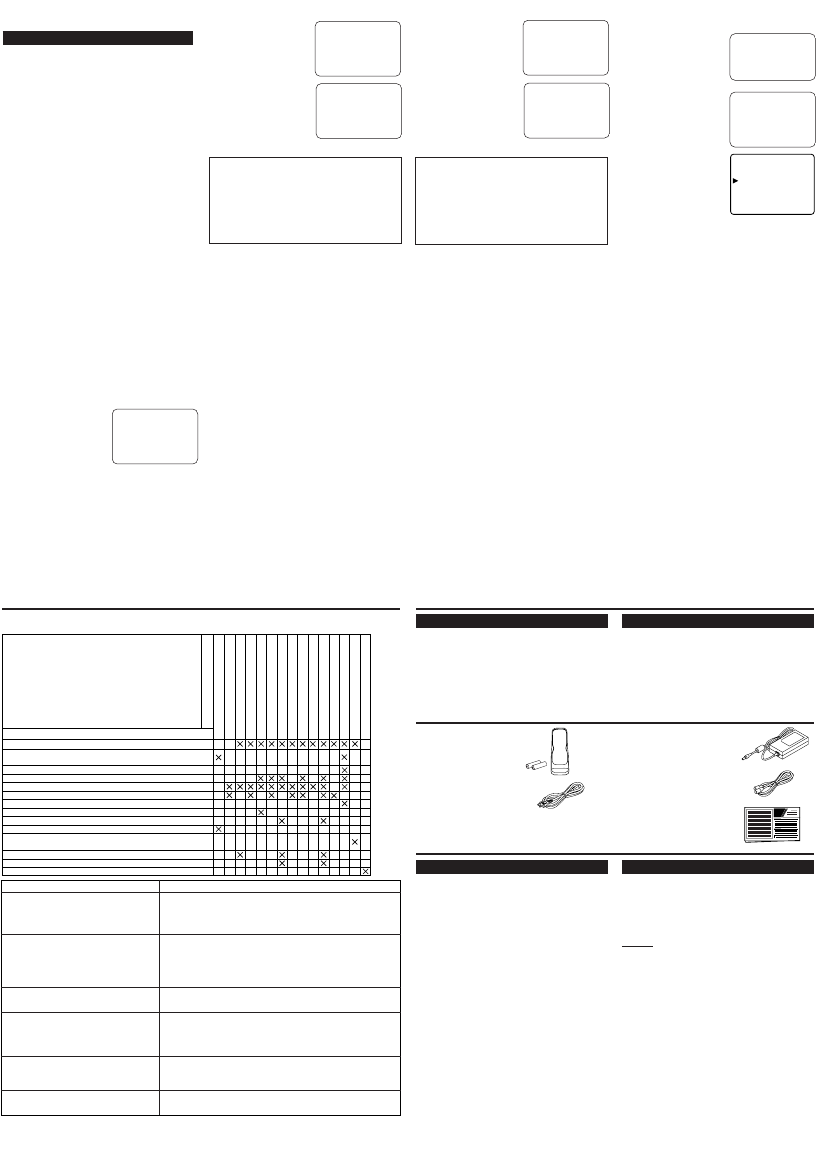
GENERAL SPECIFICATIONS
Television system: NTSC-M
TV Standard
Closed Caption System: §15.119/FCC
Channel coverage
VHF: 2 ~ 13
UHF: 14 ~ 69
CATV: 2 ~ 13, A ~ W,
W+1 ~ W+84,
A-5 ~ A-1, 5A
Tuning System: 181 channel
frequency synthesized
tuning system
Channel access: Direct access keyboard,
programmable
scan and up/down
Terminals
Antenna input: VHF/UHF/CATV
75 ohm unbalanced
(F-type)
S-Video input: Mini DIN 4-pin jack
Video input: RCA connector
Audio input: RCA connector x 4
Component video input:
One pin jack (Y), 1Vpp(75 ohm)
Two pin jacks (P
R)/(PB), 700mVpp(75 ohm)
Headphone: 1/8" monaural(3.5 mm)
Stereo Sound System
2 speakers
2 ways AV input
Sound output: 1W, 8 ohm x 2
OTHER SPECIFICATIONS
Remote control: Digital encoded
infrared light system
Operating temperature: 5°C to 40°C (41°F~104°F)
Power requirements: DC12V
Power consumption(Maximum): 44W(6615VD)
LCD: 15"(6615VD)
6615VD
Dimensions(H x W x D):
With Photo Stand
11"(280.0mm) x 18-1/8"(460mm) x 6-1/4"(159.5mm)
Without Photo Stand
11-13/16"(300.5mm) x 18-1/8"(460mm) x 2-1/8"(53.5mm)
Weight:
With Photo Stand: 8.5lbs. (3.85kg)
Without Photo Stand: 8.2 lbs. (3.7kg)
Designs and specifications are subject to
change without notice and without our
legal obligation.
If there is a discrepancy between languages,
the default language will be English.
Remote control unit (NE122UD)
Batteries ("AA" x 2)
SPECIFICATIONS
MAINTENANCE
SUPPLIED ACCESSORIES
TROUBLESHOOTING GUIDE
Sometimes a performance problem can be easily solved by checking seemingly apparent but often over-
looked possibilities. Before arranging for service, check these items. It could save you time and money.
QUICK SERVICE CHECK LIST
PROBLEM
POSSIBLE REMEDY
Try a new channel, if OK, then possible station trouble.
Is TV plugged in?
Power at outlet?
Is TV’s POWER button on?
Is antenna connected to terminal on the back of the set?
If outside antenna is being used, check for broken wire.
Check for local interference.
Turn off with POWER button and then turn it on after about a minute.
Adjust COLOR control.
Adjust CONTRAST & BRIGHT control.
Check batteries in Remote Control.
Move the TV away from the nearby appliances which have Magnetism.
Turn off using the POWER button, then turn it on again 30 minutes or so later.
Temperature around is too low.
Life of the Back Light is approximately 50,000 hours. Ask the Service Center to replace.
It is quality of the LCD Panel.
Remote Control Doesn’t Work
Bars On Screen
Picture Distorted
Picture Rolls Vertically
No Color
Poor Reception on Some Channels
Weak Picture
Lines or Streaks in Picture
Ghosts in picture
Picture Blurred
Sound OK, Picture Poor
Picture OK, Sound Poor
No Picture or Sound
Different color marks on screen
Black or Luminous point on Screen
Closed Caption Problem Possible Remedy
My TV is showing captions that are
misspelled.
My TV will not show the text in its entirety
or there is a delay of what is being said.
My captions are scrambled with white
boxes on the TV screen.
My program guide listed a TV show as
being closed captioned
but none of the captions were displayed.
My prerecorded videotape does not show
any captions. The tape box mentions it
being closed captioned.
My TV screen shows a black box on certain
channels.
You are watching a live broadcast and spelling errors made by the
closed captioning production company may pass through uncorrect-
ed. A prerecorded program will not show any misspelled words
because of the normal time available for editing the captions.
Captions that are delayed a few seconds behind the actual dialogue
are common for live broadcasts. Most captioning production compa-
nies can display a dialogue to a maximum of 220 words per minute.
If a dialogue exceeds that rate, selective editing is used to insure that
the captions remain up-to-date with the current TV screen dialogue.
Interference caused by building, power lines, thunderstorms, etc.
may cause scrambled or incomplete captions to appear.
Broadcasters may at times use a time compression process to the
actual program so that additional advertising time can be given.
Since the decoder cannot read the compressed information, captions
will be lost.
The videotape was either an illegal copying or the tape duplicating
company accidentally left out the captioning signals during the
copying process.
You are in the TEXT mode. Select CAPTION mode or CAPTION
[OFF].
Owners Manual (0EMN02344)
AC cord (WPV0182HHH01)
AC adapter (UADPDCAXB001)
RF cable (WPZ0152TM013)
CABINET CLEANING
Wipe the front panel and other exterior sur-
faces of the TV with a soft cloth immersed
in lukewarm water and wrung dry.
Never use a solvent or alcohol. Do not spray
insecticide liquid near the TV. Such chemi-
cals may cause damage and discoloration to
the exposed surfaces.
PICTURE SCREEN CLEANING
If the liquid crystal display panel should
require cleaning, wipe it with a cotton or soft
cloth. Before cleaning the picture screen, dis-
connect the power cord.
V-CHIP SET UP
V-CHIP enables parents to prevent their chil-
dren from watching inappropriate material on
TV.
V-CHIP reads the ratings for programming
(except for news and sports programs, unedit-
ed movies on premium cable channels, and
Emergency Broadcast System signals), then
denies access to programming if the program's
rating meets or exceeds the limitations you
select. In this case, "PROTECTED PRO-
GRAM by ..." message appears on the TV
screen.
To block certain ratings, follow the steps
below.
Programming may be rated by the Motion
Picture Association of America (MPAA) or
according to the Television Parental
Guidelines. In order to block any inappro-
priate programming, set your limits in both
places (MPAA RATING and TV RATING).
You cannot access the menu when the
"PROTECTED PROGRAM by ..." message
appears. In this case, change to an
unblocked channel, then press the MENU
button.
[MPAA RATING SET UP]
1) Press the MENU button so that the menu
display appears on the TV screen.
2) Press the CH(annel)
or button to point to
"V-CHIP SET UP".
Then, press the
VOL(ume)
button.
3) Press the CH(annel)
or button to point to
"MPAA RATING".
Then, press the
VOL(ume)
button.
4) Press the CH(annel)
or button to point to
your desired item.
Then, press the
VOL(ume)
button to
select [BLOCK] or [VIEW].
When you select the rating category and
turn it to [BLOCK], the higher rating will
turn [BLOCK] automatically. Also, the
lower rating will turn [VIEW] automatically.
When you turn "G" to [BLOCK] or
[VIEW], the all ratings will turn to
[BLOCK] or [VIEW] automatically.
When you turn "X" to [VIEW], then all rat-
ings will turn to [VIEW] automatically.
5) Press the MENU button to exit the menu.
[TV RATING SET UP]
1) Press the MENU button so that the menu
display appears on the TV screen.
2) Press the CH(annel)
or button to point
to "V-CHIP SET UP".
Then, press the VOL(ume)
button.
PICTURE
CHANNEL SET
[ENG] / ESP / FRA
B V-CHIP SET UP
CAPTION [OFF]
TV SOUND [MAIN]
B G[VIEW]
PG [VIEW]
PG-13 [VIEW]
R[VIEW]
NC-17 [VIEW]
X[VIEW]
<Selection> <Rating Category Explanations>
• G: General Audience
• PG: Parental Guidance suggested.
• PG-13: Unsuitable for children under 13
• R: Restricted; under 17 requires
accompanying
parent or adult guardian
• NC-17: No one under 17 admitted
• X: Mature audience only
3) Press the CH(annel)
or button to point to
"TV RATING". Then,
press the VOL(ume)
button.
4) Press the CH(annel)
or button to point to
your desired item.
Then, press the
VOL(ume)
button to
select [BLOCK] or [VIEW].
When you select the rating category and turn
it to [BLOCK], the higher rating will turn
[BLOCK] automatically. Also, the lower rat-
ing will turn [VIEW] automatically.
When you turn "TV-Y" to [BLOCK] or
[VIEW], then all ratings will turn to
[BLOCK] or [VIEW] automatically.
When you turn "TV-MA" to [VIEW], then
all ratings will turn to [VIEW] automatically.
5) Press the MENU button to exit the menu.
[V-CHIP SET UP SUB RATINGS]
When you select TV-Y7, TV-PG, TV-14, or TV-
MA and you press the VOL(ume)
button, the
sub-ratings will appear on the TV screen.
If you select the rating category (example: TV-
PG) and turn it to [BLOCK] or [VIEW], the
sub-ratings (example: V for Violence) will turn
[BLOCK] or [VIEW] automatically.
You can set the sub-ratings to [BLOCK] or
[VIEW] individually when the rating category
is set to [BLOCK]. To set the sub-ratings indi-
vidually, follow the steps below.
When you select [TV-Y7]:
Press the CH(annel)
or button to select
"FV" (Fantasy
Violence). Then, press
the VOL(ume)
button
to select [BLOCK] or
[VIEW].
When you select [TV-
PG], [TV-14] or [TV-
MA]:
Press the CH(annel)
or button to select
"D" (Suggestive
Dialog), "L"(Coarse
Language), "S"(Sexual
Situation), or "V"
(Violence). Then, press the VOL(ume)
button to select [BLOCK] or [VIEW].
Note: When you select [TV-MA], "D" does
not appear on the TV screen.
The sub-ratings which set to [BLOCK]
appear next to the rating category in the TV
RATING menu.
<Selection> <Rating Category
Explanations>
• TV-Y: Appropriate for all children
• TV-Y7: Appropriate for children seven and
older
• TV-G: General Audience
• TV-PG: Parental Guidance suggested.
• TV-14: Unsuitable for children under 14
• TV-MA: Mature audience only
TV-PG
[BLOCK]
D
[BLOCK]
L
[BLOCK]
S
[BLOCK]
V
[BLOCK]
TV-Y7 [BLOCK]
B FV [BLOCK]
B TV-Y [VIEW]
TV-Y7( ) [VIEW]
TV-G [BLOCK]
TV-PG(DLSV) [BLOCK]
TV-14 (DLSV) [BLOCK]
TV-MA( LSV) [BLOCK]
TV RATING
B MPAA RATING
B TV-Y [VIEW]
TV-Y7( ) [VIEW]
TV-G [VIEW]
TV-PG( ) [VIEW]
TV-14( ) [VIEW]
TV-MA( ) [VIEW]
B TV RATING
MPAA RATING
The LCD panel is manufactured to provide many years of useful life. Occasionally a few non
active pixels may appear as a tiny spec of color. This in not to be considered a defect in the LCD
screen.
Owner’s
Manual
Ladda ner bruksanvisning i Engelska (PDF, 0.7 MB)
(Tänk på miljön och skriv endast ut denna bruksanvisning om det verkligen är nödvändigt)

Loading…

Betyg

Berätta vad du tycker om Sylvania 6615VD LCD TV genom att betygsätta den. Vill du dela med dig av dina åsikter om denna produkt eller ställa en fråga? Lämna en kommentar nederst på sidan.
Är du nöjd med Sylvania 6615VD LCD TV?
Ja Nej
Bli den första personen som betygsätter denna produkt
0 röster

Delta i konversationen om denna produkt

Här kan du dela vad du tycker om Sylvania 6615VD LCD TV. Om du har en fråga, läs först noggrant igenom manualen. Att begära en manual kan göras genom att använda vårt kontaktformulär.

Mer om denna bruksanvisning

Vi förstår att det är trevligt att ha en pappersbruksanvisning för din Sylvania 6615VD LCD TV. Du kan alltid ladda ner bruksanvisningen från vår hemsida och skriva ut den själv. Om du vill ha en originalbruksanvisning rekommenderar vi att du kontaktar Sylvania. De kanske kan tillhandahålla en originalbruksanvisning. Letar du efter bruksanvisningen för din Sylvania 6615VD LCD TV på ett annat språk? Välj ditt föredragna språk på vår hemsida och sök efter modellnumret för att se om vi har det tillgängligt.

Specifikationer

Märke Sylvania
Modell 6615VD
Kategori LCD TV
Filtyp PDF
Filstorlek 0.7 MB

Alla bruksanvisningar för Sylvania LCD TV
Fler bruksanvisningar för LCD TV

Vanliga frågor om Sylvania 6615VD LCD TV

Vårt supportteam söker efter användbar produktinformation och svar på vanliga frågor. Om du hittar en felaktighet bland våra vanliga frågor uppskattar vi om du meddelar oss detta via vårt kontaktformulär.

Hur ansluter jag en universell fjärrkontroll till min TV? Verifierad

För att ansluta din universella fjärrkontroll behöver du modellnummer och varumärke för både fjärrkontrollen och TV: n. Det finns en lista med koder för märken och modellnummer i fjärrkontrollens manual.

Detta hjälpte (2262) Läs mer

Jag vill ansluta en högtalare till min LCD-TV med HDMI, vilken port ska jag använda? Verifierad

Du måste använda HDMI-ARC-porten, som är speciellt gjord för att ansluta ljudutrustning.

Detta hjälpte (1586) Läs mer

Spelar det någon roll till vilken HDMI-port jag ansluter min enhet? Verifierad

I allmänhet kan du ansluta en enhet som en blu-ray-spelare eller spelkonsol till vilken HDMI-port som helst. Enheten kan sedan användas genom att välja motsvarande HDMI-kanal på din TV.

Detta hjälpte (800) Läs mer

Hur mäter jag antal tum på min LCD TV? Verifierad

Mätning av antal tum på din LCD TV görs genom mätning av det diagonala avståndet mellan till exempel det övre vänstra hörnet och skärmens nedre högra hörn (inte kanten). En tum motsvarar 2,54 centimeter, så när du mäter 99 centimeter betyder det att din LCD TV är 39 tum.

Detta hjälpte (545) Läs mer

Fungerar min fjärrkontroll också på andra TV-modeller av samma märke? Verifierad

Ofta fungerar en fjärrkontroll av en TV också på liknande modeller av samma märke. Det är dock ovanligt att det fungerar på alla modeller av det märket. Universella fjärrkontroller är mer lämpade för att göra detta.

Detta hjälpte (341) Läs mer

Vad är det för skillnad mellan LCD och LED? Verifierad

Båda teknikerna använder en LCD-skärm som inte avger något ljus i sig. Skillnaden beror på belysningen bakom skärmen. En LCD-skärm använder sig av CCFL-tekniken (kall katod bakgrundsbelysning) och LED använder sig av LED-lampor.

Detta hjälpte (304) Läs mer

Kan jag reparera en död pixel själv? Verifierad

Det finns en skillnad mellan en död pixel och en fast pixel. En fast pixel är fortfarande färgad och kan fixeras genom att applicera lätt tryck exakt på pixeln tills den återställer sig själv. En död pixel är alltid svart eller vit och kan inte repareras själv.

Detta hjälpte (300) Läs mer

Vad står HDMI för? Verifierad

HDMI står för High-Definition Multimedia Interface. HDMI är en anslutning för att skicka video och ljud av hög kvalitet från en enhet till en annan.

Detta hjälpte (276) Läs mer

Varför finns det bokstäver bredvid siffrorna på fjärrkontrollen? Verifierad

Vissa TV-inställningar kan kräva att du anger bokstäver. Det finns vanligtvis tre bokstäver eller andra tecken på en knapp. När bokstavsinmatning krävs kan du trycka på den knappen en gång för den första bokstaven, trycka två gånger på den andra bokstaven och trycka tre gånger på den tredje bokstaven. På så sätt kan text skrivas med ett minimum antal knappar.

Detta hjälpte (247) Läs mer

Vad är kontrastförhållandet? Verifierad

Kontrastförhållandet visar hur långt den vitaste vita är från den svartaste. Ett kontrastförhållande på exempelvis 400: 1 betyder att den svartaste svart på skärmen är 400 gånger mörkare än den vitaste vita. Ett högt kontrastförhållande bidrar till bildens skärpa.

Detta hjälpte (212) Läs mer

Hur kan jag rengöra min LCD-TV ordentligt? Verifierad

Stäng av tv: n och torka av damm och smuts från skärmen med en mikrofiberduk. Använd inte papper, det kan orsaka repor. Använd inte för mycket tryck annars kan du skada pixlar. Använd ett specialtvättmedel eller gör ett genom att blanda 1 del vinäger med 1 del vatten. Fukta trasan med tvättmedlet och rengör skärmen. Se till att duken inte är för våt. Ta bort fläckar genom att göra roterande rörelser. Torka skärmen med en andra mikrofiberduk för att förhindra ränder.

Detta hjälpte (210) Läs mer

Vilket är det rekommenderade tittaravståndet för en tv? Verifierad

Det beror delvis på din personliga smak, men en tumregel är att ett lämpligt tittaravstånd är cirka 3 gånger tv:ns diagonala skärmyta. För en tv på 60 inch (152 cm) är alltså ett lämpligt avstånd ca 180 inch (4,5 meter).

Detta hjälpte (206) Läs mer

Vad står LCD för? Verifierad

LCD står för Liquid Crystal Display och är en teknik som gör att flytande kristaller polariserar ljus för att generera färger.

Detta hjälpte (205) Läs mer
Bruksanvisning Sylvania 6615VD LCD TV

Relaterade produkter

Relaterade kategorier

×
Download