Bruksanvisning Steren BILL-100 Sedelräknare

Behöver du en bruksanvisning för din Steren BILL-100 Sedelräknare? Nedan kan du se och ladda ner PDF-bruksanvisningen gratis på svenska. Den här produkten har för närvarande 1 vanliga frågor, 0 kommentarer och har 0 röster. Om det här inte är bruksanvisningen du vill ha, vänligen kontakta oss.

Är produkten defekt och erbjuder bruksanvisningen ingen lösning? Gå till ett Repair Café för gratis reparationstjänster.

Bruksanvisning

Loading…
PRECAUCIONES
Bill counter with counterfeit detector
BILL-100
V0.2
0517A
Before using the product, please read the following instructions.
• To ensure proper operation it is advisable to clean the equipment once
a month.
• This appliance is NOT intended for use by persons
Different, unless they are adequately prepared and supervised.
This machine detects counterfeit banknotes by magnetic stripe.
Because Mexican banknotes lack this security element,
The machine will make an error, however, you can count the tickets if you deactivate
Detection by magnetic stripe.
Check the security measures of your country's tickets to avoid
Detection errors.
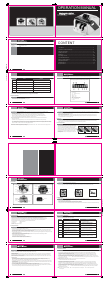
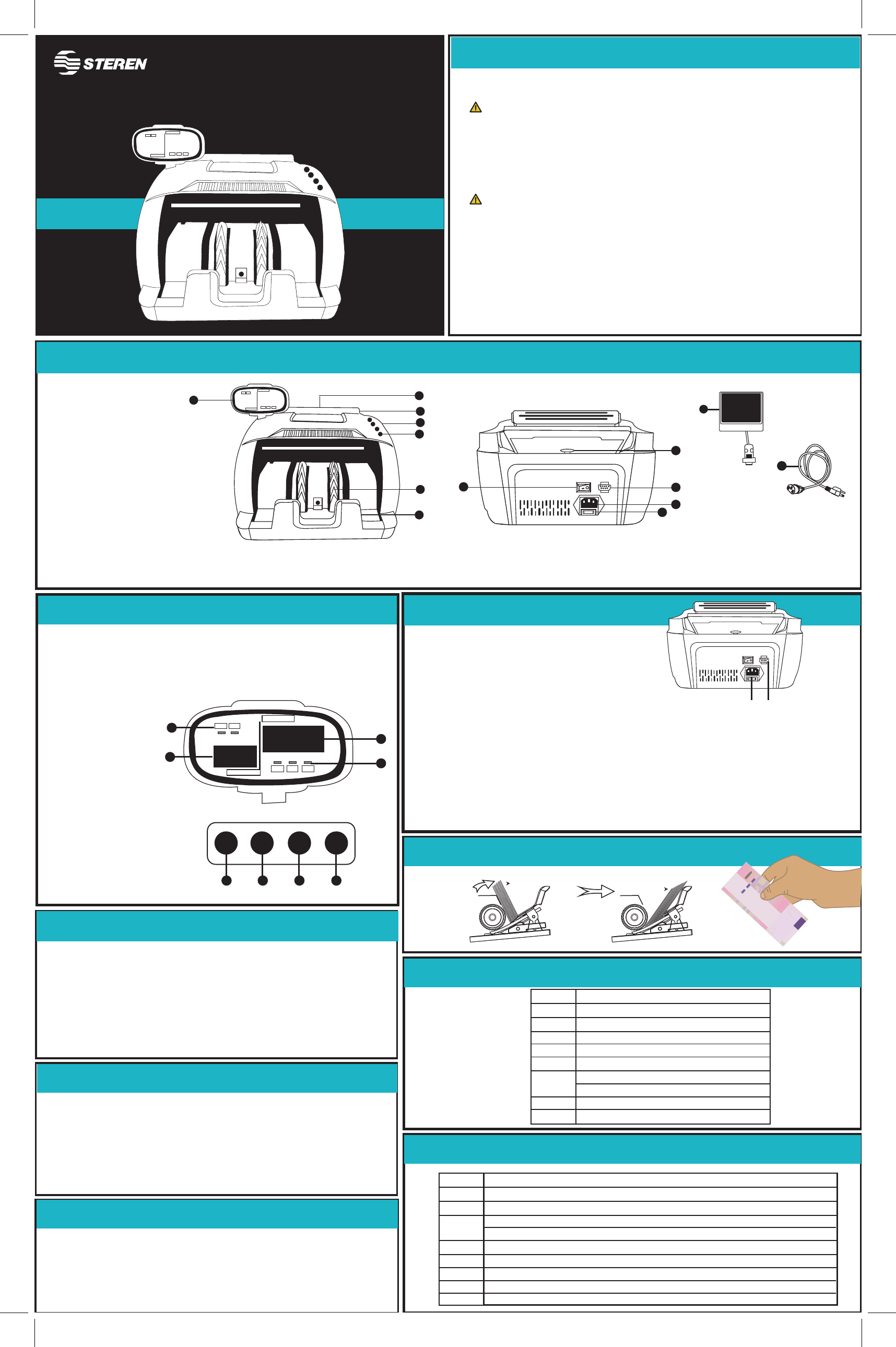
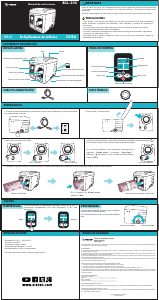
1. Feed Tray
2. Handle
3. Cover
4. Control Panel
5. Screen
6. Stacker lever
7. Stacker
8. Adjusting screw
9. External display port
10. Power socket
11. Fuse
12. Ignition switch
13. External display
14. Power cord
1. Working Mode Indicator
2. Counting screen
3. Batch View / Add
4. Type change button
detection
5. Button to select
6. Add button
7. Clear button
1. Select the type of detection: UV-MG or UV
2. Place the bills in the feed tray.
If a false ticket is detected, the count will stop, the
Will cause an error on the screen. Remove the ticket or press the RST button to resume
the count.
1. Connect the external display to the port.
2. Connect the power cable to the input
And a power outlet.
Turning on and selecting mode
1. Press the switch to turn on the meter. The UV and MG indicators will light on the screen;
Means that the equipment is in detection mode by ultraviolet light (UV) and magnetic stripe (MG)
2. If the tickets have no magnetic stripe, press the FNT button to select only UV detection.
3. Press FNT again to turn off counterfeit detection and use counting mode only.
The UV and MG indicators should be off.
CAUTIONS
IMPORTANT NOTE
MACHINE STRUCTURE
SCREEN AND CONTROL PANEL
ERROR CODES
COUNTING AND DETECTION OF FALSE TICKETS
Proper way to place tickets
1. Select the mode of use: Counting and detection or just counting.
2. Press the PST button, then press ADD to select the number of tickets
Which will contain each group (1, 5, 10, 20, 50 or 100).
3. Place the bills in the feed tray.
4. Remove the bills from the receiving tray to continue with the next grouping.
COUNTING AND BONDING
Input: 110 V~ 60 Hz 40 W
Consumption: < 900 W/h
Stand by consumption: < 3 W/h
Operating temperature: 0 - 40 °C
RH: < 90 % non condensed
BEFORE STARTING
..................
......................
UV MG
TOTAL QUANTITY
PRESET MEMORY
ADD
PRESET ALARM
8
9
10
11
12
..................
......................
UV MG
TOTAL QUANTITY
PRESET MEMORY
ADD
PRESET ALARM
1
2
5
6
7
3
4
13
14
FNT ADDPST RST
4 5 6 7
2
..................
......................
UV MG
TOTAL QUANTITY
PRESET MEMORY
ADD
PRESET ALARM
000
000
1
3
1
Banco de México
A
4
0
0
8
8
6
1
A
4
0
0
8
8
6
1
1
0
0
0
1000
M
ilP
es
o
s
12
Bills
Bills
E01
E02
E03
E04
E05
E10
E11
BF
CauseCode
The left sensor does not work or is dirty.
The right sensor does not work or is dirty.
The code sensor is dirty or loose.
The jump sensor is broken or dirty.
The output sensor is not working or dirty.
Ambient light is too strong
The sensitivity of UV light is too high.
The plastic button does not work.
Wheels that work without bills
ALARM CODES
SPECIFICATIONS
EE1
EE2
EE4
EE5
EE6
EE8
EE9
EEA
CauseCode
A false ticket was detected by UV.
A false ticket was detected by the magnetic stripe.
A broken note was detected.
Counter sensors are not working or dirty.
Two bills are being counted as one.
A ticket with the magnetic stripe was detected at a different location.
The ticket is smaller than 30 mm.
The bill is longer than 75 mm.
Folded notes were detected.
Ladda ner bruksanvisning i Engelska (PDF, 2.63 MB)
(Tänk på miljön och skriv endast ut denna bruksanvisning om det verkligen är nödvändigt)

Loading…

Betyg

Berätta vad du tycker om Steren BILL-100 Sedelräknare genom att betygsätta den. Vill du dela med dig av dina åsikter om denna produkt eller ställa en fråga? Lämna en kommentar nederst på sidan.
Är du nöjd med Steren BILL-100 Sedelräknare?
Ja Nej
Bli den första personen som betygsätter denna produkt
0 röster

Delta i konversationen om denna produkt

Här kan du dela vad du tycker om Steren BILL-100 Sedelräknare. Om du har en fråga, läs först noggrant igenom manualen. Att begära en manual kan göras genom att använda vårt kontaktformulär.

Mer om denna bruksanvisning

Vi förstår att det är trevligt att ha en pappersbruksanvisning för din Steren BILL-100 Sedelräknare. Du kan alltid ladda ner bruksanvisningen från vår hemsida och skriva ut den själv. Om du vill ha en originalbruksanvisning rekommenderar vi att du kontaktar Steren. De kanske kan tillhandahålla en originalbruksanvisning. Letar du efter bruksanvisningen för din Steren BILL-100 Sedelräknare på ett annat språk? Välj ditt föredragna språk på vår hemsida och sök efter modellnumret för att se om vi har det tillgängligt.

Specifikationer

Märke Steren
Modell BILL-100
Kategori Sedlarräknare
Filtyp PDF
Filstorlek 2.63 MB

Alla bruksanvisningar för Steren Sedlarräknare
Fler bruksanvisningar för Sedlarräknare

Vanliga frågor om Steren BILL-100 Sedelräknare

Vårt supportteam söker efter användbar produktinformation och svar på vanliga frågor. Om du hittar en felaktighet bland våra vanliga frågor uppskattar vi om du meddelar oss detta via vårt kontaktformulär.

Kan en sedelräknare bara räkna sedlar? Verifierad

Många sedlar kan också räkna andra pappersvaror av samma storlek, som biljetter och kuponger.

Detta hjälpte (27) Läs mer
Bruksanvisning Steren BILL-100 Sedelräknare

Relaterade produkter

Relaterade kategorier

×
Download