Radio Cassette Corder
WM-GX221
Sony Corporation ©2001 Printed in Malaysia
3-238-369-11(1)
Operating Instructions
English
Preparations
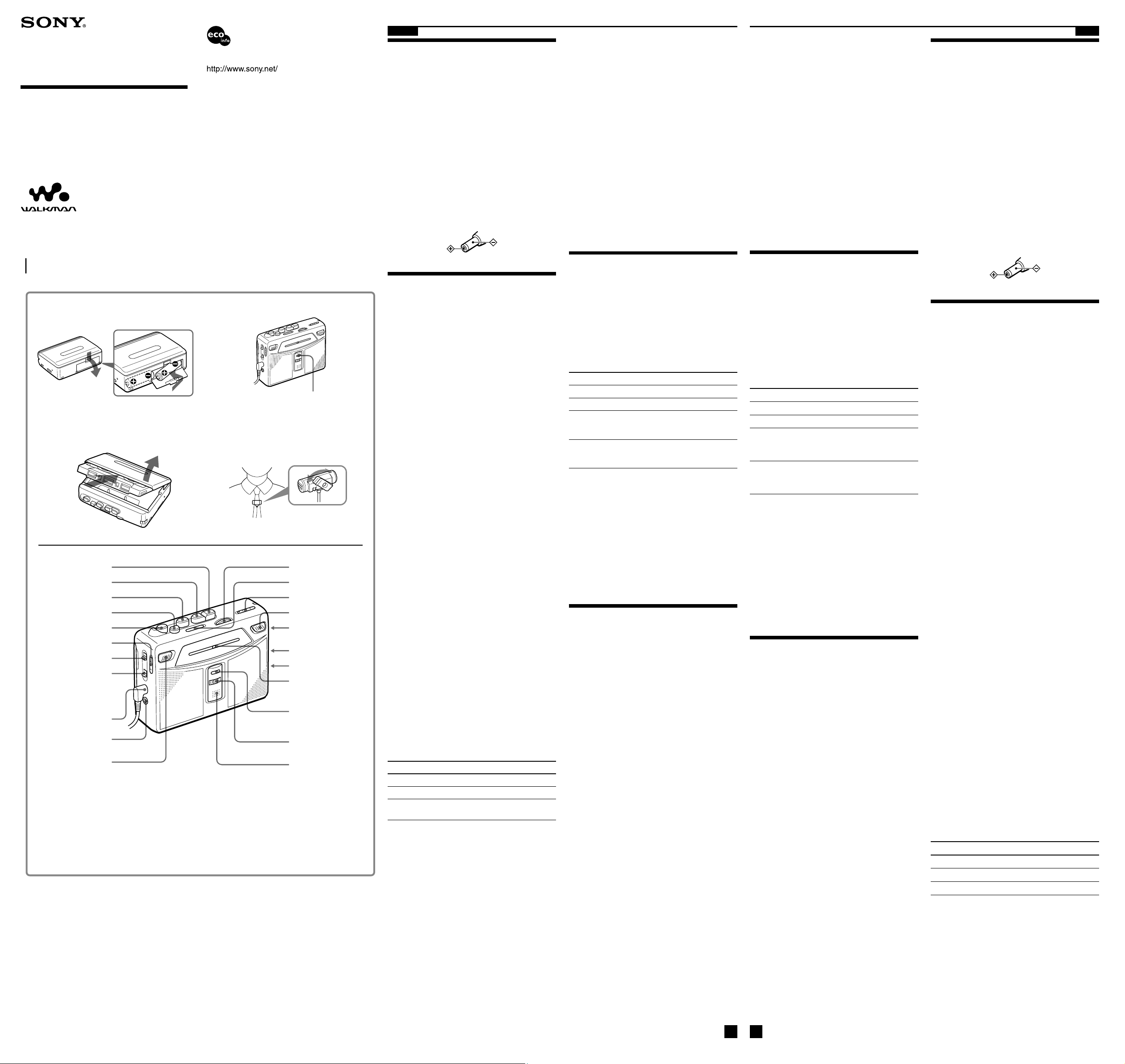
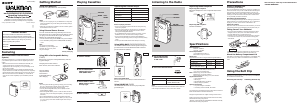
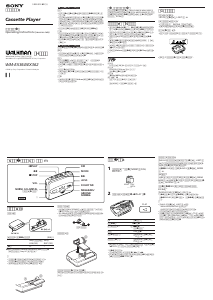
To Insert batteries A
Slide open the battery compartment lid, and insert
two R6 (size AA) dry batteries with correct polarity.
Replace the batteries with new ones when the REC/
BATT indicator dims.
B
Note
•For maximum performance we recommend that you
use Sony alkaline batteries.
To use external power
•Connect the AC power adaptor AC-E30HG (not
supplied) to the DC IN 3V jack and to the wall
outlet. Do not use any other AC power adaptor.
•Specifications for AC-E30HG vary for each area.
Check your local voltage and the shape of plug
before purchasing.
Recording
Notes
•If the record-protect tab is broken, you cannot record
on that side.
•Tapes recorded with the 2x REC TIME switch in the
DOUBLE position cannot be played properly by a tape
recorder without that recording mode function.
• Use new batteries when recording.
•When recording with the microphone, the sound to be
recorded cannot be heard through the speakers.
1 Insert a normal (TYPE I) tape. C
2 Set 2x REC TIME to the desired position.
NORM (4.8 cm/s): for optimum sound.
Recommended for normal recordings.
DOUBLE (2.4 cm/s): for double recording
time (for example, 120 minutes using both
sides of a 60-minute cassette). Suitable for
recording conferences, dictations, etc. Not
recommended to record music.
3 Select a recording source.
To record with the built-in microphone:
1 Place the unit on a hard surface (such as
a desk) with the cassette holder side
down, so that the microphone can
record effectively.
2 Set FUNCTION to TAPE.
To record with the microphone:
1 Connect the supplied microphone to
the MIC (PLUG IN POWER) jack.
2 Set FUNCTION to TAPE.
You can attach the microphone to your
clothes.
D
To record from the radio:
1 Set FUNCTION to RADIO.
2 Tune in to the station you want to
record (see “Listening to the Radio”).
4 Press z REC.
N PLAY is pressed simultaneously and
recording starts. The recording level is
automatically adjusted.
Note
•To record FM radio programs, connect the
headphones/earphones since its cord serves as an FM
antenna.
To Press/switch
Pause a recording PAUSE
Stop recording x STOP
Start recording during z REC during
playback playback
To reduce noise while recording AM
programs
Set the ISS (Interference Suppress Switch) to the
position that reduces noise the most.
BA
CD
PAUSE
z REC
FUNCTION (TAPE/RADIO)
NORM/CrO
2
/METAL•
FM ST/MONO
) (or/
DX/LOCAL
ISS
Built-in microphone
DC IN 3V
SPEAKER/i
i
x STOP
N PLAY**
VOL*
BAND (FM/AM)
SOUND BOOST (OFF/ON)
TUNING
REC/BATT indicator
REC/BATT
Tuning indicator
MIC (PLUG IN POWER)**
2x REC TIME
(NORM/DOUBLE)
R6(AA) × 2
AVLS (NORM/LIMIT)
m REW/REVIEW
M FF/CUE
REC/BATT indicator
REC/BATT
Printed using VOC (Volatile Organic Compound)-free
vegetable oil based ink.
“WALKMAN” is a trademark of Sony Corporation.
A
,
R6 AA
REC/BATTB
•
,
• AC-E30HG
DC IN 3 V
• AC-E30HG
•
• 2X REC TIME
DOUBLE
•
• ,
TYPE I C
2x REC TIME
NORM
:
DOUBLE:
,
,
:
1
,
2 FUNCTION TAPE
:
1 MIC
(PLUG IN POWER)
2
FUNCTION
TAPE
D
1 FUNCTION RADIO
2
z REC
N PLAY
• FM ,
FM
PAUSE
x STOP
z REC
AM
ISS
Polarity of the
plug
* There is a tactile dot beside VOL on the main unit to show the direction to turn
up the volume.
**The button/jack has a tactile dot.
*
VOL
**
Notes on recording
•The recording level is fixed.
•Actual recording will start about 2 seconds after you
press z REC. Press z REC about 2 seconds before the
moment you want to start recording, or you will miss
the beginning of your recording.
•Do not use a high-position (TYPE II) or metal (TYPE
IV) tape. If you do, the sound may be distorted when
you play back the tape, or the previous recording may
not be erased completely.
•Do not connect or disconnect the headphones/
earphones to/from the i jack while recording from
the radio. The recording condition may change
abruptly, or noise may be recorded.
•When recording with the microphone, do not place it
near a lamp cord or a fluorescent lamp as this may
cause interference noise.
•No other operation can be done while recording. For
other operations, stop recording first.
To prevent a tape from being accidentally
recorded over
Break off the tabs from side A and/or B. To reuse the
tape for recording, cover the tab hole with adhesive
tape.
Playing a Tape
1 Set FUNCTION to TAPE.
2 Set NORM/CrO
2
/METAL to match the tape
type.
3 Set 2x REC TIME to the same position as
that used for recording. (To playback
commercially sold tapes, select NORM.)
4 Insert a cassette.
C
5 Press N PLAY.
To Press/switch
Stop playback x STOP
Pause playback PAUSE
Fast-forward or rewind* M FF/CUE or m
REW/REVIEW during
stop
Fast-forward/rewind while M FF/CUE or m
monitoring the sound REW/REVIEW during
playback
* If you leave the unit after the tape has been
wound or rewound, the batteries will be
consumed rapidly. Be sure to press x STOP.
Note
•Do not open the cassette holder while the tape is
running.
To use the speakers
Slide SPEAKER/i to SPEAKER. The sound will
play from the speakers and no sound is heard from
the headphones/earphones.
When the speakers are in use, the AVLS function
will not operate.
Other functions
To listen with powerful sound
Set the SOUND BOOST to ON to obtain the Sound
Boost effect which emphasizes both treble and bass.
Protecting Your Hearing
—AVLS (Automatic Volume Limiter
System)
(Only when using headphones/earphones)
Set AVLS to LIMIT. The maximum volume is kept
down to protect your ears.
(turn over)
•
• z REC
z REC
• (TYPE
II) (TYPE IV) ,
• i
• ,
•
,
A B
,
FUNCTION TAPE
NORM/CrO
2
/METAL
2x REC TIME
,
NORM
C
N PLAY
x STOP
PAUSE
*M FF/CUE
m REW/REVIEW
M FF/CUE
m REW/REVIEW
* , x STOP
,
•
SPEAKER/i SPEAKER
AVLS
SOUND BOOST ON
AVLS—
AVLS LIMIT


Delta i konversationen om denna produkt
Här kan du dela vad du tycker om Sony WM-GX221 Walkman Kassettbandspelare. Om du har en fråga, läs först noggrant igenom manualen. Att begära en manual kan göras genom att använda vårt kontaktformulär.