
Troubleshooting
If your Walkman does not function as expected, try the following steps to
resolve the issue.
1 Find the symptoms of the issue in “Troubleshooting”
in the Help Guide (HTML document), and try any
corrective actions listed.
For details on troubleshooting, see the tables on the right too.
2 Connect your Walkman to your computer to charge
the battery.
You may be able to resolve some issues by charging the battery.
3 Press the RESET button with a
pen or paper clip, etc.
When you reset your Walkman, please
make sure of the following.
Your Walkman is not connected to your
computer.
Your Walkman is not playing back music.
4 Check information on the issue in
the Help of each software.
RESET
button
5 Look up information on the issue on one of the
customer support Web sites.
About the customer support Web sites, see “For the latest
information”.
6 If the approaches listed above fail to resolve the
issue, consult your nearest Sony dealer.
Symptom Cause/Remedy
Your Walkman cannot
charge the battery.
The USB cable is not connected to a USB
connector on your computer properly.
Disconnect the USB cable, and then
reconnect it.
Use the supplied USB cable.
The battery is charged in an ambient
temperature out of the range of 5 °C (41 °F) to
35 °C (95 °F).
Charge the battery in an ambient
temperature of 5 °C (41 °F) to 35 °C (95 °F).
The computer is not on.
Turn on the computer.
Your computer has entered Sleep or
Hibernation status.
Release the computer from Sleep or
Hibernation status.
A USB hub is being used.
Connecting your Walkman via a USB hub
may not work. Connect the Walkman directly
to your computer using the USB cable
(supplied).
The operating system installed on the
computer is not supported by your Walkman.
To charge the Walkman, connect the
Walkman to a computer with the operating
system that is supported by the Walkman.
Symptom Cause/Remedy
The computer does
not recognize your
Walkman.
Your Walkman is not connected to your
computer properly using the USB cable
(supplied).
Disconnect the USB cable, and then reconnect
it properly and firmly both to your Walkman
and your computer.
The remaining battery power is low or
insufficient.
Recharge the battery. When you use your
Walkman for the first time, or if you have not
used the Walkman for a long time, it may
take a few minutes to be recognized by the
computer, even if charging has already
started (the OPR lamp lights up in orange).
Check that the computer recognizes the
Walkman after you have connected it to the
computer for about 10 minutes.
The computer is running another software
other than that used for transferring.
Disconnect the USB cable (supplied), wait for
a few minutes, and reconnect it. If the
problem persists, disconnect the USB cable
(supplied), restart the computer, and then
reconnect the USB cable (supplied).
During playback of a
song, the next song is
suddenly started.
Your Walkman may perform ZAPPIN playback.
For details, refer to the Help Guide.
Precautions
Information on laws and trademarks
For information on laws, regulations and trademark rights, refer to “Important
Information” contained in the supplied software. To read it, install the supplied
software on your computer.
About the headphones
Avoid playing the unit at so loud a volume that extended play might affect
your hearing.
At a high volume outside sounds may become inaudible. Avoid listening to
the unit in situations where hearing must not be impaired, for example, while
driving or cycling.
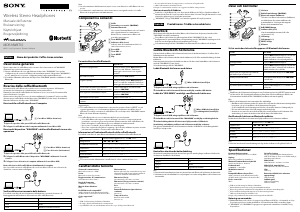
How to Turn the Power On and Wear
Your Walkman on Your Ears
1 Check the left () and right () sides of your
Walkman.
2 Slide the POWER switch on the left () side to ON to
turn on your Walkman.
Also make sure that the OUTPUT switch on the left () side is set to
(headphones).
3 Wear your Walkman on your ears.
Adjust the slider so that the headphones fit your ears properly.
Wearing Your Walkman around Your
Neck
Wear your Walkman around your neck and listen to music out loud from
the speakers.
1 Slide the POWER switch to ON and the OUTPUT switch
to (built-in speakers) on the left () side of your
Walkman.
2 Wear your Walkman around your neck with its right
and left sides correctly placed and with the speakers
() facing upwards.
Adjust the slider so that the speakers are in the best position.
Playing Music
Playing songs
Press the button (jog lever) on the right () side.
To pause playback
Press the button (jog lever) on the right () side.
Skipping to the previous/next song
Slide the button (jog lever) to (previous) or (next) direction.
Adjusting the volume
Press VOLUME +/– button on the right () side.
Listening to the Sound from Other
Players
You can listen to music from a smart phone or another player by
connecting it to your Walkman using the headphones cable (supplied).
Note
When used this way, this Walkman works only as headphones, so you cannot
operate player functions on your Walkman. Operate playback functions using
the player.
Sound will not be emitted from the speakers of your Walkman when you are
listening to music from another player connected to your Walkman.
1 Slide the POWER switch on the left () side of your
Walkman to OFF/HEADPHONES.
2 Connect the headphones cable (supplied) to the
HEADPHONES jack on the left () side.
3 Connect the other end of the cable to the player.
4 Wear your Walkman on your ears.
Headphones cable
(supplied)
As the supplied headphones are of open-air design, sounds go out through
the headphones. Remember not to disturb those close to you.
About the in-ear headphones
The earbuds seal your ears. Therefore, be aware that there is a risk of
damage to your ears or eardrums if strong pressure is applied to the
earbuds, or the earbuds are suddenly removed from your ears. After use,
be sure to take the earbuds off your ears gently.
About the earpads
Optional earpads for replacement can be ordered from your nearest Sony
dealer. For replacement procedures, please refer to the Help Guide.
For the latest information
If you have any questions or issues with this product, or would like
information on items compatible with this product, visit the following web
sites.
For customers in the USA:
http://www.sony.com/walkmansupport
For customers in Canada:
http://www.sony.ca/ElectronicsSupport/
For customers in Latin America:
http://www.sony-latin.com/index.crp
For customers in Europe:
http://support.sony-europe.com/dna/wm/
For customers in Asia, Oceania, and Africa:
English: http://www.sony-asia.com/support
Korean: http://scs.sony.co.kr/walkman/
Simplified Chinese: http://service.sony.com.cn/KB/
Traditional Chinese: http://service.sony.com.tw/
For customers who purchased overseas models:
http://www.sony.co.jp/overseas/support/
5 Start playing back on your player.




Delta i konversationen om denna produkt
Här kan du dela vad du tycker om Sony NWZ-WH505 Walkman Mp3 spelare. Om du har en fråga, läs först noggrant igenom manualen. Att begära en manual kan göras genom att använda vårt kontaktformulär.