Compact Disc
Compact Player
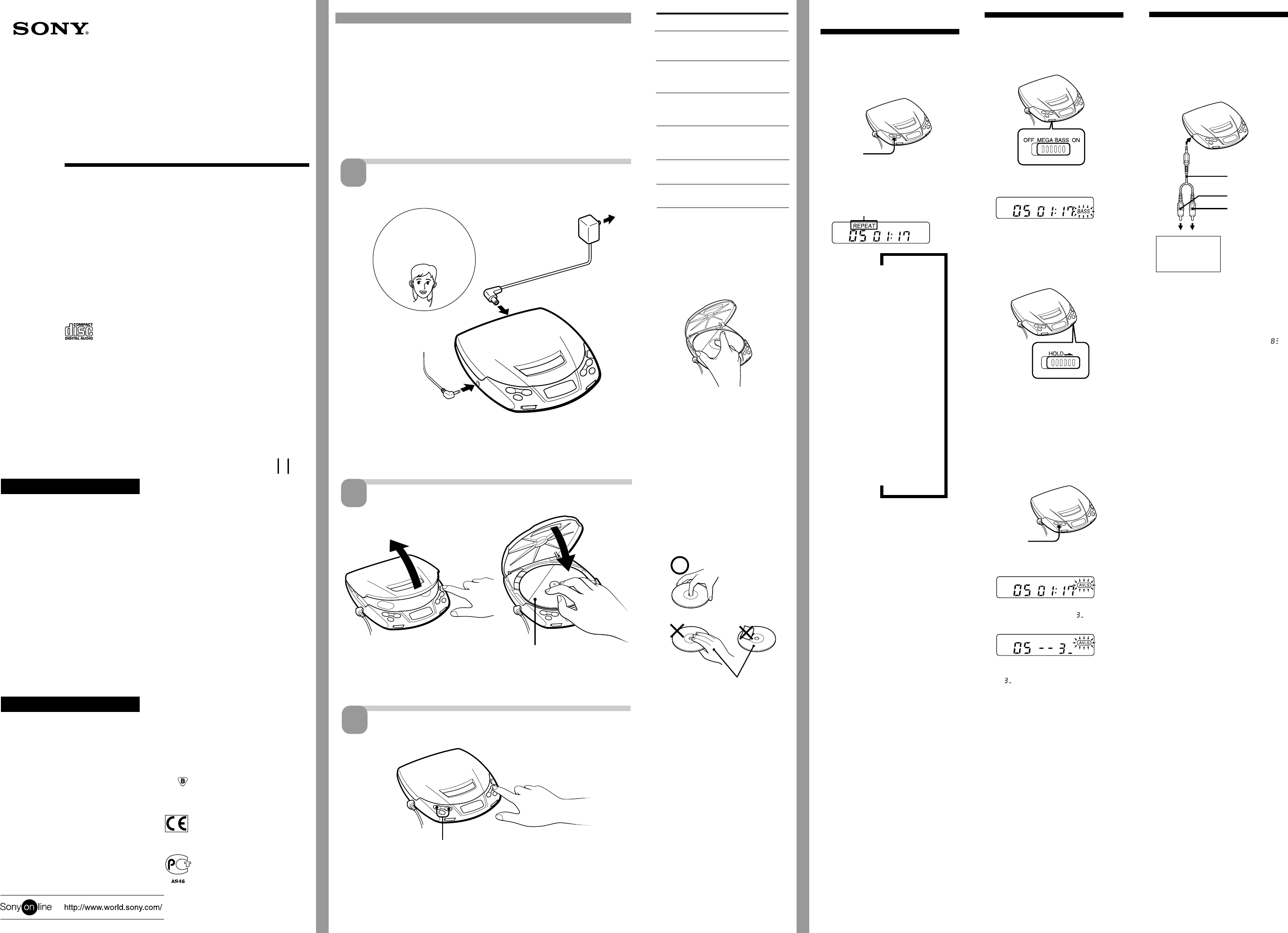
Playing a CD right
away!
If you want to play a CD right now, choose to use your player on house
current. Other choices are the following two: dry batteries (see “Power
Sources” on the reverse side) and car battery.
Connect
Sony Corporation ©1999 Printed in China
1
For the customers in the USA
This equipment has been tested and found to
comply with the limits for a Class B digital
device, pursuant to Part 15 of the FCC Rules.
These limits are designed to provide reasonable
protection against harmful interference in a
residential installation. This equipment
generates, uses, and can radiate radio frequency
energy and, if not installed and used in
accordance with the instructions, may cause
harmful interference to radio communications.
However, there is no guarantee that interference
will not occur in a particular installation. If this
equipment does cause harmful interference to
radio or television reception, which can be
determined by turning the equipment off and on,
the user is encouraged to try to correct the
interference by one or more of the following
measures:
- Reorient or relocate the receiving antenna.
- Increase the separation between the equipment
and receiver.
- Connect the equipment into an outlet on a
circuit different from that to which the receiver
is connected.
- Consult the dealer or an experienced radio/TV
technician for help.
You are cautioned that any changes or
modifications not expressly approved in this
manual could void your authority to operate this
equipment.
For the customers in Australia
The supply cord of the AC power adaptor cannot
be replaced; if the cord is damaged, the AC
power adaptor should be discarded.
For the customers not in Poland
The mark on the unit is valid only for
products marketed in Poland.
For the customers not in Europe
The CE mark on the unit is valid
only for products marketed in the
European Union.
For the customers not in Russia
This mark on the unit and package
is valid only for products marketed
in Russia.
to a wall
outlet
AC power adaptor
DC IN 4.5 V
1Press OPEN to open the lid.
OPEN
Welcome!
Thank you for purchasing the Sony
Compact Disc Compact Player.
Before operating your player, please
read this manual and retain it for
future reference.
About this manual
The instructions in this manual are for the
D-190, D-191, D-191SR and D-192CK. Before
you start reading, check your model number.
D-191 is the model used for illustration
purposes.
Owner’s Record
The model and the serial numbers are located at
the bottom. Record these numbers in the spaces
provided below. Refer to them whenever you
call upon your Sony dealer regarding this
product.
Model No. __________ Serial No.__________
WARNING
To prevent fire or shock
hazard, do not expose
the unit to rain or
moisture.
To avoid electrical
shock, do not open the
cabinet. Refer servicing
to qualified personnel
only.
CAUTION
The use of optical instruments with this product
will increase eye hazard.
PHONES
For models supplied with the AC plug adaptor
If the AC power adaptor does not fit the wall outlet, use the AC plug adaptor.
1 Press (.
2 Adjust the volume.
Operating Instructions
About area code
The area code of the player you purchased is shown on upper left of the bar
code label on the package.
For accessories supplied with your player, check the area code of your model
and refer to “Supplied accessories” toward the end of this manual.
3-865-748-22 (1)
D-190
D-191
D-191SR
D-192CK
Using other functions
To enjoy more powerful bass sound
(Sound function)
You can enjoy a powerful bass-boosted sound.
Set MEGA BASS to ON.
“BASS” appears in the display.
Note
• If the sound is distorted when emphasizing
bass, turn down the volume.
To lock the buttons
You can lock your player against any
accidental operations.
Slide HOLD in the direction of the arrow.
When you press any button, “Hold” appears
in the display and you cannot operate the
player.
To unlock, slide HOLD back.
To protect your hearing (AVLS)
The AVLS (Automatic Volume Limiter
System) function keeps down the maximum
volume to protect your ears.
Hold down MENU until “AVLS” appears in
the display.
If you turn up the volume to “ ”, you
cannot turn up the volume any more.
If you want to turn up the volume to more
than “ ”, hold down MENU until “AVLS”
disappears from the display.
Note
• If you use the sound function and the AVLS
function at the same time, sound may be
distorted. If this happens, turn down the
volume.
zOther Operations
Selecting play mode
You can enjoy the following five play modes:
“Normal play”, “Repeat play — all the
tracks”, “Single track play”, “Repeat play —
a single track” and “Repeat shuffle play”.
Press MENU during play.
Each time you press the button, the play
mode indication in the display changes as
follows:
No indication (Normal play)
The player plays all the tracks on the CD
once.
“REPEAT” (Repeat play — all the
tracks)
The player plays all the tracks on the CD
repeatedly.
“1” (Single track play)
The player plays a single track you’ve
selected once.
“REPEAT 1” (Repeat play — a single
track)
The player plays a single track you’ve
selected repeatedly.
“REPEAT SHUFFLE ” (Repeat shuffle
play)
The player plays all the track on the CD in
random order repeatedly.
Not these ways
Press
= once
= repeatedly**
+ once
+ repeatedly***
Hold down +
Hold down =
* AMS = Automatic Music Sensor
** When using =: previous track n
previous track ...... first track n
last track ......
***When using +: next track n next track
...... last track n first track n second
track ......
To remove the CD
Remove the CD while pressing the pivot.
Notes on display
• When you press (, the total number of
tracks in the CD and the total playing time
appear.
• During play, the track number and the
elapsed playing time of the current track
appear.
• Between tracks, the time to the beginning of
the next track will appear with the “–”
indication.
Notes on handling CDs
• To keep the CD clean, handle it by its edge.
Do not touch the surface.
• Do not stick paper or tape onto the CD.
• Do not expose the CD to direct sunlight or
heat sources such as hot air ducts. Do not
leave the CD in a car parked under direct
sunlight.
To
Find the beginning
of the current track
(AMS*)
Find the beginning
of previous tracks
(AMS)
Find the beginning
of the next track
(AMS)
Find the beginning
of succeeding
tracks (AMS)
Go forward
quickly
Go backwards
quickly
2Fit the CD to the pivot.
3Close the lid.
Continue to the reverse side m
Earphones
or
Headphones*
When using
earphones
Place a CD
Play
2
3
Play mode indication
Connecting to other
stereo equipment
You can listen to the CD through other stereo
equipment or record a CD on a cassette tape.
Refer to the instruction manual of the other
equipment for details. Before making
connections, turn off each piece of equipment.
Note
• Before you play the CD, turn down the volume
of the connected equipment so as not to
damage the connected speakers.
• When you connect other equipment to the
PHONES jack of this player, adjust the volume
on the connected equipment.
• If you turn up the volume to more than “
”,
the sound may be distorted.
LINE IN or
REC IN
Stereo system,
cassette recorder,
radio cassette
recorder, etc.
Left (white)
Right (red)
PHONES
Connecting cord
RK-G129HG
.
.
.
.
Label side up
MENU
MENU
* Supplied with U2
and CA models
To stop play, press p.
Note
If you press p, the setting of the volume will be canceled.
Whenever you play a CD, set it again by pressing VOL +
or –.
.


Delta i konversationen om denna produkt
Här kan du dela vad du tycker om Sony D-190 Discman. Om du har en fråga, läs först noggrant igenom manualen. Att begära en manual kan göras genom att använda vårt kontaktformulär.