Bruksanvisning Smeg SBC4604WNR Blastkylare

Behöver du en bruksanvisning för din Smeg SBC4604WNR Blastkylare? Nedan kan du se och ladda ner PDF-bruksanvisningen gratis på svenska. Den här produkten har för närvarande 0 vanliga frågor, 0 kommentarer och har 0 röster. Om det här inte är bruksanvisningen du vill ha, vänligen kontakta oss.

Är produkten defekt och erbjuder bruksanvisningen ingen lösning? Gå till ett Repair Café för gratis reparationstjänster.

Bruksanvisning

Loading…
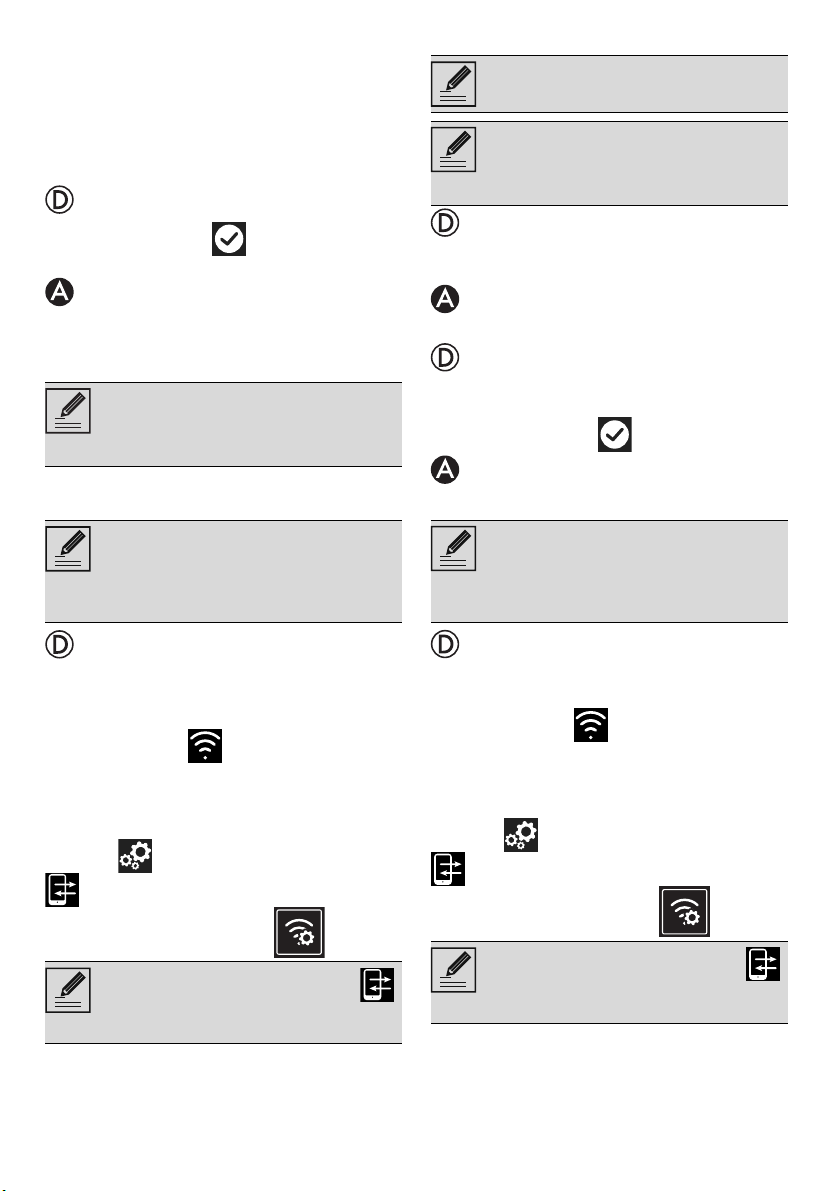
16 - USE 91477A874/B
2. Go to the Wi-Fi settings on the mobile
device and select the “smegconnect
network.
3. Enter the password “smeg0001” and
wait for the connection to be
established.
4. Go back to the SmegConnect App and
tap Next.
5. Tap the Confirm button within one
minute.
6. Enter the Access Point data:
Name of the home Wi-Fi network.
Wi-Fi password.
7. Tap Next and wait for the confirmation
page.
8. Wait for the welcome page.
The "REGISTRATION SUCCESSFUL!"
displays on the device.
The Connectivity icon (in the
information area at the top right) remains
on solid. The product registration procedure
has been completed.
Now the display of the appliance shows the
Settings menu to activate the
Remote control (on some models only:
within the Connection menu ).
Automatic mode (WPS)
1. Select Automatic mode (WPS) on the
appliance.
2. Select Automatic mode (WPS).
3. Within two minutes, press the WPS
button on your router.
4. Tap the Confirm button.
5. Wait for the welcome page.
The "REGISTRATION SUCCESSFUL!"
displays on the device.
The Connectivity icon (in the
information area at the top right) remains
on solid. The product registration procedure
has been completed.
Now the display of the appliance shows the
Settings menu to activate the
Remote control (on some models only:
within the Connection menu )
.
The device supports network names
(SSID) up to 32 digits (including
spaces) and WPA2 security settings
(not WEP or WPA).
During this step, the mobile device
automatically reconnects to the
initial Wi-Fi network or data
network. No user operation is
required.
Make sure that you activate the
Remote Control in order to control
the device via the App.
Make sure that the WPS option is
activated on your router.
Make sure that the mobile device
and the product connect to the
same Wi-Fi network during the
procedure.
During this step, the mobile device
automatically reconnects to the
initial Wi-Fi network or data
network. No user operation is
required.
Make sure that you activate the
Remote Control in order to control
the device via the App.
Ladda ner bruksanvisning i Engelska (PDF, 0.25 MB)
(Tänk på miljön och skriv endast ut denna bruksanvisning om det verkligen är nödvändigt)

Loading…

Betyg

Berätta vad du tycker om Smeg SBC4604WNR Blastkylare genom att betygsätta den. Vill du dela med dig av dina åsikter om denna produkt eller ställa en fråga? Lämna en kommentar nederst på sidan.
Är du nöjd med Smeg SBC4604WNR Blastkylare?
Ja Nej
Bli den första personen som betygsätter denna produkt
0 röster

Delta i konversationen om denna produkt

Här kan du dela vad du tycker om Smeg SBC4604WNR Blastkylare. Om du har en fråga, läs först noggrant igenom manualen. Att begära en manual kan göras genom att använda vårt kontaktformulär.

Mer om denna bruksanvisning

Vi förstår att det är trevligt att ha en pappersbruksanvisning för din Smeg SBC4604WNR Blastkylare. Du kan alltid ladda ner bruksanvisningen från vår hemsida och skriva ut den själv. Om du vill ha en originalbruksanvisning rekommenderar vi att du kontaktar Smeg. De kanske kan tillhandahålla en originalbruksanvisning. Letar du efter bruksanvisningen för din Smeg SBC4604WNR Blastkylare på ett annat språk? Välj ditt föredragna språk på vår hemsida och sök efter modellnumret för att se om vi har det tillgängligt.

Specifikationer

Märke Smeg
Modell SBC4604WNR
Kategori Blastkylare
Filtyp PDF
Filstorlek 0.25 MB

Alla bruksanvisningar för Smeg Blastkylare
Fler bruksanvisningar för Blastkylare
Bruksanvisning Smeg SBC4604WNR Blastkylare

Relaterade produkter

Relaterade kategorier

×
Download