Bruksanvisning Sandstrøm SKBTAB11 Tangentbord

Behöver du en bruksanvisning för din Sandstrøm SKBTAB11 Tangentbord? Nedan kan du se och ladda ner PDF-bruksanvisningen gratis på svenska. Den här produkten har för närvarande 2 vanliga frågor, 0 kommentarer och har 0 röster. Om det här inte är bruksanvisningen du vill ha, vänligen kontakta oss.

Är produkten defekt och erbjuder bruksanvisningen ingen lösning? Gå till ett Repair Café för gratis reparationstjänster.

Bruksanvisning

Loading…
P.N.: XXXXXXXXXXXXXXX
This symbol on the product or in the instructions means that your electrical and electronic
equipment should be disposed at the end of its life separately from your household waste. There
are separate collection systems for recycling in the EU.
For more information, please contact the local authority or your retailer where you purchased
the product.
Visit Partmaster.co.uk today for the easiest way to buy electrical spares and
accessories. With over 1 million spares and accessories available we can
deliver direct to your door the very next day. Visit www.partmaster.co.uk or
call 0844 800 3456 (UK customers only) Calls charged at National Rate.
DSG Retail Ltd. • Maylands Avenue Hemel Hempstead • Hertfordshire HP2 7TG England
Keep away from sharp object.
Do not put heavy object on keyboard too long.
Do not heating it in microwave oven.
Don't force tensile or distortion.
Keep away from oil or any other organic liquid.
Do not press the keyboard when it is in folding state.
Can wash silicone parts by water, alcohol, or alcohol disinfectant.
Notes for battery disposal:
The batteries used with this product contain chemicals that are harmful to the environment. To preserve our
environment, disposal of used batteries according to your local laws or regulations. Do not dispose of batteries
with the normal household waste.
For more information, please contact the local authority or your retailer where you purchased the product.
If unable to connect the Bluetooth Keyboard to the computer, or the keyboard work
unconventionally, please try the steps blew :
1. Before yo install your Bluetooth Keyboard, please make sure you have done the
Bluetooth Dongle installation procedure, and the Bluetooth facility is turned on.
2. Press and release the connect button on the bottom of Bluetooth facility, If anything
changed, please kindly rematch.
3. Make sure that the keyboard is within the effective range --- 10M
4. Make sure that there's no change of the Bluetooth facility. If anything changed, please
kindly rematch.
5. If your bluetooth facility is connected to other Bluetooth products, please kindly confirm
that the speed of the Bluetooth facility is enough.
6. Please kindly check the batteries, If they are short of power, replace them for new ones.
7. Please make sure that your Bluetooth Dongle is damaged or not.
Every time you turn off the keyboard power and after turn on it or reboot the computer
shuts down, if it is no response :
1. After the keyboard and the computer power, re-install back, the keyboard and the
computer needs to re-invent code, which may take 23 seconds of your time, if you shut
down and then boot, or keyboard, disconnect the power re-opened, please your press
any key on the keyboard, and then wait three seconds, your keyboard can be properly
used.
Features and specications are subject to change without prior notice.
Windows is a registered trademark of Microsoft Corporation in the United States and other countries.
DSG International Sourcing declares that the wireless keyborad and mouse comply with the essential
requirements and other relevant provisions of Directive 1999/5/EC.
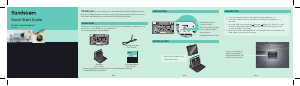
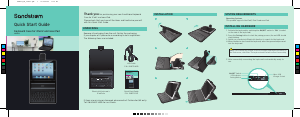
WARNINGS
GB-3 GB-4 GB-5
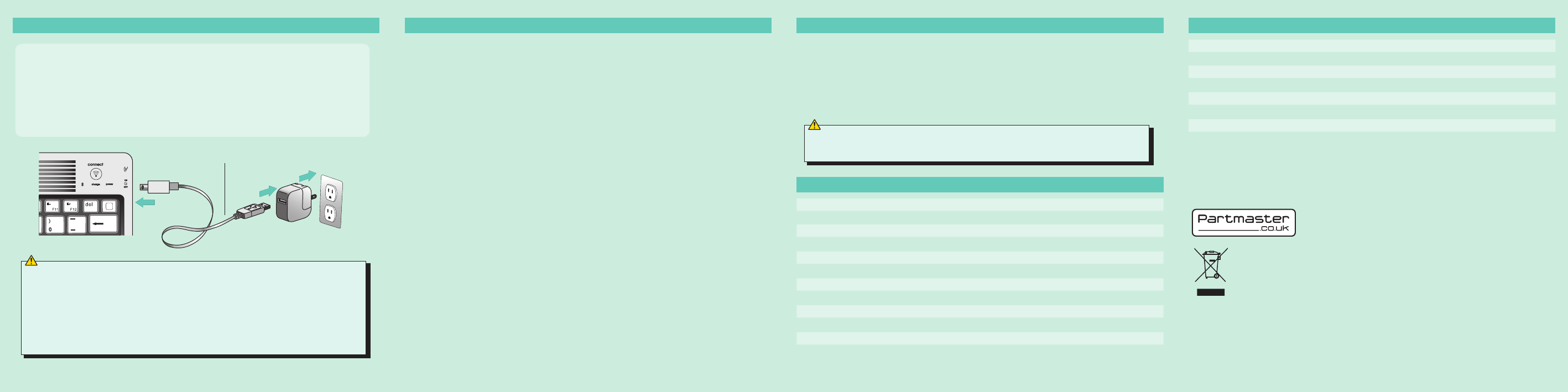
USB charging cable
CHARGING
1. If the power indicator keeps flashing, it's time to charge the keyboard
battery.
2. Insert the small end of the supplied USB cable into the micro, USB socket
on the keyboard, while the other end into the AC adapter of your iPad.
3. Plug the AC adapter into a working outlet.
4. When the keyboard is fully charged, the power indicator turns off.
WARNINGS SPECIFICATION
SPECIFICATION
Executive standard : Bluetooth V2.0
Working distance : 10 meters
Modulation system : FHSS 2.4G
Transmitting power : Class 2
Operating voltage : 3.0-5.0
Work current : <5.0MA
Standby current : 2.5MA
Sleeping current : <200 UA
Charging current : >100 MA
Standby time : 100days
Theory of working Time : 25 days
Uninterrupted working time : 90days
Charging time : 4-4.5 hours
Li-ion battery Capacity : Minimum 430 MAH
Lithium battery life : 3 years
Lithium battery Specification : 4.5X24X47 MM
Key strength : 80+_10g
Key life : 500 million
Operating temperature : -20-+55 C
Storage temperature : -40-+70 C
When you switch on the keyboard, the power light and Bluetooth light will
be on in three seconds, at this time the keyboard do not connect with any
device. But the LED light will automatically be off if the keyboard still do
not connected to any device after the Led keep lighting for 5 seconds. The
keyboard can connect when you witch on after your first successfully use,
the power light will keep lighting, ut the bluetooth light will be off after it
successfully connect to device.
When your battery is low, low voltage lights on the keyboard will blink, and
you should give your keyboard charging, so as not to affect your work.
Ladda ner bruksanvisning i Engelska (PDF, 15.84 MB)
(Tänk på miljön och skriv endast ut denna bruksanvisning om det verkligen är nödvändigt)

Loading…

Betyg

Berätta vad du tycker om Sandstrøm SKBTAB11 Tangentbord genom att betygsätta den. Vill du dela med dig av dina åsikter om denna produkt eller ställa en fråga? Lämna en kommentar nederst på sidan.
Är du nöjd med Sandstrøm SKBTAB11 Tangentbord?
Ja Nej
Bli den första personen som betygsätter denna produkt
0 röster

Delta i konversationen om denna produkt

Här kan du dela vad du tycker om Sandstrøm SKBTAB11 Tangentbord. Om du har en fråga, läs först noggrant igenom manualen. Att begära en manual kan göras genom att använda vårt kontaktformulär.

Mer om denna bruksanvisning

Vi förstår att det är trevligt att ha en pappersbruksanvisning för din Sandstrøm SKBTAB11 Tangentbord. Du kan alltid ladda ner bruksanvisningen från vår hemsida och skriva ut den själv. Om du vill ha en originalbruksanvisning rekommenderar vi att du kontaktar Sandstrom. De kanske kan tillhandahålla en originalbruksanvisning. Letar du efter bruksanvisningen för din Sandstrøm SKBTAB11 Tangentbord på ett annat språk? Välj ditt föredragna språk på vår hemsida och sök efter modellnumret för att se om vi har det tillgängligt.

Specifikationer

Märke Sandstrom
Modell SKBTAB11
Kategori Tangentbord
Filtyp PDF
Filstorlek 15.84 MB

Alla bruksanvisningar för Sandstrøm Tangentbord
Fler bruksanvisningar för Tangentbord

Vanliga frågor om Sandstrøm SKBTAB11 Tangentbord

Vårt supportteam söker efter användbar produktinformation och svar på vanliga frågor. Om du hittar en felaktighet bland våra vanliga frågor uppskattar vi om du meddelar oss detta via vårt kontaktformulär.

Bokstäverna på tangentbordet finns inte på de platser jag är van vid, varför är det så? Verifierad

De flesta tangentbord använder en QWERTY-layout och står för de sex första bokstäverna på tangentbordet. Det finns dock olika tangentbordslayouter som matchar de specifika behoven för ett visst språk. Det är också möjligt att tangentbordstangenterna har bytts ut. Speciellt med äldre tangentbord är det lätt att göra.

Detta hjälpte (1358) Läs mer

Vad är det bästa sättet att rengöra mitt tangentbord Verifierad

För aldrig in föremål mellan tangenternas kanter, eftersom detta främst kommer att trycka in smuts och skada tangentbordet. Det är bäst att rengöra tangentbordet med tryckluft medan du håller tangentbordet upp och ner. Knapparnas ovansida kan rengöras med en lätt fuktad trasa.

Detta hjälpte (201) Läs mer
Bruksanvisning Sandstrøm SKBTAB11 Tangentbord

Relaterade produkter

Relaterade kategorier

×
Download