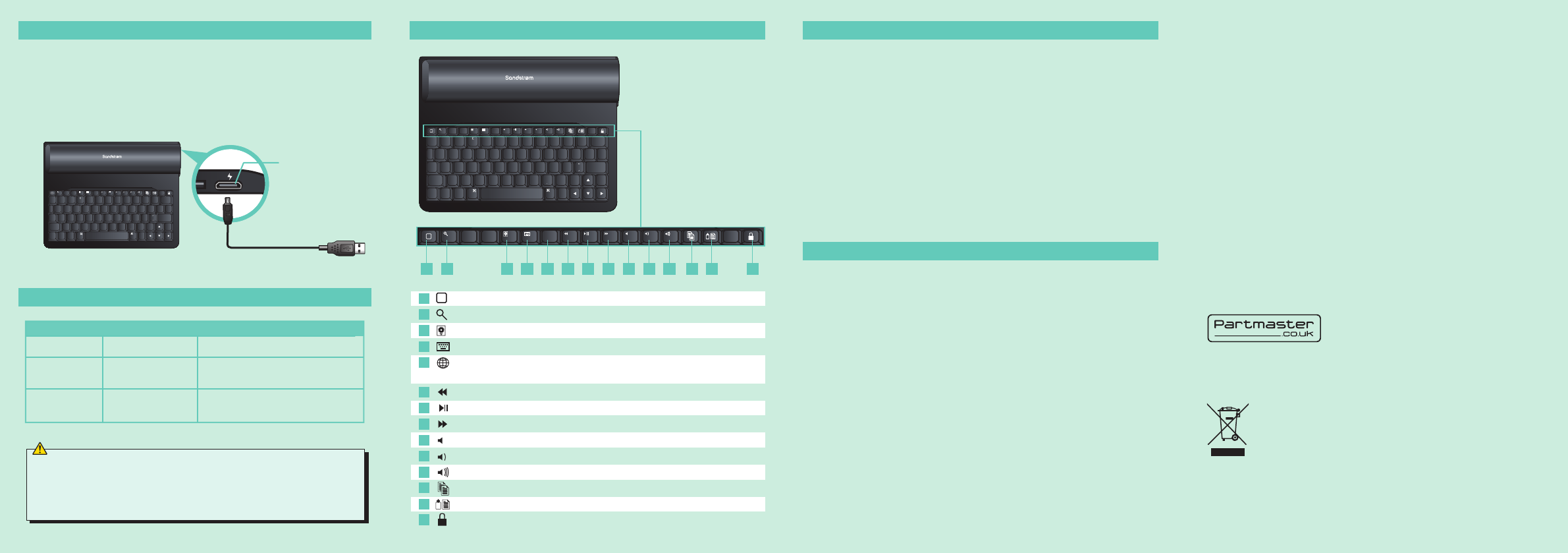
CHARGING THE KEYBOARD
LED INDICATOR
TROUBLESHOOTING
SAFETY WARNINGS
FUNCTION KEYS
1. Ensure that the computer’s Bluetooth technology is working. If a
Bluetooth USB adapter is being used, make sure it is plugged in properly.
Try unplugging and plugging the USB adapter again. On some systems, a
restart may be required.
2. If the red LED starts blinking while the keyboard is in use, the battery is
low, and should be recharged.
4. On the Mac, click on the Bluetooth icon in the system preferences pane.
Refer to the Apple Bluetooth help file to ensure Bluetooth is working
properly.
5. Ensure your batteries are fully charged and inserted correctly.
6. If the keyboard is still undiscovered, ensure the correct versions of the
software have been installed: Mac OS10.2.8 or higher, and Apple
Bluetooth
®
1.5 or higher.
7. Try moving the keyboard closer to the computer or to the adapter.
8. Ensure there are no other Bluetooth devices in pairing mode.
• Don’t disassemble the keyboard and the mouse or remove any parts.
• Don’t immerse the keyboard and the mouse in water or any liquid.
• Don’t use the keyboard and the mouse close to heat sources or expose to
high temperatures.
• Don’t use the keyboard and the mouse where strong electromagnetic
waves are present. Strong electromagnetic waves will damage to keyboard.
• Keep the keyboard away from direct sunlight, moisture, dirt or abrasive
chemical products (cleaning products etc).
Wireless Devices :
• Before boarding any aircraft or packing a wireless device in luggage that
will be checked in, remove the batteries from the wireless device.
• Wireless devices can transmit radio frequency (RF) energy, whenever
batteries are installed and the wireless device is turned on.
To reduce the risk of injury :
• Keep batteries out of the reach of children.
• Do not heat, open, puncture, mutilate, or dispose of batteries in fire.
• Do not mix new and old batteries or batteries of different types.
• Do not allow metal objects to touch the battery terminals on the
device; they can become hot and cause burns.
Features and specifications are subject to change without prior notice.
Windows is a registered trademark of Microsoft Corporation in the
United States and other countries.
DSG International Sourcing declares that the wireless keyboaqd and
mouse comply with the essential requirements and other relevant
provisions of Directive 1999/5/EC.
Notes for battery disposal:
The batteries used with this product contain chemicals that are harmful
to the environment. To preserve our environment, disposal of used
batteries according to your local laws or regulations. Do not dispose of
batteries with the normal household waste.
For more information, please contact the local authority or your retailer
where you purchased the product.
DSG Retail Ltd • Maylands Avenue • Hemel Hempstead
Herts • HP2 7TG • England
Visit Partmaster.co.uk today for the easiest
way to buy electrical spares and accessories.
With over 1 million spares and accessories
available we can deliver direct to your door the very next day. Visit
www.partmaster.co.uk or call 0844 800 3456 (UK customers only) Calls
charged at National Rate.
This symbol on the product or in the instructions means that
your electrical and electronic equipment should be disposed
at the end of its life separately from your household waste.
There are separate collection systems for recycling in the EU.
For more information, please contact the local authority or
your retailer where you purchased the product.
(P.N. SKBC12-001)
Q W E R T Y U I O P
A S D F G H J K L
Z X C V B N M
tab
caps
lock
shift shift
fn
control
}
]
{
[
:
;
|
\
return
delete
option
alt
command
?
/
>
.
<
~
`
_
-
1
!
4
$
5
%
6
^
7
&
8
*
9
(
0
)
2
@
€
3
command
option
alt
F9
F10
F5 F6 F7 F8 F11F1 F12F2 F3 F4
+
=
If the red LED continuously flashes while the keyboard is in use, you need
to charge the keyboard. Follow the steps below:
1. Plug the USB Cable’s micro USB connector into the keyboard, then plug
the other end into a computer, or USB mains adapter (not included).
Charging will begin automatically.
2. When the keyboard is fully charged, the red LED will wink out.
This device complies with part 15 of the FCC Rules.
Operation is subject to the following two conditions:
(1) This device may not cause harmful interference, and
(2) This device must accept any interference received, including interference
that may cause undesired operation.
Mirco USB
Charger Socket
Connect to USB Socket
Status LED Description
Keyboard needs to be charged
Pairing Red, Blinking Keyboard is in Pairing Mode
Battery Low While in use,
Red LED blinks
Charging Red, Blinking LED winks out when the
keyboard is fully charged.
Q W E R T Y U I O P
A S D F G H J K L
Z X C V B N M
tab
caps
lock
shift shift
fn
control
}
]
{
[
:
;
|
\
return
delete
option
alt
command
?
/
>
.
<
~
`
_
-
1
!
4
$
5
%
6
^
7
&
8
*
9
(
0
)
2
@
€
3
command
option
alt
F9
F10
F5 F6 F7 F8 F11F1 F12F2 F3 F4
+
=
Home Screen Return to the Home screen.
Search Search apps , albums, artists, or songs.
Picture Frame Open the Picture Frame.
Soft Keyboard Open the Virtual Keyboard.
Input Method Switch between keyboard layouts for
international language support.
Previous Track Goes to the previous media track.
Play / Pause Switches between play and pause.
Next Track Goes to the next media track.
Mute Mutes (turns off) the computer's sound.
Volume - Decreases the computer's sound volume.
Volume + Increases the computer's sound volume.
Copy Copies the selected item(s) to the Clipboard.
Paste Pastes the copied or cut item(s) from Clipboard.
Lock Forces the iPad into sleep/lock mode.
Q W E R T Y U I O P
A S D F G H J K L
Z X C V B N M
tab
caps
lock
shift shift
fn
control
}
]
{
[
:
;
|
\
return
delete
option
alt
command
?
/
>
.
<
~
`
_
-
1
!
4
$
5
%
6
^
7
&
8
*
9
(
0
)
2
@
€
3
command
option
alt
F9
F10
F5 F6 F7 F8 F11F1 F12F2 F3 F4
+
=
10 11 12 13 14
1 2 3 4 5 6 7 8 9
1
2
3
4
5
6
7
8
9
10
11
12
13
14
C
M
Y
CM
MY
CY
CMY
K
SKBC12_IB_120611.pdf 2 11/06/2012 6:15 PM


Delta i konversationen om denna produkt
Här kan du dela vad du tycker om Sandstrøm SKBC12 Tangentbord. Om du har en fråga, läs först noggrant igenom manualen. Att begära en manual kan göras genom att använda vårt kontaktformulär.