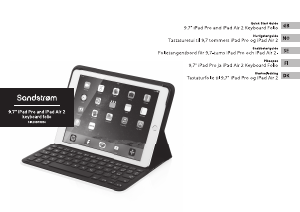
Bruksanvisning Sandstrøm SIA2KBFBK14 Tangentbord

Behöver du en bruksanvisning för din Sandstrøm SIA2KBFBK14 Tangentbord? Nedan kan du se och ladda ner PDF-bruksanvisningen gratis på svenska. Den här produkten har för närvarande 2 vanliga frågor, 0 kommentarer och har 0 röster. Om det här inte är bruksanvisningen du vill ha, vänligen kontakta oss.

Är produkten defekt och erbjuder bruksanvisningen ingen lösning? Gå till ett Repair Café för gratis reparationstjänster.

Bruksanvisning

Loading…
The symbol on the product or its packaging indicates that this product must not be disposed of with your other
household waste. Instead, it is your responsibility to dispose of your waste equipment by handing it over to a
designated collection point for the recycling of waste electrical and electronic equipment. The separate collection
and recycling of your waste equipment at the time of disposal will help conserve natural resources and ensure that
it is recycled in a manner that protects human health and the environment.
For more information about where you can drop o your waste for recycling, please contact your local authority, or
where you purchased your product.
Notes for battery disposal
The batteries used with this product contain chemicals that are harmful to the environment.
To preserve our environment, dispose of used batteries according to your local laws or regulations. Do not dispose
of batteries with normal household waste.
For more information, please contact the local authority or your retailer where you purchased the product.
The Bluetooth® word mark and logos are registered trademarks owned by Bluetooth®SIG, Inc. and any use of such marks by
DSG Retail Limited is under license. Other trademarks and trade names are those of their respective owners and all rights are
acknowledged.
All trademarks are the property of their respective owners and all rights are acknowledged.
IB-SIA2KBFBK14-GB-170911V5
Pairing the Keyboard
You must have a Bluetooth-enabled device to work with this keyboard.
1. Switch the keyboard on.
2. Press the Bluetooth
button, the Status indicator light will ash. The keyboard is
now in pairing mode.
3. Switch on your Bluetooth-enabled device, and turn on the devices wireless function to
connect using Bluetooth® technology.
4. On your device search for a keyboard with Bluetooth® technology. Select the keyboard
with “SIAKBFBK14”. You will be asked to type in a code. The Status
indicator light
will turn o.
5. Your keyboard will now be paired with your device.
Function Keys
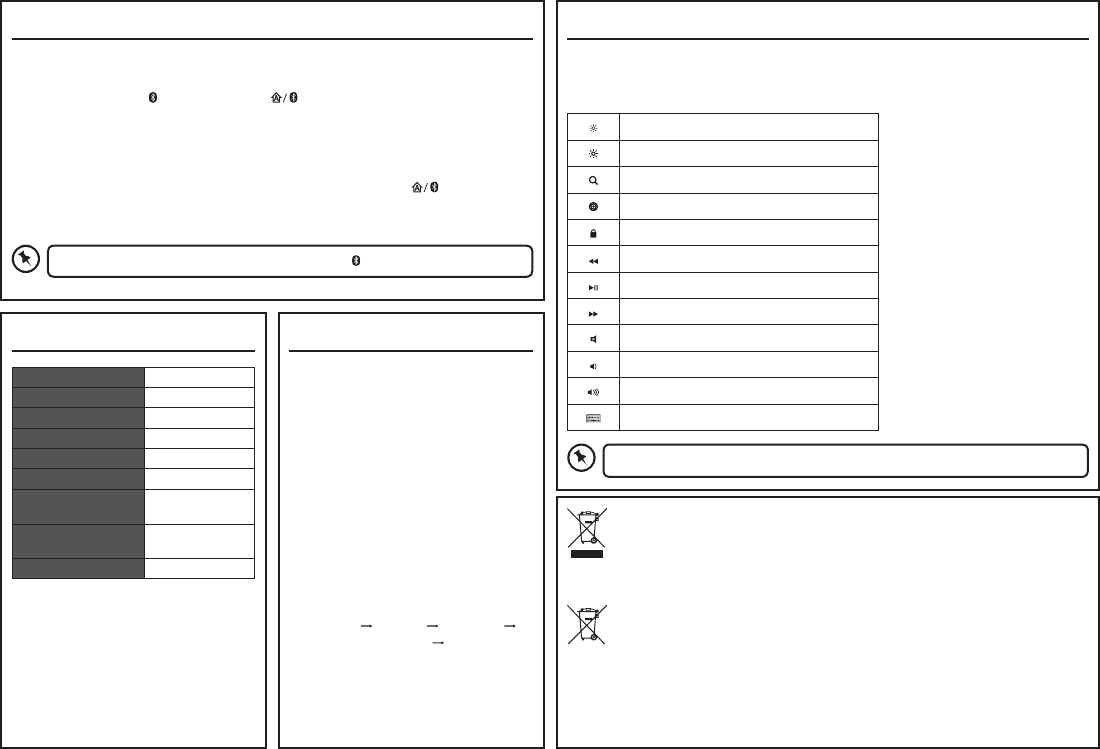
The keyboard has shortcut function keys* which can be used as shortcuts when using the
keyboard.
To access these functions, press the Fn key and the desired function key together.
To disconnect the keyboard from the device, press .
Some function keys may not be available depending on operating system.
Decrease the Brightness
Increase the Brightness
Open up Search
Select Language Source
Lock System
Back to previous track
Play/pause track
Go to next track
Mute sound
Decrease the Volume
Increase the Volume
Activate the On Screen Keyboard
Specications
Operating System IOS4 or later
Operating Distance < 10m
Bluetooth Interface Bluetooth® 3.0
Battery Type Lithium 230mAh
Battery Life 120 hrs
Frequency Band(s) 2400 – 2482 MHz
Max. Radio Frequency
Power Transmitted
-1.0 dBm
Dimension (L x W x H) 182.5 x 252.5 x
18 mm
Net Weight 416 g
Features and specications are subject to
change without prior notice.
Hints and Tips
Keyboard not working:
Recharge the keyboard.
Ensure the keyboard is switched on.
Ensure your Bluetooth-enabled
device’s wireless function is active.
Ensure there are no other wireless
devices in discovery mode.
Move the keyboard closer to the
device.
Pair again the keyboard and the
device.
If you found that cap function not
working properly, try setting on your
IOS device as below:
Settings
General Keyboard
Hardware keyboard Shut down
the Caps Lock Latin Switch.
Ladda ner bruksanvisning i Svenska (PDF, 2.77 MB)
(Tänk på miljön och skriv endast ut denna bruksanvisning om det verkligen är nödvändigt)

Loading…

Betyg

Berätta vad du tycker om Sandstrøm SIA2KBFBK14 Tangentbord genom att betygsätta den. Vill du dela med dig av dina åsikter om denna produkt eller ställa en fråga? Lämna en kommentar nederst på sidan.
Är du nöjd med Sandstrøm SIA2KBFBK14 Tangentbord?
Ja Nej
Bli den första personen som betygsätter denna produkt
0 röster

Delta i konversationen om denna produkt

Här kan du dela vad du tycker om Sandstrøm SIA2KBFBK14 Tangentbord. Om du har en fråga, läs först noggrant igenom manualen. Att begära en manual kan göras genom att använda vårt kontaktformulär.

Mer om denna bruksanvisning

Vi förstår att det är trevligt att ha en pappersbruksanvisning för din Sandstrøm SIA2KBFBK14 Tangentbord. Du kan alltid ladda ner bruksanvisningen från vår hemsida och skriva ut den själv. Om du vill ha en originalbruksanvisning rekommenderar vi att du kontaktar Sandstrom. De kanske kan tillhandahålla en originalbruksanvisning. Letar du efter bruksanvisningen för din Sandstrøm SIA2KBFBK14 Tangentbord på ett annat språk? Välj ditt föredragna språk på vår hemsida och sök efter modellnumret för att se om vi har det tillgängligt.

Specifikationer

Märke Sandstrom
Modell SIA2KBFBK14
Kategori Tangentbord
Filtyp PDF
Filstorlek 2.77 MB

Alla bruksanvisningar för Sandstrøm Tangentbord
Fler bruksanvisningar för Tangentbord

Vanliga frågor om Sandstrøm SIA2KBFBK14 Tangentbord

Vårt supportteam söker efter användbar produktinformation och svar på vanliga frågor. Om du hittar en felaktighet bland våra vanliga frågor uppskattar vi om du meddelar oss detta via vårt kontaktformulär.

Bokstäverna på tangentbordet finns inte på de platser jag är van vid, varför är det så? Verifierad

De flesta tangentbord använder en QWERTY-layout och står för de sex första bokstäverna på tangentbordet. Det finns dock olika tangentbordslayouter som matchar de specifika behoven för ett visst språk. Det är också möjligt att tangentbordstangenterna har bytts ut. Speciellt med äldre tangentbord är det lätt att göra.

Detta hjälpte (1360) Läs mer

Vad är det bästa sättet att rengöra mitt tangentbord Verifierad

För aldrig in föremål mellan tangenternas kanter, eftersom detta främst kommer att trycka in smuts och skada tangentbordet. Det är bäst att rengöra tangentbordet med tryckluft medan du håller tangentbordet upp och ner. Knapparnas ovansida kan rengöras med en lätt fuktad trasa.

Detta hjälpte (203) Läs mer
Bruksanvisning Sandstrøm SIA2KBFBK14 Tangentbord

Relaterade produkter

Relaterade kategorier

×
Download