Version 09/12
MP3 player
Item no. 35 19 19 MD111AXXX MP3 player (black)
Item no. 35 19 21 MD111AXXX MP3 player (white)
1. Intended use
ThisproductisamobiledevicedesignedtoplayMP3audioles.Filescanbecopieddirectlyfromthecomputer
to a microSD card (optionally available), and vice versa, using the USB jack cable. Power is supplied with
an integrated LiPo battery that can be charged via a USB connection. Contact with moisture, such as in
bathrooms, must be avoided.
For safety and approval purposes (CE), you must not rebuild and/or modify this product. If you use the product
for purposes other than those described above, the product may be damaged. In addition, improper use can
causehazardssuchasshortcircuiting,re,electricshocketc.Readtheinstructionscarefullyandkeepthem.
Make this product available to third parties only together with its operating instructions.
2. Delivery content
• MP3 player • USB jack cable
• Earphones
• Operating instructions
3. Safety instructions
Read the operating instructions carefully and especially observe the safety information.
If you do not follow the safety instructions and information on proper handling in this
manual, we assume no liability for any resulting personal injury or damage to property.
Such cases will invalidate the warranty/guarantee.
Persons / Product
• The device is not a toy. Keep it out of the reach of children and pets.
• Do not leave packaging material lying around carelessly. These may become dangerous playing material
for children.
• Protect the product from extreme temperatures, direct sunlight, strong jolts, high humidity, moisture,
ammablegases,vapoursandsolvents.
• Do not place the product under any mechanical stress.
• If it is no longer possible to operate the product safely, take it out of operation and protect it from any
accidental use. Safe operation can no longer be guaranteed if the product:
- is visibly damaged,
- is no longer working properly,
- has been stored for extended periods in poor ambient conditions or
- has been subjected to any serious transport-related stresses.
• Please handle the product carefully. Jolts, impacts or a fall even from a low height can damage the
product.
• Also observe the safety and operating instructions of any other devices which are connected to the product.
• Do not listen to excessively loud music over an extended period of time. This may damage your hearing.
Rechargeable batteries
• The rechargeable battery is permanently built into the product and cannot be replaced.
• Never damage the rechargeable battery. Damaging the casing of the rechargeable battery might cause an
explosionorare!Unlikeconventionalbatteries/rechargeablebatteries(e.g.AAorAAAtype),thecasing
oftheLiPorechargeablebatterydoesnotconsistofathinsheetbutratherasensitiveplasticlmonly.
• Nevershort-circuitthecontactsoftherechargeablebattery.Donotthrowthebatteryortheproductintore.
Thereisadangerofreandexplosion!
• Charge the rechargeable battery regularly, even if you do are not using the product. Due to the rechargeable
batterytechnologybeingused,youdonotneedtodischargetherechargeablebatteryrst.
• Never charge the rechargeable battery of the product unattended.
• When charging, place the product on a surface that is not heat-sensitive. It is normal that a certain amount
of heat is generated during charging.
Miscellaneous
• Consult an expert when in doubt about operation, safety or connection of the device.
• Maintenance, modications and repairs are to be performed exclusively by an expert or at a qualied
shop.
• If you have questions which remain unanswered by these operating instructions, contact our technical
support service or other technical personnel.
4. Operating elements
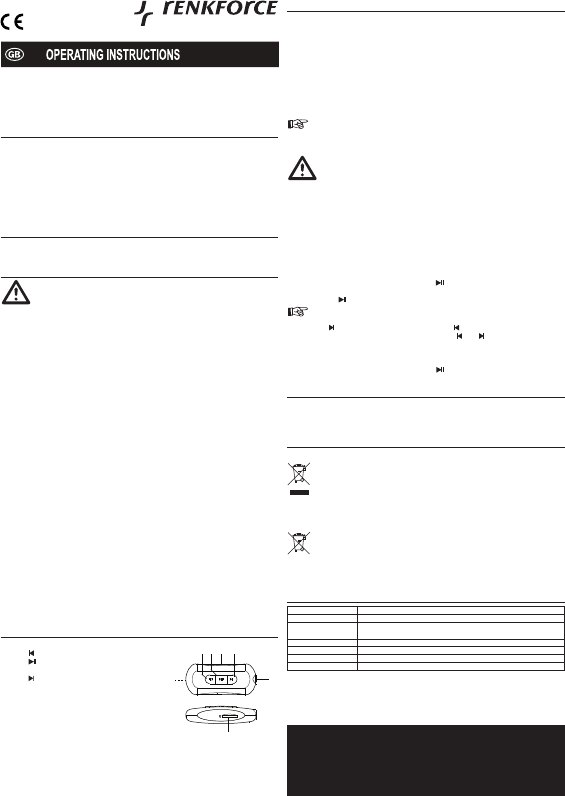
1 LED (red)
2 Button
3 Button
4 ButtonRESET(ushmounted)
5 Button
6 Jack socket
7 microSD slot (on lower side of MP3 player)
1
2 3 4 5
6
5. Operation
Charging the MP3 player
1. ChargethebatterycompletelybeforeusingtheMP3playerforthersttime.
2. Connect the USB jack cable to the jack socket (6) of the MP3 player and an available USB port on a
computer.
3. Thebatterywillautomaticallystarttocharge.TheredLED(1)ashesduringcharging.
4. The battery is fully charged when the red LED stays on permanently.
5. Disconnect the MP3 player from the USB power source.
Insert/remove microSD card
1. Ensure the MP3 player is turned off (red LED not on).
2. Note the label next to the slot (7) for the correct orientation of the microSD card.
3. Carefully insert a microSD card into the slot until it audibly locks into place.
If the microSD card is not recognised, please use a microSD card from another manufacturer or
a microSD card with a different memory size.
4. TurntheMP3playeroffbeforeremovingthemicroSDcard.Toremovethememorycardfromtheslot,rst
push it in slightly. The microSD card can now be removed.
Never remove a microSD card from the slot during playback. Data on the microSD card could be
destroyed this way. There is a risk that the microSD would not be readable afterwards. No liability
can be accepted for possible data loss.
Connecting to a computer
1. Connect the USB jack cable to the jack socket (6) of the MP3 player and an available USB port on a
computer.
2. The microSD card is automatically recognised as a drive.
3. Save the MP3 data on the microSD card.
4. Always deactivate the microSD card through the operating system before disconnecting the USB jack cable
from the MP3 player or the computer.
Operating the MP3 player
1. Connect the earphones to the jack socket (6).
2. Turn the MP3 player on by pressing and holding button (3) until the red LED (1) lights up. The playback
oftheMP3lesstarts.TheredLED(1)ashesduringplayback.
3. Press the button (3) to switch the MP3 player into pause mode. The red LED (1) stays on permanently.
If no buttons are pressed for approx. 2 minutes in pause mode, the MP3 player turns off
automatically.
4. Press button (5) to move to the next track. Press the button (2) to move to the previous track.
5. The volume can be set during playback. Press and hold button (2) or (5) to decrease or increase the
volume, respectively.
6. Ifthereisamalfunction,theMP3playerhastobereset.Usingapointedobject,presstheushmounted
button RESET (4) for approx. 2 seconds.
7. Turn the MP3 player off by pressing and holding button (3) until the red LED (1) goes off.
8. Cleaning and maintenance
The device does not need any servicing. The device‘s outside should be cleaned with a soft, dry cloth or a
brush only. Never use any aggressive cleaning agents or chemical solutions that may damage the surface of
the casing.
9. Disposal
Product
Electronic devices are recyclable waste and must not be disposed of in the household waste.
At the end of its service life, dispose of the product according to the relevant statutory regulations.
(Rechargeable) batteries
You as the end user are required by law (Battery Ordinance) to return all used batteries/rechargeable batteries.
Disposing of them in the household waste is prohibited.
Contaminated (rechargeable) batteries are labelled with this symbol to indicate that disposal in the
domestic waste is forbidden. The designations for the heavy metals involved are: Cd = Cadmium,
Hg = Mercury, Pb = Lead (name on (rechargeable) batteries, e.g. below the trash icon on the left).
Used (rechargeable) batteries can be returned to collection points in your municipality, our stores or
wherever (rechargeable) batteries are sold.
Youthusfullyourstatutoryobligationsandcontributetotheprotectionoftheenvironment.
10. Technical data
Power supply: Internal LiPo rechargeable battery, 3.7 V
Battery capacity: 120 mAh
System requirements: Microsoft®WindowsXP(32-bit),WindowsVista™,7(32/64-bit);
Mac OS 10.0 and higher
Memory card format: microSD (max. 16 GB), FAT 16 or FAT 32 formatted
Cable length: approx. 0.5 m (USB jack cable) / approx. 1.2 m (earphones)
Dimensions (W x H x D): 55 x 12 x 14 mm
Weight: approx. 11 g
These operating instructions are published by Conrad Electronic SE,
Klaus-Conrad-Straße 1, D-92240 Hirschau/Germany.
Allrightsincludingtranslationreserved.Reproductionbyanymethod,e.g.photocopy,microlming,
or the capture in electronic data processing systems require the prior written approval by the editor.
Reprinting, also in part, is prohibited.
Theoperatinginstructionsreectthecurrenttechnicalspecicationsattimeofprint.
Wereservetherighttochangethetechnicalorphysicalspecications.
© 2012 by Conrad Electronic SE.
V1_0912_02-KV


Delta i konversationen om denna produkt
Här kan du dela vad du tycker om Renkforce MD111AXXX Mp3 spelare. Om du har en fråga, läs först noggrant igenom manualen. Att begära en manual kan göras genom att använda vårt kontaktformulär.