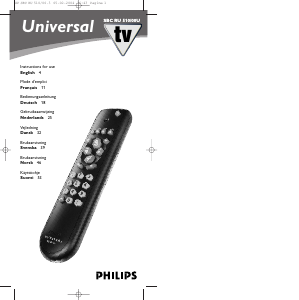
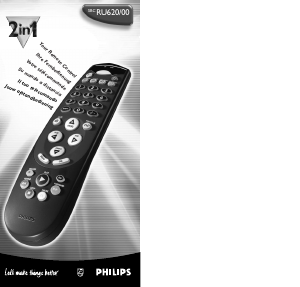
Bruksanvisning Philips RC2573GR Fjärrkontroll

Behöver du en bruksanvisning för din Philips RC2573GR Fjärrkontroll? Nedan kan du se och ladda ner PDF-bruksanvisningen gratis på svenska. Den här produkten har för närvarande 6 vanliga frågor, 0 kommentarer och har 0 röster. Om det här inte är bruksanvisningen du vill ha, vänligen kontakta oss.

Är produkten defekt och erbjuder bruksanvisningen ingen lösning? Gå till ett Repair Café för gratis reparationstjänster.

Bruksanvisning

Loading…
Philips Institutional TV Software
Philips Institutional Televisions can be configured to operate in either "Consumer" or "Commercial" operational modes. The master setup remote
is required to identify and set these modes. The master setup remote is also required for using or configuring other iTV products and accessories.
Commercial Mode: Philips Institutional Televisions are typically configured at the Factory to operate in Commercial mode. When the television
is in Commercial mode, access to its operation from its front panel controls or from a guest-mode remote can be limited, depending upon the set-
tings of the Institutional TV features. For examples, the unit’s front panel controls can be “locked-out” (rendered inoperable), only certain chan-
nels can be selected, and/or the volume can be limited to a given range.
Consumer Mode: When in the Consumer mode, the unit operates as a standard TV, bypassing the Institutional Television feature set, thus allow-
ing normal initial power ON, channel selection, and volume control (as well as a variety of selectable Menu features). When the TV is in Consumer
mode, Philips RC-5 system 0 (guest-mode) remotes, such as the RC2524BK and the RL9820BK (optional accessories) can access the Consumer-
mode Main Menu, and configure the television to the full extent offered in this mode. Guest-mode 21-button remotes such as the RC2524BK use
the Menu button to access the Consumer menu. Guest-mode 20-button remotes such as the RL9820BK, which do not have a Menu button, use the
Sleep button to access the Consumer menu. Simultaneously pressing the front panel’s Volume - and Volume + buttons also invokes the Consumer
menu.
Identifying the Operational Mode: To identify the television’s operational mode, a system 7 (commercial setup mode) master setup remote
(optional accessory, RG4172BK or RC2573GR) must be used. First, place the setup remote in setup mode. To place the the RG4172BK in setup
mode, press TV SETUP. To place the the RC2573GR in setup mode, set the switch to the TV SETUP position. Then press Recall. Television
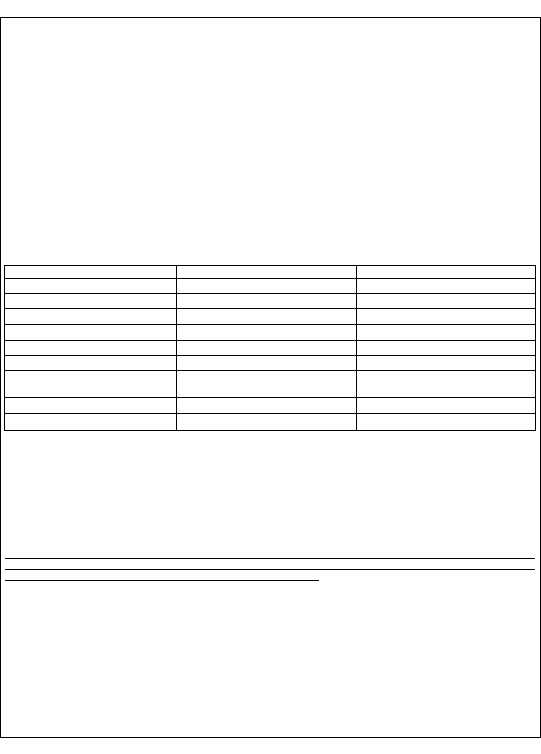
status information similar, but not necessarily identical to the following will appear on-screen.
NOTE: THE ACTUAL STATUS SCREEN WILL VARY DEPENDING UPON THE MODEL AND MANUFACTURE DATE OF THE
SPECIFIC PHILIPS INSTITUTIONAL TELEVISION.
Changing Operational Modes: To change the television’s mode between Consumer and Commercial modes, a system 7 (commercial setup mode)
master setup remote must be used. Only a setup remote in setup mode can change the television’s mode between Consumer and Commercial, and
provide complete access to the television’s Institutional Features. The RG4172BK / RC2573GR can be set to operate in either its master setup
remote mode, or in guest-mode. With the RG4172BK in setup mode (press TV SETUP on the RG4172BK, or set the switch to the TV SETUP posi-
tion on the RC2573GR), enter the following keystroke sequence: 0 2 4 9 9 5 Menu. The RG4172BK / RC2573GR guest mode facilitates testing
the desired Institutional / Commercial configuration.
IMPORTANT NOTE: If you change the operational mode, you must power the television off and back on to complete the mode change.
Once the television is in consumer
mode, do not use the setup remote to activate commercial features. Otherwise, the commercial features
will affect consumer operation. It will then be necessary to place the television back into commercial mode, then into consumer mode, and
then powered off again to properly place the television back into consumer mode.
Accessing The Philips Institutional Television Menu
Regardless of the operational mode in which the Philips Institutional Television has been placed, its control settings and features can be accessed
by placing the RG4172BK / RC2573GR setup remote in setup mode and pressing the M (menu) button. If the television is in Commercial Mode,
the Institutional features will be accessible. On the following page, a typical late-model menu is shown. The specific items contained in the menus
of your Philips Institutional television will vary depending upon the operational mode and the model and manufacture date of the specific Philips
Institutional television.
Using The Setup Remote With Other Philips iTV Products
Your RG4172BK / RC2573GR setup remote is used with and/or required for a variety of other Philips Institutional Television products and acces-
sories, including Philips Institutional Televisions, SmartLoader Clone Boxes (RL9820BK / CLON99BK), and Philips iTV SmartCards (Net1Card,
Net3Card, etc.). Later in this guide there are brief summaries describing the use of the RG4172BK / RC2573 with selected accessories. Please
consult the documentation for the respective television or accessory products with which the RG4172BK / RC2573GR is to be used.
RC2573GR DFU # 3135-xxx-xxxxx 08/12/02
2
STATUS ITEM STATUS DATA MEANING
SYSTEM STATUS (LO1ITV-US4PV)
Information title
MODE COMMERCIAL / CONSUMER
Operational mode
CHANNEL CHANNEL, INPUT (CHANNEL, INPUT)
Currently-tuned channel / input
DCM OFF / ON
Data Communications Module offline / online
CODES 209 222 1 33
Internal data for factory / service use.
SIGNAL TUNED / NOT TUNED
Valid signal present / absent
OP HRS 0031h
Number of cumulative hours unit has been in
operation (hexadecimal).
ERRORS 0 0 0 0 0
Internal data for factory / service use.
VERSION 3.3
Television microprocessor software version.
Ladda ner bruksanvisning i Engelska (PDF, 0.24 MB)
(Tänk på miljön och skriv endast ut denna bruksanvisning om det verkligen är nödvändigt)

Loading…

Betyg

Berätta vad du tycker om Philips RC2573GR Fjärrkontroll genom att betygsätta den. Vill du dela med dig av dina åsikter om denna produkt eller ställa en fråga? Lämna en kommentar nederst på sidan.
Är du nöjd med Philips RC2573GR Fjärrkontroll?
Ja Nej
Bli den första personen som betygsätter denna produkt
0 röster

Delta i konversationen om denna produkt

Här kan du dela vad du tycker om Philips RC2573GR Fjärrkontroll. Om du har en fråga, läs först noggrant igenom manualen. Att begära en manual kan göras genom att använda vårt kontaktformulär.

Mer om denna bruksanvisning

Vi förstår att det är trevligt att ha en pappersbruksanvisning för din Philips RC2573GR Fjärrkontroll. Du kan alltid ladda ner bruksanvisningen från vår hemsida och skriva ut den själv. Om du vill ha en originalbruksanvisning rekommenderar vi att du kontaktar Philips. De kanske kan tillhandahålla en originalbruksanvisning. Letar du efter bruksanvisningen för din Philips RC2573GR Fjärrkontroll på ett annat språk? Välj ditt föredragna språk på vår hemsida och sök efter modellnumret för att se om vi har det tillgängligt.

Specifikationer

Märke Philips
Modell RC2573GR
Kategori Fjärrkontroller
Filtyp PDF
Filstorlek 0.24 MB

Alla bruksanvisningar för Philips Fjärrkontroller
Fler bruksanvisningar för Fjärrkontroller

Vanliga frågor om Philips RC2573GR Fjärrkontroll

Vårt supportteam söker efter användbar produktinformation och svar på vanliga frågor. Om du hittar en felaktighet bland våra vanliga frågor uppskattar vi om du meddelar oss detta via vårt kontaktformulär.

Hur ansluter jag en universell fjärrkontroll till min TV? Verifierad

För att ansluta din universella fjärrkontroll behöver du modellnummer och varumärke för både fjärrkontrollen och TV: n. Det finns en lista med koder för märken och modellnummer i fjärrkontrollens manual.

Detta hjälpte (7988) Läs mer

Varför finns det bokstäver bredvid siffrorna på fjärrkontrollen? Verifierad

Vissa TV-inställningar kan kräva att du anger bokstäver. Det finns vanligtvis tre bokstäver eller andra tecken på en knapp. När bokstavsinmatning krävs kan du trycka på den knappen en gång för den första bokstaven, trycka två gånger på den andra bokstaven och trycka tre gånger på den tredje bokstaven. På så sätt kan text skrivas med ett minimum antal knappar.

Detta hjälpte (682) Läs mer

Fungerar min fjärrkontroll också på andra TV-modeller av samma märke? Verifierad

Ofta fungerar en fjärrkontroll av en TV också på liknande modeller av samma märke. Det är dock ovanligt att det fungerar på alla modeller av det märket. Universella fjärrkontroller är mer lämpade för att göra detta.

Detta hjälpte (524) Läs mer

Vad är det genomsnittliga intervallet för en infraröd fjärrkontroll? Verifierad

En genomsnittlig infraröd fjärrkontroll hade en räckvidd på cirka 3 till 6 meter. Ju längre bort enheten är, desto svårare blir det att sikta.

Detta hjälpte (412) Läs mer

Ett batteri i min enhet är oxiderat, kan jag fortfarande använda det säkert? Verifierad

Ja, enheten kan fortfarande användas säkert. Ta först bort det oxiderade batteriet. Använd aldrig bara händer för att göra detta. Rengör sedan batterifacket med en bomullspinne doppad i ättika eller citronsaft. Låt det torka och sätt i nya batterier.

Detta hjälpte (371) Läs mer

Kan jag lämna ett utbytbart batteri i en enhet under lång tid? Verifierad

Utbytbara batterier kan stanna kvar i en enhet under lång tid om enheten används. När en enhet lagras under lång tid är det lämpligt att ta bort batterierna för att förhindra oxidation.

Detta hjälpte (271) Läs mer
Bruksanvisning Philips RC2573GR Fjärrkontroll

Relaterade produkter

Relaterade kategorier

×
Download