Bruksanvisning Panasonic TH-37PX70B Viera Plasma TV

Behöver du en bruksanvisning för din Panasonic TH-37PX70B Viera Plasma TV? Nedan kan du se och ladda ner PDF-bruksanvisningen gratis på svenska. Den här produkten har för närvarande 12 vanliga frågor, 0 kommentarer och har 0 röster. Om det här inte är bruksanvisningen du vill ha, vänligen kontakta oss.

Är produkten defekt och erbjuder bruksanvisningen ingen lösning? Gå till ett Repair Café för gratis reparationstjänster.

Bruksanvisning

Loading…
4 5
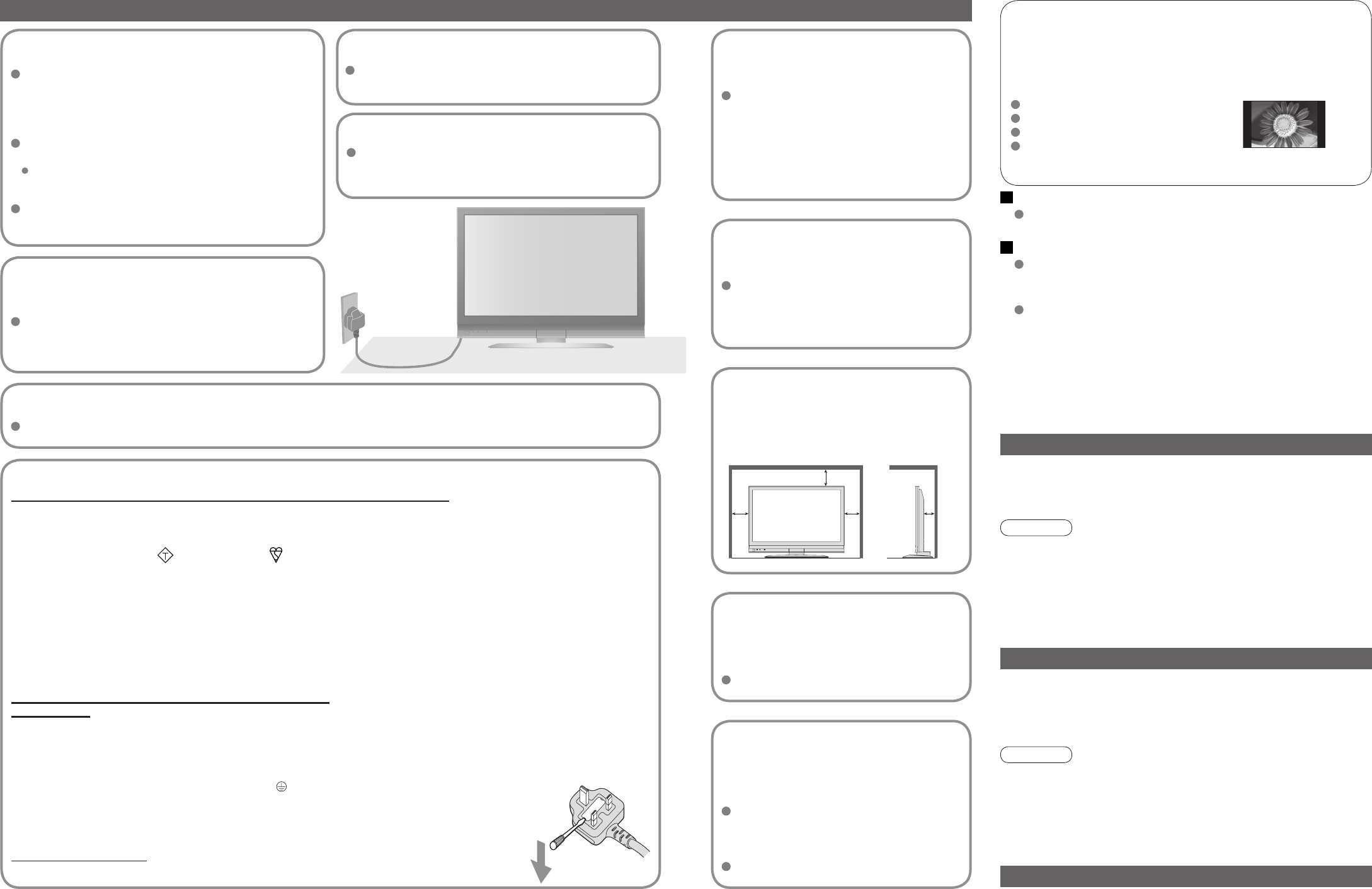
Safety Precautions
AC 220-240 V
50 / 60 Hz
Electronic equipment
In particular, do not place video equipment near the TV
(electromagnetic interference may distort images / sound).
Equipment with an infrared sensor
Keep the TV away from these equipment
Warning & Caution
Notes
Handling the mains plug
Ensure that the mains plug is easily accessible at
all times. The On / Off switch on this model does
not fully disconnect the TV from the mains supply.
Remove the mains plug from the wall socket when
the TV is not used for a prolonged period of time.
Ensure the grounding pin on the mains plug is
securely connected to prevent electrical shock.
An apparatus with CLASS I construction shall be
connected to a mains socket outlet with a protective
earthing connection.
Do not use any mains lead other than that provided
with this TV. (This may cause fire or electrical shock.)
Do not expose to direct sunlight
and other sources of heat
Avoid exposing the TV to direct sunlight and other
sources of heat. To prevent fire never place any type
of candle or naked flame on top or near the TV.
Power source
This TV is designed to operate on 220-240V,
50 / 60 Hz AC.
Display panel
Cabinet
Mains plug
Regular care: Gently wipe the surface clean of dirt by using a soft cloth.
Major contamination: Wipe the surface clean using a soft cloth dampened
with clean water or diluted neutral detergent by 100 times of water. Then,
using a soft dry cloth, evenly wipe the surface clean until it is dry.
Regular care: Wipe the surface clean using a soft dry cloth.
Major contamination: Dampen a soft cloth with clean water or
water containing a small amount of neutral detergent. Then, wring
the cloth and wipe the surface clean with it. Finally, wipe the
surface clean with a dry cloth.
Wipe the mains plug with a dry cloth at regular intervals.
(Moisture and dust may lead to fire or electrical shock.)
First, remove the mains plug from the socket outlet.
Caution
The surface of the display panel has been specially treated and
may be easily damaged.
Do not tap or scratch the surface with your fingernail or other
hard object.
Use care not to subject the surface to insect repellent, solvent,
thinner, or other volatile substances
(this may degrade surface quality).
Caution
Use care not to subject the TV’s surfaces to detergent.
(A liquid inside the TV could lead to product failure.)
Use care not to subject surfaces to insect repellent, solvent,
thinner, or other volatile substances
(this may deteriorate the surface by peeling the paint).
Do not allow the cabinet to make contact with a rubber or PVC
substance for a long time.
Maintenance
Do not remove the cover
Do not remove the rear cover as live parts are
accessible when it is removed. There are no user
serviceable parts inside.
Use only the dedicated
stands / mounting
equipment
Using an unauthorized stand or other
fixtures may make the TV shaky,
risking injury. Be sure to ask your local
Panasonic dealer to perform setup.
Use optional stands / mounts (p. 6).
Do not place the TV
on sloped or unstable
surfaces
The TV may fall off or tip over.
Do not expose to rain or
excessive moisture
To prevent damage which might result in
electric shock or fire, do not expose this
TV to rain or excessive moisture.
This TV must not be exposed to dripping
or splashing water and objects filled with
liquid, such as vases, must not be placed
on top of or above the TV.
Do not block the rear
ventilation openings
Ventilation should not be impeded by
covering the ventilation openings with
items such as newspapers, tablecloths
and curtains.
Transport only in upright position
Transporting the TV with its display panel facing upright or downward may cause damage to the internal circuitry.
If no signal is received and no operation is performed in TV mode
for 30 minutes, the TV will automatically go to standby mode.
Auto power standby function
IMPORTANT: THE MOULDED MAINS PLUG
FOR YOUR SAFETY, PLEASE READ THE FOLLOWING TEXT CAREFULLY.
The wire which is coloured GREEN-AND-YELLOW must be connected to the terminal in the mains plug which is
marked with the letter E or by the Earth symbol or coloured GREEN or GREEN-AND-YELLOW.
The wire which is coloured BLUE must be connected to the terminal in the mains plug
which is marked with the letter N or coloured BLACK.
The wire which is coloured BROWN must be connected to the terminal in the mains plug
which is marked with the letter L or coloured RED.
How to replace the fuse.
Open the fuse compartment with a screwdriver and replace the fuse.
As the colours of the wire in the mains lead of this appliance may not correspond with the coloured markings
identifying the terminals in your mains plug, proceed as follows.
WARNING: – THIS APPARATUS MUST BE EARTHED.
IMPORTANT: – The wires in this mains lead are coloured in accordance with the following code: –
Green-and-Yellow: Earth
Blue: Neutral
Brown: Live
If a new mains plug is to be fitted, please observe the wiring code as shown below.
If in any doubt, please consult a qualified electrician.
If the fitted moulded mains plug is unsuitable for the socket outlet in your home, then the fuse shall be
removed and the mains plug cut off and disposed of safety. There is a danger of severe electrical shock
if the cut off mains plug is inserted into any 13 amp socket.
If the mains plug contains a removable fuse cover, you must ensure that it is refitted when the fuse is replaced.
If you lose the fuse cover the mains plug must not be used until a replacement cover is obtained.
A replacement fuse cover may be purchased from your local Panasonic Dealer.
This appliance is supplied with a moulded three pin mains plug for your safety and convenience. A 5 amp fuse is
fitted in this mains plug. Shall the fuse need to be replaced, please ensure that the replacement fuse has a rating
of 5 amps and that it is approved by ASTA or BSI to BS1362.
Check for the ASTA mark
ASA
or the BSI mark on the body of the fuse.
Do not display a still picture for a long time
This causes the image to remain on the plasma screen (“image
retention”).
This is not considered a malfunction and is not covered by the
warranty.
To prevent image retention, contrast is lowered automatically after a few
minutes if no signals are sent or no operations are performed. (p. 47)
Typical still images
Channel number and other logos
Image displayed in 4:3 mode
Video game
Computer image
This TV also emits infrared rays (this may affect operation of
other equipment).
Allow sufficient space
around the TV for
radiated heat
10
10
10
7
(cm)
Minimum distance
Ladda ner bruksanvisning i Engelska (PDF, 17.18 MB)
(Tänk på miljön och skriv endast ut denna bruksanvisning om det verkligen är nödvändigt)

Loading…

Betyg

Berätta vad du tycker om Panasonic TH-37PX70B Viera Plasma TV genom att betygsätta den. Vill du dela med dig av dina åsikter om denna produkt eller ställa en fråga? Lämna en kommentar nederst på sidan.
Är du nöjd med Panasonic TH-37PX70B Viera Plasma TV?
Ja Nej
Bli den första personen som betygsätter denna produkt
0 röster

Delta i konversationen om denna produkt

Här kan du dela vad du tycker om Panasonic TH-37PX70B Viera Plasma TV. Om du har en fråga, läs först noggrant igenom manualen. Att begära en manual kan göras genom att använda vårt kontaktformulär.

Mer om denna bruksanvisning

Vi förstår att det är trevligt att ha en pappersbruksanvisning för din Panasonic TH-37PX70B Viera Plasma TV. Du kan alltid ladda ner bruksanvisningen från vår hemsida och skriva ut den själv. Om du vill ha en originalbruksanvisning rekommenderar vi att du kontaktar Panasonic. De kanske kan tillhandahålla en originalbruksanvisning. Letar du efter bruksanvisningen för din Panasonic TH-37PX70B Viera Plasma TV på ett annat språk? Välj ditt föredragna språk på vår hemsida och sök efter modellnumret för att se om vi har det tillgängligt.

Specifikationer

Märke Panasonic
Modell TH-37PX70B Viera
Kategori Plasma TV
Filtyp PDF
Filstorlek 17.18 MB

Alla bruksanvisningar för Panasonic Plasma TV
Fler bruksanvisningar för Plasma TV

Vanliga frågor om Panasonic TH-37PX70B Viera Plasma TV

Vårt supportteam söker efter användbar produktinformation och svar på vanliga frågor. Om du hittar en felaktighet bland våra vanliga frågor uppskattar vi om du meddelar oss detta via vårt kontaktformulär.

Jag vill ansluta en högtalare till min plasma-TV med HDMI, vilken port ska jag använda? Verifierad

Du måste använda HDMI-ARC-porten, som är speciellt gjord för att ansluta ljudutrustning.

Detta hjälpte (166) Läs mer

Hur ansluter jag en universell fjärrkontroll till min TV? Verifierad

För att ansluta din universella fjärrkontroll behöver du modellnummer och varumärke för både fjärrkontrollen och TV: n. Det finns en lista med koder för märken och modellnummer i fjärrkontrollens manual.

Detta hjälpte (113) Läs mer

Hur kan jag skydda min plasma-tv från inbränning? Verifierad

Inbränning av en plasma-tv äger rum när samma bild stannar kvar på skärmen under en lång tid. För att förhindra inbränning ska du inte låta samma bild stanna kvar på skärmen längre än 2 minuter.

Detta hjälpte (63) Läs mer

Hur mäter jag antal tum på min plasma TV? Verifierad

Mätning av antal tum på din plasma TV görs genom mätning av det diagonala avståndet mellan till exempel det övre vänstra hörnet och skärmens nedre högra hörn (inte kanten). En tum motsvarar 2,54 centimeter, så när du mäter 99 centimeter betyder det att din plasma TV är 39 tum.

Detta hjälpte (48) Läs mer

Spelar det någon roll till vilken HDMI-port jag ansluter min enhet? Verifierad

I allmänhet kan du ansluta en enhet som en blu-ray-spelare eller spelkonsol till vilken HDMI-port som helst. Enheten kan sedan användas genom att välja motsvarande HDMI-kanal på din TV.

Detta hjälpte (47) Läs mer

Kan jag reparera en död pixel själv? Verifierad

Det finns en skillnad mellan en död pixel och en fast pixel. En fast pixel är fortfarande färgad och kan fixeras genom att applicera lätt tryck exakt på pixeln tills den återställer sig själv. En död pixel är alltid svart eller vit och kan inte repareras själv.

Detta hjälpte (27) Läs mer

Vad står HDMI för? Verifierad

HDMI står för High-Definition Multimedia Interface. HDMI är en anslutning för att skicka video och ljud av hög kvalitet från en enhet till en annan.

Detta hjälpte (22) Läs mer

Fungerar min fjärrkontroll också på andra TV-modeller av samma märke? Verifierad

Ofta fungerar en fjärrkontroll av en TV också på liknande modeller av samma märke. Det är dock ovanligt att det fungerar på alla modeller av det märket. Universella fjärrkontroller är mer lämpade för att göra detta.

Detta hjälpte (16) Läs mer

Hur kan jag rengöra min plasma-tv ordentligt? Verifierad

Stäng av TV: n och torka av damm och smuts från skärmen med en mikrofiberduk. Använd inte papper, det kan orsaka repor. Använd inte för mycket tryck annars kan du skada pixlar. Använd ett specialtvättmedel eller gör ett genom att blanda 1 del vinäger med 1 del vatten. Fukta trasan med tvättmedlet och rengör skärmen. Se till att duken inte är för våt. Ta bort fläckar genom att göra roterande rörelser. Torka skärmen med en andra mikrofiberduk för att förhindra ränder.

Detta hjälpte (15) Läs mer

Vad är kontrastförhållandet? Verifierad

Kontrastförhållandet visar hur långt den vitaste vita är från den svartaste. Ett kontrastförhållande på exempelvis 400: 1 betyder att den svartaste svart på skärmen är 400 gånger mörkare än den vitaste vita. Ett högt kontrastförhållande bidrar till bildens skärpa.

Detta hjälpte (15) Läs mer

Vilket är det rekommenderade tittaravståndet för en tv? Verifierad

Det beror delvis på din personliga smak, men en tumregel är att ett lämpligt tittaravstånd är cirka 3 gånger tv:ns diagonala skärmyta. För en tv på 60 inch (152 cm) är alltså ett lämpligt avstånd ca 180 inch (4,5 meter).

Detta hjälpte (11) Läs mer

Varför finns det bokstäver bredvid siffrorna på fjärrkontrollen? Verifierad

Vissa TV-inställningar kan kräva att du anger bokstäver. Det finns vanligtvis tre bokstäver eller andra tecken på en knapp. När bokstavsinmatning krävs kan du trycka på den knappen en gång för den första bokstaven, trycka två gånger på den andra bokstaven och trycka tre gånger på den tredje bokstaven. På så sätt kan text skrivas med ett minimum antal knappar.

Detta hjälpte (11) Läs mer
Bruksanvisning Panasonic TH-37PX70B Viera Plasma TV

Relaterade produkter

Relaterade kategorier

×
Download