3 4
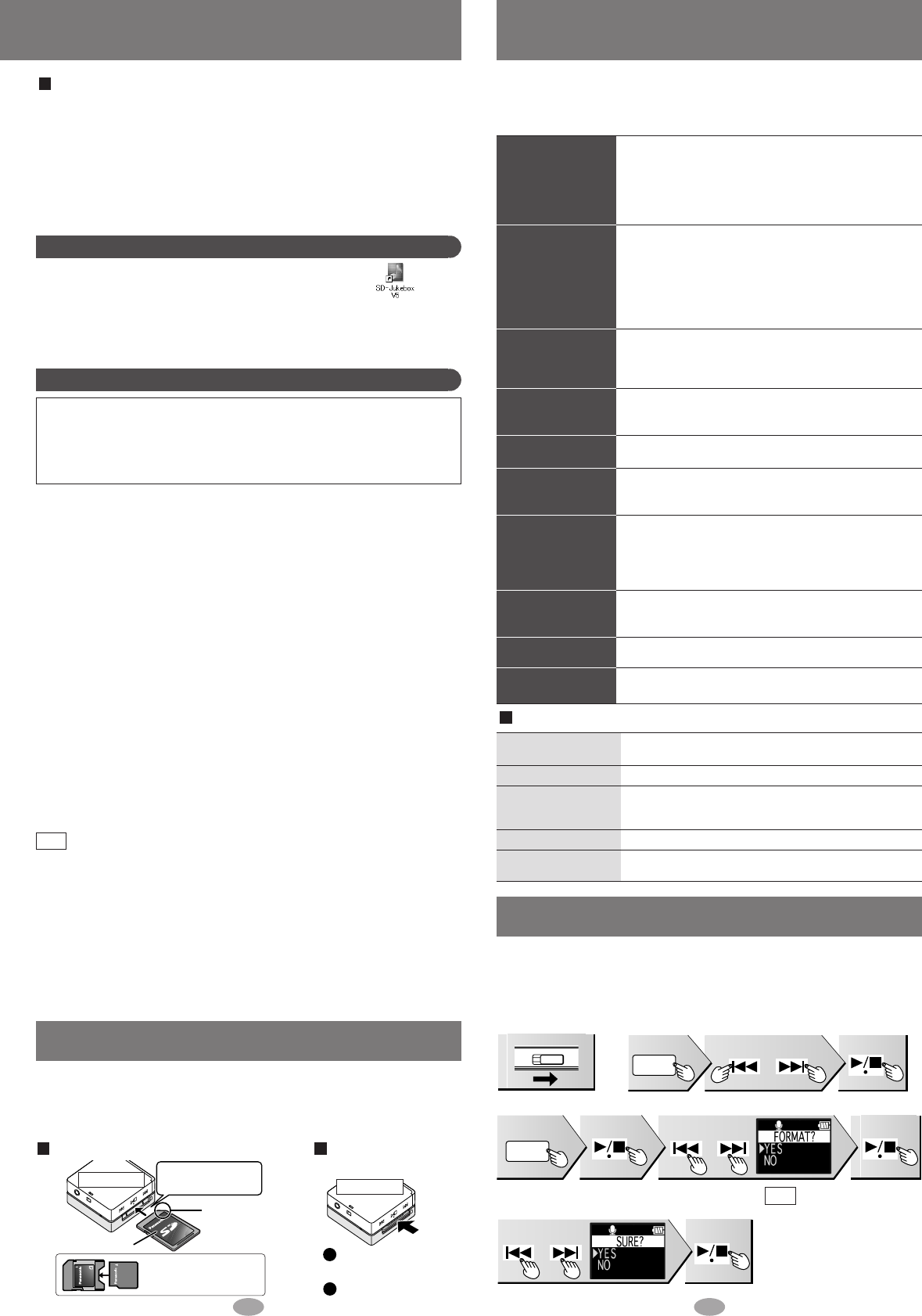
Troubleshooting guide
Before requesting service, make the below checks. If you are in doubt about some of
the check points, or if the remedies indicated in the chart do not solve the problem:
refer to the “Customer Services Directory” on page 7 if you reside in the U.S.A.,
or refer to the “Product information” on page 5 if you reside in Canada.
No operation.
Play time is short
after recharging.
Cannot hear
sound.
Play doesn’t start
from the first
track.
There is a lot of
noise.
The AC adaptor or the
unit becomes warm
during charging.
Cannot use the SD
Memory Card.
It takes time to
switch to recording
the radio.
Noise is heard in
TUNER mode.
Sound decreases
during VOICE PLAY.
• Is the hold function on? (page 10)
• Did you insert a card? (page 3)
• Has the battery run down? (page 9)
(If the battery has not run down, try removing and
re-inserting it.)
•
Are the connections for the rechargeable battery dirty
?
• This may occur the first time you recharge the
battery or if you haven't used it for a long time.
Play time should be restored after a few recharges.
• If play is extremely short even after fully
recharging the battery, the battery may have
exceeded its life. Rechargeable battery can be
recharged approximately 300 times.
• Is the volume too low? (page 11)
• Is the earphone plug inserted correctly? (page 11)
(Try plugging it in again.)
• Is the earphone plug dirty?
• Is the play mode set to RANDOM? (page 11)
• Is the resume function on? (page 10)
• Is a playlist being used? (page 11)
• Are you using the unit near a television or
mobile phone?
• It becomes slightly warm during charging. This is
not a malfunction.
• Is the card’s write-protect switch moved to the
LOCK position?
• Has the card been formatted on a computer in a
FAT32 file system or NTFS file system?
(Format the card on this unit or SD-Jukebox.)
• It may take time for the “REC. START” screen to be
displayed.
• If you connect the AC adaptor, radio reception may
be noisy or weak in TUNER mode.
• The recorded sound may decrease if an operation
is performed during recording. (page 15)
• Do not remove the SD Memory card.
• The HOLD switch is on. (page 10)
• An error has occurred.
Reinsert the card and turn the power on again. If this does
not remedy the situation, remove and reinsert the battery.
• The unit is manipulating data. Wait a moment.
• The unit cannot manipulate irregular data on the
card. Turn off the unit.
ACCESSING
KEEP CARD IN
HOLD
ERROR
PLEASE WAIT
EMERGENCY STOP
When one of the following messages appears on the display:
Double click on the SD-Jukebox icon on the desktop.
After the splash screen, the <HDD Screen> is displayed.
If the icon is not on the desktop:
from the “start” menu, select “All Programs”
→
“Panasonic”
→
“SD-
JukeboxV5”
→
“SD-JukeboxV5”.
Starting SD-Jukebox
Compatible PC: IBM PC/AT-compatible personal computers with one of
the following operating systems preinstalled
OS: Microsoft
®
Windows
®
2000 (Professional Service Pack 2, 3, 4)
Microsoft
®
Windows
®
XP
(Home Edition/Professional, or Service Pack 1, 2 supported)
Hardware
CPU: Intel
®
Pentium
®
III
500 MHz or higher
RAM: 256 MB or more
Free hard disk space: 100 MB or more
(Depending on the version of Windows or audio
data, additional free hard disk space is required.)
Display: High Color (16 bit) or more
Desktop resolution of 800
×
600 pixels or more (1,024
×
768
pixels or more recommended)
Sound: Windows compatible sound device
CD-ROM drive (required for installation and for CD recording):
A CD-ROM drive capable of digital recording is required. Four-
speed or higher is recommended.
(Recording dose not work properly with CD-ROM drives
connected through an IEEE1394 connection.)
Interface: USB port (required for connecting this unit)
(Operation is not guaranteed if the unit is connected through a
USB hub or by using a USB extension cable.)
Others:
If you are using the CDDB function, then an Internet connection is also required.
Necessary software
DirectX 8.1 or later
System Requirements
• This software can not be used on Macintosh.
• This software may not operate on some computers even if the
system requirements mentioned above are fulfilled.
• Operation is not guaranteed when a version of Windows other than
those mentioned above is used.
• Operation on an upgraded OS is not guaranteed.
• Multi-boot environment is not supported.
• Only available when the user is logged in as the system administrator.
• This software may not run properly on user-built computers.
• This software can not be used on 64-bit OS.
•
This system’s operation is not guaranteed when any other application runs.
Note
Read the operating instructions (PDF)
From the Windows “start” menu, select “All Programs” →
“Panasonic” → “SD-JukeboxV5” → “SD-JukeboxV5 Operating
Instructions”.
• You will need Adobe Acrobat Reader to read the file containing the
operating instructions.
• If the operating instructions (PDF) do not open:
Insert the included CD-ROM into the CD-ROM drive and follow
the on-screen instructions to install “Adobe Acrobat Reader”.
Inserting and removing SD Memory Card
Insert and remove the SD Memory Card when the unit is turned off.
• While “ACCESSSING CARD” appears, the card is being read from or
written to. Do not turn off the unit or remove the card. Such action may
result in malfunction or loss of the card’s contents.
To insert the SD Memory Card To remove the SD
Memory Card
Bottom view
Bottom view
The label is facing up.
The cut-off
corner is on
the right
Insert the card until
it locks into place.
Push on the center of
the card to unlock it.
Pull it straight out.
Formatting an SD Memory Card
If the SD Memory Card is formatted on other equipment, the time spent for
recording may become longer. Also, if the SD Memory Card is formatted on a
computer, you may not be able to use it on this unit. In these cases, format the card
on this unit or SD-Jukebox. (
→
page 2, PDF Operating Instructions for SD-Jukebox)
• All the data in the card will
be erased if it is formatted.
•
Use the rechargeable battery
and AC adaptor together, or
use the fully charged
rechargeable battery.
Note
1. Turn the unit on.
2. Select “VOICE REC”.
Press Press Press
3. Select “FORMAT”.
Press Select YES PressPress twice
4. Format. “FORMAT COMPLETED” appears
when formatting is completed.
Select YES Press
miniSD™ card requires
miniSD™ card adaptor.
SV̲SD100V̲En022105.2.2210:03AMページ2


Delta i konversationen om denna produkt
Här kan du dela vad du tycker om Panasonic SV-SD100V Mp3 spelare. Om du har en fråga, läs först noggrant igenom manualen. Att begära en manual kan göras genom att använda vårt kontaktformulär.