2
Saving Data
•
The data recorded using this unit’s IC Recorder or FM RADIO can be uploaded to a PC
.
• MP3 and WMA files in this unit can’t be uploaded to a PC.
• You can use this unit as a removable disc for saving PC data by
connecting the USB cable to a PC. (
→
above)
Before requesting service, make the below checks. If you are in doubt about some of
the check points, or if the remedies indicated in the chart do not solve the problem:
In the U.S.A., contact the Panasonic Customer Call Center at
1-800-211-7262, or the website (http://www.panasonic.com/contactinfo),
or the website (http://www.panasonic.com/support).
In Canada, contact the Panasonic Canada Inc. Customer Care Centre at
905-624-5505, or visit the website (www.panasonic.ca), or an authorized
Servicentre close to you.
No operation
No sound or there is a
lot of noise
Play doesn’t resume
from the track where I
stopped play
Play doesn’t start from
the first track
The unit stops working
The display is too dark
or too light
Play doesn't start
immediately
• The HOLD function is on.
• Replace the battery if it is flat.
• Ensure the earphone plug is inserted firmly.
• Wipe the plug clean with a clean cloth.
• Separate the unit from other equipment, such as mobile
phones and televisions.
• Turn up the volume.
• This doesn’t work if:
You download, record, or delete files.
The random play mode is on.
• The random play mode may be on.
• Play usually resumes from the track where you last
stopped play. Use skip to return to the first track.
• Take the battery out for about 5 seconds, then reinsert it.
• Adjust the contrast. While the display is on, switch HOLD
to on, then while pressing and holding [-MODE/•ENTER],
press the volume [+](darker) or [-](lighter).
• Depending on the amount of data in the unit, it may
take some time for play to start after downloading /
recording or changing the battery.
Displays
• There is no audio data in the player.
• The data format isn’t standard.
• The battery is dead.
<While playing or recording>
Change the battery.
<While downloading>
1. Cancel the download from your PC.
2. After confirming “SAFE REMOVE” in the display,
remove the USB cable.
3. Change the battery.
• The HOLD switch is on.
• Memory is full.
• You have tried to record more than 99 tracks into a
play list.
NO TRACK PLAY
ERROR
LOW BATTERY
KEY LOCKED HOLD
MEMORY FULL
WARNING TRACK OVER
1. Damage requiring service
The unit should be serviced by qualified service personnel if:
(a) Objects or liquids have gotten into the unit; or
(b) The unit has been exposed to rain; or
(c)
The unit does not operate normally or exhibits a marked change in performance; or
(d) The unit has been dropped or the cabinet damaged.
2. Servicing
Do not attempt to service the unit beyond that described in these operating
instructions. Refer all other servicing to authorized servicing personnel.
3. Replacement parts
When parts need replacing ensure the servicer uses parts specified by the
manufacturer or parts that have the same characteristics as the original parts.
Unauthorized substitutes may result in fire, electric shock, or other hazards.
4. Safety check
After repairs or service, ask the servicer to perform safety checks to confirm that
the unit is in proper working condition.
Product information
For product information or assistance with product operation:
In the U.S.A., contact the Panasonic Customer Call Center at
1-800-211-7262, or the website (http://www.panasonic.com/contactinfo), or the
website (http://www.panasonic.com/support).
In Canada, contact the Panasonic Canada Inc. Customer Care Centre at 905-624-5505,
or visit the website (www.panasonic.ca), or an authorized Servicentre close to you.
Specifications
Memory size:
Supported sampling frequency:
Supported bit-rates:
No. of channels:
Frequency response:
Mic S/N:
Radio Frequency range (FM):
Output:
Power supply:
Approximate play times:
Approximate recording times:
Maximum dimensions (W
×
H
×
D):
Cabinet dimensions (W
×
H
×
D):
Mass:
• Specifications are subject to change without notice.
• The play time shown depends on operating conditions.
• Mass and dimensions are approximate.
• MB means one million bytes. Useable capacity will be less.
SV-MP20V: 128 MB
SV-MP30V: 256 MB
MP3 32 kHz, 44.1 kHz, and 48 kHz
WMA 8 kHz to 44.1 kHz
MP3
8 kbps to 320 kbps (128 kbps is recommend)
WMA
32 kbps to 192 kbps (96 kbps is recommend)
Stereo, 2 channels (PLAYER, FM RADIO)
Mono, 1 channel (IC RECORDER)
20 Hz to 20,000 Hz (+0 dB, -6 dB) (PLAYER)
300 Hz to 4,300 Hz (IC RECORDER, HQ mode)
37 dB (IC RECORDER, HQ mode)
87.9 MHz to 107.9 MHz (200 kHz steps)
87.5 MHz to 108.0 MHz (100 kHz / 50 kHz steps)
4.5 mW + 4.5 mW (16 Ω, M3 jack for U.S.A.)
(32 Ω, M3 jack for Canada)
DC 1.5 V (one LR03, AAA, AM-4 battery)
10 hours (alkaline battery, PLAYER)
6 hours (alkaline battery, FM RADIO)
15 hours (alkaline battery, IC RECORDER, LP mode)
5 hours 30 minutes (alkaline battery, FM RADIO)
43.8
×
61.5
×
21.9 mm (1
3
/
4
”
×
2
7
/
16
”
×
7
/
8
”)
42.1
×
60.0
×
21.9 mm (1
11
/
16
”
×
2
3
/
8
”
×
7
/
8
”)
45.5 with battery (1.605 oz)
34.1 without battery (1.200 oz)
Product service
Troubleshooting guide
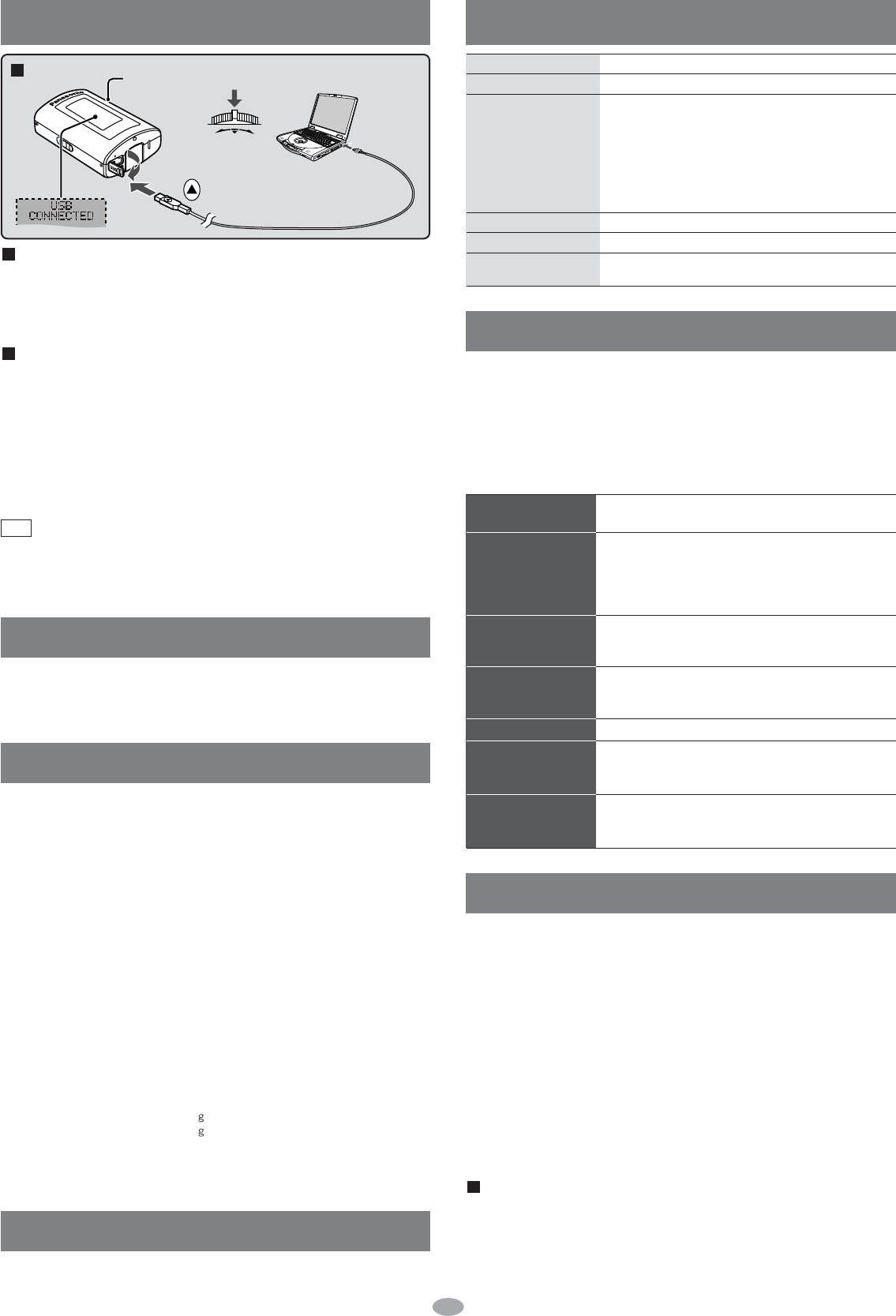
Connecting to a computer and downloading files
After connection
• Windows
®
ME, 2000, or XP: The computer automatically finds and installs
the driver for the player.
• Windows
®
98SE: Put the included CD-ROM in your disc drive, then follow the
instructions on the computer screen to install the driver.
The player appears in My Computer or Explorer as a removable disk or device.
Downloading MP3 and WMA
1.
In My Computer or Explorer, open the player’s folder (removable disk or device)
.
2. Open the PLAYER folder.
3. Copy and paste or drag and drop the MP3/WMA files from your
computer’s folder into the PLAYER folder.
• “DOWNLOAD” appears on the player’s display. Downloading is complete
10 seconds after “USB CONNECTED” re-appears.
• You can first put files into a new folder and then put that folder into the
PLAYER folder. The folders are treated as sublists by the player and the
names appear when you select play lists.
• Use only alphanumeric characters, no more than 36 words.
• If there are no ID3 tags, the display shows the “filename.mp3”.
• Supports MP3 ID3 V1 tags, ID3 V2 tags and WMA tags.
• Music protected by Windows Media Player cannot be played even if
you download it.
•
You cannot play MP3/WMA files that are in the player through the computer
.
Note
Connection
To USB
terminal
Small end to
player, large
end to PC
Turn the unit on.
Press
and
hold
Insert so
the arrows
match.
Maintenance
Clean with a soft, dry cloth.
Do not use any type of abrasive pad, scouring powder or solvent such as alcohol or benzine
.


Delta i konversationen om denna produkt
Här kan du dela vad du tycker om Panasonic SV-MP20V Mp3 spelare. Om du har en fråga, läs först noggrant igenom manualen. Att begära en manual kan göras genom att använda vårt kontaktformulär.