Other Play Methods
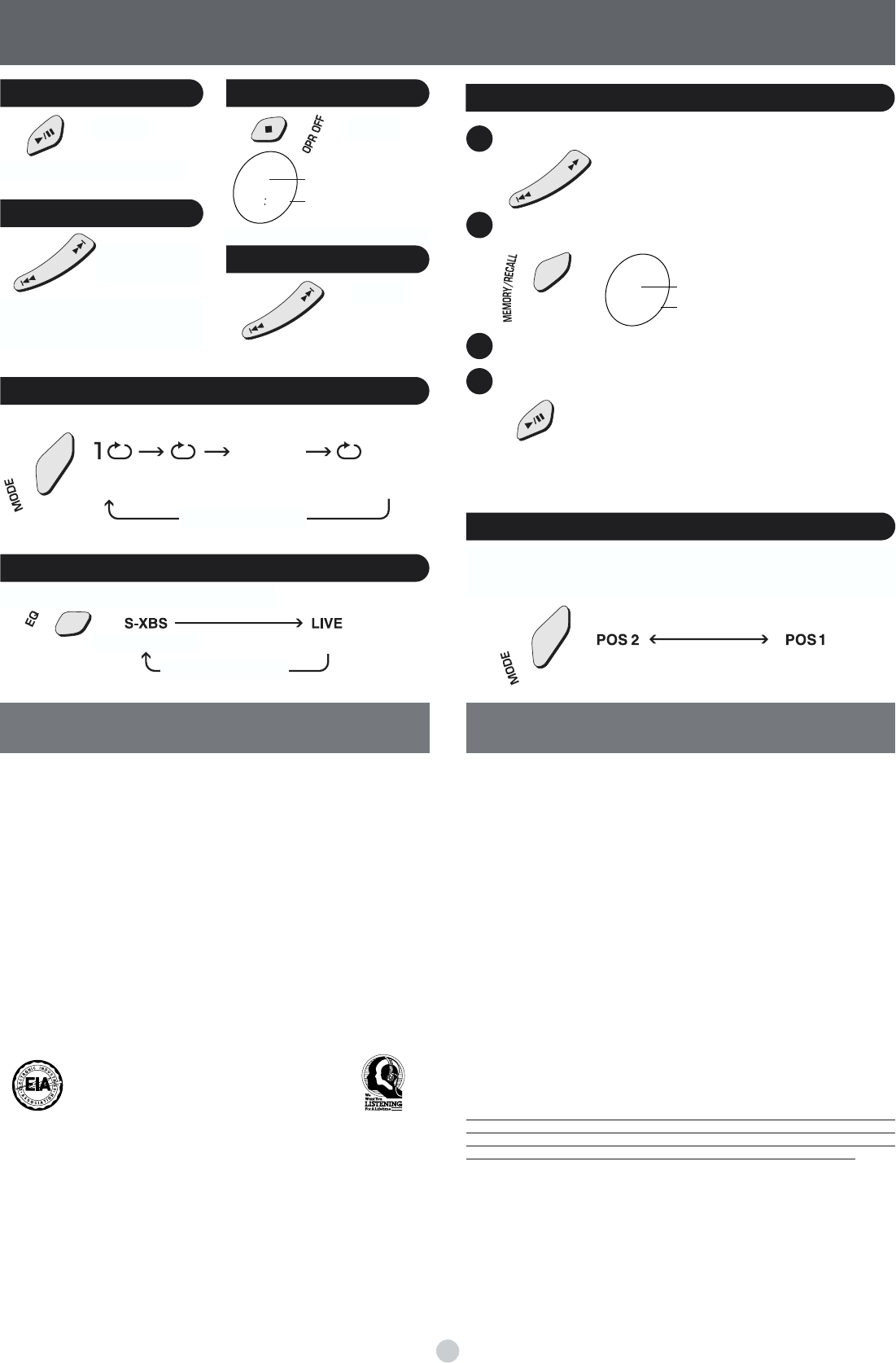
Program Play
Play modes
Track number
Sequence number
Select the tracks while stopped.
Press to register.
Start play.
Repeat steps 1 and 2 to register up to 20 tracks.
∫To confirm the contents of the program
∫
Press [MEMORY/RECALL] while the disc is playing.
∫To delete the entire program
∫
Press [∫, OPR OFF].
Changing the sound quality
Each time you press
Boosts the bass Concert hall-like sound
Each time you press
One track
repeat
All track
repeat
Random
Random
repeat
∫The effect may differ between different kinds of music.
∫You cannot skip back to other tracks during random play.
No display (canceled)
Anti-Skip System
This system reduces the skipping caused by vibration to a minimum.
You can change the anti-skip memory time to improve sound quality.
Each time you press and hold
Better sound quality,
10-second anti-skip memory
Normal sound quality,
45-second anti-skip memory
RQT6781
No display (canceled)
4
∫Water Resistant (Splash Proof)
This unit is splash proof, however damage will result if water gets inside the unit.
≥Do not use in water or splash with salt water or a lot of water.
≥Wipe off water, dust or sand from the unit before opening and closing the lid.
≥Slide the lock firmly to close the lid.
≥Insert the rubber caps into the headphone and AC adaptor jacks when not using the unit.
∫Batteries
≥Do not peel off the covering on batteries and do not use if the covering has been peeled off.
≥Align the poles + and - correctly when inserting the batteries.
≥Do not mix different types of batteries or old and new batteries.
≥Remove the batteries if you do not intend to use the unit for a long time.
≥Do not throw into fire, short-circuit, disassemble, or subject to excessive heat.
≥Do not attempt to recharge dry cell batteries.
≥
When carrying batteries in a pocket or bag, ensure no metal objects such as necklaces are placed
together with them. Contact with metal may cause short-circuiting which can cause a fire.
∫CDs
≥Do not use irregularly shaped CDs.
≥Do not use non-specification discs.
≥Do not use CDs printed with label printers available on the market.
≥Do not use CDs with labels and stickers that are coming off or with adhesive exuding from
under labels and stickers.
∫Listening
Do not play your headphones or earphones at a high volume. Hearing experts advise against
continuous extended play.
If you experience a ringing in your ears, reduce volume or discontinue use.
Do not use while operating a motorized vehicle. It may create a traffic hazard and is illegal in many areas.
You should use extreme caution or temporarily discontinue use in potentially hazardous situations.
Even if your headphones or earphones are the open-air type designed to let you hear outside
sounds, don’t turn up the volume so high that you can’t hear what’s around you.
Sound can be deceiving. Over time your hearing “comfort level” adapts to higher volumes of
sound. So what sounds “normal” can actually be loud and harmful to your hearing.
Guard against this by setting your equipment at a safe level BEFORE your hearing adapts.
To establish a safe level:
≥Start your volume control at a low setting.
≥
Slowly increase the sound until you can hear it comfortably and clearly, and without distortion.
Once you have established a comfortable sound level:
≥Leave it there.
∫Allergies
Discontinue use if you experience discomfort with the earphones or any other parts that directly
contact your skin. Continued use may cause rashes or other allergic reactions.
Pause Stop
Search
Skip
Product service
1. Damage requiring service—The unit should be serviced by qualified service personnel if:
1. (a) The AC power supply cord or AC adaptor has been damaged; or
1. (b) Objects or liquids have gotten into the unit; or
1. (c) The unit has been exposed to rain; or
1. (d) The unit does not operate normally or exhibits a marked change in performance; or
1. (e) The unit has been dropped or the cabinet damaged.
2.
Servicing—Do not attempt to service the unit beyond that described in these operating
instructions. Refer all other servicing to authorized servicing personnel.
3.
Replacement parts—
When parts need replacing ensure the servicer uses parts specified by the
manufacturer or parts that have the same characteristics as the original parts. Unauthorized
substitutes may result in fire, electric shock, or other hazards.
4. Safety check—After repairs or service, ask the servicer to perform safety checks to
confirm that the unit is in proper working condition.
Product information
For product information or assistance with product operation:
In the U.S.A., contact the Panasonic Customer Call Center at 1-800-211-7262, or e-mail
For assistance in the continental U.S.A. in obtaining repairs please ship the product to:
Panasonic Services Company - Customer Servicenter
Suite B 4900 George McVay Drive
McAllen, TX 78503
In Puerto Rico contact the Panasonic Sales Company.
Tel. (787) 750-4300 Fax. (787) 768-2910
When shipping the unit carefully pack and send it prepaid, adequately insured and preferably in
the original carton. Include a letter detailing the complaint and provide a day time phone
number where you can be reached.
IF REPAIR IS NEEDED DURING THE WARRANTY PERIOD THE PURCHASER WILL BE
REQUIRED TO FURNISH A SALES RECEIPT/PROOF OF PURCHASE INDICATING DATE OF
PURCHASE, AMOUNT PAID AND PLACE OF PURCHASE. CUSTOMER WILL BE CHARGED
FOR THE REPAIR OF ANY UNIT RECEIVED WITHOUT SUCH PROOF OF PURCHASE.
Also, the purchaser will be responsible for shipping the unit to the above address.
In Canada, contact the Panasonic Canada Inc. Customer Care Centre at 905-624-5505, or visit
the website (www.panasonic.ca), or an authorized Servicentre close to you.


Delta i konversationen om denna produkt
Här kan du dela vad du tycker om Panasonic SL-SW940P Discman. Om du har en fråga, läs först noggrant igenom manualen. Att begära en manual kan göras genom att använda vårt kontaktformulär.