2
IMPORTANT SAFETY INSTRUCTIONS
1. Power source—Connect the unit to a power source of the type described in
these instructions or as marked on the unit.
2. Polarization—The unit is equipped with a polarized power plug where one
blade is wider than the other. This safety feature ensures that the plug fits into
your household AC outlet only one way. If the plug doesn’t fit one way, try
reversing it. If the plug still doesn’t fit, contact an electrician to replace the
obsolete outlet. Do not attempt to defeat the safety purpose of the plug.
3. Power cord protection—Route the AC power supply cord so that it will not be
walked on or pinched by items placed on or against it. Never take hold of the
plug or cord with wet hands. Always grasp the plug body firmly when
connecting and disconnecting it.
4. Overloading—When connecting the AC power supply cord, be careful not to
overload the household AC outlet, extension cord, or outlet from any other
device as this can result in fire or electric shock.
5. Nonuse periods—Turn the unit off when it is not in use. Unplug the unit from
the household AC outlet if it is not to be used for a long time. Unplug the unit
during lightning storms. Leaving the unit connected to a household AC outlet
for extended periods can cause battery fluid leakage.
6. Attachments and accessories—Use only the attachments and accessories
recommended in these operating instructions.
∫Placement
1. Foreign material—Ensure objects and liquids do not get into the unit. Avoid
exposing the unit to excessive smoke, dust, mechanical vibration, and shock.
2. Magnetism—Situate the unit away from equipment and devices that generate
strong magnetic fields.
3. Stacking—Do not place anything on top of this unit.
4. Wall and ceiling mounting—Do not mount the unit on walls or ceilings unless
specified in the instructions.
∫Environment
1. Water and moisture—Do not use the unit near water, such as near a bathtub
or swimming pool. Avoid damp basements.
2. Heat—Situate the unit away from heat sources, such as radiators. Do not leave
it in an automobile exposed to direct sunlight with the doors and windows closed as
this may deform the cabinet.
2. Do not situate where temperatures fall below 5 oC (41 oF) or rise above 35 oC (95 oF).
Safety
Unplug the unit from the household AC outlet before cleaning.
Clean with a damp cloth.
Do not use abrasive pads, scouring powders, or solvents.
1. Damage requiring service—The unit should be serviced by qualified service
personnel if:
1. (a) The AC power supply cord or AC adaptor has been damaged; or
1. (b) Objects or liquids have gotten into the unit; or
1. (c) The unit has been exposed to rain; or
1. (d) The unit does not operate normally or exhibits a marked change in
performance; or
1. (e) The unit has been dropped or the cabinet damaged.
2. Servicing—Do not attempt to service the unit beyond that described in these
operating instructions. Refer all other servicing to authorized servicing
personnel.
3. Replacement parts—When parts need replacing ensure the servicer uses parts
specified by the manufacturer or parts that have the same characteristics as the
original parts. Unauthorized substitutes may result in fire, electric shock, or
other hazards.
4. Safety check—After repairs or service, ask the servicer to perform safety
checks to confirm that the unit is in proper working condition.
Installation
Maintenance
Service
Read these operating instructions carefully before using the unit. Follow the safety instructions on the unit and the safety precautions listed below. Keep these operating
instructions handy for future reference.
∫Batteries
≥Do not peel off the covering on batteries and do not use if the covering has been
peeled off.
≥Align the poles + and - correctly when inserting the batteries.
≥Do not mix different types of batteries or old and new batteries.
≥Remove the batteries if you do not intend to use the unit for a long time.
≥Do not throw into fire, short-circuit, disassemble, or subject to excessive heat.
≥Do not attempt to recharge dry cell batteries.
≥When carrying batteries in a pocket or bag, ensure no metal objects such as
necklaces are placed together with them. Contact with metal may cause short-
circuiting which can cause a fire.
Caution
∫Listening
Do not play your headphones or earphones at a high volume. Hearing experts
advise against continuous extended play.
If you experience a ringing in your ears, reduce volume or discontinue use.
Do not use while operating a motorized vehicle. It may create a traffic hazard and is
illegal in many areas.
You should use extreme caution or temporarily discontinue use in potentially
hazardous situations.
Even if your headphones or earphones are the open-air type designed to let you
hear outside sounds, don’t turn up the volume so high that you can’t hear what’s
around you.
Sound can be deceiving. Over time your hearing “comfort level” adapts to higher
volumes of sound. So what sounds “normal” can actually be loud and harmful to
your hearing.
Guard against this by setting your equipment at a safe level BEFORE your hearing
adapts.
To establish a safe level:
≥Start your volume control at a low setting.
≥Slowly increase the sound until you can hear it comfortably and clearly, and
without distortion.
Once you have established a comfortable sound level:
≥Leave it there.
∫Allergies
Discontinue use if you experience discomfort with the earphones or any other parts
that directly contact your skin. Continued use may cause rashes or other allergic
reactions.
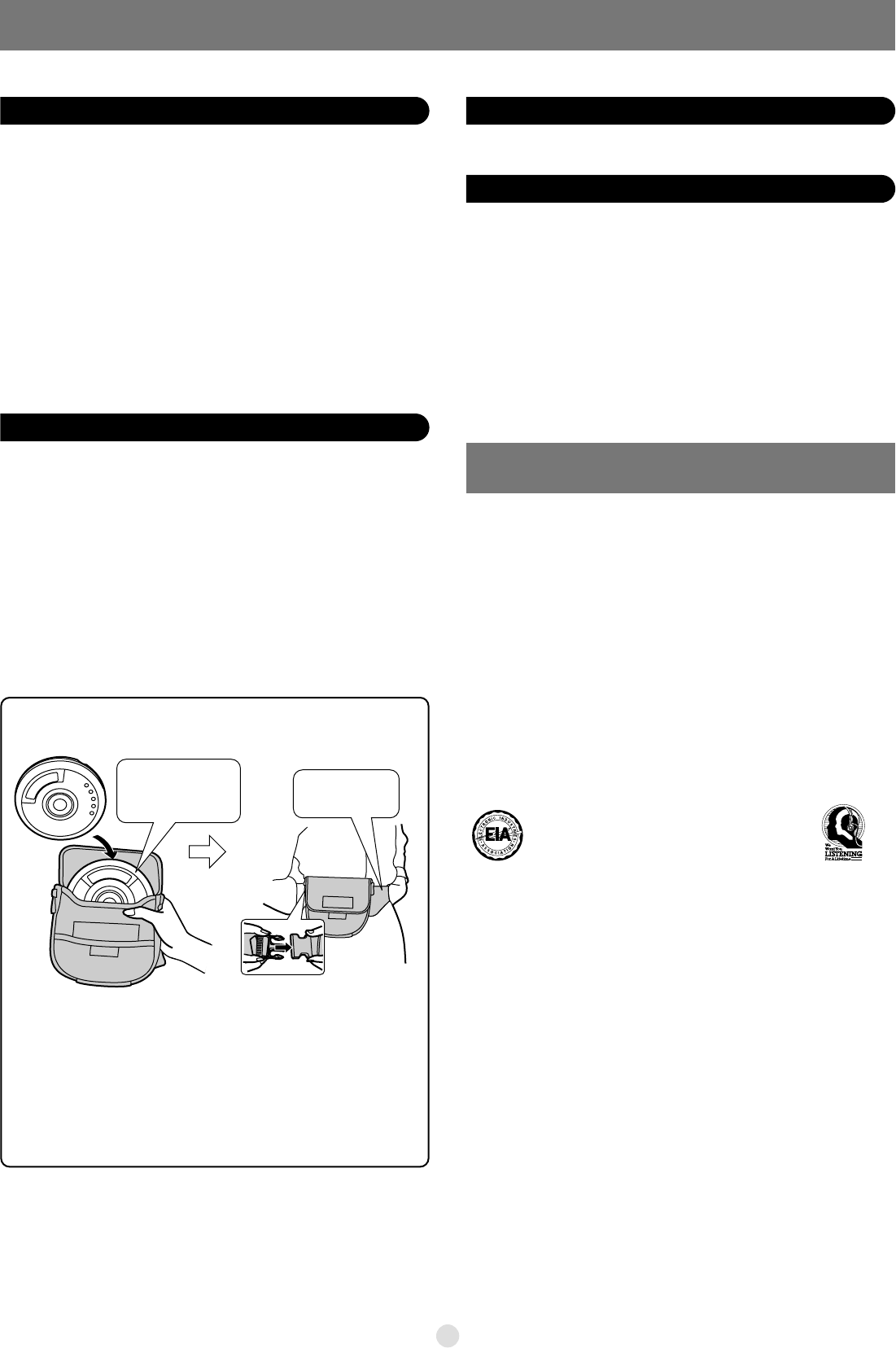
Using jogger soft case
(SL-MP73J only)


Delta i konversationen om denna produkt
Här kan du dela vad du tycker om Panasonic SL-MP71CPC Discman. Om du har en fråga, läs först noggrant igenom manualen. Att begära en manual kan göras genom att använda vårt kontaktformulär.