2
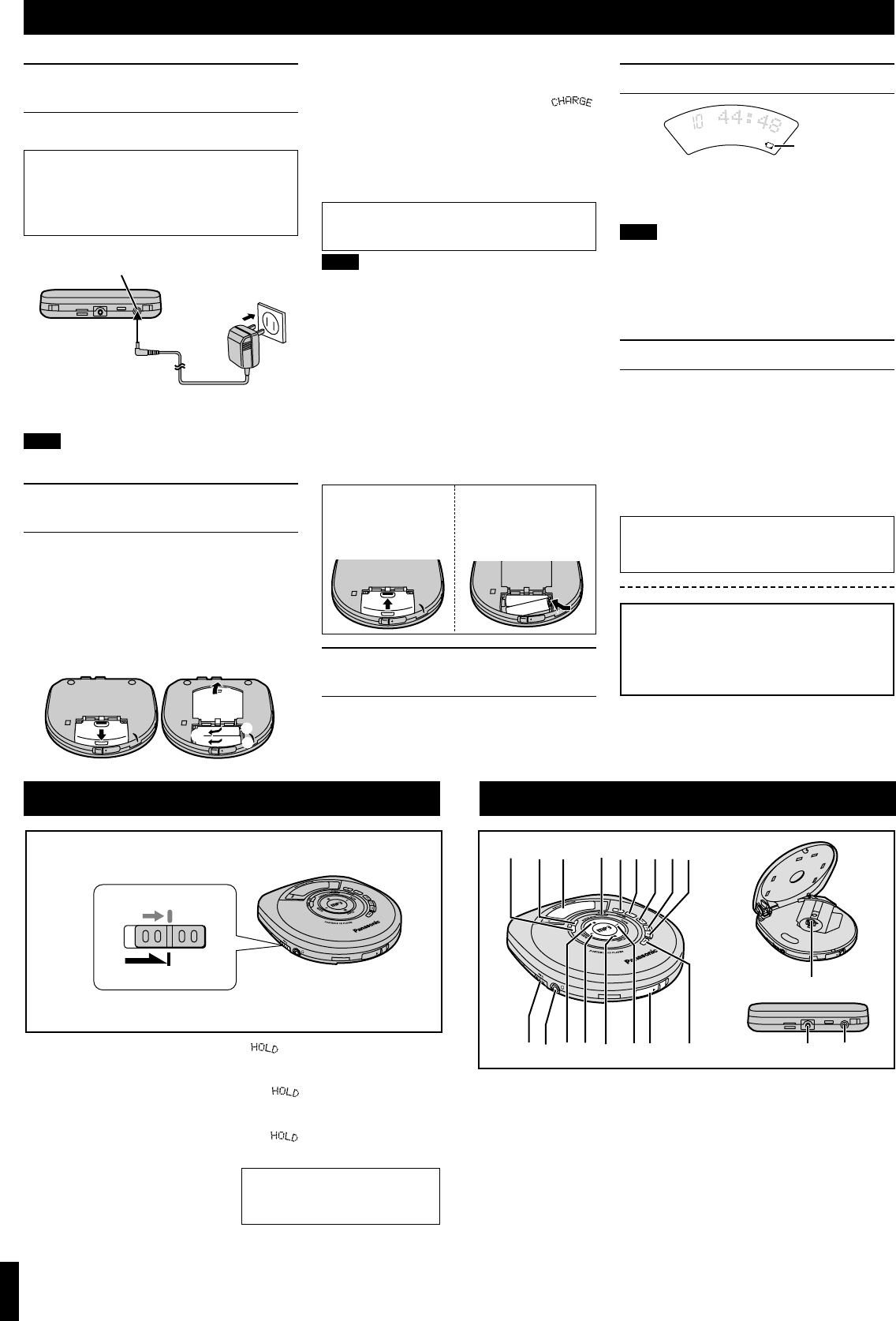
Power Supply Preparations
Refer to the specifications (page 8) for information on operating times when using rechargeable batteries or dry cell batteries.
Using the AC adaptor
(not included)
Use only the recommended AC adaptor. Using other AC
adaptors can damage the unit.
Connect the AC adaptor.
2 Connect the AC adaptor.
(Refer to “Using the AC adaptor” for connection
instructions.) Recharging starts and the “
”
charging indicator flashes on the display. When
the rechargeable batteries fully recharge the
charging indicator disappears.
3
When charging is complete, unplug
the AC adaptor from the household
AC outlet and DC IN jack.
Note!
≥Rechargeable batteries have a service life of approxi-
mately 300 charge-discharge cycles. The batteries
have reached the end of their operational life if they
last for a noticeably shorter time after recharging, or if
they cannot be recharged at all. Replace the batteries.
≥Recharging may only be performed when the unit is
off.
≥The AC adaptor and rechargeable batteries may be-
come warm while recharging is in progress. This is not
a malfunction.
≥Leaving the AC adaptor connected can cause the bat-
teries to go flat. After recharging the batteries and dis-
connecting the AC adaptor from the household AC
outlet, ensure you disconnect the AC adaptor from the
unit’s [DC IN 4.5 V
K
] terminal.
Battery indicator
This indicator flashes when the batteries are almost out
of power. Power is cut off completely a short while later.
Rechargeable batteries: Recharge batteries.
Dry cell batteries: Replace batteries with new ones.
Note!
≥The length of time the unit will continue to operate be-
tween when the battery indicator starts flashing and
when the power is cut off differs depending on the
type of batteries used.
≥The battery indicator may not flash if rechargeable
batteries other than those designated by Panasonic
are used.
Using the car adaptor
SL-MP36C includes a car adaptor. Refer to the sepa-
rate “Installation Instructions”.
For SL-MP35, obtain the car adaptor (SH-CDC9) avail-
able as an optional accessory.
The car adaptor can be used to recharge the unit’s bat-
teries while in the car.
Use only the recommended car adaptor. Use of other
car adaptors can damage the unit.
Removing batteries
Push up on the battery
in the direction indicat-
ed by the arrow. Then
lift it out.
If the battery lid
comes loose
Slide the lid back into
place horizontally.
If the unit malfunctions or freezes during
use, disconnect the power source (the AC
adaptor or batteries).
Re-connect the power source and contin-
ue operation.
DC IN jack (DC IN 4.5 V K)
Back panel of the unit
Household
AC outlet
AC adaptor
Battery indicator
Location of Controls
A Memory/recall button
(MEMORY)
B Mode button (MODE)
C Display
D S-XBS button (S-XBS)
E Headphone volume control
(i, VOLUME, j)
F Skip/search buttons
(:, 9)
G Play/pause button (1/;)
H Stop/operation off button (∫)
I Open switch (OPEN 1)
J Album skip buttons
(
M
ALBUM
L
)
K Display button (DISPLAY)
L Album mode button
(ALBUM MODE)
M Headphone jack (Ë)
N Hold switch (HOLD)
O CD release button (PUSH)
P Hole for car mounting base
Q DC IN jack
(DC IN 4.5 V K)
Conserving power
To save power when the unit is not to be used for a long
time, unplug the AC adaptor from the household AC outlet.
Note!
Turn the unit off before connecting or disconnecting the
AC adaptor.
P
Q
O
PE
N
A
B D E F
H
CEG
I
M
L
J
F
J
K
N
O
P
E
N
H
O
L
D
O
H
O
L
D
DC IN 4.5 V
K
HOLD mode
This function causes the unit to ignore
short, accidental button presses. (The
disc lid can still be opened and closed.)
The HOLD function prevents the
following:
≥The unit is powered on accidentally
when not in use, causing the batteries
to run down.
≥A button is accidentally pressed during
play, interrupting the operation.
To use the HOLD function
Set [HOLD] to the HOLD position.
“” indication
When the unit is in HOLD mode,
pressing any button causes the indica-
tion, “ ” to appear on the display.
When the unit is off
The “ ” indication appears only
when [1/;] is pressed.
HOLD Function
≥Never mix dry cell and rechargeable batteries.
≥Turn the unit off before replacing the recharge-
able batteries.
Using rechargeable batteries
(not included)
Obtain the optional rechargeable batteries.
Make sure to recharge the batteries before using them.
The unit cannot be used to charge rechargeable batter-
ies other than those specially designed for it.
Optional batteries: P-3GAVA/2B
Recharging procedure
1 Insert the special rechargeable bat-
teries into the unit.
Using dry cell batteries
(not included)
After disconnecting the AC adaptor, insert two “LR6,
AA, UM-3” alkaline batteries.
The procedure for inserting and removing dry cell
batteries is identical to that for rechargeable bat-
teries.
CAUTION:
Use only car adaptor, Model: SH-CDC9 manufac-
tured by Matsushita Electric Industrial Co., Ltd.
Before operating the buttons
Be sure to move [HOLD] to release
the unit from the HOLD mode.
For U.S.A
To order the optional AC adaptor RP-AC46 contact 1-
800-332-5368 or web site (http://www.panasonic.com).
For Canada
Be sure to obtain the optional AC adaptor RP-AC46.
It is available through your Panasonic dealer.
Back panel
of the unit


Delta i konversationen om denna produkt
Här kan du dela vad du tycker om Panasonic SL-MP36CPC Discman. Om du har en fråga, läs först noggrant igenom manualen. Att begära en manual kan göras genom att använda vårt kontaktformulär.