3
RQT6721
Getting started
Accessories
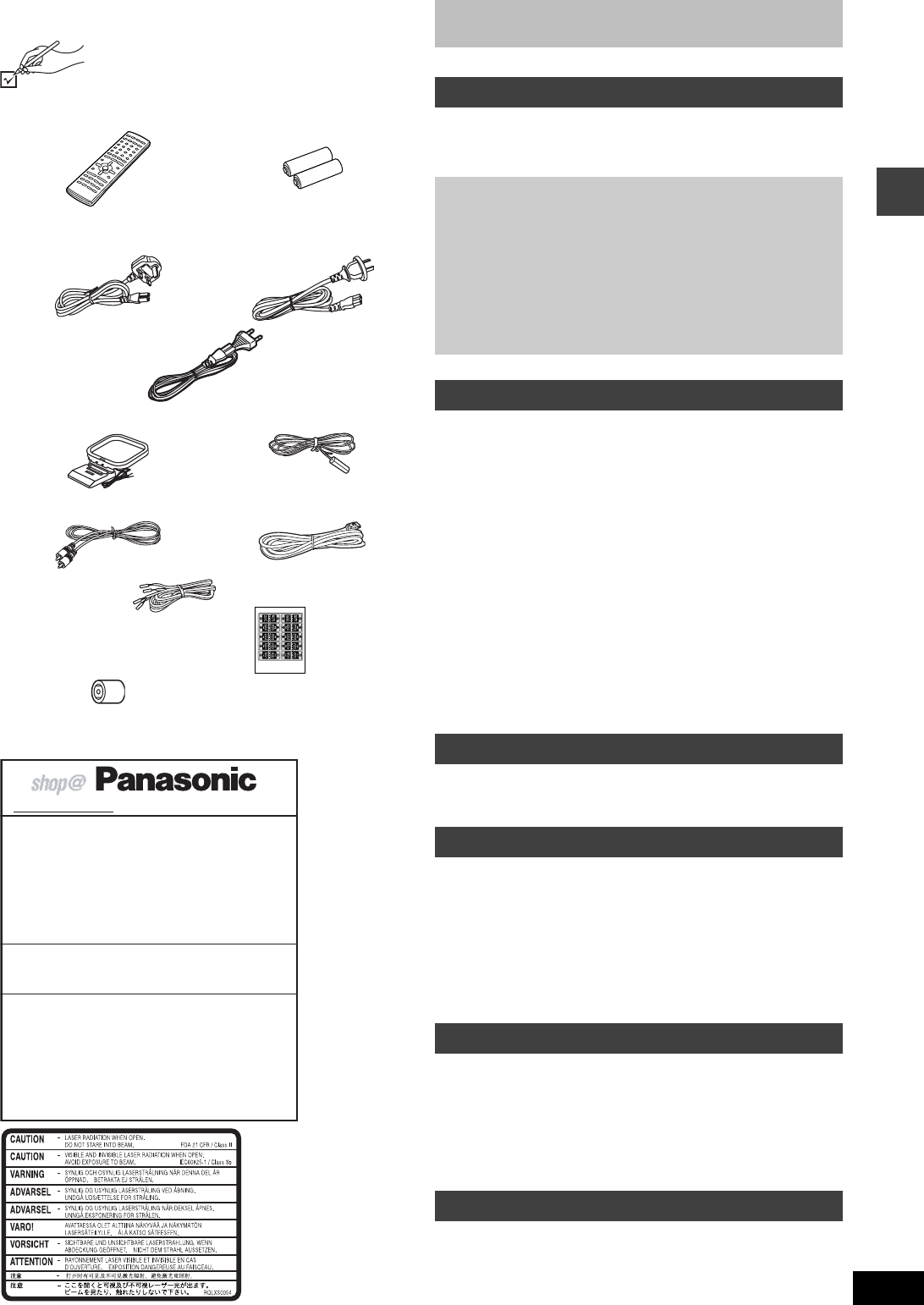
Please check and identify the supplied accessories.
Use numbers indicated in parentheses when asking
for replacement parts.
[Note]
The included AC mains lead is for use with this unit only. Do not use it with other equipment.
[For\the\United\Kingdom\and\Republic\of\Ireland]
∏ 1 Remote control
(EUR7623XA0)
∏ 2 Batteries
for remote control
∏ 1 AC mains lead
[For\the\United\Kingdom]
(RJA0053-3X)
[For\Australia\and\N.Z.]
(RJA0035-2X)
[For\others]
(RJA0019-2K)
∏ 1 AM loop antenna
(N1DAAAA00001)
∏ 1 FM indoor antenna
(RSA0007-J)
∏ 1 Video cable
(RJL1P016815A)
∏ 1 System cable
(K1HA25HA0001)
∏ 5 Speaker cables
(RFA2163-J)
3k4-m cables
2k10-m cables
∏ 1 Sheet of speaker-cable
stickers
∏
[For\the\United\Kingdom\only]
1 Antenna plug adaptor
(K1Y202000013)
www.panasonic.co.uk (for UK customers only)
≥ Order accessory and consumable items for your
product with ease and confidence by telephoning our
Customer Care Centre Mon–Friday 9:00am–5:30pm.
(Excluding public holidays.)
≥ Or go on line through our Internet Accessory ordering
application.
≥ Most major credit and debit cards accepted.
≥ All enquiries transactions and distribution facilities are
provided directly by Panasonic UK Ltd.
≥ It couldn’t be simpler!
Customer Care Centre
For UK customers: 08705 357357
For Republic of Ireland customers: 01 289 8333
Technical Support
For UK customers: 0870 1 505610
This Technical Support Hot Line number is for
Panasonic PC software related products only.
For Republic of Ireland, please use the Customer Care
Centre number listed above for all enquiries.
For all other product related enquiries, please use the
Customer Care Centre numbers listed above.
(Inside of product)
(Tuotteen sisällä)
(Produktets innside)
Table of contents
Accessories. . . . . . . . . . . . . . . . . . . . . . . . . . . . . . . . . . . . 3
Caution for AC Mains Lead . . . . . . . . . . . . . . . . . . . . . . . 4
Disc information . . . . . . . . . . . . . . . . . . . . . . . . . . . . . . . . 5
Control reference guide . . . . . . . . . . . . . . . . . . . . . . . . . 12
Discs—Basic play. . . . . . . . . . . . . . . . . . . . . . . . . . . . . . 13
Position Memory function . . . . . . . . . . . . . . . . . . . . . . . . . . . . . 13
Skipping items/Fast forward and rewind—SEARCH. . . . . . . . . 14
Slow-motion play/Frame-by-frame viewing . . . . . . . . . . . . . . . . 14
Discs—Convenient functions . . . . . . . . . . . . . . . . . . . . 15
Starting play from a selected item/Repeat play. . . . . . . . . . . . . 15
A-B repeat play/Selecting groups to play . . . . . . . . . . . . . . . . . 15
All group play/Program play/Random play . . . . . . . . . . . . . . . . 16
Soundtracks/Subtitles . . . . . . . . . . . . . . . . . . . . . . . . . . . . . . . . 17
Marking places to play again. . . . . . . . . . . . . . . . . . . . . . . . . . . 18
Variable Zoom function . . . . . . . . . . . . . . . . . . . . . . . . . . . . . . . 18
WMA/MP3 and CD text navigation menus . . . . . . . . . . 19
Playing the programs or play lists on DVD-RAM. . . . . 20
Selecting a program to play—DIRECT NAVIGATOR . . . . . . . . 20
Using the play list menu . . . . . . . . . . . . . . . . . . . . . . . . . . . . . . 20
Using GUI (Graphical User Interface) screens. . . . . . . 21
Common procedures/Progress indicator. . . . . . . . . . . . . . . . . . 21
Disc information/Unit information . . . . . . . . . . . . . . . . . . . . . . . 22
The radio . . . . . . . . . . . . . . . . . . . . . . . . . . . . . . . . . . . . . 24
Manual tuning/Preset tuning . . . . . . . . . . . . . . . . . . . . . . . . . . . 24
RDS broadcasting . . . . . . . . . . . . . . . . . . . . . . . . . . . . . . . . . . . 25
Sound field . . . . . . . . . . . . . . . . . . . . . . . . . . . . . . . . . . . 25
Dolby Digital and DTS. . . . . . . . . . . . . . . . . . . . . . . . . . . . . . . . 25
Dolby Pro Logic/Speaker level adjustments . . . . . . . . . . . . . . . 26
Super Surround. . . . . . . . . . . . . . . . . . . . . . . . . . . . . . . . . . . . . 26
Sound Field Control/Center Focus . . . . . . . . . . . . . . . . . . . . . . 27
Custom Sound Memory—Store the sound settings . . . . . . . . . 27
Sound quality . . . . . . . . . . . . . . . . . . . . . . . . . . . . . . . . . 27
Adjusting the bass. . . . . . . . . . . . . . . . . . . . . . . . . . . . . . . . . . . 27
Re-master—Enjoying more natural sound . . . . . . . . . . . . . . . . 27
Convenient functions . . . . . . . . . . . . . . . . . . . . . . . . . . . 28
Muting the volume/Dimming the display . . . . . . . . . . . . . . . . . . 28
The sleep timer/Using headphones. . . . . . . . . . . . . . . . . . . . . . 28
Operating a television or video cassette recorder . . . 29
Changing settings. . . . . . . . . . . . . . . . . . . . . . . . . . . . . . 30
Language code list . . . . . . . . . . . . . . . . . . . . . . . . . . . . . 32
Optional antenna connections . . . . . . . . . . . . . . . . . . . 32
Safety precautions . . . . . . . . . . . . . . . . . . . . . . . . . . . . . 32
Glossary. . . . . . . . . . . . . . . . . . . . . . . . . . . . . . . . . . . . . . 33
Maintenance . . . . . . . . . . . . . . . . . . . . . . . . . . . . . . . . . . 33
Troubleshooting guide. . . . . . . . . . . . . . . . . . . . . . . . . . 34
Specifications . . . . . . . . . . . . . . . . . . . . . . . . . . . . . . . . . 36
Getting started
Simple setup
STEP1 Locating . . . . . . . . . . . . . . . . . . . . . . . . . . . . .6
STEP2 Speakers . . . . . . . . . . . . . . . . . . . . . . . . . . . . .7
STEP3 Television . . . . . . . . . . . . . . . . . . . . . . . . . . . .8
STEP4 Connecting the subwoofer, antennas, and
AC mains lead . . . . . . . . . . . . . . . . . . . . . . . .9
STEP5 The remote control. . . . . . . . . . . . . . . . . . . . .9
Other speaker setup options . . . . . . . . . . . . . . . . . .10
STEP6 QUICK SETUP. . . . . . . . . . . . . . . . . . . . . . . .11
Disc operations
Radio operations
Sound field/sound quality operations
Other functions
Reference


Delta i konversationen om denna produkt
Här kan du dela vad du tycker om Panasonic SC-MT1 Hembiopaket. Om du har en fråga, läs först noggrant igenom manualen. Att begära en manual kan göras genom att använda vårt kontaktformulär.