[z PLAY] Timer PLAY ON/OFF
[1-9, 0,
≧
10] Numbered buttons
To select a 2-digit number
e.g. 16: [
≧
10] [1] [6]
To select a 3-digit number
e.g. 226: [
≧
10] [
≧
10] [2] [2] [6]
[MUSIC PORT] Selector switch to MUSIC PORT
[2/u, 1\i] CD: Skip/Search
MP3: Track Skip
TUNER: Tune up/down, [Long press] Auto tuning
[g] Stop button
[MUSIC PORT] Selector switch to MUSIC PORT
3
[;, OPEN/CLOSE] Open and Close CD lid
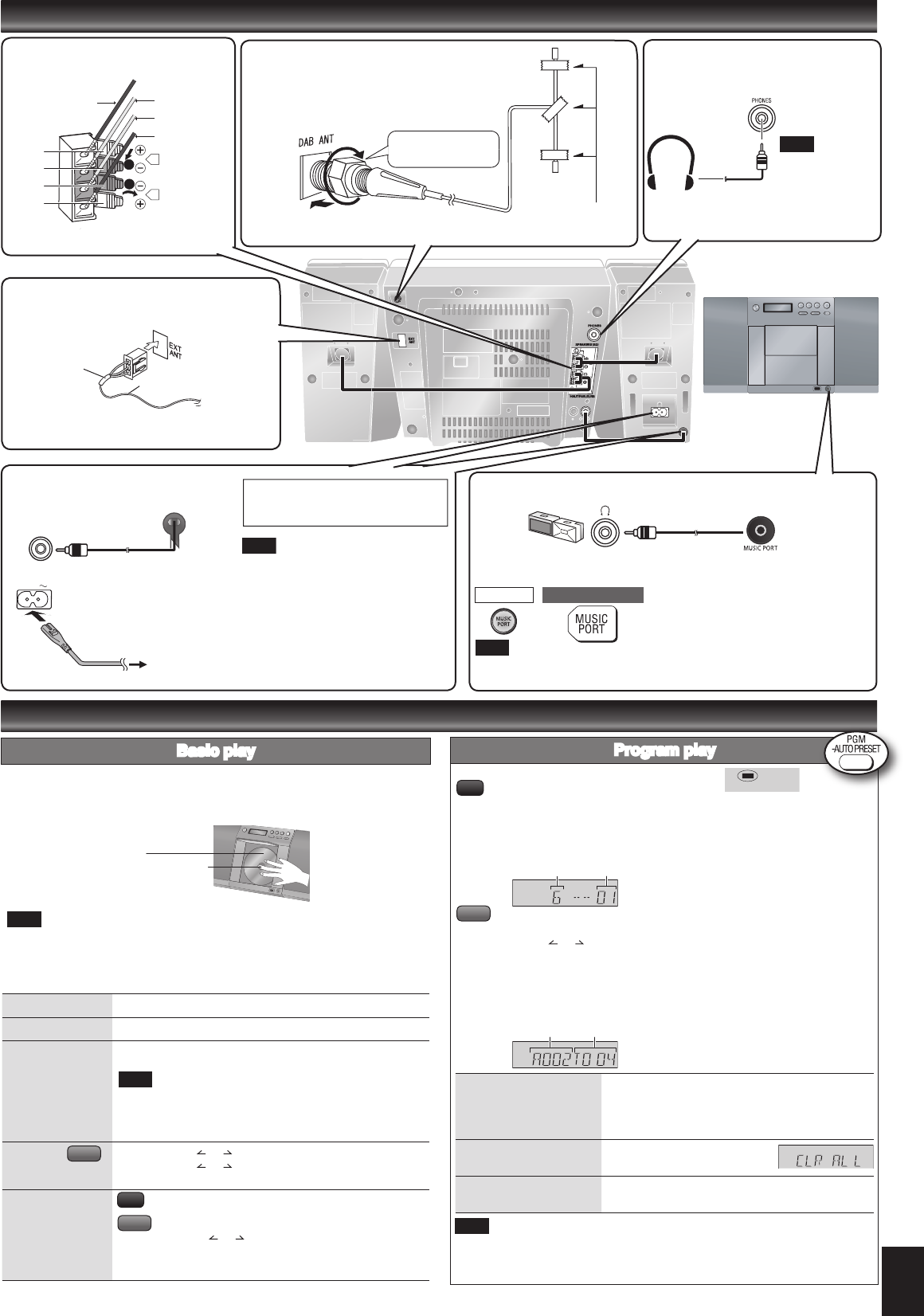
Press [8] to turn the unit on.
Press [; OPEN/CLOSE] to open the CD lid and then set the CD in place.
Press [; OPEN/CLOSE] again to close the lid.
Keep fingers away from the CD lid when it is closing to avoid possible minor injury.
Label must face outward.
Press until you hear it click into place.
Press [CD q/h] to start play.
Adjust the volume.
Be sure to press the [; OPEN/CLOSE] button to open and close the CD lid.
Damage may occur if the lid is forced closed.
During standby, if the CD is ready in the unit, the unit comes on and play begins.
(One touch play)
•
•
•
Basic play
Discs operations
Connections
3. FM antenna
Stand the antenna up on its base.
Taped part
FM antenna
Headphones
(not included)
Reduce the volume
level and connect
the headphones.
Plug type:
3.5 mm stereo.
To prevent hearing
damage, avoid
listening for
prolonged periods
of time .
Note
Portable audio equipment
(Cords and equipment not included)
Use
Adjust the volume and sound quality of this unit and the other equipment.
For details, refer to the instruction manual of the other equipment.
•
•
Portable audio player Plug type:
3.5 mm stereo
➡
Start Playback from the
Portable audio source.
Stop
Press [g].
Pause
Press [CD q/h]. Press again to resume play.
Skip/Search
Press [2/u] or [1/i] to skip/
Press and hold [2/u] or [1/i] to search.
You can search during play or while paused.
You cannot search through MP3 files.
You can only search within the current track during
program play, one track repeat, and random play.
•
•
•
Skip album Press [ALBUM or ] in the play mode.
Press [ALBUM or ] once and then the numbered buttons
in the stop mode.
Direct access play
(Play starts with the
track you select.)
Press the numbered buttons to select the desired track.
Press [ALBUM or ] to select the album.
Press [1/i] once and then press the numbered buttons
to
select the desired track.
Note
Note
1. Speakers
Copper (+)
Silver (-)
Silver (-)
Copper (+)
➡
Page 2 for the position of remote control and
main unit buttons.
The function allows you to program up to 24 tracks.
Press [PGM, -AUTO PRESET] while stopped.
Press the numbered buttons to select tracks. (Maximum 24 tracks)
Repeat this step to program other tracks.
Press [CD q/h] to start play.
Press [PGM, -AUTO PRESET] while stopped.
Press [ALBUM or ] to select your desired album.
Press [1/i] once and then press the numbered buttons to select tracks.
(Maximum 24 tracks)
Press [ENTER].
Repeat step 2 to 4 to program other tracks.
Press [CD q/h] to start play.
g Confirm a programmed
track
Press [2/u] or [1/i] when “PGM” is displayed
in the stop mode. To check while programming,
press [PGM, -AUTO PRESET] twice after “PGM”
appears, then press [2/u] or [1/i] .
g Delete all programs
Press [CLEAR] in the stop mode.
“CLR ALL” is displayed.
g Cancel program mode
Press [PGM, -AUTO PRESET] in the stop mode to
clear “PGM” indicator from the display.
Program contents are stored in the unit’s memory even after changing to a different
function or turning the unit off. All program contents are erased by pressing [CLEAR]
or by opening the CD lid.
Program play
Track number
Program number
Note
Album number Track number
MP3
CD
MP3
CD
MP3
Note
Red
Red
Black
Black
Unplug the antenna connector by holding the taped
part.
MAIN UNIT REMOTE CONTROL
2. DAB “T” antenna
The cross bar of the T should be kept firmly stretched.
Find a position with good reception.
There is a function on the unit to check signal quality.
Be sure to fully
tighten the screw.
Adhesive tape
For best reception
A DAB outdoor antenna is recommended (refer to page 5).
4. AC mains lead
To household
mains socket
If the unit is left unplugged for longer
than approximately two weeks, all
settings will revert to the factory settings.
Remember to reset the radio stations
and any other memory items before
using the unit again.
Connect the AC mains lead
after all other connections
are complete.
Note
Connect the DC in cord from
left speaker to main set.
Connect the AC mains lead.
READ THE CAUTION FOR THE AC
MAINS LEAD ON PAGE 11 BEFORE
CONNECTION.
SC-EN35 DBEB.indd 3 28/03/2007 14:20:04


Delta i konversationen om denna produkt
Här kan du dela vad du tycker om Panasonic SC-EN35DB Stereoanläggning. Om du har en fråga, läs först noggrant igenom manualen. Att begära en manual kan göras genom att använda vårt kontaktformulär.