2
Warning and Important Information
Important
Your attention is drawn to the fact that the recording of
pre-recorded tapes or discs or other published or broadcast
material may infringe copyright laws.
For your safety
Do not remove outer cover.
Touching internal parts of the VCR is dangerous, and may
seriously damage it. To prevent electric shock, do not
remove cover. There are no user serviceable parts inside.
Refer all servicing to qualified service personnel.
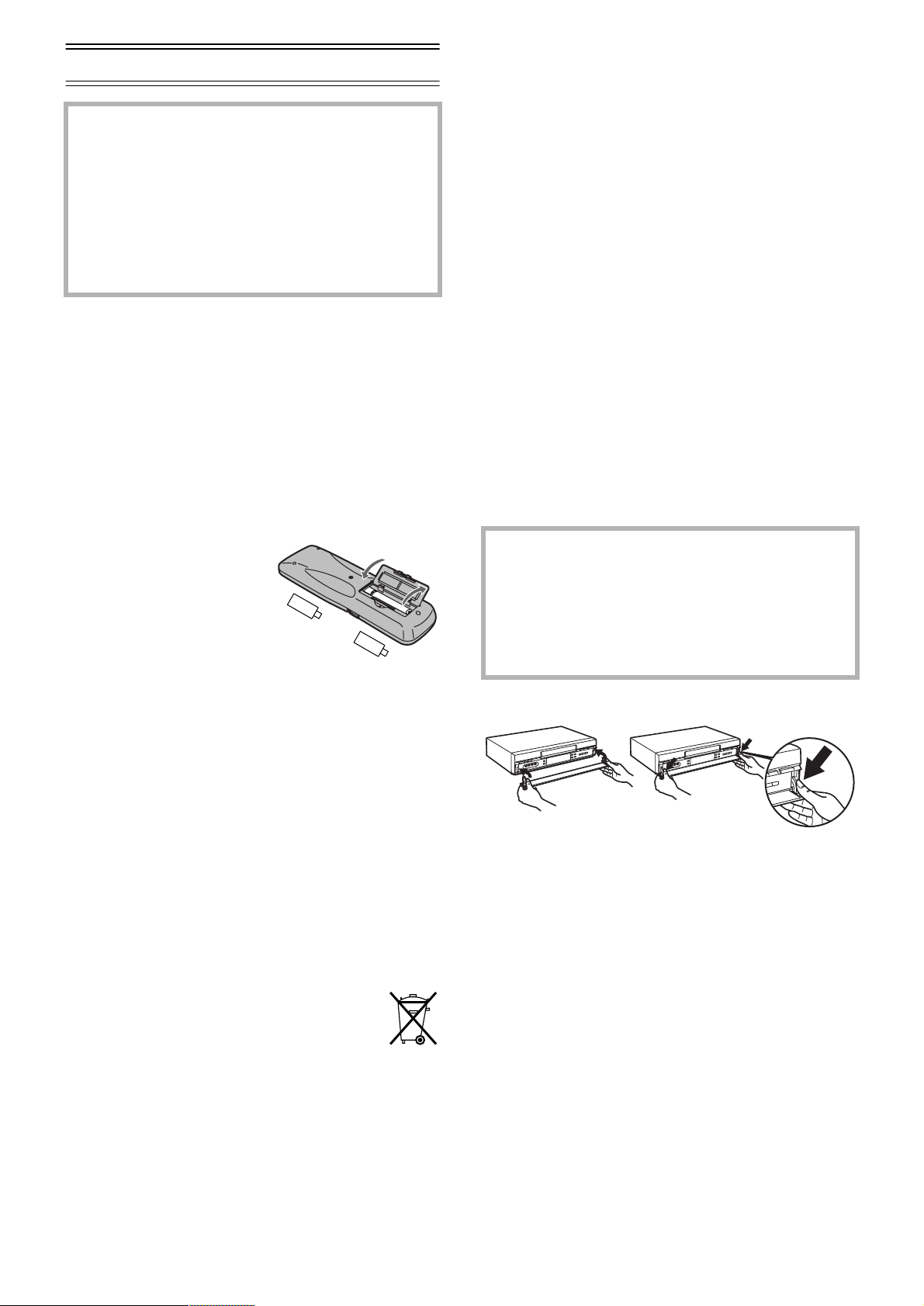
Inserting Remote Control Batteries
Insert the batteries with the polarity (+ and -) correctly
aligned.
Notes:
• The service life of the batteries is approximately 1 year.
However, it varies considerably depending on the frequency of
use.
• When they are exhausted, replace them with two AA, UM3, or R6
size batteries.
• When the batteries are exhausted, remove them immediately and
dispose of them correctly.
• Make sure that the batteries are inserted with the polarity (+ and
-) correctly aligned.
• Do not mix old battery with new battery.
• Do not mix different battery types, i.e. Alkaline and Manganese.
• Do not use rechargeable (Ni-Cd) batteries.
• Do not heat or short-circuit the batteries.
• When you do not use the remote control for a long time, take out
the batteries and store them in a cool, dry place.
Conserve the environment
See [Power save] of page 20.
Disposal of old equipment
Batteries, packaging and old equipment should not
be disposed of as domestic waste, but in
accordance with the applicable regulations.
Cautions before you operate this VCR
Avoid:
• Humidity and dust.
• Extreme heat such as direct sunlight.
• Magnets or electromagnetic objects.
• Touching internal parts of the VCR.
• Water or some other liquid.
• Lightning. (Disconnect the aerial plug from the VCR during
lightning storms.)
• Anything heavy on the VCR.
• Connecting or handling the equipment with wet hands.
• Using a cell phone near the VCR because doing so may
cause noise to adversely affect the picture and sound.
Do:
• Wipe the VCR with a clean and dry cloth.
• Install the VCR in a horizontal position.
• Keep the VCR, TV and other equipment switched off until
you have finished all connections.
Condensation may form in the following cases:
• The VCR is brought from cold surroundings into a
well-heated room.
• The VCR is suddenly brought from cool surroundings, such
as an air-conditioned room or car, to a place which is hot
and humid.
Note:
• In any of the above-mentioned conditions, do not operate the VCR
for at least 1 hour. This VCR is not equipped with a dew sensor.
If the front panel comes off
1) Insert the panel as show in the illustration.
2) Ensure the panel is parallel to the unit, then press firmly
down and in on the levers until they click into place.
3) Check that the panel now moves correctly.
• If it does not, remove it and repeat the above
procedure.
Front panel
A half-mirror is used in the front panel. Characters (tape
counter, etc.) indicated in the display may be illegible
depending on environmental brightness and light reflections.
Maintenance
When the half-mirror on the front panel gets dirty with
fingerprints or dust, wipe it with lens cleaner for eyeglasses
or cloth taking care not to damage the mirror.
As this equipment gets hot during use, operate it in
a well ventilated place;
do not install this equipment in a confined space
such as a book case or similar unit.
WARNING:
To reduce the risk of fire electric shock or product
damage, do not expose this equipment to rain,
moisture, dripping or splashing and ensure that no
objects filled with liquids, such as vases, shall be
placed on the equipment.
-
-
+
+
Standard Accessories
1 pc. RF Coaxial cable
1 pc. Remote Control
NV-HS880Series: N2QAKB000040
NV-HS830Series: N2QAKB000022 or
N2QAKB000027
2 pcs. R6 size batteries
1 pc. AC mains lead
1
2


Delta i konversationen om denna produkt
Här kan du dela vad du tycker om Panasonic NV-HS830EE Video inspelare. Om du har en fråga, läs först noggrant igenom manualen. Att begära en manual kan göras genom att använda vårt kontaktformulär.