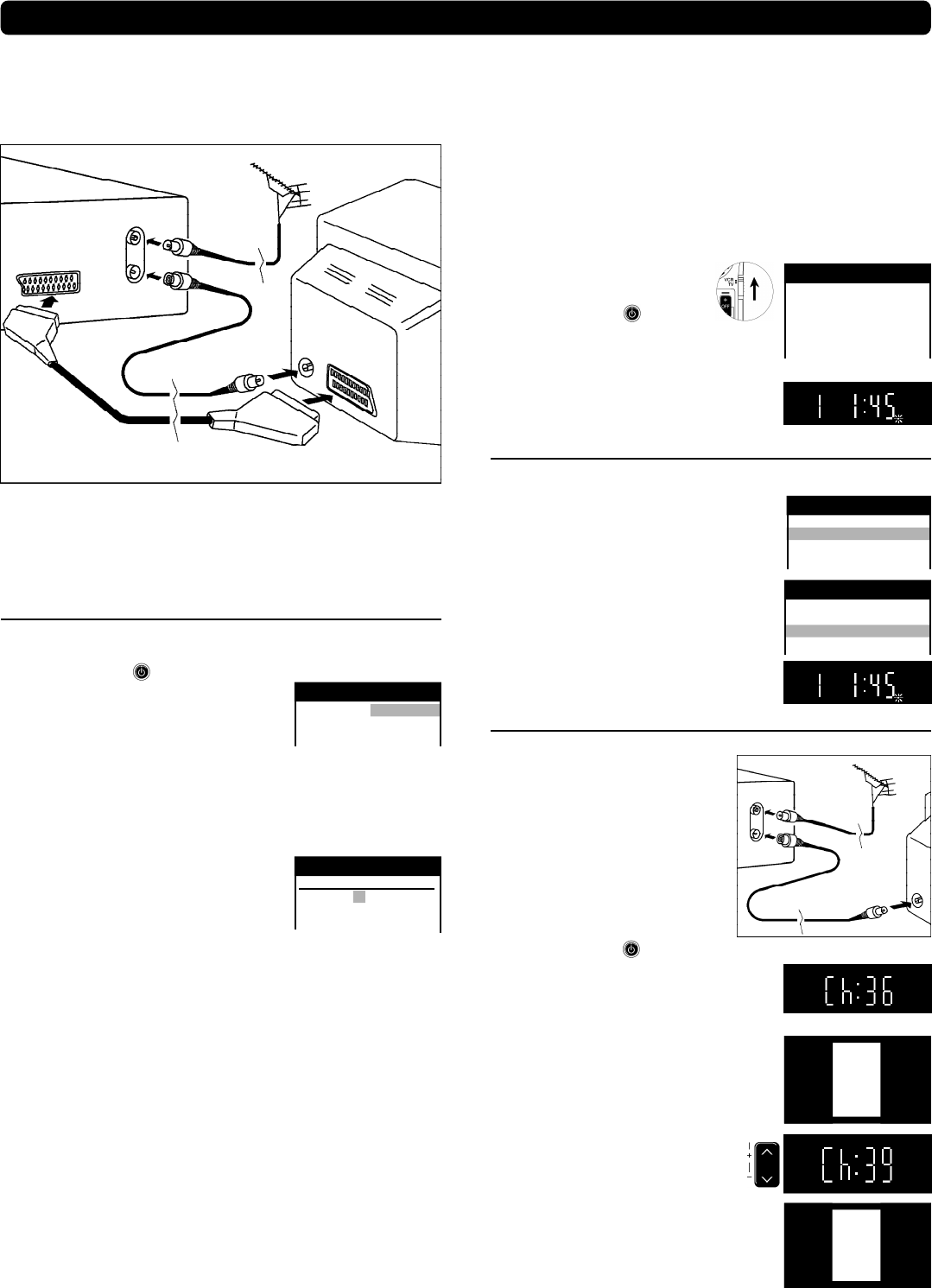
Setting up
VCR
TV
Aerial
(not supplied)
21-pin Scart cable
(not supplied)
RF Coaxial Cable
(supplied)
Note:
n The RF (radio frequency) coaxial cable must be connected for TV
reception, even if the video recorder is already connected with
a 21-pin Scart cable.
n More information about the remote control buttons and of cursors,
see page 4-5.
Set up the connections shown here, and connect the mains lead
(supplied) to your AC mains.
If you want to connect the TV
only with a RF Coaxial Cable
(supplied), you must ensure that
the video output channel is adjusted
to the input channel of the TV.
For this purpose, please also read
the operating instructions for your TV.
n Switch on the VCR
n Press the m Button for about 7
seconds until the number of the channel
appears on the VCR display
(the pre-setting is channel 36).
n Tune the TV until the test screen appears.
A distorted picture on the channel can be
reduced, by adjusting the VCR and the TV
to another channel.
n Use this button to select
the channel number (e.g. channel 39).
n Tune the TV until the test screen appears.
n To store this adjustment, press
o
.
n After that, please continue with the
Automatic Setting
with the [Country] setting menu.
On Screen Display
VCR
Ch:36
VCR display
VQT9524
3
Automatic Setting without Q Link
n Switch on the VCR
and the [Country] setting menu will appear.
n Use the cursors
:;8 9
on the
remote control to select your country.
n After pressing
o
, all the TV stations
which can be received will be tuned
automatically in about 5 minutes.
n When the menu [Clock setting] appears,
use the cursors
:;8 9
on
the remote control to select
the Time and Date manually.
n To end this procedure, press
o
.
n To cancel this settings press
e
.
Notes:
n If the selection for the Country menu does not appear
after switching on the VCR, you can restart the Automatic Setting;
see page 8.
n An incorrect setting of Time or Date (observe summer- and wintertime)
will influence the Timer recording.
n If you select the country [Suisse] the menu [Power save] will appear.
Select the settings with the cursors
:;
and store with
o
.
More information see on page 9.
Notes about
€
:
(for NV-FJ631, NV-FJ630, NV-FJ626)
n Following systems from other manufacturers
have similar function with Q Link from Panasonic.
n List of registered trademarks:
Q Link (Panasonic), DATA LOGIC (Metz), Easy Link (Philips),
Megalogic (Grundig), SMARTLINK (Sony)
On Screen Display
Panasonic VCR
Country
Belgien Deutschland
Belgique Österreich
Belgiê Portugal
Panasonic VCR
Clock setting
Clock setting : MAN.
Time : 20:30:24
Date : 21.03.01
RF Coaxial Cable
(supplied)
TV
VCR
AV
RF IN
RF OUT
VCR
Ch:39
Automatic Setting with Q Link
(for NV-FJ631, NV-FJ630, NV-FJ626)
If your TV is equipped with Q Link or with a similar function from other
manufacturers (see notes), the TV programme positions can be
downloaded with a fully-wired 21-pin Scart cable (not supplied).
The programme positions must be tuned on the TV first.
n Connect the Scart cable.
n Set the AV channel of the TV.
n Set the remote control to VCR.
n Switch on the VCR .
n Downloading of the TV data starts.
n When the indication appears on
the VCR display, the downloading
is complete.
Download in
progress,
please wait.
Position 49
Panasonic VCR
Download
On Screen Display
VCR display
Manual download start
(for NV-FJ631, NV-FJ630, NV-FJ626)
n Set the AV channel of the TV.
n press m
n Select [Tuning]
;
n Access by pressing
o
n Select [Download]
;
n Press
o
n Confirm by pressing
o
n When the indication appears on
the VCR display, the downloading
is complete.
Panasonic VCR
Tuning
Manual
Auto-Setup Restart
Download
Shipping condition
Panasonic VCR
Main menu
Timer recording
Tuning
Clock setting
Other settings
Connecting and Setting up



Delta i konversationen om denna produkt
Här kan du dela vad du tycker om Panasonic NV-FJ630 Video inspelare. Om du har en fråga, läs först noggrant igenom manualen. Att begära en manual kan göras genom att använda vårt kontaktformulär.