5
RQT9257
Getting started
HDD (Hard disk drive) handling care
The HDD is a high precision recording instrument and because of its long recording capability and high speed operation it is a very special device
that is easily susceptible to damage.
As a basic rule, save important content to a disc as backup.
∫ The HDD is a device that is not built to withstand vibration/shock or dust
Depending on the setup environment and handling of the HDD some content may become damaged and play and recording may no longer be
possible. Especially during operation, do not subject the unit to any vibration, shock, or remove the AC mains lead from the household mains
socket. In the event of a power failure during recording or play, the content may be damaged.
∫ The HDD is a temporary storage device
The HDD is not an everlasting storage device for recorded content. Use the HDD as a temporary storage place for one-off viewing, editing, or
copying. It is recommended to save the recorded content on a disc or to keep the original data or CDs that they were copied from.
∫ Immediately save (backup) all content as soon as you feel there may be a problem with the HDD
If there is an irregularity within the HDD, repetitive strange sounds or problems with picture (block noise, etc.) may result. Using the HDD in this
condition may worsen the problem and in the worst case the HDD may no longer be usable. As soon as you notice this type of problem, copy all
content to disc and request service. Recorded content (data) on a HDD that has become unusable is unrecoverable.
≥When the unit is turned on or off, there may be an unexpected sound. This does not indicate a problem with this unit.
∫ HDD recording time remaining
This unit records using a VBR (Variable bit rate) data compression system to vary recorded data segments to match video data segments which
may cause differences in the displayed amount of time and space remaining for recording.
If the remaining amount of time is insufficient, delete any unwanted titles to create enough space before you start recording. (Deleting a playlist
will not increase the amount of time.)
The precision parts in this unit are readily affected by the
environment, especially temperature, humidity, and dust.
Cigarette smoke also can cause malfunction or breakdown.
To clean this unit, wipe with a soft, dry cloth.
≥Never use alcohol, paint thinner or benzine to clean this unit.
≥Before using chemically treated cloth, carefully read the
instructions that came with the cloth.
Observe the following points to ensure continued listening and
viewing pleasure.
Dust and dirt may adhere to the unit’s lens over time, making it
impossible to record or play discs.
Use the DVD lens cleaner (not included) about once every year,
depending on frequency of use and the operating environment.
Carefully read the lens cleaner’s instructions before use.
Do not obstruct the rear panel’s internal cooling fan.
∫ Setup precautions
≥Do not place in an enclosed area where the rear cooling
fan and the cooling vents on the side are covered up.
≥Place the unit on a surface that is flat and not subject to
vibration or impact.
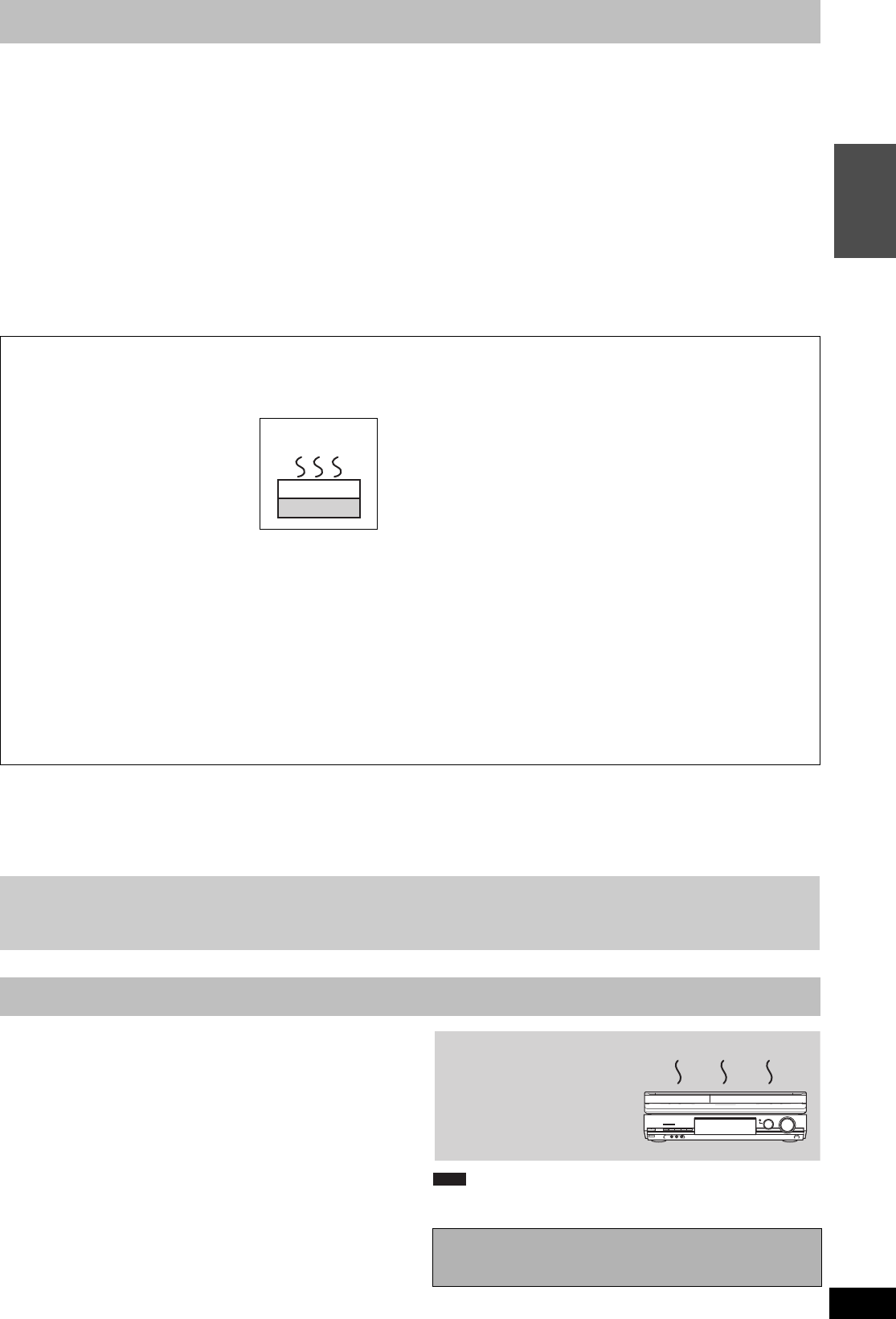
≥Do not place on anything that
generates heat like a video cassette
recorder, etc.
≥Do not place in an area often subject to
temperature changes.
≥Place in an area where condensation
does not occur. Condensation is a
phenomenon where moisture forms on a
cold surface when there is an extreme
change in temperature. Condensation may cause internal
damage to the unit.
≥Conditions where condensation may occur
– When there is an extreme change in temperature (moving
from a very hot location to a very cold location, or vice versa,
or when subjected to an air conditioner or when cooled air
directly impacts the unit). When the HDD (warms during
operation) is subjected to cold air, condensation may form on
the inside of the HDD and may cause damage to the HDD
heads, etc.
– When there is high humidity or a lot of steam in the room.
– During the rainy season.
In the above situation, without turning the unit on, let the unit
adjust to the room temperature and wait 2–3 hours until
condensation is gone.
∫ Cigarette smoke etc. causes malfunction or
breakdown
The unit may breakdown if cigarette smoke or bug spray/vapor,
etc. gets inside the unit.
∫ While operating
≥Do not move the unit or subject to vibration or impact. (The
HDD may become damaged.)
≥Do not remove the AC mains lead from the household mains
socket, or flip the power breaker switch.
While the unit is on, the HDD is rotating at high speed. Sound or
movement due to rotation is normal.
∫ When moving the unit
1 Turn the unit off. (Wait until “BYE” disappears from the
display.)
2 Remove the AC mains lead from the household mains socket.
3 Move only after the unit has come to a complete stop (approx.
2 minutes) in order to avoid subjecting to vibration and shock.
(Even after turning the unit off, the HDD continues operating
for a short time.)
∫ Indemnity concerning recorded content
Panasonic does not accept any responsibility for damages directly or indirectly due to any type of problems that result in loss of recording or
edited content (data), and does not guarantee any content if recording or editing does not work properly. Likewise, the above also applies in a
case where any type of repair is made to the unit (including any other non-HDD related component).
Unit care
Before moving the unit, ensure the disc tray is empty.
Failure to do so will risk severely damaging the disc and the
unit.
Do not place the unit on
amplifiers or equipment
that may become hot.
The heat can damage the unit.
DO NOT
EH595EG-RQT9257-L_eng.book 5 ページ 2008年12月15日 月曜日 午後7時47分


Delta i konversationen om denna produkt
Här kan du dela vad du tycker om Panasonic DMR-EH595 DVD spelare. Om du har en fråga, läs först noggrant igenom manualen. Att begära en manual kan göras genom att använda vårt kontaktformulär.