Bruksanvisning Oregon IWA-80055 Väderstation

Behöver du en bruksanvisning för din Oregon IWA-80055 Väderstation? Nedan kan du se och ladda ner PDF-bruksanvisningen gratis på svenska. Den här produkten har för närvarande 5 vanliga frågor, 0 kommentarer och har 0 röster. Om det här inte är bruksanvisningen du vill ha, vänligen kontakta oss.

Är produkten defekt och erbjuder bruksanvisningen ingen lösning? Gå till ett Repair Café för gratis reparationstjänster.

Bruksanvisning

Loading…
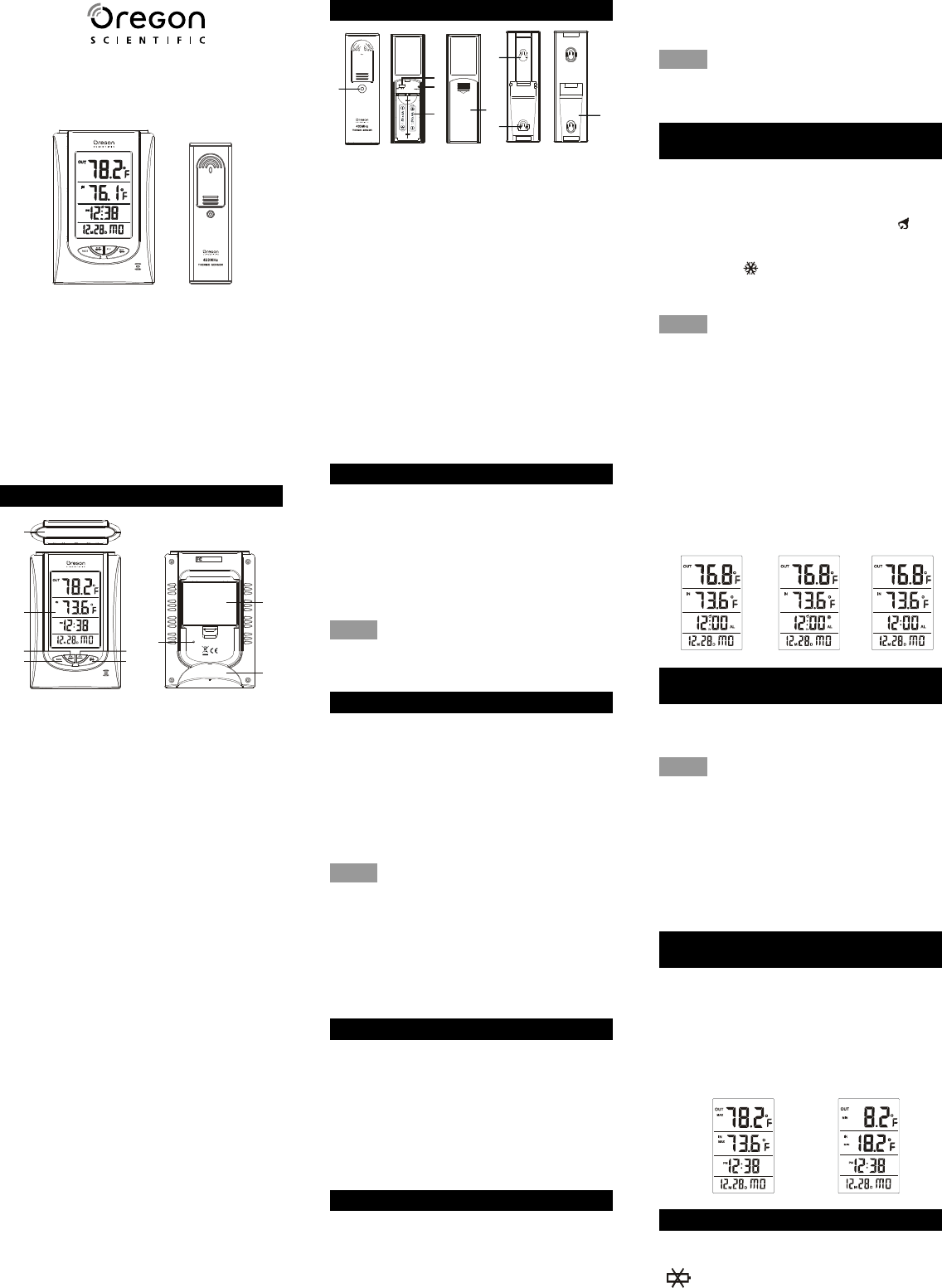
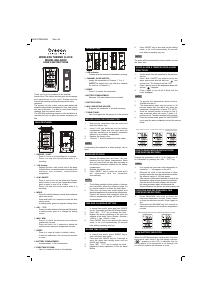
TRANSMITTER:
1. LED indicator:
- Flashes when the remote unit transmits a reading.
2. CHANNEL SLIDE SWITCH:
- Assign the transmitter to Channel 1, 2 or 3.
(NOTE: The default and only effective channel
for receiver is Channel 1.)
3. RESET:
- Press it to restart the transmitter.
4. BATTERY COMPARTMENT:
- Requires 2 AA size batteries (not included).
5. BATTERY DOOR:
6. WALL-MOUNTING HOLDER:
- Supports the transmitter in the wall mounting.
7. TABLE STAND:
- Use it to support the the sensor on a flat surface.
BEFORE USING THE TRANSMITTER
1. Remove the transmitter from the stand and
open the battery door.
2. Insert 2 AA size batteries into the battery
compartment. Make sure you insert them the
right way according to the polarity information
marked on the battery compartment.
3. Replace the battery door.
4. “Channel 1” must be selected for this model.
NOTE:
Avoid placing the transmitter in direct sunlight, rain or
snow.
WEATHER STATION
1. Remove the battery door and insert 3 AA size
batteries into the battery compartment. Make
sure you insert them the right way according to
the polarity information marked on the battery
compartment.
2. Replace the battery door.
3. Press “RESET” key to restart the clock and it
will synchronize with the transmitter
automatically.
NOTE:
1. The building material and the position of receiver
and transmitter affect the effective range. So
try various locations to obtain the best result.
2. Place the unit away from metal objects and
electrical appliances to minimize the interference.
Position the receiver and transmitter within the
effective transmission range: 100 feet in usual
circumstances.
TIME AND CALENDAR SETTING
1. In normal time mode, press and hold “MODE”
key for 2 seconds until the HOUR digit flashes.
2. Press ADJ · °C/°F key to change its value.
3. Repeat the above operations to set time and
calendar in this order: Hour > Minute > Second >
12/24 Hr > Year > Month > Date.
4. Press “MODEkey to save and exit the setting
mode, or let it exit automatically 30 seconds
later without pressing any key.
ALARM TIME SETTING
1. In normal time mode, press MODE key to
enter the alarm time mode.
2. Press and hold “MODE key for 2 seconds to
enter the alarm time setting mode until the
HOUR digit flashes.
3. Press ADJ · °C/°F key to change its value.
4. Repeat the above operations to set the alarm
Minute.
WIRELESS THERMO CLOCK
MODEL IWA-80055
USERS INSTRUCTIONS
Thank you for your purchase of this wireless
thermo clock. The utmost care has gone into the design
and manufacture of your clock. Please read the
instructions carefully and keep the manual for future
reference.
The receiver unit has a clear, easy-to-read display that
shows the indoor/outdoor temperature, time, date, month
and day of the week . It is able to receive and display
readings from the remote sensor.
The 433 MHz technology means no wire installation is
required and you can place the sensor anywhere you
like.
MAIN FEATURES:
1. SNOOZE / LIGHT:
- Press it to turn on the backlight for 5 seconds.
- Press it to stop the current alarm when it is
sounding.
2. LCD display:
- Displays the time, date, month, day of the week,
indoor/outdoor current temperature as well as the
maximum and minimum indoor/outdoor
temperature.
3. ALM ON/OFF:
- Press it once to turn on the Alarm and Snooze;
press it twice to turn on the Temperature Alarm;
press it again to turn off all of them.
- Press it to stop the current alarm when it is
sounding.
4. MODE:
- Press it to switch between normal time mode and
alarm time mode.
- Press and hold it for 2 seconds to enter the time
setting mode.
- In setting mode, press it to step the setting items.
5. ADJ · °C/°F:
- Press it to switch between Celsius and Fahrenheit.
- In setting mode, press it to change the setting
values.
6. MAX / MIN:
- Press it to check the minimum and maximum
temperature records.
- Press and hold it for 3 seconds to delete the
maximum and minimum temperature records.
7. RESET:
- Press it to reset all values to default values.
- In case of malfunction, the unit may be required
to reset.
8. BATTERY COMPARTMENT:
- Accommodates 3 AA size batteries.
9. FIXED TABLE STAND:
- Use it to stand the clock on the desktop.
2
4
6
S N O O Z E / L I G H T
1
3
5
C/ F
8
7
9
RESET
MOD EL NO : IWA -800 55
MA DE I N CHI NA
Rem ote Ther mo Cl ock
IWA -800 55
3
2
5
6
7
6
4
1
OFF
Temperature
Alarm and Snooze ON
Temperature Alarm ON
C8257-PD08423M Size: A4
5. Press “MODEkey to save and exit the setting
mode, or let it exit automatically 30 seconds
later without pressing any key.
NOTE:
The alarm will be automatically turned on when you set
the alarm time.
USING ALARM & TEMPERATURE ALARM
FUNCTIONS
1. Set the alarm time as described in the previous
section.
2. Press “ALM ON/OFF” key once to turn on the
alarm and snooze with the bell icon and
snooze icon “Zz” displayed on the LCD.
3. Press it twice to turn on the temperature alarm with
the icon ” displayed.
4. Press it again to turn off all of them until the
icons disappear.
NOTE:
1. To activate the temperature alarm function,
ALARM must be on.
2. The temperature alarm can be turned on 30
minutes earlier than the alarm only when the
transmitter’s temperature is below -3°C (26°F).
3. Once the snooze function is turned on, the 4-
step crescendo alarm will sound 7 times in 5-
minute interval. The alarm duration is 60 seconds.
4. Enter the snooze mode; press the “ALM ON/OFF”
key to stop the alarm completely and exit the snooze
mode.”
HOW TO READ INDOOR AND OUTDOOR
TEMPERATURE RECORDS
Change the temperature unit to °C for Celsius or °F
for Fahrenheit by pressing the “ADJ · °C/°F key.
NOTE:
1. If no signals are received or the transmission is
interfered, “---will appear on the LCD.
2. Relocate the clock or the transmitter in other
positions and make sure the transmission is within
the effective range of 100 feet approx.
3. After several unsuccessful attempts to receive the
temperature signal, please remove the batteries
from the sensor and main display unit and start
the setup procedure again and decrease the
distance between the sensor and main display unit.”
CHECKING AND DELETING MAX. /MIN.
TEMPERATURE RECORDS
1. PressMAX/MIN key once to check the
maximum temperature records. Press it twice
to check the minimum records. Press it again to
exit.
2. Press and hold “MAX/MIN” key for 3 seconds to
delete the maximum and minimum temperature
records.
LOW BATTERY INDICATOR
When the LCD becomes dim, replace with 3 AA size
batteries at once; while if the low battery indicator
appears on the LCD, it indicates that the
battery power of the transmitter is not enough, and
you should replace the batteries at once.
MAX.temperature record
MIN.temperature record
Ladda ner bruksanvisning i Engelska (PDF, 1.08 MB)
(Tänk på miljön och skriv endast ut denna bruksanvisning om det verkligen är nödvändigt)

Loading…

Betyg

Berätta vad du tycker om Oregon IWA-80055 Väderstation genom att betygsätta den. Vill du dela med dig av dina åsikter om denna produkt eller ställa en fråga? Lämna en kommentar nederst på sidan.
Är du nöjd med Oregon IWA-80055 Väderstation?
Ja Nej
Bli den första personen som betygsätter denna produkt
0 röster

Delta i konversationen om denna produkt

Här kan du dela vad du tycker om Oregon IWA-80055 Väderstation. Om du har en fråga, läs först noggrant igenom manualen. Att begära en manual kan göras genom att använda vårt kontaktformulär.

Mer om denna bruksanvisning

Vi förstår att det är trevligt att ha en pappersbruksanvisning för din Oregon IWA-80055 Väderstation. Du kan alltid ladda ner bruksanvisningen från vår hemsida och skriva ut den själv. Om du vill ha en originalbruksanvisning rekommenderar vi att du kontaktar Oregon. De kanske kan tillhandahålla en originalbruksanvisning. Letar du efter bruksanvisningen för din Oregon IWA-80055 Väderstation på ett annat språk? Välj ditt föredragna språk på vår hemsida och sök efter modellnumret för att se om vi har det tillgängligt.

Specifikationer

Märke Oregon
Modell IWA-80055
Kategori Väderstationer
Filtyp PDF
Filstorlek 1.08 MB

Alla bruksanvisningar för Oregon Väderstationer
Fler bruksanvisningar för Väderstationer

Vanliga frågor om Oregon IWA-80055 Väderstation

Vårt supportteam söker efter användbar produktinformation och svar på vanliga frågor. Om du hittar en felaktighet bland våra vanliga frågor uppskattar vi om du meddelar oss detta via vårt kontaktformulär.

Enligt min väderstation var prognosen att det skulle regna, men det hände inte. Vad beror det på? Verifierad

Väderstationens prognos baseras på lufttrycket. Generellt betyder lågtryck dåligt väder och högtryck bra väder. Det är möjligt att vädermönstret utvecklas annorlunda än vad lufttrycket förutspår.

Detta hjälpte (1466) Läs mer

Vad är den bästa platsen för en väderstation och dess sensorer? Verifierad

Själva väderstationen är placerad inuti och måste hållas borta från värmekällor som kök, fönster eller elektriska apparater. En separat yttemperaturgivare måste placeras i skugga och minst 1,25 m över marken. En regnsensor måste placeras i ett öppet område där det alltid kan samla regn. En vindsensor måste också placeras i ett öppet område med eventuella hinder som påverkar vinden.

Detta hjälpte (394) Läs mer

Min väderstation har en regnmätare, kan den också mäta mängden snöfall? Verifierad

Vissa regnmätare är utrustade med ett värmeelement som gör att snön smälter och låter den mätas. Utan värmeelement tätas regnmätaren och ingen mätning kan utföras.

Detta hjälpte (280) Läs mer

Ett batteri i min enhet är oxiderat, kan jag fortfarande använda det säkert? Verifierad

Ja, enheten kan fortfarande användas säkert. Ta först bort det oxiderade batteriet. Använd aldrig bara händer för att göra detta. Rengör sedan batterifacket med en bomullspinne doppad i ättika eller citronsaft. Låt det torka och sätt i nya batterier.

Detta hjälpte (279) Läs mer

Kan jag lämna ett utbytbart batteri i en enhet under lång tid? Verifierad

Utbytbara batterier kan stanna kvar i en enhet under lång tid om enheten används. När en enhet lagras under lång tid är det lämpligt att ta bort batterierna för att förhindra oxidation.

Detta hjälpte (279) Läs mer
Bruksanvisning Oregon IWA-80055 Väderstation

Relaterade produkter

Relaterade kategorier

×
Download