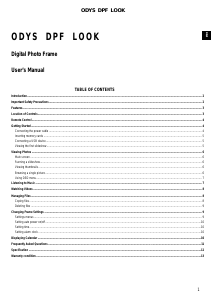
Bruksanvisning ODYS DPF-Look Digital fotoram

Behöver du en bruksanvisning för din ODYS DPF-Look Digital fotoram? Nedan kan du se och ladda ner PDF-bruksanvisningen gratis på svenska. Den här produkten har för närvarande 2 vanliga frågor, 0 kommentarer och har 0 röster. Om det här inte är bruksanvisningen du vill ha, vänligen kontakta oss.

Är produkten defekt och erbjuder bruksanvisningen ingen lösning? Gå till ett Repair Café för gratis reparationstjänster.

Bruksanvisning

Loading…

2
EN
Introduction
Congratulations on your purchase of this Digital Photo Frame (DPF).
Before operating this unit, please read this manual thoroughly and keep it for future reference.
This manual will help you use many of the exciting features to make your Digital Photo Frame view more enjoyable.
The DPF is compatible with SD, MMC, MS and CF memory card formats, which enables you to view digital photo directly from your camera’s
memory card.
This manual contains important safety instructions and correct operation information, so please read all the information carefully before you use
the unit in order to avoid any unexpected accidents.
Important Safety Precautions
Always follow these basic safety precautions when using your Digital Photo Frame. This will reduce the risk of fire, electric shock, product damage
and personal injury.
y Warning: To reduce the risk of electric shock, do not remove the cover or back. There are no user-serviceable parts inside. Refer
servicing to qualified personnel.
y Warning: To prevent fire or electric shock hazard, do not expose the unit to rain or moisture.
y Do not expose the Digital Photo Frame to water (dripping or splashing) and no objects filled with liquids, such as vases, should be placed
on the unit.
y Keep the Digital Photo Frame away from direct sunlight and heat source such as radiators or stoves.
y Do not block the ventilation openings. Slots and openings on the unit are provided for ventilation. The openings should never be blocked
by placing your Digital Photo Frame on a cushion, sofa or other similar surface
y Do not place the Digital Photo Frame on unstable cart, stand, tripod, bracket or table. The unit may fall, resulting in possible damage or
injury.
y Never place heavy or sharp objects on the LCD panel or frame.
y Only use the AC adapter included with Digital Photo Frame. Using any other adapter will void your warranty.
y Protect the power cord from being walked on or pinched particularly at plugs, receptacles and the point where the cord attached to the
Digital Photo Frame.
y Unplug the power from the outlet when the unit is not in use.
Cleaning
y Before cleaning the product make sure it is turned off.
y Never spray or pour liquid directly onto the screen or plastic casing.
y To clean the LCD screen, wipe the screen with a clean, soft, lint-free cloth. This removes dust and other particles. If it still is not clean,
apply a small amount of non-ammonia, non-alcohol based glass cleaner on a clean, soft, lint-free cloth to clean the screen.
y To clean the plastic casing, use a soft, dry cloth. If it still is not clean, apply a small amount of non-ammonia, non-alcohol based, mildly
non-abrasive detergent on a clean, soft, lint-free cloth to clean the surface.
y To clean the frame, use a soft, dry cloth.
Disclaimer: Authorized Dealer does not recommend the use of any ammonia or alcohol-based cleaners on the LCD screen or plastic casing.
Some chemical cleaners have been reported to damage the screen and/or display case. Authorized Dealer will not be liable for damage resulting
from the use of any ammonia or alcohol-based cleaners.
We assume no responsibility for the errors or omissions in this manual. We also have no responsibility for damages or loss of
data caused by improper operation.
The instruction manual is subject to change for improvement without notice.
Trademarks and trade names used in this instruction manual are owned by their respective companies or organizations.
Ladda ner bruksanvisning i Engelska (PDF, 0.38 MB)
(Tänk på miljön och skriv endast ut denna bruksanvisning om det verkligen är nödvändigt)

Loading…

Betyg

Berätta vad du tycker om ODYS DPF-Look Digital fotoram genom att betygsätta den. Vill du dela med dig av dina åsikter om denna produkt eller ställa en fråga? Lämna en kommentar nederst på sidan.
Är du nöjd med ODYS DPF-Look Digital fotoram?
Ja Nej
Bli den första personen som betygsätter denna produkt
0 röster

Delta i konversationen om denna produkt

Här kan du dela vad du tycker om ODYS DPF-Look Digital fotoram. Om du har en fråga, läs först noggrant igenom manualen. Att begära en manual kan göras genom att använda vårt kontaktformulär.

Mer om denna bruksanvisning

Vi förstår att det är trevligt att ha en pappersbruksanvisning för din ODYS DPF-Look Digital fotoram. Du kan alltid ladda ner bruksanvisningen från vår hemsida och skriva ut den själv. Om du vill ha en originalbruksanvisning rekommenderar vi att du kontaktar ODYS. De kanske kan tillhandahålla en originalbruksanvisning. Letar du efter bruksanvisningen för din ODYS DPF-Look Digital fotoram på ett annat språk? Välj ditt föredragna språk på vår hemsida och sök efter modellnumret för att se om vi har det tillgängligt.

Specifikationer

Märke ODYS
Modell DPF-Look
Kategori Digitala fotoramar
Filtyp PDF
Filstorlek 0.38 MB

Alla bruksanvisningar för ODYS Digitala fotoramar
Fler bruksanvisningar för Digitala fotoramar

Vanliga frågor om ODYS DPF-Look Digital fotoram

Vårt supportteam söker efter användbar produktinformation och svar på vanliga frågor. Om du hittar en felaktighet bland våra vanliga frågor uppskattar vi om du meddelar oss detta via vårt kontaktformulär.

Vad är en megapixel? Verifierad

En megapixel (MP) motsvarar en miljon pixlar Megapixlar används bland annat för att indikera upplösningen hos digitalkameror och videokameror. En kamera som producerar bilder på 1280x960 pixlar har till exempel en upplösning på cirka 1,3 MP. Även om det finns många faktorer som påverkar bildkvaliteten kan det sägas att fler megapixlar ger en en bättre bild.

Detta hjälpte (96) Läs mer

Vad står SD för? Verifierad

SD står för Secure Digital. SD-kort är standardlagringsmediet för många digitalkameror.

Detta hjälpte (28) Läs mer
Bruksanvisning ODYS DPF-Look Digital fotoram

Relaterade produkter

Relaterade kategorier

×
Download