Noctua NH-L9a-AM4
|
Installation Manual
Dear customer,
Congratulations on choosing the Noctua NH-L9a-AM4. This small cooler
packs all essential technologies of our award-winning high-end models
into a highly compact package in order to give you the best possible quiet
cooling experience for HTPCs and small form factor builds. I’m confident
that you will be able to sense some of the research, attention and care
we’ve put into making this product.
Enjoy your Noctua NH-L9a on AM4!
Yours sincerely,
Roland Mossig, Noctua CEO
This manual will guide you through the installation process of the
SecuFirm2™ mounting system step by step.
Prior to installing the cooler, please consult the compatibility list
on our website (www.noctua.at/compatibility) and verify that the
cooler is fully compatible with your motherboard. In particular, if
your motherboard does not come with a pre-installed stock back-
plate, double check that there are no components on the rear side
that would prevent the installation of the NM-ABP4 backplate.
Should you encounter any difficulties, please check the FAQs on
our website (www.noctua.at/faqs) and don’t hesitate to contact our
support team at support@noctua.at.
Noctua cannot be held responsible for any damage or losses caused
by compatibility issues.
Multilingual versions of this manual are available on our
website: www.noctua.at/manuals
Required mounting parts:
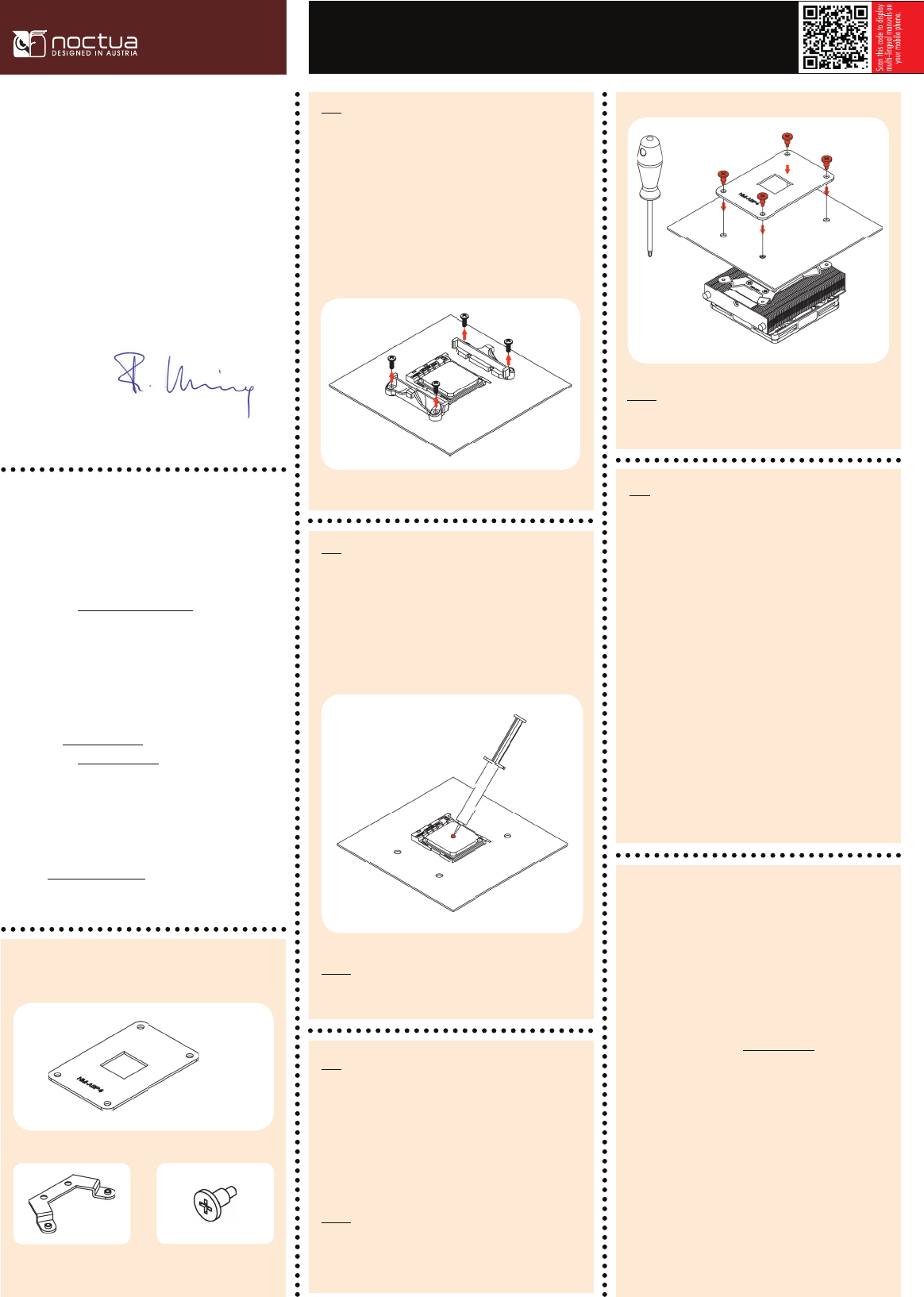
NM-ABP4 backplate
2x NM-AFB6 fastening brackets 4x NM-ABT1 mounting-screw
Removing the stock retention module and backplate
Step 1
If your motherboard comes with a pre-installed CPU cooler retention
module, please first remove it by unscrewing it from the backplate. Then
remove the backplate.
If your motherboard does not come with a pre-installed CPU cooler reten-
tion module and backplate, please proceed with step 2.
If there are residual traces of thermal paste or thermal pads on your
CPU, please clean them off first. Then press a small drop (4-5mm
diameter) of the supplied NT-H1 thermal compound onto the centre of the
heatspreader.
Applying thermal paste
Step 2
Caution: Applying too much thermal paste will lower heat conductivity and
cooling performance!
Caution: Gently tighten the screws until they stop, but don’t use excessive
force (max. torque 0.6 Nm).
Fan setup
Step 4
Connect the fan to the motherboard.
Depending on your CPU and the temperature inside the case, you may inter-
connect the supplied NA-RC7 Low-Noise Adaptor (L.N.A.) in order to further
reduce the fan’s operating noise.
Caution: When using the L.N.A., check the temperature of your CPU using
appropriate software (e.g. the respective applications of your motherboard
manufacturer), in order to evade automatic throttling of the CPU due to
the increased temperature. If the cooling performance is insufficient, please
increase case ventilation or remove the L.N.A.
In case you would like to use a 92x25mm fan for further improved per-
formance, please first unscrew the preinstalled NF-A9x14 fan and use the
supplied longer screws to install the 92x25mm fan.
Warranty, support and FAQs
Even with high-grade products and strict quality control, the possibility of
defects cannot be eliminated entirely. Therefore, we aim at providing the
highest possible level of reliability and convenience by offering a warranty
period of 6 years and direct, fast and straightforward RMA service.
Should you encounter any problems with your Noctua product, please
check the FAQs on our website (www.noctua.at/faqs) and don’t hesitate
Put the heatsink onto the CPU and the supplied NM-ABP4 backplate to
the rear side of the motherboard. Now stick the mounting screws through
the holes of the backplate and fix the cooler. Perform 3 turns on each
screw, then repeat until all are fully tightened.
Caution: Please make sure that the insulated side of the backplate is
facing the motherboard.
Fastening the heatsink to the CPU
Step 3


Delta i konversationen om denna produkt
Här kan du dela vad du tycker om Noctua NH-L9a-AM4 CPU kylare. Om du har en fråga, läs först noggrant igenom manualen. Att begära en manual kan göras genom att använda vårt kontaktformulär.