Advanced functions is provided in some operation modes –
to be set on the flash unit
Functions by Camera setting – The flash is automatically
controlled by the camera
MENU SCREEN FOR MAIN MODES
5 6
3 4
ADVANCED FUNCTIONS
page 10
page 12
page 16
page 22
page 24
page 29
Flash synchronizes to the faster shutter speed than regular synchronization speed.
High speed shutter synchronization
page 31
The flash fires just before the rear curtain close. A moving subject will appear with
Rear curtain synchronization
page 31
Flash exposure level is automatically compensated on the sequence of frames
Auto Flash Bracketing
page 31
Blinks of flash released before actual effective flash eliminate
Red-eye reduction
page 32
The flash is controlled at slow shutter speed considering the dim condition of the
Slow Shutter Synchronization
page 32
Flash exposure can be locked at the main subject while moving the framing.
Fv. Lock
page 32
Fv.
Lock
This safety instructions refer important information to use the product safely
and properly. Please read the following instructions before using the product.
SAFTY INSTRUCTIONS
WARNING
The flash unit contains high voltage electric parts. Do not try to open or repair the flash unit. Return it back
to the repair service station or the store you bought it.
Do not touch the inside parts from the opening when the unit was dropped or broken.
Do not shoot the flash directly to the eye at short distance. It may damage the eye.
When taking flash picture, especially toward a baby, it is recommended to keep the flash unit at lease 1
meter (3.3feet) away from the subject.
Or use diffuser or bounce the light to the ceiling or to the wall to soften its intensity.
Do not place the flash unit near any flammable gas, chemical or such liquids. It may cause fire or electric
shock.
Do not touch the flash unit with wet hands or use in the water. The flash unit carries high voltage inside and
it may cause an electric shock.
Do not shoot the flash unit directly to the driver of automobiles or such vehicles.
Do not set the flash window close to the human body and shoot, which may get burned.
Place the batteries correctly in position. Placing the batteries in wrong polarity may cause leakage,
exothermic heat or explosion.
CAUTIONS
Do not leave or store the flash unit in the temperature over 40ºC, such like in the automobile.
The flash unit is not water resistance. Keep the unit away from rain, snow and humidity.
Do not use benzene, thinner or other alcoholic agents to clean the unit.
Do not use this flash unit with the cameras which is not recommended in this instruction manual, otherwise it
may damage the camera’s circuitry.
Remove the batteries when not in use for a longer period of time.
Do not have a heavy impact to the flash unit, nor throw it onto a hard surface floor.
When using the external power pack, read the safety instruction carefully and follow the operation manual.
This sign refers the danger or serious damage.
This sign refers the damage or defect.
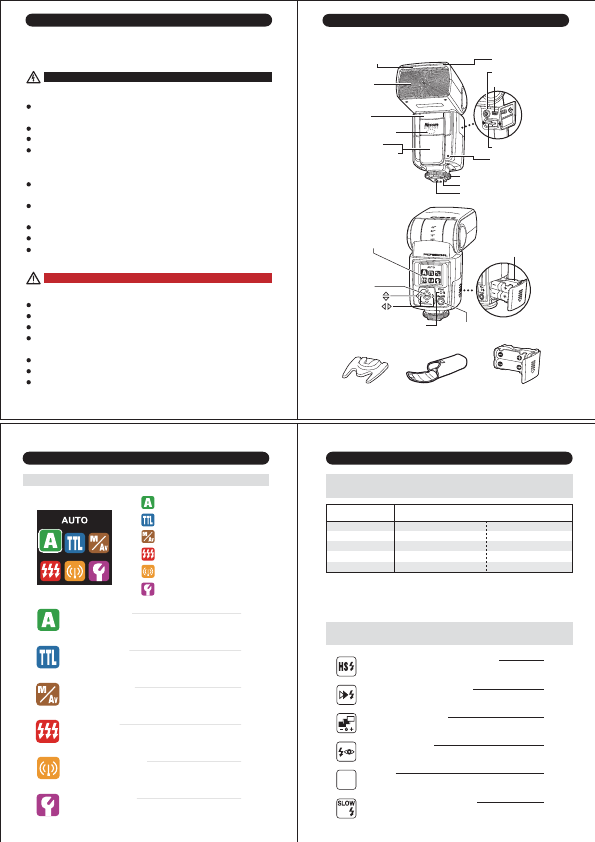
Nomenclature
Light diffusing panel Fill-in reflector
Flash head/
Wireless transmitter
Sub-Flash
AF-assist light
Wireless sensor
External auto exposure
sensor
Rotating
display screen
Set button
Pilot lamp (Test flash button)
On/Off switch (System lock button)
Select button
Select button
Flash stand
Extra
battery magazine
(option)
Battery magazine
Lock ring
X-terminal
USB service port
Power Pack socket
Hotshoe contacts
Foot lock pin
External service
box
Mounting foot
Multifunction button
Soft Case
Remote/ Slave sensor
Di866 Flash Mode and Functions - to be set on the flash unit.
Full Automatic Mode
TTL Program Mode
Manual Setting Mode
Multi- flash Mode
Wireless TTL Flash Mode
Custom Setting Mode
…
…
…
…
…
…
Flash light is fully controlled by the camera for the most proper exposure.
Full Automatic Mode
Flash light is automatically controlled by the camera but the flash exposure value can be
TTL Program Mode
Manual Mode -Selecting the desired manual power on the flash unit,
Manual Setting Mode
Multiple lighting exposes the playback photos in one frame of picture.
Multi-flash Mode
Placing multiple numbers of flashes (remote flash) off camera and controlling the creative
Wireless TTL Flash Mode
Variety of custom settings is available for own default value.
Custom Setting Mode
exposure.
exposure value can be compensated.
Av poriority Mode- Selecting the desired f-stop on the flash unit.
controlling the creative TTL lighting.
Advanced
Functions
Operation Modes
Sub-Flash
Manual Zoom
Slave Mode
F.Stop Setting
ISO setting
TTL Program Mode
TTL Program Mode
Manual Setting Mode
Manual Setting Mode*1
Manual Setting Mode*2
Manual Setting Mode
Manual Setting Mode
*1 Effective on at Universal Slave function in Manual Power operation and when using Di866 with film
type camera or with non dedicted camera.
*2 Effective on Universal Slave function, and when using Di866 with film type camera or with non
dedicated camera.
such moving marks behind.
pre-set in the camera.
background.


Delta i konversationen om denna produkt
Här kan du dela vad du tycker om Nissin Di866 Professional (for Nikon) Blixt. Om du har en fråga, läs först noggrant igenom manualen. Att begära en manual kan göras genom att använda vårt kontaktformulär.